Park Distance Control (PDC)
 Introduction to the subject
In this chapter you will find information on the following subjects:
Depending on equipment, your vehicle may be equipped with the Park Distance Control system (PDC).
The Park Distance Control (PDC) system can help the driver when backing up and parking. PDC uses ultrasonic sensors in the bumpers to measure the distance between the vehicle and objects. The system uses the time it takes for the ultrasonic waves to bounce back from the object to calculate the distance between the vehicle and an object. PDC works only at speeds up to about 5–10 mph (10–15 km/h).
If the vehicle gets too close to an obstacle behind it, a beeping signal sounds. The closer the vehicle gets to the obstacle, the faster the beep. When the obstacle is very close, the sound is continuous.
If you move even closer to the obstacle despite the continuous warning sound, the system cannot measure the distance remaining until collision.
 WARNING
Park Distance Control is no substitute for careful and attentive driving. Never rely completely on these systems for information about people and objects that might be in the way of the vehicle and could be struck resulting in serious personal injuries.
- Always be careful and look around you when parking. The sensors have blind spots and cannot always detect people, animals, and objects. Watch out for small children and animals in particular.
- Never pay so much attention to the images on the screen that you fail to notice what is going on around you.
- Certain types of clothing and the surfaces of certain objects do not reflect the ultrasonic waves that the sensors send and receive. Such objects and persons wearing such clothing will not be detected by PDC or will not be detected accurately.
- Noise in the area can interfere with the signals of the Park Distance Control sensors. Under certain circumstances, the system will not detect people and objects for this reason.
 NOTE
NOTE
- Things like trailer draw bars, thin rods, fences, trees, narrow painted vertical poles, posts, or a trunk lid that is opening may not be detected by the Park Distance Control sensors and could damage the vehicle.
- If you keep driving closer to an object that the Park Distance Control has already detected and reported, the object may disappear from the sensor range and may no longer be detected. This is especially true for low or high objects. The system will no longer sound warnings about these objects. Ignoring signals from the Park Distance Control system could result in serious damage to the vehicle.
- The sensors in the bumpers can be damaged or become misaligned in low speed impacts and parking maneuvers. Damaged or misaligned sensors cannot accurately detect or report objects that might be within range of the PDC system.
- To help make sure that the system works properly, always keep the sensors in the bumpers clean and free of snow and ice; do not cover the sensors with stickers or other objects.
- Repainting the sensors in the bumpers can prevent the PDC system from working properly.
- When cleaning the sensors with power washers or steam cleaners, only spray the sensors directly for a very short time, and always keep the washer nozzle at least 4 inches (10 cm) from the sensors.
- Noise from rough roads, cobblestones, other vehicles and the surrounding area, for example, can prevent the Park Distance Control system from accurately detecting and reporting people and objects that may be within range of the sensors.
- Aftermarket components such as bicycle racks can prevent the PDC system from working properly.

Volkswagen recommends practicing with the Park Distance Control system in a location or parking space with no traffic in order to become familiar with the system and how it works.
Certain settings are automatically saved by the driver personalization feature .
A Declaration of Compliance with the United States FCC and Industry Canada regulations is on .
Switching on and off
Fig. 121 In the lower center console: Button to switch the Park Distance Control system on or off.
Read and follow the introductory information and safety information first
Switching Park Distance Control (PDC) on
- Press the
button .
PDC is automatically switched on when you shift into reverse (R) or when the vehicle rolls backwards.
The indicator light in the button lights up and stays on as long as PDC is active.
In some vehicles, PDC can also be set to activate automatically when the vehicle moves forward .
Switching Park Distance Control (PDC) off
- Press the
- OR: Drive forward faster than about 5–10 mph (10–15 km/h).
- OR: Move the selector lever to park (P).
Automatic PDC activation when driving forward (depending on equipment)
When the PDC is activated automatically when driving forward, a mini PDC display appears on the left-hand side of the screen.
Automatic PDC activation when driving forward only works when the speed falls below about 10 mph (15 km/h) when driving slowly toward an obstacle in front of the vehicle. Automatic activation only happens once. Reactivate the PDC with one of the following actions when the ignition is switched on:
- Press the
- Switch the ignition off and back on again.
- Automatic or DSG transmission: Move the selector lever to park (P) and then to reverse (R).
- Vehicles with electronic parking brake: Switch the parking brake on and off again.
Automatic PDC activation when driving forward can be turned on or off in the Vehicle settings menu in the Infotainment system .
Maneuver braking
The maneuver braking feature can help the driver by braking automatically when the vehicle is backing up and an obstacle behind the vehicle is detected.
Depending on equipment, the maneuver braking feature may also brake the vehicle automatically when driving forward if PDC has been switched on manually.
The maneuver braking feature helps prevent collisions only at vehicle speeds lower than 5 mph (10 km/h). The feature is activated or deactivated when PDC is switched on or off.
The maneuver braking feature does not switch on if PDC is activated automatically when driving forward. You must switch on PDC manually by pressing the button to activate emergency braking while driving forward.
You can also switch maneuver braking on and off by tapping the function key in the PDC display or in the Vehicle settings menu in the Infotainment system .
After emergency braking occurs, the maneuver braking feature is deactivated until you move the selector lever to another position. The same restrictions that apply to the PDC system also apply to the maneuver braking feature.
PDC signal chimes and displays
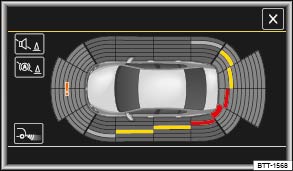
Fig. 122 PDC display of the area around the vehicle (display may vary depending on vehicle equipment).
Read and follow the introductory information and safety information first
When the factory-installed Infotainment system is switched on, the areas to the front and rear of the vehicle that are scanned by ultrasonic sensors are shown on the screen . The positions of potential obstacles are displayed relative to the vehicle.
- Obstacle close to the vehicle. A continuous chime sounds. Stop! Do not keep driving!
- Obstacle in the vehicle’s path. An intermittent chime sounds. The shorter the distance, the shorter the intervals between the chimes.
- Obstacle outside of the vehicle's path.
- Switch the PDC sound on or off.
- Switch maneuver braking on and off (depending on vehicle equipment).
- Switch to the Rear View camera display.
- System fault in the scanned area.
- Temporary malfunction in the scanned area, depending on vehicle equipment (not pictured).
Tips and troubleshooting
Read and follow the introductory information and safety information first
If the system is not responding as expected
- The sensors are dirty . The sensors may not work properly if blocked by dirt and snow or residue from abrasive cleaning agents or coatings.
- The conditions for automatic PDC activation are not met .
- The sensors have been damaged or misaligned in low speed impacts or parking maneuvers. Damaged or misaligned sensors cannot accurately detect or report objects that might be within range of the PDC system.
- The system function is impaired by an aftermarket component such as a bicycle rack.
- A sensor area has been repainted or structural modifications have been made.
- The sensors may not detect people and objects due to noise interference from rough roads, cobblestones, other vehicles, and the surrounding area.
If there is no sensor visibility, an error message, or the system switches itself off
If an ultrasonic sensor malfunctions, the corresponding sensor area is switched off and cannot be reactivated until the malfunction is corrected.
If you hear a long beep of about 3 seconds when you first turn PDC on or the indicator light in the button starts blinking, there is a malfunction in the Park Distance Control system.
A message may also appear in the instrument cluster display, depending on equipment.
Possible solutions
- Switch the system off temporarily.
- Check whether any of the causes described in this section apply.
- Clean the sensors or remove stickers or accessories from the sensors and cameras .
- Check for any visible damage.
- After checking all the possible causes and making the necessary adjustments, switch the system back on.
- If the system still does not respond as expected, have it checked by an authorized Volkswagen dealer or an authorized Volkswagen Service Facility.
Download Manual