Park Assist
 Introduction to the subject
In this chapter you will find information on the following subjects:
The Park Assist system is an extension of the Park Distance Control system and can assist the driver when:
- Finding a suitable parking space.
- Selecting a parking mode.
- Parking in a suitable parallel or perpendicular parking space.
- Pulling out of a parallel parking space.
Park Assist uses ultrasonic sensors in the front and rear bumpers and the button, which turns the Park Assist system on and off.
Park Assist steers the vehicle automatically. The driver must control the accelerator, gear changes, and brake.
The Park Assist system has certain system-related limitations. The driver still has to be careful when using the Park Assist system .
 WARNING
Park Assist technology cannot overcome the laws of physics and the limits of the system. Do not let the extra convenience Park Assist can provide tempt you into taking extra risks. The system is not a substitute for the driver's full concentration.
- Careless or unintentional use of Park Assist may result in accidents and severe injuries.
- Always adjust your speed and driving style to road, traffic, weather, and visibility conditions.
- Always be careful and look around you. The sensors have blind spots and cannot always detect people, animals, or objects in certain situations. Watch out for small children and animals in particular.
- The Park Assist system has system-related limitations. In some situations the automatic brake intervention is limited or may not work at all.
- Always be prepared to brake the vehicle yourself.
- Automatic braking assistance ends after about 1.5 seconds. Always depress the brake pedal yourself after an automatic braking intervention.
WARNING
Making quick turning movements of the steering wheel when parking or pulling out of a parking space can cause serious injuries.
- When parking or pulling out of a parking space, do not reach for the steering wheel until prompted to do so by the system.
 NOTE
NOTE
- Park Assist uses parked vehicles, the curb, and other objects for guidance. Please make sure that the wheels and tires are not damaged when parking the vehicle. If necessary, stop the parking maneuver early enough to prevent damage to the vehicle.
- Things like trailer draw bars, thin rods, fences, posts, trees, or an open trunk lid may not be detected by the Park Assist system and could damage the vehicle.
- Aftermarket components such as bicycle racks can prevent the Park Assist system from working properly and may cause vehicle damage.
- The sensors in the bumpers can be damaged or become misaligned in low speed impacts and parking maneuvers. Damaged or misaligned sensors cannot accurately detect or report objects that might be within range of the Park Assist system.
- When cleaning the sensors with power washers or steam cleaners, only spray the sensors directly for a very short time, and always keep the washer nozzle at least 4 inches (10 cm) from the sensors.
- Noise from rough roads, cobblestones, other vehicles and the surrounding area, for example, can prevent the Park Assist system from accurately detecting and reporting people and objects that may be within range of the sensors.
NOTE
Failure to observe the illuminated text messages can lead to the vehicle being damaged.

Volkswagen recommends practicing with the Park Assist system in a location or parking space with no traffic in order to become familiar with the system and how it works.
When parking or pulling out of a parking space, the system gives a signal tone to tell the driver to switch between driving forward and backing up. Do not wait until the Park Distance Control sounds continuously before changing direction.
If the Park Assist system turns the steering wheel when the vehicle is not moving, the symbol also appears in the instrument cluster display. Depress the brake pedal so that the steering movement takes place while the vehicle is not moving, keeping the required number of parking maneuvers to a minimum.
Certain settings are automatically saved by the driver personalization feature .
A Declaration of Compliance with the United States FCC and Industry Canada regulations is on .
Requirements
Read and follow the introductory information and safety information first
To park or to pull out of a parking space, the following requirements must be met:
- The ASR must be switched on .
- Maintain a distance of 1.6–6.5 feet (0.5–2 meters) when driving past the parking space.
- The parking space must at least be the minimum size required by Park Assist.
- For parallel parking: Do not go faster than about 25 mph (40 km/h) when driving past the parking space.
- For perpendicular parking: Do not go faster than about 12 mph (20 km/h) when driving past the parking space.
- Do not go faster than about 4 mph (7 km/h) when parking.
Selecting a parking space

Fig. 124 In the lower center console: Button for switching on the Park Assist system.
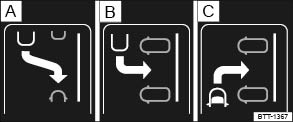
Fig. 125 In the instrument cluster display: Parking modes overview.
Read and follow the introductory information and safety information first
Key to :
- Reverse parallel parking
- Reverse perpendicular parking
- Forward perpendicular parking
- Slowly drive past a row of parked cars, paying attention to traffic.
- Press the
button . Park Assist automatically looks for a parking space on the front passenger side.
- Stop when Park Assist shows a recommended parking mode in the instrument cluster display.
- Drive into the parking space when the prompt to park appears ⑤.
If you want Park Assist to look for a parking space on the opposite side of the road, activate the turn signal for the side of the street on which you want to park.
Switching the parking mode
Other possible parking modes are shown as a mini display.
When the prompt to park appears ⑤, select a different parking mode by pressing the button again. After all relevant parking modes have been displayed, Park Assist switches off automatically. The originally recommended parking mode is displayed again if you press the
button another time.
If you wish to drive into a perpendicular parking space instead of backing in, select Forward perpendicular parking . Otherwise, the vehicle will back into the perpendicular parking space.
Park Assist can also be switched on after driving past a parking space; if the parking space meets system requirements, it appears on the display.
Parking with Park Assist
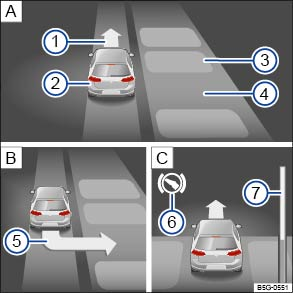
Fig. 126 In the instrument cluster display: Parking perpendicular to the road.
Read and follow the introductory information and safety information first
Key to :
- Searching for a parking space
- Positioning the vehicle for parking
- Maneuvering in the parking space
 Prompt to drive forward
 Your vehicle
 Parked vehicles
 Parking space detected
 Arrow indicating the parking suggestion (prompt to park)
 Prompt to press the brake pedal
 Progress bar: Symbolic display of the relative remaining distance
The requirements for parking using Park Assist must be met and the vehicle must not be moving.
- Release the steering wheel when the following message is shown in the instrument cluster display: Auto. steering active. Check surround. area! .
- Shift into reverse (R) when the prompt to back up appears in the instrument cluster display.
- Check the area around the vehicle and carefully back up. Do not exceed 4 mph (7 km/h). The Park Assist system will only turn the steering wheel during the parking procedure. The driver must control the accelerator, the brake, and the transmission selector lever/gearshift lever.
- Back up until there is a continuous tone from the Park Distance Control (PDC) system, OR until a chime sounds and the
symbol along with the prompt to drive forward appear in the instrument cluster display.
- Drive forward until a chime sounds and the prompt to back up is displayed in the instrument cluster.
- Repeat backing up and driving forward until the message Park Assist ended! is shown in the instrument cluster display.
Wait until Park Assist has stopped turning the steering wheel at the end of each parking maneuver for an optimal parking result.
Stopping the parking maneuver too soon could lead to less than optimal parking results.
If there is not enough room to maneuver the vehicle, the suggested parking space may still be shown in the instrument cluster display. However, you will not be prompted to park.
Pulling out of a parallel parking space using Park Assist
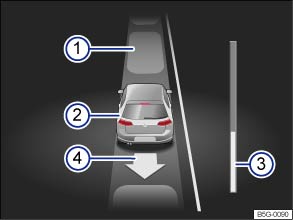
Fig. 127 In the instrument cluster display: Driving out of a parallel parking space.
Read and follow the introductory information and safety information first
Key to :
- Parked vehicles
- Your vehicle with reverse gear engaged
- Progress bar
- Arrow indicating the suggested procedure for driving out of a space
Park Assist can pull out of a parallel parking space if the requirements are met .
- Press the
- Activate the turn signal in the direction (left or right) in which you would like to pull out of the parking space.
- Shift into reverse (R) when the prompt to back up appears in the instrument cluster display.
- Release the steering wheel when the message appears in the instrument cluster display: Auto. steering active. Check surround. area! .
- Check the area around the vehicle and carefully back up. Do not exceed 4 mph (7 km/h). The Park Assist system will only operate the steering wheel while driving out of the parking space. The driver must control the accelerator, the brake, and the transmission selector/gearshift lever.
- Back up until there is a continuous tone from the Park Distance Control (PDC) system, OR until a chime sounds and the
- Press the brake pedal until the Park Assist system has stopped steering OR until the
- Drive forward until a chime sounds and the prompt to back up is displayed in the instrument cluster.
- Repeat backing up and driving forward until a message is displayed in the instrument cluster indicating when the vehicle can be driven out of the parking space. A chime may also sound.
- When traffic permits, pull out of the parking space.
Tips and troubleshooting
Read and follow the introductory information and safety information first
 System fault in the scanned area
The yellow indicator light comes on in the instrument cluster.
If the system is not responding as expected
- The sensors are dirty . The sensors may not work properly if blocked by dirt and snow or residue from abrasive cleaning agents or coatings.
- The system requirements are not met .
- The sensors are covered by water.
- The cameras have been damaged or misaligned in low speed impacts or parking maneuvers.
- A sensor area has been repainted or structural modifications have been made.
- The system function is impaired by an aftermarket component such as a bicycle rack.
- The sensors may not detect people and objects due to noise interference from rough roads, cobblestones, other vehicles, and the surrounding area.
- A wheel has been changed and wheel dimensions are now different.
- There is a sharp curve in the road where you wish to park.
If there is no sensor view, an error message, or the system switches itself off
Park Assist switches off automatically if a sensor fails.
- Clean the sensors or remove stickers or accessories from the sensors .
- Check for any visible damage.
Possible solutions
- Switch the system off temporarily.
- Check whether any of the causes described in this section apply.
- If wheel dimensions have been changed, new wheel dimensions need to be synchronized with the system. See your authorized Volkswagen dealer or authorized Volkswagen Service Facility for assistance.
- After checking all the possible causes and making the necessary adjustments, switch the system back on.
- If the system still does not respond as expected, have it checked by an authorized Volkswagen dealer or an authorized Volkswagen Service Facility.
Interrupting or automatically stopping a parking procedure or pulling out of a parking space
The Park Assist system cancels the parking maneuver or movement out of a parking space if one of the following occurs:
- The
- The vehicle speed is faster than about 4 mph (7 km/h).
- The driver intervenes by turning the steering wheel.
- The driver door is opened.
- The parking maneuver was not completed within about 6 minutes after activating the feature.
- There is a system fault (system is temporarily unavailable).
- ASR is switched off.
- Regulation related to driving dynamics takes place through ASR or ESC.
If none of the above situations apply, resume Park Assist by pressing the button again.
Park Assist tries to steer when the vehicle is not moving
If Park Assist tries to turn the steering wheel when the vehicle is not moving, the white symbol appears in the instrument cluster display.
- Depress the brake pedal.
Park Assist automatic braking
Park Assist can help the driver by braking automatically in certain situations. The driver is always responsible for braking in time .
Depending on certain conditions such as weather, vehicle condition, vehicle load, or vehicle angle, the Park Assist system can bring the vehicle to a stop before it reaches an obstacle. Depress the brake pedal! An automatic brake intervention to minimize damage stops the current parking maneuver.
Download Manual