Parking brake
Using the parking brake (Golf, Golf GTI)
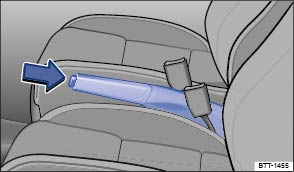
Fig. 118 Between the front seats: Parking brake.
The following information applies to models with a parking brake lever. If your vehicle is equipped with an electronic parking brake, see .
Setting the parking brake
- Pull the parking brake lever up firmly.
- When the ignition is on, the red indicator light
or
in the instrument cluster lights up to show that the parking brake is engaged.
Releasing the parking brake
- Pull the lever up slightly and press the release button (arrow).
- While holding the release button down, move the lever all the way down.
 WARNING
Improper use of the parking brake can cause accidents and severe injuries.
- Never use the parking brake to slow down the vehicle when it is moving, except in an emergency. Braking distance is much longer, since only the rear wheels are braked. Always use the foot brake.
- Never drive with the parking brake partially engaged. This can cause the brake to overheat and negatively affect the brake system. It will also cause the rear brake pads to wear prematurely.
- Never activate the throttle manually from the engine compartment when the engine is running and the automatic or DSG transmission is in gear. The vehicle will start to move even if the parking brake is engaged.
 NOTE
NOTE
Even though the transmission is in Park (P), the vehicle may move a couple of inches (a few centimeters) forwards or backwards if you take your foot off the brake pedal after stopping the vehicle without first firmly setting the parking brake.

A warning signal sounds if you drive faster than about 4 mph (6 km/h) with the parking brake engaged.
Using the electronic parking brake (Golf R)
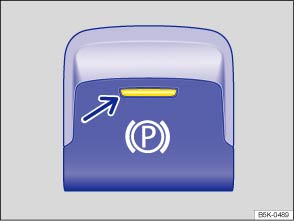
Fig. 119 In the lower center console: Electronic parking brake switch.
The following information applies to models with an electronic parking brake. If your vehicle is equipped with a parking brake lever, see .
Setting the electronic parking brake
You can engage the electronic parking brake any time the vehicle is not moving - even if the ignition is switched off. Always shift the transmission to park (P) and engage the parking brake when you leave or park the vehicle .
- Pull and hold the
switch .
- The parking brake is engaged when the yellow indicator light in the switch (arrow) and the red indicator light
- Release the switch.
Releasing the electronic parking brake
- Switch the ignition on.
- Press the
- The parking brake is released when the yellow indicator light in the switch (arrow) and the red indicator light
Automatic electronic parking brake release when you start driving
The electronic parking brake releases automatically when you start driving if the driver door is closed. With a manual transmission, you must also press the clutch pedal all the way down before you start driving so the system recognizes that the parking brake should be switched off.
You can prevent the electronic parking brake from switching off automatically by pulling and holding the switch while pulling away.
The electronic parking brake is only switched off after you let go of the switch. This makes it easier to start off with a heavier load.
Automatic electronic parking brake activation when the driver leaves the vehicle
In vehicles with an automatic or DSG transmission, the electronic parking brake can automatically switch on when the driver leaves the vehicle to help prevent the vehicle from moving if the system detects that it is necessary.
Emergency braking feature
Only use the emergency braking feature in an emergency, when you cannot stop the vehicle using the brake pedal !
- Pull and hold the
- To stop the braking maneuver, release the
WARNING
Improper use of the electronic parking brake can cause accidents and severe injuries.
- Never use the parking brake to slow down the vehicle when it is moving, except in an emergency. Braking distance is much longer, since only the rear wheels are braked. Always use the foot brake.
- Never press the accelerator pedal when a selector lever position or gear is engaged and the engine is running. The vehicle could begin moving, even if the electronic parking brake is set.
- Never activate the throttle manually from the engine compartment when the engine is running and the automatic or DSG transmission is in gear. The vehicle will start to move even if the parking brake is engaged.
NOTE
Even though the transmission is in Park (P), the vehicle may move a couple of inches (a few centimeters) forwards or backwards if you take your foot off the brake pedal after stopping the vehicle without first firmly setting the parking brake.
Vehicles with manual transmission: The electronic parking brake switches off automatically when you release the clutch pedal and press the accelerator pedal at the same time.
Auto Hold (Golf R)
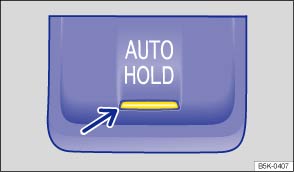
Fig. 120 In the lower center console: Button for Auto Hold (if equipped).
Depending on vehicle equipment, models equipped with an electronic parking brake may also be equipped with the Auto Hold feature.
When switched on, the Auto Hold feature automatically prevents the stationary vehicle from rolling away without the driver having to press the brake pedal.
Requirements for holding the vehicle with Auto Hold
- The driver door is closed.
- The driver is wearing a safety belt.
- The engine is running.
Vehicles with automatic or DSG transmission: If the selector lever is moved to position N, Auto Hold will not switch on and will remain deactivated. The vehicle will not be held at a standstill .
If any of the conditions for using Auto Hold change while the vehicle is not moving, the Auto Hold feature switches off automatically and the green indicator light in the instrument cluster display goes out, along with the yellow indicator light in the
button.
In some situations, the electronic parking brake may engage automatically to help hold the vehicle securely . The red indicator light or
comes on in the instrument cluster display.
Switching Auto Hold on
- Press the
button. The indicator light in the
If Auto Hold has been switched on using the
button before switching the ignition off, the Auto Hold feature switches on automatically when the ignition is switched on again.
Holding the vehicle at a standstill with Auto Hold
- Make sure the Auto Hold feature is switched on.
- Press the brake pedal until the vehicle comes to a complete stop.
- Vehicles with manual transmission: Press the clutch pedal and keep it fully depressed, or shift to Neutral.
- Release the brake pedal. The Auto Hold feature holds the vehicle stationary as soon as it detects that the vehicle is not moving and the brake pedal is released. The green indicator light
When the driver accelerates, the Auto Hold feature releases the electronic parking brake again. The green indicator light in the instrument cluster display goes out and the vehicle begins to move, depending on the incline.
Switching Auto Hold off
- Press the
If Auto Hold is switched off while it is holding the vehicle in place, the electronic parking brake switches on automatically. The electronic parking brake will not switch on if the brake pedal is depressed when Auto Hold is switched off .
If the Auto Hold feature is switched off, it will remain switched off when the ignition is switched on again.
Switching Auto Hold off temporarily using the electronic parking brake
You can switch the Auto Hold feature off temporarily so that the vehicle can roll more easily, for example, when maneuvering.
- With the engine switched on, depress the brake pedal.
- Press the
Auto Hold switches on again as soon as the brake pedal is depressed and the vehicle comes to a full stop.
System limits
Under certain circumstances, the vehicle may neither be secured against rolling away by the Auto Hold feature nor by the electronic parking brake when switching off the ignition or when opening the driver door . Always make sure that after switching off the ignition or opening the driver door, the red or
indicator light in the instrument cluster display lights up. The electronic parking brake is switched on.
WARNING
The intelligent technology of the Auto Hold feature cannot overcome the laws of physics. Never let the increased convenience provided by the Auto Hold feature tempt you into taking risks.
- Never leave the vehicle with the engine running and the Auto Hold feature switched on.
- Always switch off the engine and the ignition and take the key with you when you leave the vehicle.
- The Auto Hold feature cannot keep the vehicle from moving in all hill-start situations (for example, if the ground is slippery or icy).
- Unintended vehicle movement can cause serious personal injury.
NOTE
Before entering a car wash, always deactivate Auto Hold. Otherwise, the electronic parking brake can engage automatically and cause damage.
Tips and troubleshooting
When the ignition is switched on, several warning and indicator lights come on briefly for a function check. They go out after a few seconds.
or 

 The parking brake is switched on
The red warning light comes on.
or The electronic parking brake does not have enough holding force for the current situation
Golf R models only: The red warning light flashes.
- Find another place to park the vehicle.
- Pull and hold the electronic parking brake switch
 There is an electronic parking brake malfunction
Golf R models only: The yellow indicator light comes on. See an authorized Volkswagen dealer or an authorized Volkswagen Service Facility.
If the electronic parking brake does not switch off
Golf R models only: The conditions for releasing the electronic parking brake are not met.
OR: The 12 Volt vehicle battery is dead.
- Check whether all conditions for releasing the electronic parking brake are met .
- If the 12 Volt vehicle battery is dead, the electronic parking brake cannot be released. Jump-start the vehicle instead .
If the electronic parking brake makes noises
Golf R models only:
- You may hear noises when setting or releasing the electronic parking brake. This is normal and no cause for concern.
- If the electronic parking brake is not used for some time, an automatic system check will occasionally run when the vehicle is parked. This system check makes audible noises.
WARNING
Failure to heed warning lights and instrument cluster text messages can cause the vehicle to break down in traffic and result in a collision and serious personal injury.
- Never ignore warning lights or text WARNINGS.
- Always stop the vehicle as soon as it is safe to do so.
NOTE
Failure to heed warning lights or text WARNINGS can result in vehicle damage.
Download Manual