Using the audio/visual system
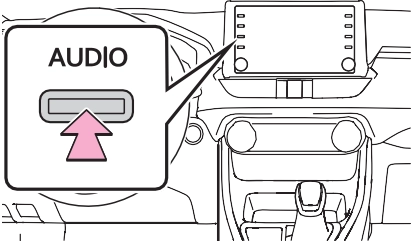
’ From the “AUDIO” button
1 Press the “AUDIO” button.
’ From the “MENU” button
1 Press the “MENU” button, then select “Audio”.
|
|
|
To prevent the battery from being discharged, do not leave the audio/visual system on lon- ger than necessary when the engine is not running.
|
 NOTICE
|
|
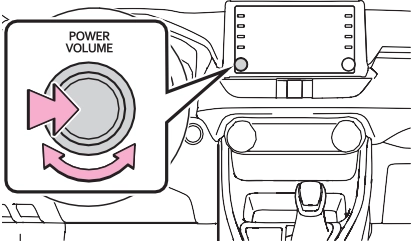
“POWER VOLUME” knob:
Press to turn the audio/visual system on and off. The system turns on in the last mode used. Turn this knob to adjust the vol- ume.
|
|
 or
or  to change the page.
*: This function is not made avail- able in some countries or areas.
|
Reordering the audio source |
source then  or
or  to reor- der.
1 Connect a device.
Select to set the tre- ble/mid/bass. (P.419)
Select to set the fader/bal- ance. (P.420)
Select to set the automatic sound leveliser. (P.420)
How good an audio program sounds is largely determined by the mix of the treble, mid and bass levels. In fact, different kinds of music and vocal pro- grams usually sound better with different mixes of treble, mid and bass.
Select “+” or “-” to adjust high-pitched tones.
Select “+” or “-” to adjust mid- pitched tones.
Select “+” or “-” to adjust low- pitched tones.
A good balance of the left and right stereo channels and of the front and rear sound levels is also important.
Keep in mind that when listening to a stereo recording or broad- cast, changing the right/left bal- ance will increase the volume of 1 group of sounds while decreasing the volume of another.
Select to adjust the sound balance between the front and rear speakers.
Select to adjust the sound balance between the left and right speakers.
The system adjusts to the opti- mum volume and tone quality
according to vehicle speed to compensate for increased road noise, wind noise, or other noises while driving.
The screen format can be selected for USB video.
Select to display a 4 : 3 screen, with either side in black.
Select to enlarge the image horizontally and vertically to full screen.
Select to enlarge the image by the same ratio horizontally
and vertically.
The contrast and brightness of the screen can be adjusted.
“+”: Select to strengthen the con- trast of the screen.
“-”: Select to weaken the contrast of the screen.
“+”: Select to brighten the screen. “-”: Select to darken the screen.
|
Voice command system |
Download Manual