Operating the lights and wipers
’ Type A
|
|
Canada
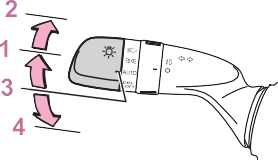
1  The side marker, parking, tail, license plate, instrument panel lights, and daytime run- ning lights (P.209) turn on.
2  The headlights and all lights listed above (except daytime running lights) turn on.
on and off automatically.
 4
4  (U.S.A.) Off (Can- ada) The daytime running lights turn on. (P.209)
’ Type B
|
|
Canada
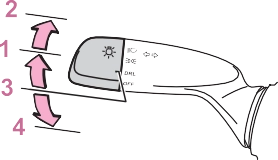
1  The side marker, parking, tail, license plate, instrument panel lights, and daytime run- ning lights (P.209) turn on.
2  The headlights and all lights listed above (except daytime running lights) turn on.
 The daytime running lights turn on. (P.209)
 Off
OffThe engine switch is in ON.
the low beam headlight lights, and illuminate dimmer than the low beam headlight lights.
 The headlight switch is in the
 (Canada only), ,
  or *
or *
position
*: When the surroundings are bright
The daytime running lights remain on after they illuminate, even if the parking brake is set again.
The sensor may not function prop- erly if an object is placed on the sen- sor, or anything that blocks the sensor is affixed to the windshield. Doing so interferes with the sensor detecting the level of ambient light and may cause the automatic head- light system to malfunction.
ately if on the key is pressed after all the doors are closed.)
To turn the lights on again, turn the engine switch to ON, or turn the light switch off once and then back to
 or
or  position.
’ Vehicles without smart key system A buzzer sounds when the engine switch is turned to ACC or OFF, the
key is removed and the driver’s door
is opened while the lights are turned on.
’ Vehicles with smart key system A buzzer sounds when the engine
switch is turned to ACC or OFF and
the driver’s door is opened while the lights are turned on.
When driving during daytime with
the headlight switch turned to  , if the windshield wipers are used, the headlights will turn on automatically
after several seconds to help enhance the visibility of your vehi- cle.
In order to prevent the battery of the vehicle from discharging, if the headlights and/or tail lights are on when the engine switch is turned to OFF, the battery saving function will operate and automatically turn off all the lights after approximately 20 minutes.
When any of the following are per- formed, the battery-saving function is canceled once and then reacti- vated. All the lights will turn off auto- matically 20 minutes after the battery-saving function has been reactivated:
The system may be malfunctioning. Have the vehicle inspected by your Toyota dealer.
Settings (e.g. light sensor sensitiv- ity) can be changed. (Customizable features: P.687)
|
Turning on the high beam headlights |
Pull the lever toward you to the center position to turn the high beams off.
You can flash the high beams with the headlights on or off.
|
|
|
To prevent battery discharge
Do not leave the lights on longer than necessary when the engine is not running. |
 NOTICE
in the or  position.
The Automatic High Beam indicator will come on when the system is operating.
The system may be malfunctioning. Have the vehicle inspected by your Toyota dealer.
The sensitivity of the sensor can be temporarily lowered.
 or position.
Automatic High Beam (headlights) may turn on even when the vehicle is stopped.
The Automatic High Beam indicator will turn off.
Push the lever away from you to activate the Automatic High Beam system again.
|
|
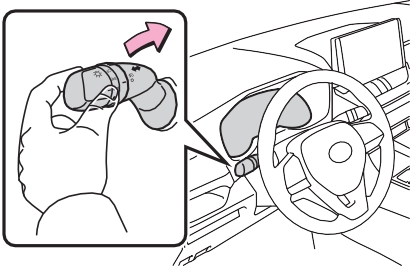
The Automatic High Beam indicator will turn off and the high beam indi- cator will turn on.
Press the switch to activate the Automatic High Beam system again.
|
|
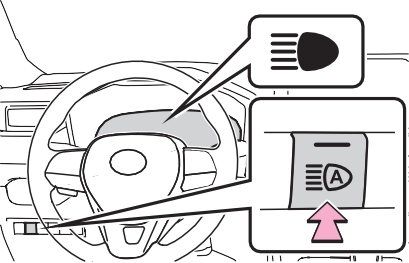
*: If equipped
|
Operating the wiper lever |
2  Turns the fog lights on
*1: For the U.S.A.
*2: For Canada
The headlights are on in low beam.
’ Intermittent windshield wipers
|
|
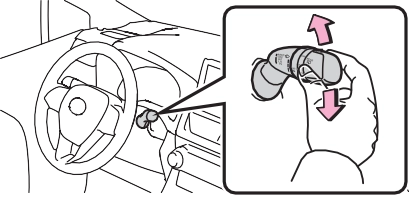
 *1 or *2 Off 1
 *1 or *2 High speed operation 4
 *1 or *2 Temporary operation 5
*1: For the U.S.A.
*2: For Canada
8  Washer/wiper dual operation
Pulling the lever operates the wip- ers and washer.
The wipers will automatically oper- ate a couple of times after the washer squirts.
|
|
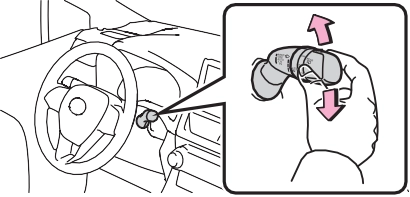
 *1 or *2 Off 1
*1: For the U.S.A.
*2: For Canada
When “AUTO” is selected, the wip- ers will operate automatically when the sensor detects falling rain. The system automatically adjusts wiper timing in accordance with rain vol- ume and vehicle speed.
|
|
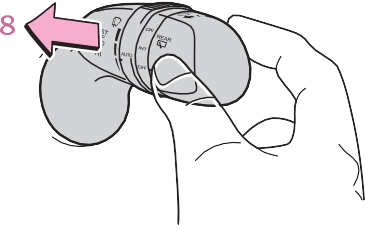
8  Washer/wiper dual operation
Pulling the lever operates the wip- ers and washer.
The wipers will automatically oper- ate a couple of times after the washer squirts.
The engine switch is in ON.
Check that the washer nozzles are not blocked if there is washer fluid in the windshield washer fluid reser- voir.
|
|
|
Caution regarding the use of washer fluid
When it is cold, do not use the washer fluid until the windshield becomes warm. The fluid may freeze on the windshield and cause low visibility. This may lead to an accident, resulting in death or serious injury. |
 WARNING
|
|
|
When the rear window is dry
Do not use the wiper, as it may damage the rear window. |
 NOTICE
 *1 or *2 Off 1
*1: For the U.S.A.
*2: For Canada
Pushing the lever operates the wiper and washer.
The wiper will automatically operate a couple of times after the washer squirts.
The engine switch is in ON.
Check that the washer nozzle is not blocked if there is washer fluid in the washer fluid reservoir.
When the rear window wiper is operating, if the back door is opened while the vehicle is stopped, opera- tion of the rear window wiper will be stopped to prevent anyone near the vehicle from being sprayed by water from the wiper. When the back door is closed, wiper operation will resume.*
*: The setting must be customized at your Toyota dealer.
When the shift lever is shifted to R when the front wipers are operating, the rear window wiper will operate once.
Setting of the reverse-linked func- tion can be changed. (Customizable features: P.688)
|
|
|
When the washer fluid tank is empty
Do not operate the switch continu- ally as the washer fluid pump may overheat. When a nozzle becomes blocked
In this case, contact your Toyota dealer. Do not try to clear it with a pin or other object. The nozzle will be damaged. To prevent battery discharge
Do not leave the wiper on longer than necessary when the engine is off. |
 NOTICE
Download Manual