Disclaimer: Not affiliated with or endorsed by Toyota Motor Company. For informational purposes only. Full Disclaimer

2019 Toyota RAV4 Owners Manual - Tips for operating the audio/visual system


Tips for operating the audio/visual system

Operating information

FM is about 25 miles (40 km). Once outside this range, you

may notice fading and drifting,

    The use of a cellular phone inside or near the vehicle may cause a noise from the speakers of the audio/visual system which you are listening to. However, this does not indicate a malfunction.

For example, nearby buildings and terrain can interfere with FM reception. Power lines or phone wires can interfere with AM sig- nals. And of course, radio sig- nals have a limited range. The farther the vehicle is from a sta- tion, the weaker its signal will be. In addition, reception condi- tions change constantly as the vehicle moves.

Here are some common recep- tion problems that may not indi- cate a problem with the radio as described.

    FM

Fading and drifting stations: Generally, the effective range of

which increase with the distance from the radio transmitter. They are often accompanied by dis- tortion.

Multi-path: FM signals are reflective, making it possible for 2 signals to reach the vehicle’s antenna at the same time. If this happens, the signals will cancel each other out, causing a momentary flutter or loss of reception.

Static and fluttering: These occur when signals are blocked by buildings, trees or other large objects. Increasing the bass level may reduce static and flut- tering.

Station swapping: If the FM sig- nal being listened to is inter- rupted or weakened, and there is another strong station nearby on the FM band, the radio may tune in the second station until the original signal can be picked up again.

    AM

Fading: AM broadcasts are reflected by the upper atmo- sphere ― especially at night. These reflected signals can interfere with those received directly from the radio station, causing the radio station to sound alternately strong and weak.

Station interference: When a reflected signal and a signal received directly from a radio station are very nearly the same frequency, they can interfere with each other, making it diffi- cult to hear the broadcast.

Static: AM is easily affected by external sources of electrical noise, such as high tension power lines, lightening or electri- cal motors. This results in static.


    Certification

    Use of the Made for Apple badge means that an acces- sory has been designed to connect specifically to the Apple product(s) identified in the badge, and has been cer- tified by the developer to meet Apple performance stan- dards. Apple is not responsi- ble for the operation of this

device or its compliance with safety and regulatory stan- dards. Please note that the use of this accessory with an Apple product may affect wireless performance.

    iPhone, iPod, iPod classic, iPod nano, iPod touch, and Lightning are trademarks of Apple Inc., registered in the

U.S. and other countries.

    Compatible models

The following iPod nano®, iPod touch® and iPhone® devices can be used with this system.

Made for

    iPhone 7
    iPhone 7 Plus
    iPhone SE
    iPhone 6s
    iPhone 6s Plus
    iPhone 6
    iPhone 6 Plus
    iPhone 5s
    iPhone 5c
    iPhone 5
    iPhone 4s
    iPod touch (6th generation)
    iPod touch (5th generation)
    iPod nano (7th generation)

    This system only supports audio playback.
    Depending on difference between models or software versions etc., some models might be incompati- ble with this system.

High-resolution sound source

The definition of high-resolution is based on the standards of groups such as the CTA (Con- sumer Technology Association).

Supported formats and play- able media are as follows.

    Supported formats

WAV, FLAC, ALAC, OGG Vorbis

    Playable media

USB

*: USB video only

File information

USB communi- cation formats

USB 2.0 HS (480

Mbps)

File formats

FAT 16/32

Correspon- dence class

Mass storage class

Item

USB

Compatible file format

MP3/WMA/AAC

WAV(LPCM)/FL AC/ALAC/OGG

Vorbis

MP4/AVI/WMV

*1: Only compatible with Windows Media Audio Standard

*2: Sound source of 48kHz or more is down-converted to 48kHz/24bit.

*1: Variable Bit Rate (VBR) compati- ble

*2: Only compatible with Windows Media Audio Standard

    MP3 (MPEG Audio Layer 3), WMA (Windows Media Audio) and AAC (Advanced Audio Coding) are audio compres- sion standards.
    This system can play MP3/WMA/AAC files on USB memory.
    MP4, WMV and AVI files can use the following resolutions: 128x96, 160x120, 176x144 (QCIF), 320x240 (QVGA), 352x240 (SIF), 352x288 (CIF), 640x480 (VGA), 720x480 (NTSC), 720x576 (PAL)
    When naming an MP3/WMA/AAC file, add an appropriate file extension (.mp3/.wma/.m4a).
    This system plays back files with .mp3/.wma/.m4a file extensions as MP3/WMA/AAC files respec- tively. To prevent noise and playback errors, use the appropriate file extension.
    MP3 files are compatible with the ID3 Tag Ver. 1.0, Ver. 1.1, Ver. 2.2 and Ver. 2.3 formats. This system cannot display disc title, track title and artist name in other formats.
    WMA/AAC files can contain a WMA/AAC tag that is used in the same way as an ID3 tag. WMA/AAC tags carry infor- mation such as track title and artist name.
    The emphasis function is available only when playing MP3 files.
    This system can play back AAC files encoded by iTunes.
    The sound quality of MP3/WMA files generally improves with higher bit rates.
    m3u playlists are not compati- ble with the audio player.
    MP3i (MP3 interactive) and MP3PRO formats are not compatible with the audio player.
    The player is compatible with VBR (Variable Bit Rate).
    When playing back files recorded as VBR (Variable Bit Rate) files, the play time will not be correctly displayed if the fast forward or reverse operations are used.
    It is not possible to check fold- ers that do not include MP3/WMA/AAC files.
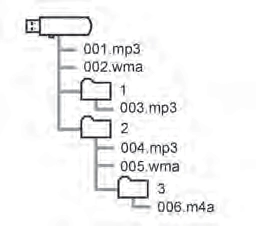
    MP3/WMA/AAC files in fold- ers up to 8 levels deep can be played. However, the start of playback may be delayed when using USB memory containing numerous levels of folders. For this reason, we recommend creating USB memory with no more than 2 levels of folders.

    The play order of the USB memory with the structure shown above is as follows:

    The order changes depending on the personal computer and MP3/WMA/AAC encoding software you use.
    ID3 tag
    This is a method of embed-

ding track-related information in an MP3 file. This embed- ded information can include the track number, track title, the artist’s name, the album title, the music genre, the year of production, comments, cover art and other data. The contents can be freely edited using software with ID3 tag editing functions. Although the tags are restricted to a number of characters, the information can be viewed when the track is played back.

    WMA tag
    WMA files can contain a WMA tag that is used in the same way as an ID3 tag. WMA tags carry information such as track title and artist name.
    MP3
    MP3 is an audio compression standard determined by a working group (MPEG) of the ISO (International Standard Organization). MP3 com- presses audio data to about 1/10 the size of that on con- ventional discs.
    WMA
    WMA (Windows Media Audio) is an audio compression for- mat developed by Microsoft®. It compresses files into a size smaller than that of MP3 files. The decoding formats for

WMA files are Ver. 7, 8 and 9.

    Windows Media is either a registered trademark or trade- mark of Microsoft Corpora- tion in the United States and/or other countries.

This product includes technol- ogy owned by Microsoft Cor- poration and cannot be used or distributed without a license from Microsoft Licens- ing, Inc.

    AAC
    AAC is short for Advanced Audio Coding and refers to an audio compression technol- ogy standard used with MPEG2 and MPEG4.
    USB
    iPod

Message

Explanation

“iPod Error”

This indicates a problem in the iPod or its con- nection.

“No music files found.”

This indicates that there is no music data in the iPod.

“Please check the iPod firm- ware version.”

This indicates that the software version is not compatible. Per- form the iPod firmware updates and try again.

“Unable to authorize the iPod.”

This indicates that it failed to authorize the iPod.

Please check your iPod.

    Bluetooth® audio

Message

Explanation

“Music tracks not supported.

Please check your portable player.”

This indicates a problem in the Bluetooth® device.

    If the malfunction is not rectified: Take your vehicle to your Toyota dealer.

’ For vehicles sold in Canada

’ Gracenote

’ For U.S. owners


Download Manual