For owners
|
Entretien et soin |
Avec un chiffon ou une àponge, nettoyez à l’aide d’un savon doux et de l’eau ti à¨de. V àrifiez aussi les ceintures r àguli à¨re- ment pour vous assurer qu’elles ne pr àsentent pas d’usure excessive, d’effilochage ou de coupures.
|
|
|
Dommages et usure de la ceinture de s àcurit à
V àrifiez p àriodiquement le sys- t à¨me de ceintures de s àcurit à. V àrifiez qu’il n’y a pas de cou- pures, d’effilochures ni de pi à¨ces desserr àes. N’utilisez pas une ceinture de s àcurit à endommag àe avant qu’elle ne soit remplac àe. Les ceintures de s àcurit à endom- mag àes ne peuvent pas prot àger les occupants contre les bless- ures graves, voire mortelles. |
 AVERTISSEMENT
’ Coussins gonflables SRS avant
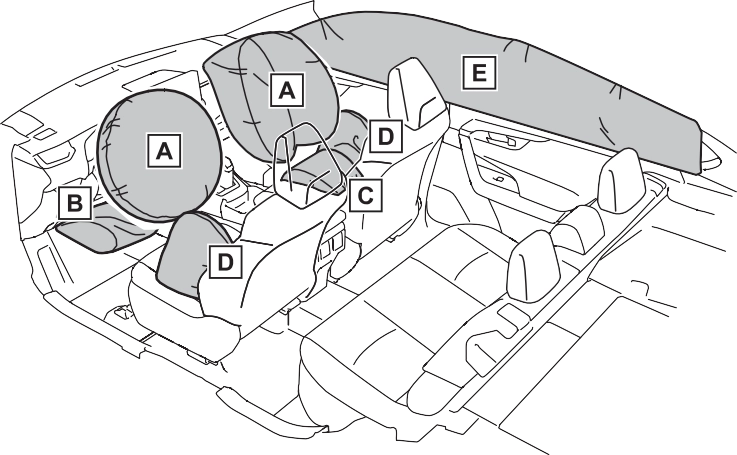 Coussin gonflable SRS du conducteur/coussin gonflable SRS du passager avant
Peuvent aider à prot àger la t àªte et la poitrine du conducteur et du passager avant contre les impacts avec des composants int àrieurs
Coussin gonflable SRS de protection des genoux
Peut aider à prot àger le conducteur
Peut aider à retenir le passager avant
Peuvent aider à prot àger le torse des occupants des si à¨ges avant
Voyants “AIR BAG ON” et “AIR BAG OFF”
Coussin gonflable du passager avant Capteurs d’impact lat àral (porti à¨re avant) Coussins gonflables en rideau
Limiteurs de force et dispositifs de tension des ceintures de s àcu- rit à
Capteurs d’impact lat àral (avant) Coussins gonflables lat àraux
Coussin gonflable du coussin de si à¨ge
Contacteur de boucle de ceinture de s àcurit à du passager avant Capteurs d’impact lat àral (arri à¨re)
Contacteur de boucle de ceinture de s àcurit à du conducteur Capteur de position du si à¨ge du conducteur
Coussin gonflable du conducteur
Syst à¨me de classification de l’occupant du si à¨ge du passager avant (ECU et capteurs)
Coussin gonflable de protection des genoux Lampe t àmoin SRS
Module de capteur de coussin gonflable
Votre v àhicule est dot à de COUSSINS GONFLABLES ÉVOLUÉS dont la conception s’appuie sur les normes de s àcurit à des v àhicules à moteur am àricains (FMVSS208). Le module de capteur de coussin gonflable (ECU) contr à´le le d àploiement des coussins gonflables en fonction des informations obtenues des capteurs et d’autres àl à- ments affich às dans le diagramme des composants du syst à¨me ci- dessus. Ces informations comprennent des donn àes relatives à la gravit à de l’accident et aux occupants. Au moment du d àploiement des coussins gonflables, une r àaction chimique se produit dans les gonfleurs de coussin gonflable et les coussins gonflables se remplis- sent rapidement d’un gaz non toxique pour aider à limiter le mouve- ment des occupants.
Index
Alphabetical Index 711
You lose your keys
If you lose your electronic keys, the risk of vehicle theft increases significantly. Con- tact your Toyota dealer imme- diately. (P.646)
The doors cannot be locked or unlocked
Is the engine switch in ON? When locking the doors, turn the engine switch off. (P.199)
Is the electronic key left inside the vehicle?
When locking the doors, make sure that you have the electronic key on your person.
The rear door cannot be opened
|
If you think something is wrong |
 The engine does not start (vehicles without smart key system)
 The engine does not start (vehicles with smart key system)
switch while firmly depress- ing the brake pedal? (P.196)
In this case, the engine can be started in a temporary way. (P.648)
The shift lever cannot be shifted from P even if you depress the brake pedal
If you cannot release the shift lever by depressing the brake pedal with the engine switch in ON (P.202)
The steering wheel cannot be turned after the engine is stopped
It is locked to prevent theft of the vehicle if the key is removed from the engine switch. (P.195)
tem:
It is locked automatically to prevent theft of the vehicle. (P.197)
The windows do not open or close by operating the power window switches
The power window except for the one at the driver’s seat cannot be operated if the win- dow lock switch is pressed. (P.160)
 The engine switch is turned off automatically (vehicles with smart key system)
A warning buzzer sounds during driving
Are the driver and the passengers wearing the seat belts? (P.628, 629)
Is the parking brake released? (P.205)
other types of warning buzzer may also sound. (P.622, 633)
An alarm is activated and the horn sounds (if equipped)
The sensor detects it and the alarm sounds. (P.73)
To stop the alarm, turn the engine switch to ON or start the engine.
A warning buzzer sounds when leaving the vehicle (vehicles with smart key system)
A warning light turns on or a warning message is dis- played
If you have a flat tire
The vehicle becomes stuck
A
Air conditioning filter 589
Automatic air conditioning sys- tem 509
Eco air conditioning mode 510
Manual air conditioning system
........................................... 504
S-FLOW mode 511
Function 362
Warning light 624
ACA (Active Cornering Assist)
............................................... 362
Active Cornering Assist (ACA)
............................................... 362
Airbag operating conditions 35
Airbag precautions for your child
............................................. 38
Airbag warning light 623
Correct driving posture 27
Curtain shield airbag operating conditions 36
Curtain shield airbag precautions
............................................. 38
Front passenger occupant clas- sification system 43
General airbag precautions 38
Locations of airbags 33
Modification and disposal of air- bags 41
Seat cushion airbag 33
Side airbag operating conditions
............................................. 36
Side airbag precautions 38
Side and curtain shield airbags operating conditions 36
Side and curtain shield airbags precautions 38
SRS airbag instructions for Canadian owners 698
SRS airbags 33
SRS warning light 623
Air conditioning filter 589
Automatic air conditioning sys- tem 509
Eco air conditioning mode 510
Manual air conditioning system
...........................................504
S-FLOW mode 511
Alarm 73
Warning buzzer 622
Warning light 624
Audio source 418
Operating information 438
Reordering the audio source 418 Screen adjustment 420
Some basics 418
Sound settings 419
Turning the system on and off
...........................................418
USB/AUX port 419
Voice command system 421
Audio button (Menu screen) 379
Audio button (Setup screen)382, 437
AUDIO button 377
Common settings 437
Radio settings 437
Air conditioning filter 589
Eco air conditioning mode 510
S-FLOW mode 511
S mode 202
B
Hands Free Power Back Door
........................................... 120
Power back door 119
Wireless remote control 119
Replacing light bulbs 599
Wattage 668
Checking 571
If the vehicle battery is dis- charged 649
Preparing and checking before winter 369
Replacing 651
Warning light 622
Blind Spot Monitor function 266
Rear Cross Traffic Alert function
........................................... 269
Registering/Connecting a Blue- tooth® device 433
Bluetooth® setup screen 396
Connecting a Bluetooth® device
...........................................397
Deleting a Bluetooth® device399 Detailed settings screen 401
Displaying the Bluetooth® setup screen 396
Editing the Bluetooth® device information 399
Registering a Bluetooth® device
...........................................398
...............................................399
Bluetooth® hands-free system
...............................................458
Bluetooth® phone message func- tion 469
Calling the message sender.472 Checking received messages
...........................................470
Displaying the message screen
...........................................469
Receiving a message 470
Replying to a message (dicta- tion reply) 471
Replying to a message (quick reply) 472
Brake
Brake Hold 208
Fluid 569
Parking brake 205
Warning light 622
Instrument panel light control84, 88
Blind Spot Monitor function 266
Rear Cross Traffic Alert function
........................................... 269
C
Aluminum wheels 550
Exterior 550
Interior 553
Seat belts 553
Fixed with a LATCH system 59
Fixed with a seat belt 54
Front passenger occupant clas- sification system 43
Points to remember 50
Riding with children 49
Types of child restraint system installation method 52
Using an anchor bracket 61
Airbag precautions 38
Back door precautions 115
Battery precautions 572, 652
Child restraint system 52
Heated steering wheel and seat heater precautions 516
How your child should wear the seat belt 30
Moon roof precautions 162
Panoramic moon roof precau-
tions 166
Power window lock switch 160
Power window precautions 159
Rear door child-protectors 113
Removed key battery precau- tions 596
Seat belt extender precautions
.............................................30
Seat belt precautions 29
Seat heater precautions 516
Aluminum wheels 550
Exterior 550
Interior 553
Radar sensor 225
Seat belts 553
Checking 568
Preparing and checking before winter 369
Warning light 623
Engine overheating 653
D
Replacing light bulbs 599
Outside rear view mirrors 505,
512
Rear window 505, 512
Windshield 505, 512
BSM (Blind Spot Monitor) 263
Drive information 93
Driving information 91
Dynamic radar cruise control with full-speed range 252
Fuel consumption information 99 Intuitive parking assist 272
LTA (Lane-Tracing Assist) 244
Multi-information display 89
RCTA 263
Warning messages 633
Back door 115
Side doors 109
Smart key system 129
Wireless remote control 104
Automatic door locking and unlocking system 114
Back door 115
Door glasses 158
Door lock 109
Open door warning buzzer 113
Outside rear view mirrors 156
Rear door child-protectors 113
Side doors 109
Driver’s seat belt reminder light
...............................................628
Driver’s seat position memory
...............................................139
Driving position memory 139
Memory recall function 140
Driving
Break-in tips 172
Correct posture 27
Driving mode select switch 353
Procedures 171
Winter drive tips 369
Driving mode select switch 353
Driving position memory 139
Memory recall function 140
Dynamic radar cruise control with full-speed range Function 252
Warning message 633
Dynamic Torque Vectoring AWD system 363
E
Eco Driving Indicator 92
Eco Driving Indicator Light 92
EDR (Event data recorder) 10
Elapsed time 93
Electric Power Steering (EPS)
Function 363
Warning light 624
Battery-saving function 130
If the electronic key does not operate properly 647
Replacing the battery 594
Jam protection function 165
Operation 164
If a warning buzzer sounds 622
If a warning light turns on 622
If a warning message is dis- played 633
If the electronic key does not operate properly 647
If the engine will not start 645
If the vehicle battery is dis- charged 649
If the vehicle is trapped in rising water 613
If you have a flat tire 636
If you lose your keys 646
If you think something is wrong
........................................... 620
If your vehicle becomes stuck
........................................... 655
If your vehicle has to be stopped in an emergency 612
If your vehicle needs to be towed
........................................... 615
If your vehicle overheats 653
Enform App Suite button (Setup screen) 382
Engine
ACC 195, 199
Compartment 566
Engine switch 195, 196
Fuel pump shut off system 621
Hood 563
How to start the engine 195, 196 Identification number 659
If the engine will not start 645
If your vehicle has to be stopped in an emergency 612
Ignition switch (Engine switch)
................................... 195, 196
Overheating 653
Tachometer 82, 85
Capacity 662
Checking 568
Preparing and checking before winter 369
Warning light 623
Capacity 660
Checking 566
Preparing and checking before winter 369
Warning light 623
Auto power off function 199
Changing the engine switch modes 199
Changing the engine switch positions 195
If your vehicle has to be stopped in an emergency 612
Entering letters and numbers387 List screen 388
...............................................377
EPS (Electronic Power Steering)
Function 363
Warning light 624
Flat tire 636
Tire pressure warning system
........................................... 576
Fluid
Automatic transmission 663
Brake 569, 664
Washer 572
Fog lights
Replacing light bulbs 599
Switch 216
Wattage 668
Front passenger’s seat belt reminder light 628
Front passenger occupant clas- sification system 43
Front seat heaters 516
Front seats 135
Adjustment 135
Cleaning 553
Correct driving posture 27
Driving position memory 139
Head restraints 141
Memory recall function 140
Seat heaters 516
Seat position memory 139
Seat ventilators 516
Light switch 210
Replacing light bulbs 599
Wattage 668
Replacing light bulbs 599
Turn signal lever 204
Wattage 668
Capacity 660
Fuel gauge 82, 85
Fuel pump shut off system ...621 Gas station information 728
Information 669
Refueling 221
Type 660, 669
Warning light 628
Average fuel economy 91
Current fuel consumption 99
Refueling 221
G
Displaying the general settings screen 411
General settings screen 411
H
Automatic High Beam system
...........................................213
Light switch 210
Replacing light bulbs 599
Wattage 668
Automatic air conditioning sys- tem 509
Heated steering wheel 516
Manual air conditioning system
........................................... 504
Outside rear view mirrors ... 505, 512
Seat heaters 516
Replacing light bulbs 599
Cargo hooks 526
Coat hooks 541
Retaining hooks (floor mat) 26
I
Engine 659
Vehicle 659
Auto power off function 199
Changing the engine switch modes 199
Changing the engine switch positions 195
If your vehicle has to be stopped in an emergency 612
Starting the engine 195, 196
Items to initialize 693
Maintenance 557
Moon roof 162
Panoramic moon roof 165
Parking Support Brake 283
Power back door 124
Power windows 158
Tire pressure warning system
...........................................579
Caution screen 383
Restarting the system 383
Switch 519
Wattage 668
Intuitive parking assist
Function 272
Warning message 275
J
Positioning a floor jack 564
Vehicle-equipped jack 637
Jam protection function
Electronic sunshade 165
Moon roof 161
Panoramic moon roof 165
Power back door 122
Power windows 158
K
Smart key system 129
Wireless remote control 104
Battery-saving function 130
Electronic key 102
Engine switch 195, 196
If the electronic key does not operate properly 647
If you lose your keys 646
Key number plate 102
Keyless entry 104, 129
Mechanical key 107
Replacing the battery 594
Warning buzzer 129
Wireless remote control key. 104
L
Operation 238
Warning messages 248
Auxiliary catch lever 563
Hood lock release lever 563
Shift lever 200
Turn signal lever 204
Wiper lever 216, 219
Light switch 210
Replacing light bulbs 599
Replacing 599
Wattage 668
Automatic High Beam system
........................................... 213
Fog light switch 216
Front interior lights 519
Headlight switch 210
Interior lights 519
Personal lights 520
Rear interior light 520
Replacing light bulbs 599
Turn signal lever 204
Vanity lights 530
Wattage 668
LTA (Lane Tracing Assist) 238
Operation 238
Warning messages 248
Wattage 668
M
Do-it-yourself maintenance 561
General maintenance 557
Maintenance data 658
Maintenance requirements 556
Manual air conditioning system
...............................................504
Air conditioning filter 589
Menu screen 379
Menu screen operation 379
Clock 82, 85
Indicators 76
Instrument panel light control84, 88
Meter control switches 90
Meters 82, 85
Multi-information display 89
Settings 94, 682
Units 96, 682
Warning lights 622
Warning messages 98, 633
Microphone 461
Mirrors
Digital Rear-view Mirror 147
Inside rear view mirror 145
Outside rear view mirror defog- gers 505, 512
Outside rear view mirrors 156
Vanity mirrors 530
Connectable devices and avail- able functions 456
Mobile Assistant operation 456
Door lock linked moon roof oper- ation 161
Jam protection function 161
Operation 161
Warning message 162
Audio system-linked display 93
Changing the display 90
Display contents 89
Driving information display 91
Driving support system informa- tion display 93
Dynamic radar cruise control with full-speed range 252
Eco Driving Indicator 92
Intuitive parking assist-sensor
........................................... 272
Language 96, 682
LTA (Lane-Tracing Assist) 244
Menu icons 90
Meter control switches 90
Navigation system-linked display
............................................. 93
PCS (Pre-Collision System) . 230 Pop-up display 96
Settings 94, 682
Suggestion function 98
Tire pressure 576
Units 96, 682
Vehicle information display 93
Warning message display 98
Warning messages 633
N
.................................................93
Noise from under vehicle 8
Normal mode 353, 356
O
Odometer 82, 85 Odometer and trip meter display “ODO TRIP” switch 84, 88
Oil
Engine oil 660
Rear differential oil 663
Transfer oil 663
Back door 117, 119
Fuel filler door 222
Hood 563
Replacing light bulbs 599
Wattage 668
Adjusting and folding 156
BSM (Blind Spot Monitor) 263
Outside rear view mirror defog- gers 505, 512
P
Panoramic moon roof
Jam protection function 165
Operation 164
Warning message 166
Camera switch 317
Checking around the vehicle 320
Checking the front and around the vehicle 321
Checking the rear and around the vehicle 326
Checking the sides of the vehicle
........................................... 323
Customizing the panoramic view monitor 334
Display 317
Driving precautions 315
How to switch the display 318
Magnifying function 334
Panoramic view monitor precau- tions 335
Things you should know 344
When folding the outside rear view mirrors 333
Operation 205
Parking brake engaged warning buzzer 207
Warning light 628
Warning message 206
Light switch 210
Replacing light bulbs 599
Wattage 668
Indicator 79
Parking Support Brake function (rear-crossing vehicles) 290
Parking Support Brake function (static objects) 284
Warning light 626
Warning message 282
PCS (Pre-Collision System) Enabling/disabling the pre-colli- sion system 233
Function 230
Warning light 624
Warning message 229, 635
Switch 520
Wattage 668
About the contacts in the contact list 462
Phone screen operation 458
Registering/Connecting a Blue- tooth® phone 460
Some basics 459
Troubleshooting 484
Voice command system 462
When selling or disposing of the vehicle 462
Contacts/Call history settings476 Message settings 482
Notifications settings 475
Sounds settings 474
Indicator 79
Parking Support Brake function (rear-crossing vehicles) 290
Parking Support Brake function (static objects) 284
Warning light 626
Warning message 282
By call history 463
By contacts list 464
By favorites list 464
By home screen 466
By keypad 465
...............................................119
Warning light 624
Door lock linked window opera- tion 159
Jam protection function 158
Operation 158
Window lock switch 160
Pre-Collision System (PCS) Enabling/disabling the pre-colli- sion system 233
Function 230
Warning light 624
Warning message 229, 635
............................................... 379
R
Dynamic radar cruise control with full-speed range 252
Presetting a station 422
Radio broadcast data system423
Light switch 210
RCTA Function 262, 269
Warning message 264
Rear seat
Folding down the rear seatbacks
........................................... 137
Head restraints 141
Seat heaters 516
Light switch 210
Replacing light bulbs 599
Replacing light bulbs 599
Turn signal lever 204
Wattage 668
Digital Rear-view Mirror 147
Inside rear view mirror 145
Outside rear view mirrors 156
Driving precautions 294
Rear view monitor system pre- cautions 296
Screen description 295
Things you should know 300
Capacity 660
Fuel types 660, 669
Opening the fuel tank cap 222
Profiles 395
Registering a Bluetooth® audio player for the first time 394
Registering a Bluetooth® phone for the first time 392
Electronic key battery 594
Fuses 597
Light bulbs 599
Tires 636
Wiper insert 591
Wireless remote control battery
...........................................594
S
Adjusting the seat belt shoulder anchor height 31
Automatic Locking Retractor 31
Child restraint system installation
............................................. 54
Cleaning and maintaining the seat belt 553
Emergency Locking Retractor 31 How to wear your seat belt 30
How your child should wear the seat belt 30
Pregnant women, proper seat belt use 29
Reminder light and buzzer . 628, 629
Seat belt extender 30
Seat belt instructions for Cana- dian owners 697
Seat belt pretensioners 32
SRS warning light 623
Adjustment precautions 135, 136
Adjustment 135, 136
Child restraint system installation
............................................. 50
Cleaning 553
Driving position memory 139
Folding down the rear seatbacks
...........................................137
Head restraint 141
Properly sitting in the seat 27
Seat heaters 516
Seat position memory 139
Seat ventilators 516
Secondary Collision Brake 362
Sensor
Automatic headlight system . 211 Automatic High Beam system
...........................................213
BSM (Blind Spot Monitor) 265
Digital Rear-view Mirror 150
Inside rear view mirror 146
Intuitive parking assist 272
LTA (Lane Tracing Assist) 238
Parking Support Brake function (rear-crossing vehicles) 265
Parking Support Brake function (static objects) 272
Rain-sensing windshield wipers
...........................................218
RCTA 265
Toyota Safety Sense 2.0 224
Setup button (Menu screen) 379, 382
Setup screen 382
Shift lever 200
Automatic transmission 200
If the shift lever cannot be shifted from P 202
Side airbags 33
Side auxiliary box 527
Side doors 109
Side marker lights
Light switch 210
Replacing light bulbs 599
Wattage 668
Adjustment 156
BSM (Blind Spot Monitor) 263
Folding 156
Heaters 505, 512
Replacing light bulbs 599
Turn signal lever 204
Antenna location 129
Entry functions 109, 116
Starting the engine 196
Warning message 633
Storage location 637
Status icon explanation 380
Column lock release 195, 197
Steering lock system warning message 197
Audio switch 436
Talk switch 450
Adjustment 144
Heated steering wheel 516
Meter control switches 90
Replacing light bulbs 599
Function 347
Replacing battery 651
If the vehicle becomes stuck 655
Switches
“ODO TRIP”switch 84, 88
“SOS” button 65
Automatic High Beam switch213 Brake hold switch 208
BSM (Blind Spot Monitor) 264
Digital Rear-view Mirror control switches 147
Door lock switch 113
Driving mode select switch 353
Driving position memory switches 139
Dynamic radar cruise control with full-speed range 252
Electronic sunshade switch 164
Emergency flashers switch 612
Engine switch 195, 196
Fog light switch 216
Garage door opener switches
...........................................541
Heated steering wheel 517
Ignition switch (Engine switch)
...................................195, 196
Intuitive parking assist 273
Light switch 210
LTA switch 244
Meter control switches 90
Moon roof switches 161
Outside rear view mirror switches 156
Panoramic moon roof switches
...........................................164
Parking brake switch 205
PCS (Pre-Collision System) .233 PKSB (Parking Support Brake)
........................................... 280
Power back door opener switch
........................................... 119
Power door lock switch 113
Power window switch 158
RCTA 264
Rear window and outside rear view mirror defoggers switch
................................... 505, 512
Rear window wiper and washer switch 219
Seat heater switches 517, 518
Seat ventilator switches 518
Snow mode switch 359
Tire pressure warning reset switch 579
Vehicle-to-vehicle distance switch 252
VSC OFF switch 363
Window lock switch 160
Windshield defogger switch505, 512
Windshield wiper de-icer switch
........................................... 515
Windshield wipers and washer switch 216
T
Light switch 210
Replacing light bulbs 599
Call screen operation 467
Incoming call waiting 469
Sending tones 468
Transmit volume setting 468
Alarm 73
Engine immobilizer system 70
Maintenance data 664
Tire inflation pressure display function 576
Warning light 629
Glossary 675
Size 673
Tire identification number 672
Tire section names 673
Function 576
Initializing 579
Installing tire pressure warning valves and transmitters 578
Registering ID codes 582
Warning light 629
Chains 371
Checking 573
Glossary 675
If you have a flat tire 636
Inflation pressure 585
Information 671
Replacing 636
Rotating tires 575
Size 664
Snow tires 369
Spare tire 636
Tire identification number 672
Tire inflation pressure display function 576
Tire pressure warning system
...........................................576
Uniform Tire Quality Grading 674 Warning light 629
Touch screen gestures 384
Touch screen operation 385
Dinghy towing 193
Emergency towing 618
Towing eyelet 618, 637
Trailer sway control 362
Trailer towing 182
Entering keyword 499
Toyota Entune Remote Connect
............................................... 495
Toyota Entune Service Connect
............................................... 496
Toyota parking assist monitor
............................................... 302
Distance guide line display mode
........................................... 307
Driving precautions 302
Estimated course line display mode 305
Parking assist guide line display mode 306
Screen display 303
Things you should know 312
Toyota parking assist monitor precautions 308
Using the system 304
Automatic High Beam 213
Dynamic radar cruise control with full-speed range 252
LTA (Lane Tracing Assist) 238
PCS (Pre-Collision System) . 230 RSA (Road Sign Assist) 249
Transmission
Automatic transmission 200
Driving mode select switch 353
S mode 202
Troubleshooting
In other situations 486
When making/receiving a call
...........................................485
When registering/connecting a cellular phone 484
When using the Bluetooth® mes- sage function 486
When using the hands-free sys- tem with a Bluetooth® device
...........................................484
When using the phonebook 485
Replacing light bulbs 599
Turn signal lever 204
Wattage 668
U
USB charging ports 532
USB memory 426
Utility vehicle precautions 372
V
Vanity lights 530
Wattage 668
Vehicle button (Setup screen)
.......................................382, 415
Vehicle data recordings 9
Vehicle identification number659 Vehicle settings 415
Displaying the vehicle settings screen 415
Valet mode setting 416
Vehicle settings screen 415
............................................... 362
Ventilators (seat ventilators) . 516 Voice button (Setup screen) 382, 414
Using the voice command sys- tem 450
Voice command system opera- tion 451
Displaying the voice settings screen 414
Voice settings screen 414
VSC (Vehicle Stability Control)
............................................... 362
W
Approach warning 258
Brake hold 627
Brake Override System 627
Brake system 622
Downshifting 203
Drive-Start Control 627
Electric power steering 624
High coolant temperature 623
Intuitive parking assist OFF indi- cator 625
Intuitive parking assist 272
Low engine oil pressure 623
LTA (Lane Tracing Assist) 238
LTA indicator 625
Open door 113
Open hood 113
Open window 159
PKSB OFF indicator 626
Pre-collision warning 230
RCTA (Rear Cross Traffic Alert)
........................................... 263
RCTA OFF indicator 626
Seat belt reminder 628, 629
Vehicle sway warning 243
ABS 624
Brake hold operated indicator
...........................................627
Brake Override System 627
Brake system 622
Charging system 622
Drive-Start Control 627
Electric power steering 624
Engine 623
High coolant temperature 623
Intuitive parking assist OFF indi- cator 625
Low engine oil pressure 623
Low fuel level 628
LTA indicator 625
Malfunction indicator lamp 623
Parking brake indicator 628
PCS warning light 624
PKSB (Parking Support Brake)
...........................................627
PKSB OFF indicator 626
RCTA OFF indicator 626
Seat belt reminder light 628, 629 Slip indicator 626
SRS 623
Stop & Start cancel indicator 625 Tire pressure 629
Washer
Checking 572
Low washer fluid warning mes- sage 572, 633
Preparing and checking before winter 369
Switch 216, 219
Weight
Cargo capacity 178, 181
Load limits 181
Weight 658
Replacing wheels 587
Size 664
Connecting a device to the in- vehicle access point 403
Operating hints 406
Power windows 158
Power windows 158
Rear window defogger . 505, 512
Washer 216, 219
Intermittent windshield wipers
........................................... 216
Position 216, 219
Rain-sensing windshield wipers
........................................... 216
Replacing the wiper insert 591
Wiper insert 591
Wireless charger 533
Wireless remote control 104
Battery-saving function 130
Locking/Unlocking 104
Panic mode 105
Replacing the battery 594
For vehicles with Entune Premium Audio with Navi- gation or Entune Audio Plus, refer to “NAVIGA- TION AND MULTIMEDIA SYSTEM OWNER’S MAN-
UAL” for information regarding the equipment listed below.
GAS STATION INFORMATION
|
Fuel tank capacity (Reference) |
14.5 gal. (55 L, 12.1 Imp.gal.) |
|
Fuel type |
Unleaded gasoline only P.660 |
|
Cold tire inflation pressure |
P.664 |
|
Engine oil capacity (Drain and refill - reference) |
P.660 |
|
Engine oil type |
P.660 |