Driving procedures
|
Starting the engine |
 The parking brake indicator will come on.
The engine immobilizer system may not have been deactivated. (P.70) Contact your Toyota dealer.
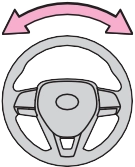 When starting the engine, the engine switch may seem stuck in OFF. To free it, turn the key while turning the steering wheel slightly left and right.
P.221
|
Changing the engine switch positions |
|
|
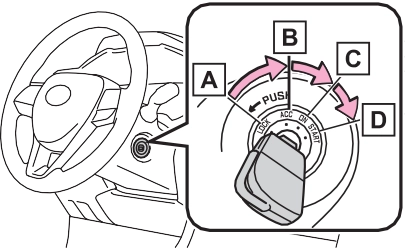
The steering wheel is locked and the key can be removed. (The key can be removed only when the shift lever is in P.)
Some electrical components such
as the audio system can be used.
All electrical components can be used.
For starting the engine.
|
Starting the engine |
A buzzer sounds if the driver’s door is opened while the engine switch is in OFF or ACC to remind you to remove the key.
The parking brake indicator will come on.
and a message will be dis-
played on the multi-information dis- play.
If it is not displayed, the engine cannot be started.
When operating the engine switch, one short, firm press is enough. It is not necessary to press and hold the switch.
The engine will crank until it starts or for up to 30 seconds, whichever is less.
Continue depressing the brake pedal until the engine is completely started.
The engine can be started from any
 engine switch mode.
Contact your Toyota dealer.
The engine cannot be started using the smart key system. Refer to P.649 to restart the engine.
P.102
P.130
P.131
If “Smart Entry & Start System Mal- function” is displayed on the multi- information display, the system may be malfunctioning. Have the vehicle inspected by your Toyota dealer immediately.
P.221
P.594
If the smart key system has been deactivated in a customized setting, refer to P.648.
|
|
|
When starting the engine
Always start the engine while sit- ting in the driver’s seat. Do not depress the accelerator pedal while starting the engine under any circumstances. Doing so may cause an accident resulting in death or serious injury. Caution while driving
If engine failure occurs while the vehicle is moving, do not lock or open the doors until the vehicle reaches a safe and complete stop. Activation of the steering lock in this circumstance may lead to an accident, resulting in death or serious injury. |
 WARNING
|
|
|
When starting the engine
Do not race a cold engine.
If the engine becomes difficult to start or stalls frequently, have your vehicle checked by your Toyota dealer immediately.
Symptoms indicating a mal- function with the engine switch
If the engine switch seems to be operating somewhat differently than usual, such as the switch sticking slightly, there may be a malfunction. Contact your Toyota dealer immediately. |
 NOTICE
Check the parking brake indicator is illuminated.
The engine will stop, and the meter display will be extinguished.
|
|
|
Stopping the engine in an emergency
If you want to stop the engine in an emergency while driving the vehicle, press and hold the engine switch for more than 2 seconds, or press it briefly 3 times or more in succession. (P.612)
However, do not touch the engine switch while driving except in an emergency. Turn- ing the engine off while driving will not cause loss of steering or braking control, but the power assist to these systems will be lost. This will make it more diffi- cult to steer and brake, so you should pull over and stop the vehicle as soon as it is safe to do so. If the engine switch is operated while the vehicle is running, a warning message will be shown on the multi-information display and a buzzer sounds.
When restarting the engine after an emergency shutdown, press the engine switch shortly and firmly.
|
 WARNING
Modes can be changed by pressing the engine switch with brake pedal released. (The mode changes each time the switch is pressed.)
The emergency flashers can be used.
The multi-information display will not be displayed.
Some electrical components such as the audio system can be used. “ACCESSORY” will be displayed on the multi-information display.
All electrical components can be used.
“IGNITION ON” will be displayed on the multi-information display.
*: If the shift lever is in a position other than P when turning off the engine, the engine switch will be turned to ACC, not to OFF.
If the vehicle is left in ACC for more than 20 minutes or ON (the engine is not running) for more than an hour with the shift lever in P, the engine switch will automatically turn to OFF. However, this function can- not entirely prevent battery dis- charge. Do not leave the vehicle with the engine switch in ACC or ON for long periods of time when the engine is not running.
|
|
|
To prevent battery discharge
Do not leave the engine switch in ACC or ON for long periods of time without the engine running.
If “ACCESSORY” or “IGNITION ON” is displayed on the multi- information display, the engine switch is not in OFF. Exit the vehicle after turning the engine switch to OFF.
|
 NOTICE
|
When stopping the engine with the shift lever in a position other than P |
press the engine switch shortly and firmly.
|
|
|
To prevent battery discharge
Do not stop the engine when the shift lever is in a position other than P. If the engine is stopped in another shift lever position, the engine switch will not be turned to OFF but instead be turned to ACC. If the vehicle is left in ACC, battery discharge may occur. |
 NOTICE
|
Shift position purpose and functions |
|
Shift position |
Objective or function |
|
P |
Parking the vehicle/start- ing the engine |
|
R |
Reversing |
|
N |
Neutral |
|
D |
Normal driving*1 |
|
S |
S mode driving*2 (P.201) |
*1: Shifting to the D position allows the system to select a gear suit- able for the driving conditions. Setting the shift lever to the D position is recommended for nor- mal driving.
*2: Selecting shift ranges using S mode restricts the upper limit of the possible gear ranges, con- trols engine braking force, and prevents unnecessary upshifting.
Even when performing the following actions with the intent of enabling engine braking, engine braking will not activate because dynamic radar cruise control with full-speed range
will not be canceled.
Make sure to return to D position driving and reduce speed by easing off the accelerator pedal. Stop the vehicle in a safe place, shift the shift lever to P and let the engine idle until the warning message goes out.
When the warning message goes out, the vehicle can be driven again.
If the warning message does not go out after waiting a while, have your vehicle inspected by your Toyota dealer.
P.172
The AI-SHIFT automatically selects the suitable gear according to driver performance and driving conditions. The AI-SHIFT automatically oper- ates when the shift lever is in D. (Shifting the shift lever to S cancels the function.)
|
Shifting the shift lever |
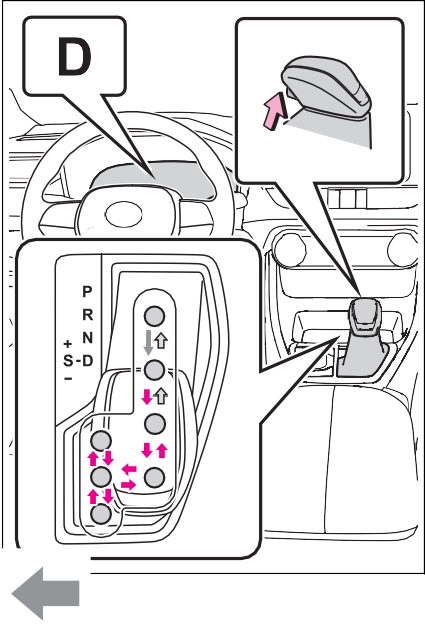 depressed*, shift the shift lever
while pushing the shift release button on the shift knob.
 Shift the shift lever while
pushing the shift release button on the shift knob.
 Shift the shift lever nor-
mally.
When shifting the shift lever between P and D, make sure that the vehicle is completely stopped.
*: For the vehicle to be able to be shifted from P, the brake pedal must be depressed before the shift release button is pushed. If the shift release button is pushed
first, the shift lock will not be released.
The shift lever can be shifted while both buttons are pressed.
The shift lock system is a system to prevent accidental operation of the shift lever in starting.
The shift lever can be shifted from P only when the engine switch is in ON, the brake pedal is depressed and the shift release button is pushed.
First, check whether the brake pedal is being depressed.
If the shift lever cannot be shifted even though the brake pedal is depressed and the shift release but- ton is pushed, there may be a prob- lem with the shift lock system. Have the vehicle inspected by your Toyota dealer immediately.
The following steps may be used as an emergency measure to ensure that the shift lever can be shifted.
Releasing the shift lock:
set. (P.204)
|
Changing shift ranges in S mode |
When the shift lever is in the S position, the shift lever can be operated as follows:
The selected shift range, from S1 to S8 will be displayed on the multi- information display.
However, the initial shift range may be set to 3 if AI-SHIFT has operated while the shift lever was in the D position. (P.200)
To help ensure safety and driving performance, downshifting opera- tion may sometimes be restricted. In some circumstances, downshifting may not be possible even when the shift lever is operated. (A buzzer will sound twice.)
This may indicate a malfunction in the automatic transmission system. Have the vehicle inspected by your Toyota dealer immediately. (In this situation, the transmission will oper- ate in the same manner as when the shift lever is in D.)
|
|
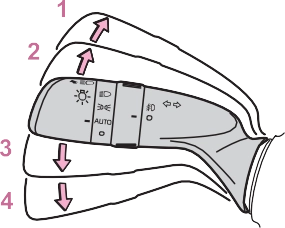
The right hand signals will flash 3 times.
The left hand signals will flash 3 times.
burned out.
Operate the lever again.
Operate the lever in the opposite direction.
The engine switch is in ON.
Check that a light bulb in the front or rear turn signal lights has not
Parking brake indicator light (U.S.A.)
Parking brake indicator light (Canada)
Parking brake lamp
1 Pull the switch to set the parking brake
The parking brake indicator light and parking brake lamp will turn on. Pull and hold the parking brake
switch if an emergency occurs and
it is necessary to operate the park- ing brake while driving.
Make sure that the parking brake indicator light and parking brake lamp turn off.
While the vehicle is stopped, pull and hold the parking brake switch until a buzzer sounds and a message is shown on the multi-information display.
When the automatic mode is turned on, the parking brake operates as follows.
brake will be released, and the parking brake indicator light and parking brake lamp will turn off.
Operate the shift lever with the vehicle stopped and the brake pedal depressed.
While the vehicle is stopped and depressing the brake pedal, press and hold the parking brake switch until a buzzer sounds and a message is shown on the multi-information display.
The parking brake will be released automatically when the accelerator pedal is slowly depressed under the following conditions:
If the automatic release function does not operate, release the park- ing brake manually.
If the parking brake is operated repeatedly over a short period of time, the system may restrict opera- tion to prevent overheating. If this happens, refrain from operating the parking brake. Normal operation will return after about 1 minute.
Operate the parking brake switch. If the message does not disappear after operating the switch several times, the system may be malfunc- tioning. Have the vehicle inspected by your Toyota dealer.
When the parking brake operates, a
motor sound (whirring sound) may be heard. This does not indicate a malfunction.
ON: Comes on until the parking brake is released.
Not in ON: Stays on for approxi- 
Automatic mode (automatic brake setting and releasing) will be turned
P.171
A buzzer will sound if the vehicle is driven with the parking brake engaged. “Parking Brake ON” is dis- played on the multi-information dis- play (with the vehicle reaching a speed of 5 km/h [3 mph]).
P.622
P.368
|
|
|
When parking the vehicle
Do not leave a child in the vehicle alone. The parking brake may be released unintentionally and there is the danger of the vehicle mov- ing that may lead to an accident resulting in death or serious injury. Parking brake switch
Do not set any objects near the parking brake switch. Objects may interfere with the switch and may lead the parking brake to unexpectedly operate. |
 WARNING
The brake hold standby indicator
(green) comes on. While the system is holding the brake, the brake hold operated indicator (yel-
low) comes on.
The brake hold system cannot be turned on in the following condi- tions:
If any of the conditions above are detected when the brake hold sys- tem is enabled, the system will turn off and the brake hold standby indi- cator light will go off. In addition, if any of the conditions are detected while the system is holding the brake, a warning buzzer will sound and a message will be shown on the multi-information display. The park- ing brake will then be set automati- cally.
Perform any of the following opera- tions to release the parking brake:
Make sure that the parking brake indicator light goes off. (P.204)
 When the brake hold standby indi- cator (green) does not illuminate even when the brake hold switch is pressed with the brake hold system operating conditions met, the sys- tem may be malfunctioning. Have the vehicle inspected at your Toyota dealer.
The system may be malfunctioning. Have the vehicle inspected by your Toyota dealer.
Warning messages and buzzers are used to indicate a system malfunc- tion or to inform the driver of the need for caution. If a warning mes- sage is shown on the multi-informa- tion display, read the message and follow the instructions.
P.627
|
|
|
When the vehicle is on a steep incline
When using the brake hold sys- tem on a steep incline, exercise caution. The brake hold function may not hold the vehicle in such a situation. |
 WARNING
Download Manual