Opening, closing and locking the doors
|
|
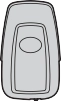
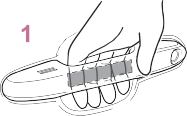
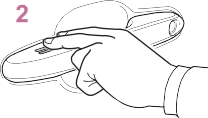
1 Grip the driver’s door handle to unlock the door. Holding the driver’s door handle for approximately 2 seconds unlocks all the doors.
Grip the front passenger’s door handle or rear door han- dle (some models) to unlock all the doors*.
Make sure to touch the sensor on the back of the handle.
The doors cannot be unlocked for 3 seconds after the doors are locked.
*: The door unlock settings can be
changed. (P.110)
Check that the door is securely locked.
|
|
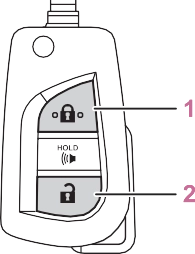
Check that the door is securely locked.
Press and hold to open the side windows.*
*: This setting must be customized at your Toyota dealer.
Check that the door is securely locked.
Press and hold to open the side windows and moon roof (if equipped) or panoramic moon roof (if equipped).*
*: This setting must be customized at your Toyota dealer.
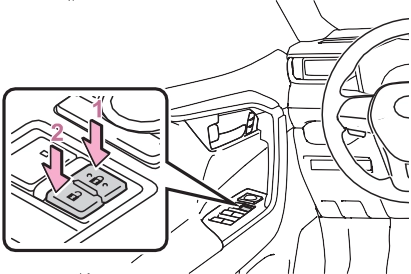
1 Locks all the doors
Turn and hold to close the side win- dows.*
Turning the key unlocks the driver’s door. Turning the key again within 5 seconds unlocks the other doors.
Turn and hold to open the side win- dows.*
*: These settings must be custom- ized at your Toyota dealer.
The doors can also be locked and unlocked with the mechani- cal key. (P.647)
It is possible to set which doors the entry function unlocks using the wireless remote control.
hold , or for approximately 5 seconds while
pressing and holding  . The setting changes each time an operation is performed, as shown
below. (When changing the setting
continuously, release the buttons, wait for at least 5 seconds, and repeat step 2.)
|
Multi-informa- tion dis- play/Beep |
Unlocking func- tion |
|
Holding the |
|
|
driver’s door han- |
|
|
dle unlocks only |
|
|
the driver’s door. |
|
|
Holding the pas- |
|
|
Exterior: Beeps 3 |
senger’s door |
|
times Interior: Pings once |
handle or press- ing the back door opener switch |
|
unlocks all the |
|
|
doors. |
|
|
Holding a door handle or press- ing the back door opener switch unlocks all the doors. |
|
|
Exterior: Beeps |
|
|
twice |
|
|
Interior: Pings |
|
|
once |
Vehicles with alarm: To prevent unintended triggering of the alarm, unlock the doors using the wireless remote control and open and close a door once after the settings have been changed. (If a door is not opened within 60 seconds after
is pressed, the doors will be locked again and the alarm will automatically be set.)
In a case that the alarm is triggered, immediately stop the alarm. (P.73)
Doors: A buzzer sounds and the emergency flashers flash to indicate that the doors have been locked/unlocked using the entry function or wireless remote control. (Locked: Once; Unlocked: Twice)
Side windows and moon roof (if equipped) or panoramic moon roof (if equipped): A buzzer sounds to indicate that the side windows and moon roof or panoramic moon roof
are operating using the wireless remote control.
’ Vehicles without smart key system
If a door is not opened within approximately 60 seconds after the vehicle is unlocked using the wire- less remote control, the security fea- ture automatically locks the vehicle again.
’ Vehicles with smart key system If a door is not opened within
approximately 60 seconds after the vehicle is unlocked using the entry function or wireless remote control, the security feature automatically locks the vehicle again. (However, depending on the location of the electronic key, the key may be detected as being in the vehicle. In this case, vehicle may be unlocked.)
If the door will not lock even when the topside sensor area is touched, try touching both the topside and underside sensor areas at the same time.
When gloves are being worn, remove the gloves.
If an attempt to lock the doors using the entry function or wireless remote control is made when a door is not fully closed, a buzzer sounds contin- uously for 5 seconds. Fully close the door to stop the buzzer, and lock the
vehicle once more.
Locking the doors will set the alarm system. (P.73)
’ Vehicles without smart key system
P.105
’ Vehicles with smart key system
P.130
The doors cannot be locked and unlocked using the smart key sys- tem (if equipped) or wireless remote control. Lock or unlock the doors using the key (vehicles without smart key system) or mechanical key (vehicles with smart key sys- tem). (P.110, 647)
Settings (e.g. unlocking function using a key) can be changed. (Customizable features: P.683)
|
|
|
To prevent an accident
Observe the following precautions while driving the vehicle. Failure to do so may result in a door opening and an occupant could be thrown out of the vehicle, resulting in death or serious injury. Ensure that all doors are prop- erly closed and locked.
|
 WARNING
|
|
|
|
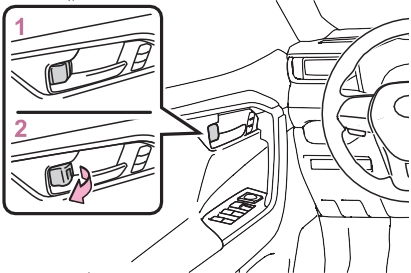
The front doors can be opened by pulling the inside handle even if the lock buttons are in the lock position.
’ Vehicles without smart key system The door cannot be locked if the key is in the engine switch.
’ Vehicles with smart key system The door cannot be locked if the engine switch is in ACC or ON, or
the electronic key is left inside the
vehicle.
Depending on the position of the electronic key, the key may not be detected correctly and the door may be locked.
If the vehicle speed reaches 3 mph (5 km/h), the master warning light flashes and a buzzer sounds to indi- cate that the door(s) or the hood is not fully closed.
The open door(s) or hood is dis- played on the multi-information dis- play.
|
Rear door child-protector lock |
|
|
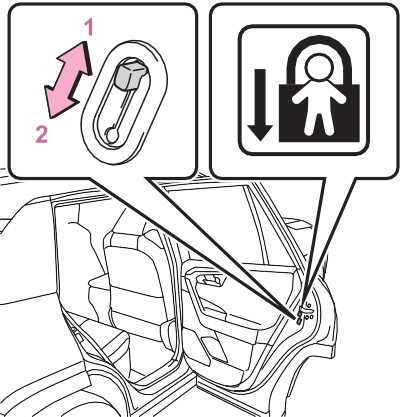
These locks can be set to prevent children from opening the rear doors. Push down on each rear door switch to lock both rear doors.
|
Automatic door locking and unlocking systems |
For instructions on customizing, refer to P.681.
|
|
|
Observe the following precau- tions. Failure to do so may result in death or serious injury. Before driving
Make sure that the back door is fully closed.
If the back door is not fully closed, it may open unexpect- edly while driving and hit near- by objects or luggage in the lug- gage compartment may be thrown out, causing an acci- dent. Do not allow children to play in the luggage compartment.
If a child is accidentally locked in the luggage compartment, they could get heat exhaustion or other injuries. Do not allow a child to open or close the back door.
Doing so may cause the back door to operate unexpectedly, or cause the child’s hands, head, or neck to be caught by the closing back door. Important points while driving
Keep the back door closed while driving.
If the back door is left open, it may hit near-by objects or lug- gage in the luggage compart- ment may be thrown out, causing an accident. |
 WARNING
|
Do not pull on the back door damper stay (vehicles without power back door) (P.119) or back door spindle (vehicles with power back door) (P.126) to close the back door, and do not hang on the back door damper stay (vehicles without power back door) or back door spindle (vehicles with power back door). Doing so may cause hands to be caught or the back door damper stay (vehicles without power back door) or back door spindle (vehicles with power back door) to break, causing an accident.
Vehicles without power back door: If a bicycle carrier or simi- lar heavy object is attached to the back door, it may suddenly shut again after being opened, causing someone’s hands, head or neck to be caught and injured. When installing an accessory part to the back door, using a genuine Toyota part is recommended.
|
|
Unlocking and locking the back door from the out- side |
|
|
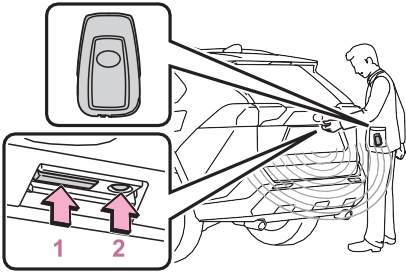
The doors cannot be unlocked for 3 seconds after the doors are locked.
Check that the door is securely locked.
A buzzer sounds and the emer- gency flashers flash to indicate that the doors have been locked/unlocked using the entry function (if equipped) or wireless remote control. (Locked: once; Unlocked: twice)
’ Vehicles without smart key system
If a door is not opened within approximately 60 seconds after the vehicle is unlocked using the wire- less remote control, the security fea- ture automatically locks the vehicle again.
’ Vehicles with smart key system If a door is not opened within
approximately 60 seconds after the vehicle is unlocked using the entry function or wireless remote control, the security feature automatically locks the vehicle again. (However, depending on the location of the
electronic key, the key may be detected as being in the vehicle. In this case, vehicle may be unlocked.)
|
Unlocking and locking the back door from the inside |
|
Opening/closing the back door (vehicles without power back door) |
Raise the back door while pressing up the back door opener switch.
|
|
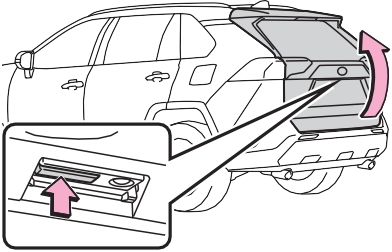
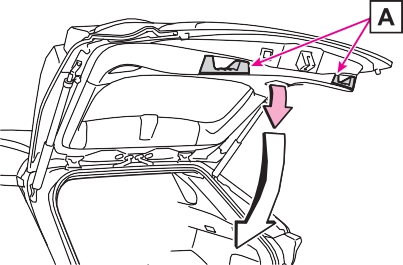
Lower the back door using the
back door handle , and make sure to push the back door down from the outside to close it.
Be careful not to pull the back door sideways when closing the back door with the handle.
The luggage compartment light turns on when the back door is opened with the luggage compart- ment light switch on.
When the engine switch is turned to OFF, the light will go off automati- cally after 20 minutes.
The back door can be unlocked from the inside.
To prevent damage, cover the tip of the screwdriver with a rag.
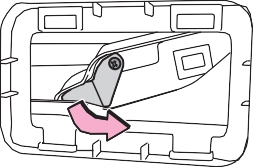 Move the lever.
the operation. When the switch is pressed again during the halted operation, the back door will per- form the reverse operation.
|
|
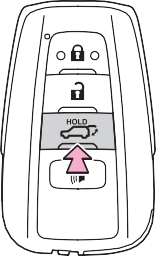
The power back door automatically opens/closes.
Unlock the back door before oper- ating.
Pressing the switch while the power back door is opening/closing stops the operation. When the switch is pressed again during the halted operation, the back door will per- form the reverse operation.
|
Opening/closing the back door (vehicles with power back door) |
The power back door automatically opens/closes.
Pressing the switch while the power back door is opening/closing stops
opener switch.
When the back door is locked: While carrying the electronic key on your person, press the back door opener switch.
The power back door automatically opens.
Pressing the switch while the power back door is opening/closing stops the operation.
The power back door automatically closes.
Pressing the switch while the power back door is operating will stop the operation.
When the switch is pressed again during the halted operation, the back door will perform the reverse operation.
The back door closing assist will be activated, and the power back door will fully close automatically.
|
|
1 While carrying an electronic key, stand within the smart key system operation range, approximately 11.8 to 19.7 in.
(30 to 50 cm) from the rear bumper.
Kick sensor
Hands Free Power Back Door operation detection area
Smart key system operation detection area (P.129)
2 Perform a kick operation by moving your foot to within approximately 3.9 in. (10 cm) of the rear bumper and then pulling it back.
Perform the entire kick operation within 1 second.
The back door will not start operat- ing while a foot is detected under the rear bumper.
Operate the Hands Free Power Back Door without contacting the rear bumper with your foot.
If another electronic key is in the cabin or luggage compartment, it may take slightly longer than nor-
mal for the operation to occur.
Hands Free Power Back Door operation detection area
3 When the sensor detects that your foot is pulled back, a buzzer will sound and the back door will automatically fully open/close.
If a foot is moved under the rear bumper while the back door is opening/closing, the back door will stop moving.
If a foot is moved under the rear bumper again during the halted operation, the back door will per- form the reverse operation.
The luggage compartment light turns on when the back door is opened with the luggage compart- ment light switch on.
When the engine switch is turned to OFF, the light will go off automati- cally after 20 minutes.
In the event that the back door is left slightly open, the back door closer will automatically close it to the fully closed position.
Whatever the state of the engine switch, the back door closer oper- ates.
The power back door can automati- cally open and close under the fol- lowing conditions:
Sensors are equipped on both sides of the power back door. If anything obstructs the power back door while it is closing, the back door will auto- matically operate in the opposite direction or stop.
While the power back door is open- ing automatically, applying exces- sive force to it will stop the opening operation to prevent the power back door from suddenly shutting.
If the back door is lowered manually when the back door is stopped at an open position, the back door will fully close automatically.
This function is a function which reserves locking of all doors, before- hand, when the power back door is open.
When the following procedure is performed, all the doors except the power back door are locked and then power back door will also be locked at the same time it is closed.
A buzzer sounds and the emer- gency flashers flash to indicate that all the doors have been closed and locked.
the jam protection function, etc., while the back door is automati- cally closing after a door reserve lock operation is performed, the door reserve lock function is can- celed and all the doors will unlock.
The Hands Free Power Back Door will open/close automatically when the following conditions are met:
The power back door may also be operated by putting a hand, an elbow, a knee, etc. near the lower center part of the rear bumper and moving it away from the rear bumper. Make sure to put it close enough to the center part of the rear bumper.
In the following situations, the Hands Free Power Back Door may not operate properly:
If the rear bumper has been touched for a while, wait for a short time before attempting to operate the Hands Free Power Back Door again.
too close to the rear bumper
If an accessory has been installed, turn the Hands Free Power Back Door (kick sensor) operation setting off.
When an electronic key is in the operation range, the Hands Free Power Back Door may operate unin- tentionally, so be careful in the fol- lowing situations.
Door (kick sensor) operation setting off. (P.94)
To enable the power back door to operate properly, close the back door manually.
The back door can be unlocked from the inside.
1 Remove the cover.
To prevent damage, cover the tip of the screwdriver with a rag.
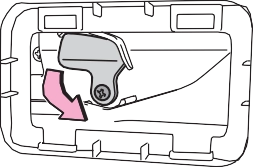 Turn the cover.
Settings (e.g. power back door opening angle) can be changed. (Customizable features: P.685)
Observe the following precautions when operating the power back door.
Failure to do so may cause death or serious injury.
that position.
 screen of the multi-informa- tion display. (P.94)
The changed power back door set- tings are not reset by turning the engine switch to OFF. In order to restore the original settings, they need to be changed back on the
 screen of the multi-information display.
When the settings are completed, the buzzer sounds 4 times.
When opening the back door the next time, the back door will stop at
Press and hold the power back door switch on the back door for approxi- mately 7 seconds.
After the buzzer sounds 4 times, it sounds twice more. When the power back door does the opening operation the next time, the door will open to the initial settings position.
The opening position can be set with the multi-information display. (P.94)
Priority for the stop position is given to the last position set by either the power back door switch on the back door or multi-information display.
*: If equipped
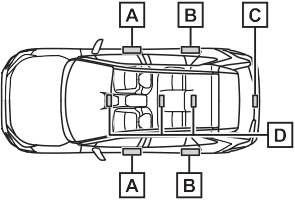
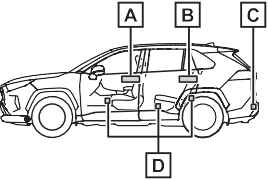
Antennas outside the cabin (front)
Antennas outside the cabin (rear) (if equipped)
Antenna outside the luggage compartment
Antennas inside the cabin
When locking or unlocking the doors
The system can be operated when the electronic key is within about 2.3 ft. (0.7 m) of the front door handles, rear door handles (if equipped) and back door opener switch. (Only the doors detecting the key can be operated.)
When starting the engine or changing engine switch modes
The system can be operated when the electronic key is inside the vehi- cle.
An alarm sounds and warning mes- sage displays shown on the multi- information display are used to pro- tect against unexpected accidents or theft of the vehicle resulting from erroneous operation. When a warn- ing message is displayed, take appropriate measures based on the displayed message.
When only an alarm sounds, cir- cumstances and correction proce- dures are as follows.
The battery-saving function will be activated in order to prevent the electronic key battery and the bat- tery from being discharged while the vehicle is not in operation for a long time.
m) of the outside of the vehicle for 10 minutes or longer.
mechanical key, to unlock the doors.
Press  twice while pressing and holding
  .
.
Confirm that the electronic key indi- cator flashes 4 times.
While the battery-saving mode is set, the smart key system cannot be used. To cancel the function, press any of the electronic key buttons.
The smart key system uses weak radio waves. In the following situa- tions, the communication between the electronic key and the vehicle may be affected, preventing the smart key system, wireless remote control and engine immobilizer sys- tem from operating properly.
(Ways of coping: P.647)
tact with, or is covered by the fol- lowing metallic objects
started or engine switch modes are changed.
the effective range, the door may lock and unlock repeatedly. In that case, follow the following correc- tion procedures to wash the vehi- cle:
Make sure to carry the electronic key when operating the system. Do not get the electronic key too close to the vehicle when operating the system from the outside of the vehi- cle.
Depending on the position and hold- ing condition of the electronic key, the key may not be detected cor- rectly and the system may not oper- ate properly. (The alarm may go off accidentally, or the door lock pre- vention may not operate.)
Settings (e.g. smart key system) can be changed.
(Customizable features: P.684)
If the smart key system has been deactivated in a customized setting, refer to the explanations for the fol- lowing operations.
’ For vehicles sold in the U.S.A., Hawaii, American Samoa, Guam, Saipan and Puerto Rico
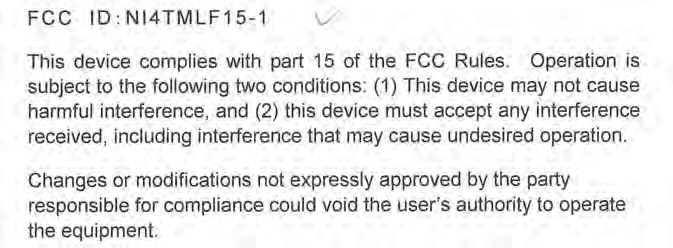
’ For vehicles sold in Canada
Download Manual