Using the air conditioning system and defogger
Windshield defogger switch
Rear window defogger and outside rear view mirror defoggers* switch
Airflow mode control switch Outside/recirculated air mode switch “A/C” switch
“MAX A/C” switch
*: If equipped
If “A/C” switch is not pressed, the system will blow ambient tempera- ture air or heated air.
Pressing the on/off switch turns off the fan.
When the fan is off, pressing the on/off switch or turning the fan speed control switch will turn on the
fan.
The airflow mode changes as fol- lows each time the switch is pressed.
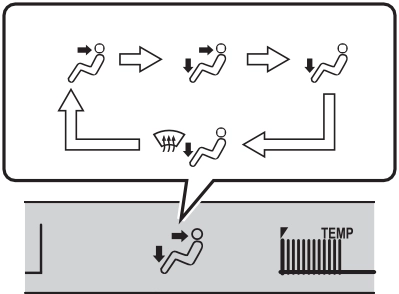
Press the outside/recirculated air mode switch.
The mode switches between outside air mode and recircu- lated air mode each time the switch is operated.
When recirculated air mode is selected, the indicator illuminates on the outside/ recirculated air mode switch.
When the function is on, the indica- tor illuminates on the “A/C” switch.
Press the windshield defogger switch.
Set the outside/recirculated air mode switch to outside air mode if the recirculated air mode is used.
To defog the windshield and the side windows quickly, turn the air flow and temperature up.
To return to the previous mode, press the windshield defogger switch again when the windshield is defogged.
When the windshield defogger switch is on, the indicator illumi- nates on the windshield defogger switch.
Press the rear window defogger and outside rear view mirror defoggers switch.
When the rear window defogger and outside rear view mirror defog-
gers switch is on, the indicator illu- minates on the rear window defogger and outside rear view mir- ror defoggers switch.
The defoggers will automatically turn off after a while.
Press the “MAX A/C” switch.
The air conditioning will automati- cally turn on.
At this time, the following will occur:
In Eco drive mode, the air condition- ing system is controlled to prioritize fuel efficiency by regulating the engine speed and compressor oper- ation to restrict the heating/cooling capacity.
To improve air conditioning perfor- mance, perform the following opera- tions:
When driving on dusty roads such
as tunnels or in heavy traffic, set the outside/recirculated air mode switch to the recirculated air mode. This is effective in preventing outside air from entering the vehicle interior.
During cooling operation, setting the recirculated air mode will also cool the vehicle interior effectively.
The dehumidification function may not operate even when the “A/C” switch is pressed.
It is recommended that the air conditioning system be set to out- side air mode prior to turning the vehicle off.
When the engine is stopped due to the Stop & Start system operations, the air conditioning cooling, heating and dehumidification functions turn off and only ambient temperature air is blown, and there is a possibility that the blowing of ambient tem- perature air will stop. To prevent the air conditioning system from turning
off, press the Stop & Start cancel switch to deactivate the system.
Press the windshield defogger switch to restart the engine and defog the windshield.
If the windshield continuously fogs up, press the Stop & Start cancel switch and refrain from using the Stop & Start system.
Press the Stop & Start cancel switch to restart the engine.
P.589
|
|
|
To prevent battery discharge
Do not leave the air conditioning system on longer than necessary when the engine is off. |
 NOTICE
|
Air outlet layout and oper- ations |
|
|
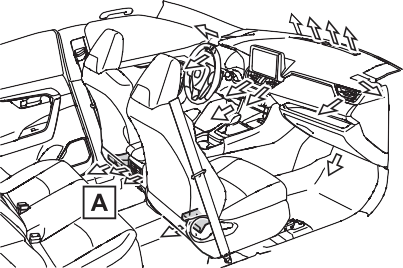
If equipped
’ Front
’ Rear (if equipped)
|
|
|
To not interrupt the wind- shield defogger from operat- ing
Do not place anything on the instrument panel which may cover the air outlets. Otherwise, air flow may be obstructed, preventing the windshield defoggers from defog- ging. |
 WARNING
Automatic air conditioning system
Automatic mode switch
Left-hand side temperature control knob Right-hand side temperature control knob “SYNC” switch
“OFF” switch
Windshield defogger switch
Rear window defogger and outside rear view mirror defoggers switch
Eco air conditioning mode switch Fan speed decrease switch
Fan speed increase switch Airflow mode control switch
Outside/recirculated air mode switch S-FLOW mode switch
“A/C” switch
Turn driver’s side temperature
control dial clockwise to increases the temperature and turn the dial counterclockwise to
 decreases the temperature.
The air conditioning system switches between individual and simultaneous modes each time the “SYNC” switch is pressed.
Simultaneous mode (the indicator on the “SYNC” switch is on):
The driver’s side temperature con- trol dial can be used to adjust the temperature for the driver’s and passenger’s side. At this time, operate the passenger’s side tem- perature control dial to enter indi- vidual mode.
Individual mode (the indicator on the “SYNC” switch is off):
The temperature for the driver’s and passenger’s side can be adjusted separately.
Pressing the “OFF” switch to turns off the fan.
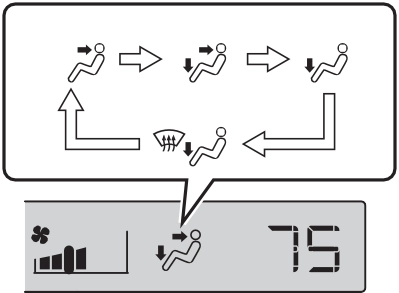
The airflow mode changes as fol- lows each time the switch is pressed.
|
1 2 3 4
|
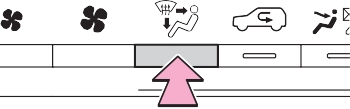
Press the outside/recirculated air mode switch.
The mode switches between out- side air mode and recirculated air mode each time the switch is oper- ated.
When recirculated air mode is selected, the indicator illuminates on the outside/ recirculated air mode switch.
When the function is on, the indica- tor illuminates on the “A/C” switch.
tized such as reducing fan speed, etc.
Press the eco air conditioning mode switch.
When the eco air conditioning mode is on, the indicator illumi- nates on the eco air conditioning mode switch.
Operation in S-FLOW mode dif- fers according to the following conditions:
When no passenger is judged to be in the front passenger seat.
Manual S-FLOW mode is selected or no passengers are judged to be in the rear seats when in automatic S- FLOW mode.
A passenger is judged to be in a rear seat when in automatic
S-FLOW mode.
Depending on the set tempera- ture, operation in S-FLOW mode may not change as described above.
When certain conditions are met and priority is given to the driver’s seat only, the tempera- ture indicator for the front pas- senger side will turn off.
Refer to P.512 for details of how the system determines whether there are passengers.
The following S-FLOW modes are available:
’ Automatic S-FLOW mode
When a rear passenger is deter- mined to be in the vehicle (P.512), S-FLOW mode will be automatically disabled.
The indicator will illuminate on the S-FLOW mode switch when S- FLOW mode is enabled.
To enable/disable S-FLOW mode and enter manual S-FLOW mode, press the SFLOW mode switch.
When the S-FLOW mode switch is pressed, S-FLOW mode will be manually enabled/ disabled.
The indicator will illuminate on the S-FLOW mode switch when S- FLOW mode is enabled.
In this mode, the system does not determine whether a passenger is in the rear seats, so S-FLOW mode cannot be automatically disabled.
To automatically disable S-FLOW
mode when opening and closing a rear door, switch to automatic S- FLOW mode. (P.513)
Press the windshield defogger switch.
Set the outside/recirculated air mode switch to outside air mode if the recirculated air mode is used. (It may switch automatically.)
To defog the windshield and the side windows quickly, turn the air flow and temperature up.
To return to the previous mode, press the windshield defogger switch again when the windshield is defogged.
When the windshield defogger switch is on, the indicator illumi- nates on the windshield defogger switch.
Press the rear window defogger and outside rear view mirror defoggers switch.
The defoggers will automatically turn off after 15 minutes.
When the rear window defogger and outside rear view mirror defog-
gers switch is on, the indicator illu- minates on the rear window defogger and outside rear view mir- ror defoggers switch.
The system determines that there is a passenger in any of the following situations.
If a passenger is judged to be in the vehicle, the system will retain the judgment for a certain amount of time after the engine switch is turned off.
After only the front passenger side door is opened and closed, when the vehicle is driven at 12 mph (20 km/h) or more, the system deter- mines that there is no passenger in the front passenger seat.
When a rear door is opened and closed
When the system is operating in S- FLOW mode, if a rear door is opened and then closed, S-FLOW mode will be disabled. To enable S- FLOW mode, select the S-FLOW mode switch. In this case, the sys- tem switches to manual S-FLOW mode.
The S-FLOW mode switch indicator will go off.
Eco driving mode, the air condi- tioning eco mode will be turned on automatically. Even in this case, the air conditioning eco mode can be turned off by pressing the Eco air conditioning mode switch.
The dehumidification function may not operate even when “A/C” is pressed.
When the engine is stopped due to Stop & Start system operations, the automatic air conditioning cooling, heating and dehumidification func- tions turn off and the fan speed is decreased according to the outside
temperature etc. or air blowing stops. To stop the air conditioning system from turning off, press the Stop & Start cancel switch and refrain from using the Stop & Start system.
Press the windshield defogger switch to restart the engine and defog the windshield.
If the windshield continuously fogs up, press the Stop & Start cancel switch and refrain from using the Stop & Start system.
Press the Stop & Start cancel switch to restart the engine.
P.589
Some functions can be customized. (Customizable features: P.691)
|
When the outside rear view mirror defoggers are operat- ing (if equipped)
Do not touch the rear view mirror surfaces when the outside rear view mirror defoggers are on. |
|
|
|
To prevent battery discharge
Do not leave the air conditioning system on longer than necessary when the engine is off. |
 NOTICE
|
Using automatic mode |
The dehumidification function begins to operate. Air outlets and fan speed are automatically adjusted according to the tempera- ture setting and humidity.
If the fan speed setting or air flow modes are operated, the automatic mode indicator goes off. However, automatic mode for functions other than that operated is maintained.
Fan speed is adjusted automati- cally according to the temperature setting and the ambient conditions.
Therefore, the fan may stop for a while until warm or cool air is ready to flow immediately after the auto- matic mode switch is pressed.
|
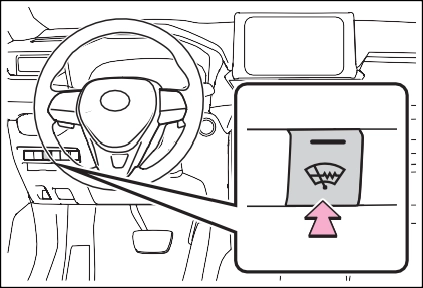
Windshield wiper de-icer (if equipped) |
Press the switch to turn the sys- tem on/off.
The indicator comes on when the system is on.
The windshield wiper de-icer will automatically turn off after a period of time.
|
|
|
To prevent burns
Do not touch the glass at lower part of the windshield or to the side of the front pillars when the windshield wiper deicer is on. |
 WARNING
If equipped
’ Front
’ Rear (if equipped)
|
|
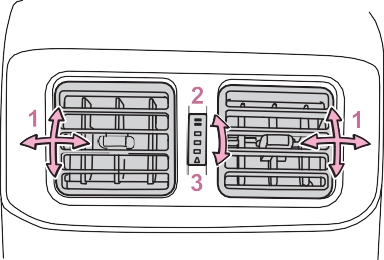
1 Direct air flow to the left or
right, up or down
 *: If equipped
|
|
|
To prevent minor burn inju- ries
Care should be taken if anyone in the following categories comes in contact with the steering wheel or seats when the heater is on: Babies, small children, the elderly, the sick and the physi- cally challenged
Persons with sensitive skin
Persons who are fatigued
Persons who have taken alco- hol or drugs that induce sleep (sleeping drugs, cold remedies, etc.)
|
 WARNING
|
|
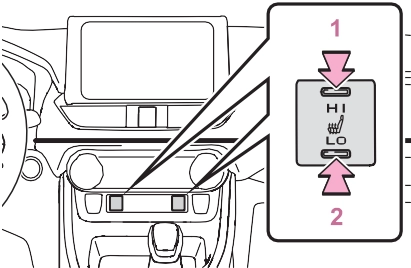
The indicator light comes on when the heated steering wheel is oper- ating.
When the seat heater is on, the indicator illuminates on the seat heater switch.
When not in use, put the switch in the neutral position. The indi- cator will turn off.
’ Rear
The indicator light comes on when the seat heater is operat- ing.
The engine switch is in ON.
’ Front
The engine switch is in ON.
|
|
|
To prevent causes of over- heating and minor burn inju- ries
Observe the following precautions when using a seat heater: Do not cover the seat with a blanket or cushion when using the seat heater.
Do not use seat heater more than necessary.
|
 WARNING
Hi (3 segments lit) Mid (2 segments lit) Lo (1 segment lit) Off
|
|
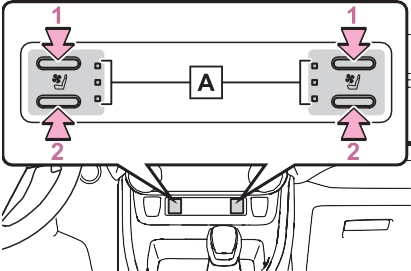
The level indicators (yellow) light up during operation.
The level indicators (green) light up during operation.
When a seat ventilator is set to Hi, the fan speed of the seat ventilator may increase according to the fan speed of the air conditioning sys- tem.
|
|
|
To prevent causes of over- heating and minor burn inju- ries
Observe the following precautions when using a seat heater: Do not cover the seat with a blanket or cushion when using the seat heater.
Do not use seat heater more than necessary.
|
 WARNING
The engine switch is in ON.
Download Manual