Instrument cluster
Warning lights and indicators
For the purpose of explanation, the following illustrations display all warning lights and indicators illuminated.
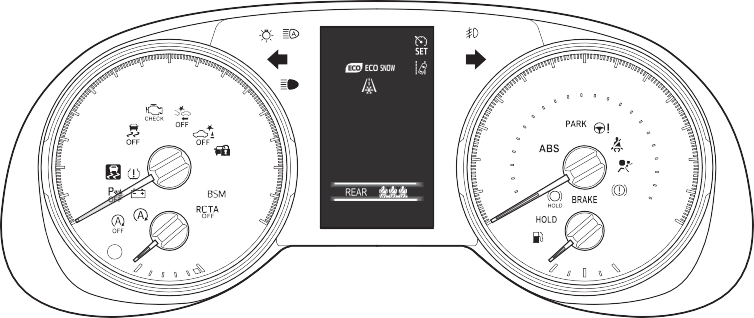 With 4.2-inch display
The units used on the meters and some indicators may differ depending on the target region.
*: The display of the speedometer can be selected from two types, analog or digital. (P.94)
The units used on the meters and some indicators may differ depending on the target region.
The units used on the meters and some indicators may differ depending on the target region.
(U.S.A.)
(Canada) (Red)
Brake system warn- ing light*1 (P.622)
Brake system warn- ing light*1 (P.622)

 (Yellow)
(U.S.A.)
(Canada)
(U.S.A.)
(Canada)
(Red/yellow)
(Flashes or illuminates)
(Orange)
Brake system warn- ing light*1 (P.622)
Charging system warning light*1 (P.622)
High coolant tempera- ture warning light*2 (P.623)
Low engine oil pres- sure warning light*2 (P.623)
Malfunction indicator lamp*1 (P.623)
Malfunction indicator lamp*1 (P.623)
SRS warning light*1 (P.623)
ABS warning light*1 (P.624)
ABS warning light*1 (P.624)
Electric power steer- ing system warning light*1 (P.624)
PCS warning light*1 (P.624)
LTA indicator (P.625)
Stop & Start cancel indicator*1 (if

(Flashes)
(Flashes)
(Flashes)
(U.S.A.)

 (Flashes)
(Canada) (Flashes)
Intuitive parking assist OFF indicator*3 (if equipped) (P.625) PKSB OFF indica- tor*1 (if equipped) (P.626)
RCTA OFF indicator*1 (if equipped) (P.626)
Slip indicator light*1 (P.626)
Brake Override Sys- tem/Drive-Start Con- trol/PKSB (if equipped) warning light*2 (P.627)
Brake hold operated indicator*1 (P.627)
Parking brake indica- tor (P.628)
Parking brake indica- tor (P.628)
Low fuel level warn- ing light (P.628)
Driver’s and front pas- senger’s seat belt reminder light (P.628)
Rear passengers’ seat belt reminder light (if equipped) (P.629) Tire pressure warning light*1 (if equipped) (P.629)
(Flashes)
equipped) (P.625)
*1: These lights turn on when the engine switch is turned to ON to
indicate that a system check is being performed. They will turn off after the engine is started, or after a few seconds. There may be a malfunction in a system if the light does not come on, or turn off. Have the vehicle inspected by your Toyota dealer.
*2: This light illuminates on the multi-information display with a message.
*3: Intuitive parking assist OFF indi- cator turns on when the engine switch is turned to ON while the Intuitive parking assist function is on. It will turn off after a few sec- onds.

|
Indicators |
Turn signal indicator (P.204)
Headlight indicator (P.210)
(U.S.A.)
Tail light indicator (P.210)
(Canada)
Headlight high beam indi- cator (P.212)
Automatic High Beam indicator (P.213)
Fog light indicator (if equipped) (P.216)
Smart key system indica- tor*1 (if equipped) (P.196)
Cruise control indicator (P.252)
Dynamic radar cruise control indicator (P.252)
Cruise control “SET” indi-  cator (P.252)
LTA indicator*2 (P.244)
 Intuitive parking assist OFF indicator*3, 4 (if equipped) (P.273)
PKSB OFF indicator*3, 5
(if equipped) (P.280)


 (Flashes)
(U.S.A.)
(Canada)
Slip indicator light*5 (P.363)
VSC OFF indicator*3, 5
(P.364)
PCS warning light*3, 5
(P.233)
BSM outside rear view mirror indicators*5, 6 (if equipped) (P.263)
BSM indicator (if equipped) (P.263)
RCTA OFF indicator*3, 5
(if equipped) (P.263)
Stop & Start indicator*5 (if equipped) (P.347) Stop & Start cancel indi- cator*3, 5 (if equipped)
(P.348)
Brake hold standby indi- cator*5 (P.208)
Brake hold operated indi- cator*5 (P.208)
Security indicator (P.70, 73)
Low outside temperature indicator*7 (P.83, 87)
Eco Driving Indicator Light*5 (P.92)
Parking brake indicator (P.205)
Parking brake indicator (P.205)
Eco drive mode indicator (P.353)
Sport mode indicator (P.353)
Mud & sand mode indica- tor (if equipped) (P.356)
Rock & dirt mode indica- tor (if equipped) (P.356)
 Snow mode indicator (if equipped) (P.359)
Downhill assist control system indicator*5 (if equipped) (P.360) “AIR BAG ON/OFF” indi-
cator*5, 8 (P.43)
*1: This light illuminates on the multi-information display with a message.
*2: Depending on the operating con- ditions of the system, the color and state (illuminated/blinking) of the indicator change.
*3: The light comes on when the system is turned off.
*4: Intuitive parking assist OFF indi- cator turns on when the engine switch is turned to ON while the Intuitive parking assist function is on. It will turn off after a few sec- onds.
*5: These lights turn on when the engine switch is turned to ON to indicate that a system check is being performed. They will turn off after the engine is started, or after a few seconds. There may be a malfunction in a system if the lights do not turn on, or turn off. Have the vehicle inspected by your Toyota dealer.
*6: This light illuminates on the out- side rear view mirrors.
*7: When the outside temperature is approximately 37°F (3°C) or lower, the indicator will flash for approximately 10 seconds, then stay on.
*8: This light illuminates on the cen- ter panel.
In order to confirm operation, the BSM outside rear view mirror indica- tors illuminate in the following situa- tions:
enabled on screen of the multi-information display.
enabled on screen of the multi-information display while the engine switch is in ON.
If the system is functioning correctly, the BSM outside rear view mirror indicators will turn off after a few seconds.
If the BSM outside rear view mirror indicators do not illuminate or do not turn off, there may be a malfunction in the system. If this occurs, have the vehicle inspected by your Toyota dealer.
The units used on the meter and display may differ depending on the target region.
Displays the engine speed in revolutions per minute
Multi-information display
Presents the driver with a variety of driving-related data (P.89) Displays warning messages if a malfunction occurs (P.633)
Displays the vehicle speed
Displays the quantity of fuel remaining in the tank
Odometer:
Displays the total distance that the vehicle has been driven Trip meter:
Displays the distance the vehicle has been driven since the meter was last
reset. Trip meters “A” and “B” can be used to record and display different distances independently.
Displays the selected shift position or selected shift range (P.200)
Displays the engine coolant temperature
 nate when
The engine switch is in ON.
 Displays the outside temperature within the range of -40°F (-40°C) to 122°F (50°C).
lower, the indicator  will flash for approximately 10 seconds, then stay on.
P.90
When the trip meter is dis- played, pressing and holding the switch will reset the trip meter.
The brightness of the instrument panel lights can be adjusted by turning the dial.
levels when the tail lights are on and off can be adjusted individually.
However, when the surroundings are bright (daytime, etc.), turning on the tail lights will not change the instrument cluster brightness.
|
Adjusting the clock |
’ Vehicles with Entune Audio
P.412
’ Vehicles with Entune Audio Plus or Entune Premium Audio
Refer to “NAVIGATION AND MULTIMEDIA SYSTEM OWNER’S MANUAL”.
The instrument cluster brightness
’ Analog speedometer
The units used on the meter and display may differ depending on the target region.
Displays the engine speed in revolutions per minute
Displays the vehicle speed
Displays the quantity of fuel remaining in the tank
Displays the engine coolant temperature
Odometer:
Displays the total distance that the vehicle has been driven
Trip meter:
Displays the distance the vehicle has been driven since the meter was last reset. Trip meters “A” and “B” can be used to record and display different distances independently.
Presents the driver with a variety of driving-related data (P.89)
Displays warning messages if a malfunction occurs (P.633)
Displays the selected shift position or selected shift range (P.200)
The units used on the meter and display may differ depending on the target region.
Displays the engine speed in revolutions per minute
Displays the vehicle speed
Displays the quantity of fuel remaining in the tank
Displays the engine coolant temperature
Odometer:
Displays the total distance that the vehicle has been driven Trip meter:
Displays the distance the vehicle has been driven since the meter was last
reset. Trip meters “A” and “B” can be used to record and display different distances independently.
Presents the driver with a variety of driving-related data (P.89)
Displays warning messages if a malfunction occurs (P.633)
Displays the selected shift position or selected shift range (P.200)
The engine switch is in ON.
lower, the indicator  will flash for approximately 10 seconds, then stay on.
P.90
Settings (e. g. meter display) can be
changed on screen of the multi- information display. (P.94)
|
|
|
The information display at low temperatures
Allow the interior of the vehicle to warm up before using the liquid crystal information display. At extremely low temperatures, the display monitor may respond slowly, and display changes may be delayed. For example, there is a lag between the driver’s shifting and the new gear number appearing on the display. This lag could cause the driver to downshift again, causing rapid and exces- sive engine braking and possibly an accident resulting in death or injury. |
 WARNING
|
|
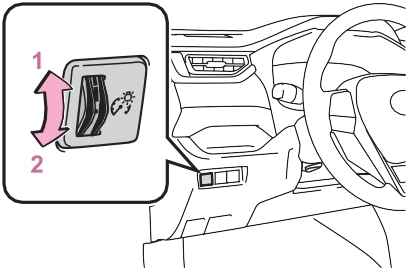
When the trip meter is dis- played, pressing and holding the switch will reset the trip meter.
The brightness of the instrument panel lights can be adjusted by turning the dial.
The instrument cluster brightness levels when the tail lights are on and off can be adjusted individually.
However, when the surroundings are bright (daytime, etc.), turning on the tail lights will not change the instrument cluster brightness.
|
Adjusting the clock |
’ Vehicles with Entune Audio
P.412
’ Vehicles with Entune Audio Plus or Entune Premium Audio
Refer to “NAVIGATION AND MULTIMEDIA SYSTEM OWNER’S MANUAL”.
A variety of information can be dis-
played by selecting a menu icon. Additionally, warning or sugges- tion/advice pop-up displays will be
displayed in some situations.
|
Display contents |
Driving support system infor- mation
Displays recognized signs while the RSA system is operating. (P.249)
Displays an image when the follow- ing systems are operating and a
Displays recognized signs while the RSA system is operating. (P.249)
Displays an image when the follow- ing systems are operating and a
menu icon other than  is selected:
Download Manual