Wireless remote control/ electronic key battery
Replace the battery with a new one if it is depleted.
You will need the following items:
- Flathead screwdriver
- small flathead screwdriver
- lithium battery cr2016 (vehicles without a smart key system), or cr2032 (vehicles with a smart key system)
Replacing the battery
- Vehicles without a smart key system
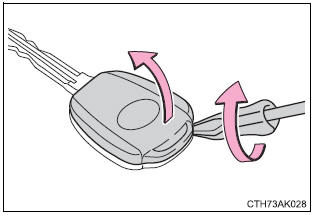
- Remove the cover.
To prevent damage to the key, cover the tip of the flathead screwdriver with a rag.
To prevent the buttons from being disassembled, face the button surface downward.
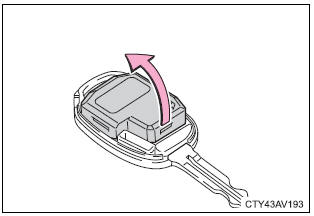
- Remove the module.
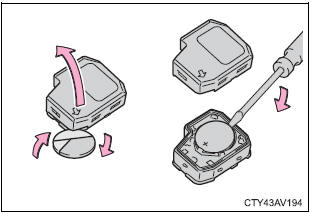
- Open the case cover using a coin protected with tape etc.
And remove the depleted battery using a small flathead screwdriver.
Insert a new battery with the “+” terminal facing up.
- Vehicles with a smart key system
- Take out the mechanical key.
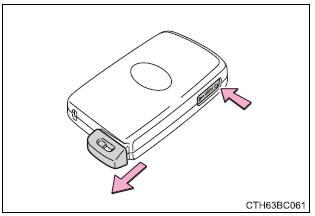
- Remove the cover.
To prevent damage to the key, cover the tip of the flathead screwdriver with a rag.
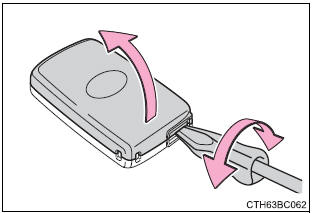
- Remove the depleted battery.
Insert a new battery with the “+” terminal facing up.
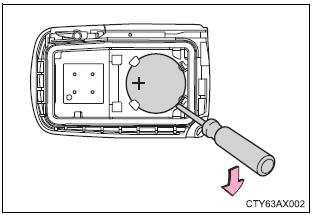
Use a cr2016 (vehicles without a smart key system) or cr2032 (vehicles with a smart key system) lithium battery
- Batteries can be purchased at your toyota dealer, local electrical appliance shops or camera stores.
- Replace only with the same or equivalent type recommended by the manufacturer.
- Dispose of used batteries according to local laws.
If the key battery is depleted
The following symptoms may occur:
- the smart key system (if equipped) and wireless remote control will not function properly.
- The operational range will be reduced.
 Warning Warning
These parts are small and if swallowed by a child, they can cause choking. Keep away from children. Failure to do so could result in death or serious injury. |
 Notice Notice
Observe the following precautions to prevent accidents:
|
Download Manual