Bluetooth® audio
Listening to bluetooth® audio
The bluetoothr audio system enables the user to enjoy music played on a portable player from the vehicle speakers via wireless communication.
When a bluetoothr device cannot be connected, check the connection status on the "bluetooth* audio" screen. If the device is not connected, either register or reconnect the device. *: Bluetooth is a registered trademark of bluetooth sig, inc.
Status display
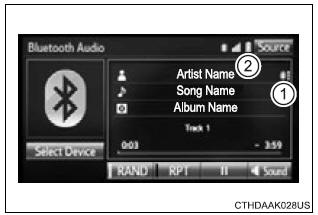
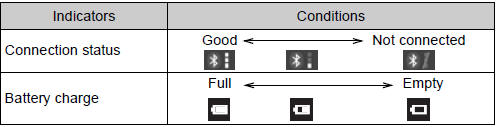
You can check such indicators as signal strength and battery charge on the screen.
- Connection status
- Battery charge
Playing bluetooth® audio
Select  or
or
to play/pause.
For details on "bluetooth* audio" screen operation methods, refer to basic audio operations. For details on how to select a track or album, refer to selecting, fastforwarding and reversing tracks/files/songs. *: Bluetooth is a registered trademark of bluetooth sig, inc.
Download Manual