Using the air conditioning system and defogger
Front manual air conditioning system
Air conditioning controls
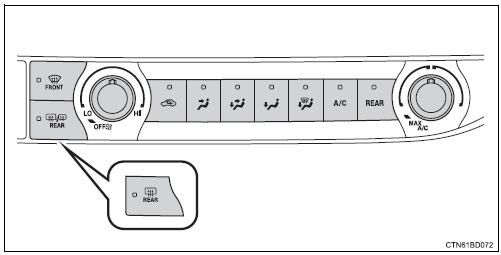
Adjusting the temperature setting
To adjust the temperature setting, turn  clockwise (warm) or
counterclockwise (cool).
If  is not pressed, the system will
blow ambient temperature air or heated air.
For quick cooling, turn  to the "max
a/c" position. The air conditioning will automatically turn on in recirculated air mode.
Fan speed setting
To adjust the fan speed, turn 
clockwise (increase) or counterclockwise (decrease).
Turning the dial to “off” turns off the fan.
Changing airflow modes
To change the airflow mode, press  ,
,
 ,
,
 or
or
 .
.
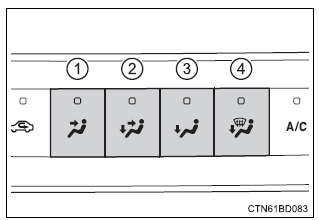
- Air flows to the upper body.
- Air flows to the upper body and feet.
- Air flows to the feet.
- Air flows to the feet and the windshield defogger operates.
Other functions
Switching between outside air and recirculated air mo
Press  .
.
The mode switches between outside air mode (indicator off) and recirculated air mode (indicator on) each time 
is pressed.
Defogging the windshield
Defoggers are used to defog the windshield and front side windows.
- Press
 .
.
If the recirculated air mode is used, it will automatically switch to the outside air mode. - Perform the following operations accordingly:
- to adjust the fan speed, turn
 .
. - To adjust the temperature setting, turn .
- If the dehumidification function is not operating, press
 to
to
operate the dehumidification function.
To defog the windshield and the side windows early, turn the air flow and temperature up.
Defogging the rear window and outside rear view mirrors
- Vehicles without outside rear view mirror defoggers
A defogger is used to defog the rear window.
Press  .
.
The defogger will automatically turn off after a period of time.
- Vehicles with outside rear view mirror defoggers
Defoggers are used to defog the rear window, and to remove raindrops, dew and frost from the outside rear view mirrors.
Press  .
.
The defoggers will automatically turn off after a period of time.
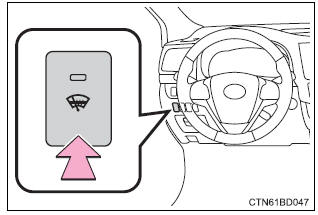
Windshield wiper de-icer (if equipped)
This feature is used to prevent ice from building up on the windshield and wiper blades.
Press the switch to turn the system on/off.
The indicator comes on when the windshield wiper de-icer is on.
The windshield de-icer will automatically turn off after a period of time.
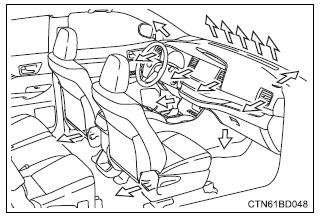
Air outlets
Location of air outlets
The air outlets and air volume change according to the selected airflow mode.
Adjusting the position of and opening and closing the air outlets
- Front center outlets
Direct air flow to the left or right, up or down.
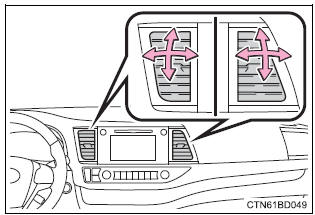
- Front side outlets
Direct air flow to the left or right, up or down.
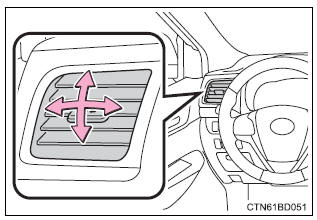
- Closes the vent slide the knob to the most outward position.
- Opens the vent
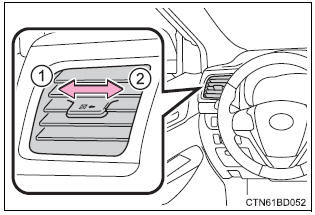
Fogging up of the windows
- The windows will easily fog up when the humidity in the vehicle is high.
Turning
 on will dehumidify the
air from the outlets and defog the windshield effectively. - If you turn
 off, the
windows may fog up more easily. - The windows may fog up if the recirculated air mode is used.
Outside/recirculated air mode
- ?When driving on dusty roads such as tunnels or in heavy traffic, set the outside/ recirculated air mode button to the recirculated air mode. This is effective in preventing outside air from entering the vehicle interior. During cooling operation, setting the recirculated air mode will also cool the vehicle interior effectively.
- Outside/recirculated air mode may automatically switch depending on the temperature setting or the inside temperature.
When the outside temperature exceeds 75ƒ‹f (24ƒ‹c) and the air conditioning system is on
- In order to reduce the air conditioning power consumption, the air conditioning system may switch to recirculated air mode automatically. This may also reduce fuel consumption.
- Recirculated air mode is selected as a default mode when the engine switch is turned to "on" position.
- It is possible to switch to outside air mode at any time by pressing
 .
.
Ventilation and air conditioning odors
- To let fresh air in, set the air conditioning system to the outside air mode.
- During use, various odors from inside and outside the vehicle may enter into and accumulate in the air conditioning system. This may then cause odor to be emitted from the vents.
- To reduce potential odors from occurring: it is recommended that the air conditioning system be set to outside air mode prior to turning the vehicle off.
Air conditioning filter
 Warning Warning
To prevent burns
|
 during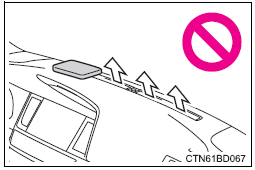
 Notice Notice
Do not leave the air conditioning system on longer than necessary when the engine is stopped. |
Front automatic air conditioning system
Air outlets and fan speed are automatically adjusted according to the temperature setting.
Air conditioning controls
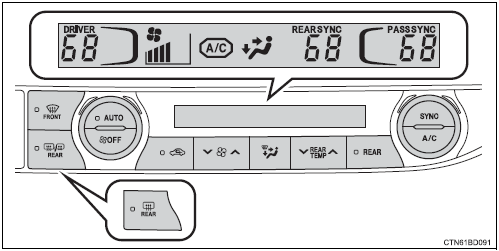
Adjusting the temperature setting
To adjust the temperature setting, turn  clockwise to increase
the temperature and counterclockwise to decrease the temperature.
The temperature for the driver, front passenger and rear seats can be adjusted separately when:
-
 is pressed. (The
"sync" displays disappear.) - the front passenger side
 dial is turned. (The "pass
sync" display changes to "pass".) - the "
 " or "
 "
"
side of is pressed. (The "rear
sync" display changes to "rear".)
The air conditioning system switches between individual and synchronized modes each time  is pressed.
Fan speed setting
To adjust the fan speed, press ""
on  to increase the fan
speed and "" to decrease the fan
speed.
Press  to turn the fan off.
Changing airflow modes
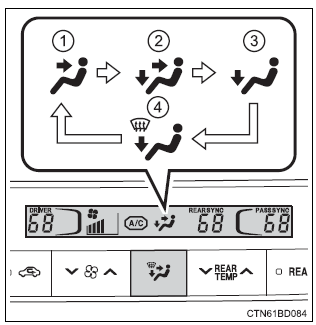
To change the airflow mode, press  .
.
The air outlets used are switched each time the button is pressed.
- Air flows to the upper body.
- Air flows to the upper body and feet.
- Air flows to the feet.
- Air flows to the feet and the windshield defogger operates.
Using automatic mode
- Press
 .
. - Adjust the temperature setting.
- To stop the operation, press
 .
.
Automatic mode indicator
If the fan speed setting or air flow modes are operated, the automatic mode indicator goes off. However, automatic mode for functions other than that operated are maintained.
Other functions
Switching between outside air and recirculated air modes
Press  .
.
The mode switches between outside air mode (indicator off) and recirculated air mode (indicator on) each time 
is pressed.
Defogging the windshield
Defoggers are used to defog the windshield and front side windows.
Press  .
.
Set the outside/recirculated air mode button to outside air mode if the recirculated air mode is used. (It may switch automatically.) To defog the windshield and the side windows early, turn the air flow and temperature up.
To return to the previous mode, press  again when the windshield
is defogged.
Defogging the rear window and outside rear view mirrors
- Vehicles without outside rear view mirror defoggers
A defogger is used to defog the rear window.
Press  .
.
The defogger will automatically turn off after a period of time.
- Vehicles with outside rear view mirror defoggers
Defoggers are used to defog the rear window, and to remove raindrops, dew and frost from the outside rear view mirrors.
Press  .
.
The defoggers will automatically turn off after a period of time.
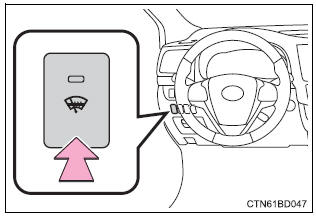
Windshield wiper de-icer (if equipped)
This feature is used to prevent ice from building up on the windshield and wiper blades.
Press the switch to turn the system on/off.
The indicator comes on when the windshield wiper de-icer is on.
The windshield de-icer will automatically turn off after a period of time.
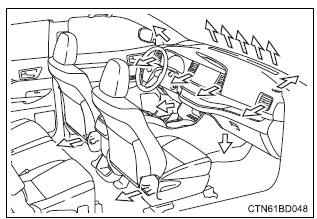
Air outlets
Location of air outlets
The air outlets and air volume change according to the selected airflow mode.
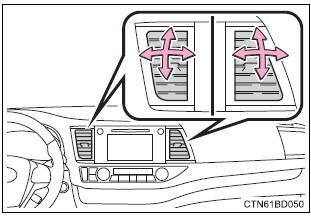
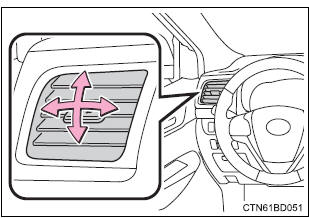
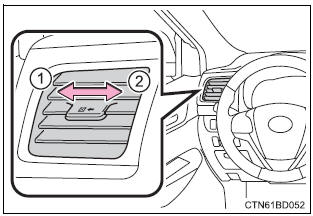
Adjusting the position of and opening and closing the air outlets
- Front center outlets
Direct air flow to the left or right, up or down.
- Front side outlets
Direct air flow to the left or right, up or down.
- Closes the vent
slide the knob to the most outward position. - Opens the vent
Using automatic mode
Fan speed is adjusted automatically according to the temperature setting and the ambient conditions.
Therefore, the fan may stop for a while until warm or cool air is ready to flow immediately after  is pressed.
Fogging up of the windows
- The windows will easily fog up when the humidity in the vehicle is high.
Turning
 on will dehumidify the
air from the outlets and defog the windshield effectively. - If you turn
 off, the
windows may fog up more easily. - The windows may fog up if the recirculated air mode is used.
Outside/recirculated air mode
- When driving on dusty roads such as tunnels or in heavy traffic, set the outside/ recirculated air mode button to the recirculated air mode. This is effective in preventing outside air from entering the vehicle interior. During cooling operation, setting the recirculated air mode will also cool the vehicle interior effectively.
- Outside/recirculated air mode may automatically switch depending on the temperature setting or the inside temperature.
When the outside temperature exceeds 75°F (24°C) and the air conditioning system is on
- In order to reduce the air conditioning power consumption, the air conditioning system may switch to recirculated air mode automatically. This may also reduce fuel consumption.
- Recirculated air mode is selected as a default mode when the engine switch is turned to the "on" position (vehicles without a smart key system) or ignition on mode (vehicles with a smart key system).
- It is possible to switch to outside air mode at any time by pressing
 .
.
Ventilation and air conditioning odors
- To let fresh air in, set the air conditioning system to the outside air mode.
- During use, various odors from inside and outside the vehicle may enter into and accumulate in the air conditioning system. This may then cause odor to be emitted from the vents.
- To reduce potential odors from occurring:
- It is recommended that the air conditioning system be set to outside air mode prior to turning the vehicle off.
- The start timing of the blower may be delayed for a short period of time immediately after the air conditioning system is started in automatic mode.
Air conditioning filter
Customization
Settings (e.G. A/c auto switch operation) can be changed.
(Customizable features )
 Warning Warning
To prevent burns
|
 during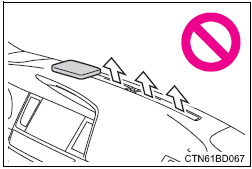
 Notice Notice
Do not leave the air conditioning system on longer than necessary when the engine is stopped. |
Rear manual air conditioning system
Air conditioning controls
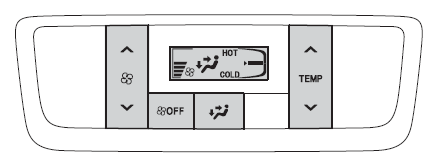
Adjusting the temperature setting
- To adjust the temperature setting, press "
 "
"
on to increase
the temperature and " " to
" to
decrease the temperature.
Fan speed setting
To adjust the fan speed, press " "
"
on  to increase the fan
speed and " " to decrease the fan
speed.
Press  to turn the fan off.
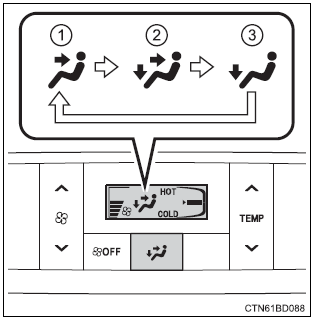
Changing airflow modes
To change the airflow mode, press  .
.
The air outlets used are switched each time the button is pressed.
- Air flows to the upper body.
- Air flows to the upper body and feet.
- Air flows to the feet.
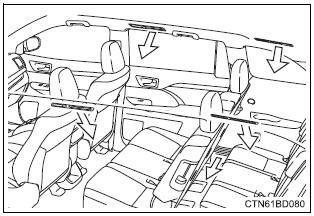
Air outlets
Location of air outlets
The air outlets and air volume change according to the selected airflow mode.
Adjusting the position of and opening and closing the air outlets
Direct air flow to the left or right, forward or backward.
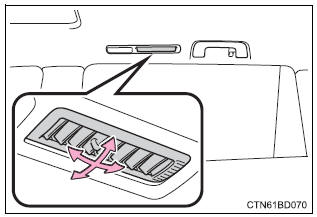
- Closes the vent
slide the knob to the rear-most position. - Opens the vent
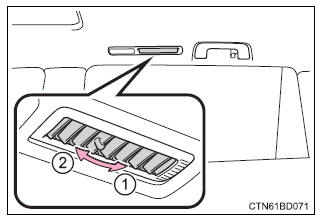
 Notice Notice
Do not leave the air conditioning system on longer than necessary when the engine is stopped. |
Rear automatic air conditioning system
Air outlets and fan speed are automatically adjusted according to the temperature setting.
Air conditioning controls
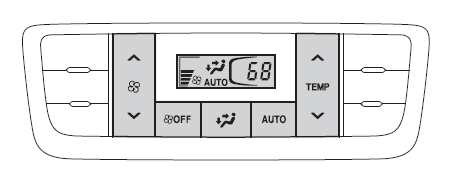
Adjusting the temperature setting
To adjust the temperature setting, press " "
"
on  to increase
the temperature and " " to decrease
the temperature.
Fan speed setting
To adjust the fan speed, press ""
on  to increase the fan
speed and " " to decrease the fan
speed.
Press  to turn the fan off.
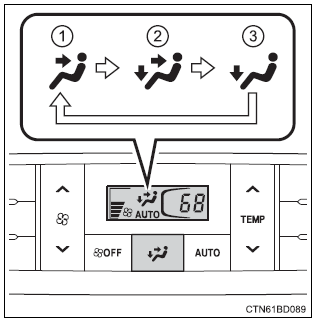
Changing airflow modes
To change the airflow mode, press  .
.
The air outlets used are switched each time the button is pressed.
- Air flows to the upper body.
- Air flows to the upper body and feet.
- Air flows to the feet.
Using automatic mode
- Press
 .
. - Adjust the temperature setting.
- To stop the operation, press
 .
.
Automatic mode indicator
If the fan speed setting or air flow modes are operated, the automatic mode indicator goes off. However, automatic mode for functions other than that operated are maintained.
Air outlets
Location of air outlets
The air outlets and air volume change according to the selected airflow mode
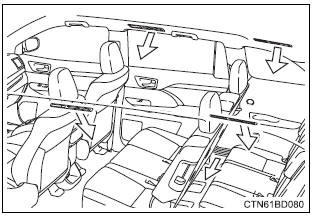
Adjusting the position of and opening and closing the air outlets
Direct air flow to the left or right, forward or backward.
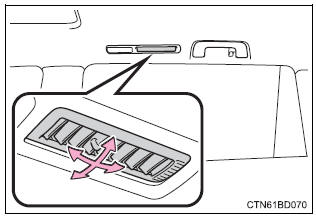
- Closes the vent
slide the knob to the rear-most position. - Opens the vent
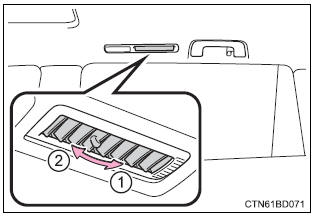
 Notice Notice
Do not leave the air conditioning system on longer than necessary when the engine is stopped. |
Heated steering wheel/seat heaters/seat ventilators
The heated steering wheel and seat heaters heat the side grips of the steering wheel and seats, respectively. Seat ventilators maintain good airflow by blowing air from the seats.
 Warning Warning
|
 Notice Notice
|
Heated steering wheel
Turn the heated steering wheel on/off
The indicator light comes on when the heated steering wheel is operating.
The heated steering wheel will automatically turn off after about 30 minutes.
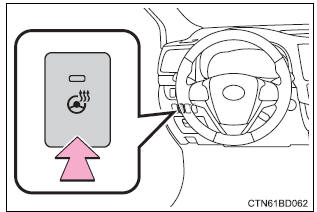
The heated steering wheel can be used when
The engine switch is in ignition on mode.
Front seat heaters and ventilators
Seat heaters
- Turns the seat heater on the indicator light comes on.
- Adjusts the seat temperature the further you move the dial forward, the warmer the seat becomes.
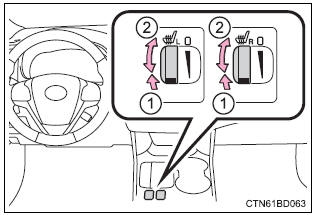
Seat heaters/ventilators
- Turns the seat heater on the indicator light comes on.
The higher the number is, the warmer the seat becomes.
- Blows air from the seat the indicator light comes on.
The higher the number is, the stronger the airflow becomes.
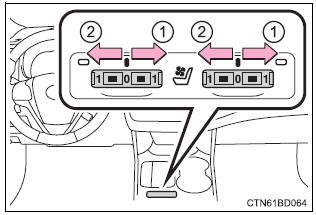
The seat heaters and seat heaters/ventilators can be used when
- Vehicles without a smart key system the engine switch is in the "on" position.
- vehicles with a smart key system the engine switch is in ignition on mode.
When not in use
- Seat heaters turn the dial fully backward. The indicator light will turn off.
- seat heaters/ventilators set the knob at "0". The indicator light will turn off.
Second seat heaters
- Hi
- Lo
- Off
The indicator comes on when the second seat heater is on.
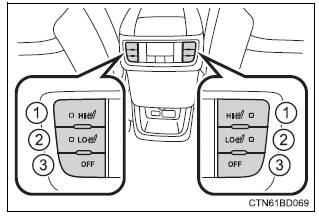
The second seat heaters can be used when
The engine switch is in ignition on mode.
Download Manual