Gauge and meters
The displayed content may differ depending on the type of meter.
- Vehicles with monochrome display
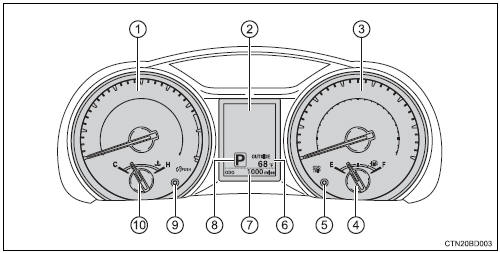
- Vehicles with color display
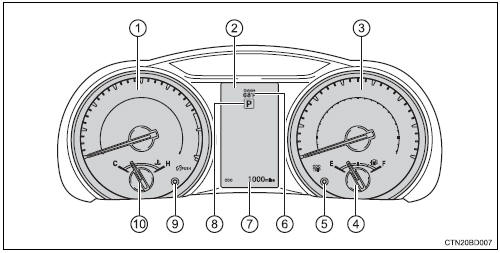
- Tachometer displays the engine speed in revolutions per minute.
- Multi-information display presents the driver with a variety of driving-related data.
- Speedometer
- Fuel gauge
- Trip meter reset knob switches the trip information.
- Outside temperature odometer and trip meter display
- Shift position and shift range displays the selected shift position or selected shift range.
- Meter panel lights control button
- Engine coolant temperature gauge displays the engine coolant temperature.
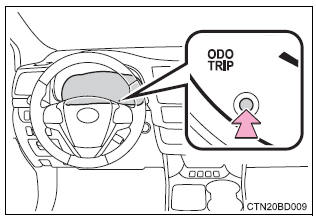
Changing the trip meter display
Switches between the trip meter “a” and “b” displays. When the trip meter is displayed, pressing and holding the knob will reset the trip meter.
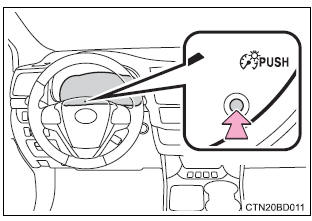
Instrument panel light control
The brightness of the meter panel lights can be adjusted.
Pressing the button will adjust the brightness of the meter panel lights.
The brightness level of the meters when the surroundings are bright (day mode) and dark (night mode) can be adjusted individually. However, when in day mode, adjusting the brightness level will also change the brightness level of night mode.
The meters and display illuminate when
- vehicles without a smart key system
The engine switch is in the "on" position.
- vehicles with a smart key system
The engine switch is in ignition on mode.
Outside temperature display
In the following situations, the correct outside temperature may not be displayed, or the display may take longer than normal to change.
- When stopped, or driving at low speeds (less than 12 mph [20 km/h])
- when the outside temperature has changed suddenly (at the entrance/exit of a garage, tunnel, etc.)
 Notice Notice
|
Download Manual