If the electronic key does not operate properly
If communication between the electronic key and vehicle is interrupted Or the electronic key cannot be used because the battery is depleted, the smart key system and wireless remote control cannot be used. In such cases, the doors can be opened and the engine can be started by following the procedure below.
Locking and unlocking the doors and key linked functions
Use the mechanical key In order to perform the following operations:
- locks all the doors
- closes the windows and moon roof*1 (turn and hold)*2
- Unlocks the door turning the key rearward unlocks the driver¢¦s door. Turning the key once again within 5 seconds unlocks the other doors.
- Opens the windows and moon roof*1 (turn and hold)*2
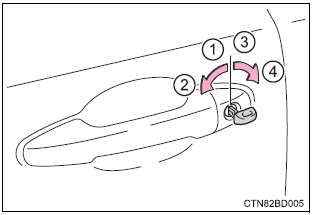
*1: If equipped
*2: this setting must be customized at your toyota dealer.
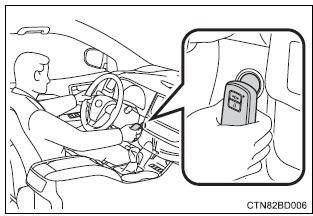
Starting the engine
- Ensure that the shift lever is in p and depress the brake pedal.
- Touch the toyota emblem side of the electronic key to the engine switch.
When the electronic key is detected, a buzzer sounds and the engine switch will turn to ignition on mode.
When the smart key system is deactivated in customization setting, the engine switch will turn to accessory mode.
- Firmly depress the brake pedal.
Vehicles with monochrome display: check that
 is shown on the
multi-information display.Vehicles with color display: check that
 and a message are
shown on the multi-information display. - Press the engine switch.
In the event that the engine still cannot be started, contact your toyota dealer.
Stopping the engine
Shift the shift lever to p and press the engine switch as you normally do when stopping the engine.
Replacing the key battery
As the above procedure is a temporary measure, it is recommended that the electronic key battery be replaced immediately when the battery is depleted.
Changing engine switch modes
Release the brake pedal and press the engine switch in step 3 above.
The engine does not start and modes will be changed each time the switch is pressed.
When the electronic key does not work properly
- Make sure that the smart key system has not been deactivated in the customization setting. If it is off, turn the function on.
(Customizable features )
- Check if battery-saving mode is set. If it is set, cancel the function.
Download Manual