Basic operations
Audio system types
- Entune audio
- entune audio plus/entune premium audio with navigation
Owners of models equipped with a navigation system should refer to the "navigation and multimedia system owner's manual".
Using cellular phones
Interference may be heard through the audio system's speakers if a cellular phone is being used inside or close to the vehicle while the audio system is operating.
About bluetooth
The bluetooth wordmark and logo are owned by bluetooth sig. And permission has been granted to use the trademark of the licensee panasonic corporation. Other trademarks and trade names are owned by various different owners.
Certification (caution)
- U.S.A.
Fcc id: acj932yeap01a473w
Note
: this device complies with part 15 of the fcc rules. Operation is subject to the following two conditions:
- this device may not cause harmful interference, and
- this device must accept any interference received, including interference that may cause undesired operation.
Fcc warning:
Changes or modifications not expressly approved by the party responsible for compliance could void the user’s authority to operate the equipment.
Radiofrequency radiation exposure information: this equipment complies with fcc radiation exposure limits set forth for an uncontrolled environment.
This equipment should be installed and operated with minimum distance of 7.9 In. (20Cm) between the radiator and your body.
This transmitter must not be co-located or operating in conjunction with any other antenna or transmitter.
- U.S.A. And canada
Part 15 of the fcc rules
Fcc warning: any unauthorized changes or modifications to this equipment will void the user’s authority to operate this device.
- Canada
Ic: 216j-yeap01a473w
Note
: this device complies with industry canada license-exempt rss standard(s). Operation is subject to the following two conditions:
- this device may not cause interference, and
- this device must accept any interference, including interference that may cause undesired operation of the device.
Le présent appareil est conforme aux cnr d'industrie canada applicables aux appareils radio exempts de licence. L'exploitation est autorisée aux deux conditions suivantes :
- l'appareil ne doit pas produire de brouillage, et
- l'utilisateur de l'appareil doit accepter tout brouillage radioélectrique subi, même si le brouillage est susceptible d'en compromettre le fonctionnement.
This radio transmitter (identify the device by certification number, or model number if category II) has been approved by industry canada to operate with the antenna types listed below with the maximum permissible gain and required antenna impedance for each antenna type indicated. Antenna types not included in this list, having a gain greater than the maximum gain indicated for that type, are strictly prohibited for use with this device.
Le présent émetteur radio (identifier le dispositif par son numéro de certification ou son numéro de modèle s'il fait partie du matériel de catégorie i) a été approuvé par industrie canada pour fonctionner avec les types d'antenne énumérés ci-dessous et ayant un gain admissible maximal et l'impédance requise pour chaque type d'antenne. Les types d'antenne non inclus dans cette liste, ou dont le gain est supérieur au gain maximal indiqué, sont strictement interdits pour l'exploitation de l'émetteur.
Laser products
- Do not take this unit apart or attempt to make any changes yourself.
This is an intricate unit that uses a laser pickup to retrieve information from the surface of compact discs.
The laser is carefully shielded so that its rays remain inside the cabinet.
Therefore, never try to disassemble the player or alter any of its parts since you may be exposed to laser rays and dangerous voltages.
- This product utilizes a laser.
Use of controls or adjustments or performance of procedures other than those specified herein may result in hazardous radiation exposure.
 Notice Notice
Do not leave the audio system on longer than necessary when the engine is off. To avoid damaging the audio system
Take care not to spill drinks or other fluids on the audio system. |
Audio system
Operations such as listening to audio, using the hands-free phone, confirming vehicle information and changing audio system settings are started by using the following buttons.
Audio system operation buttons
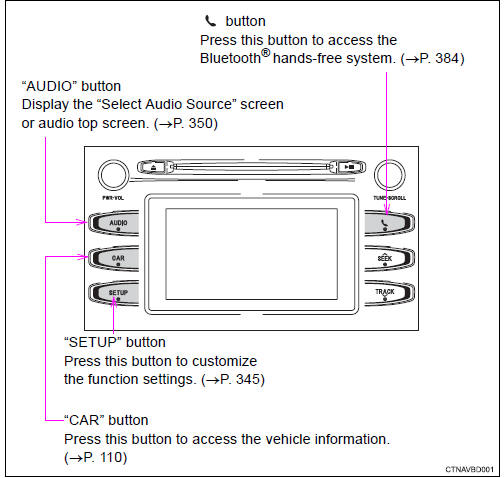
*: if equipped
Operating the touch screen
By touching the screen with your finger, you can control the audio system, etc.
Drag
Touch the screen with your finger, and move the screen to the desired position.
- Scrolling the lists
- using scroll bar in lists
Flick
Touch the screen with your finger and quickly move the screen by flicking your finger.
- Scrolling the main screen page
- returning to the menu screen from the sub-menu screen (screen one level below)
*: the above operations may not be performed on all screens.
Capacitive touch switches
The control panel uses capacitive touch sensors.
- In the following cases, incorrect operation or non-response may occur.
- If the operating section is dirty or has liquid attached to it, incorrect operation or non-response may occur.
- If the operating section receives electromagnetic waves, incorrect operation or non-response may occur.
- If wearing gloves during operation, non-response may occur.
- If fingernails are used to operate the system, non-response may occur.
- If a touch pen is used to operate the system, non-response may occur.
- If the palm of your hand touches the operating section during operation, incorrect operation may occur.
- If the palm of your hand touches the operating section, incorrect operation may occur.
- If operations are performed quickly, non-response may occur.
- Please do not reach your hand to the part of button when audio system turn on. Because the button may become unresponsive for a while. But it will be back to normal for a given time even if audio system turned on under the condition.
When using the touch screen
- If the screen is cold, the display may be dark, or the system may seem to be operating slightly slower than normal.
- ´The screen may seem dark and hard to see when viewed through sunglasses.
Change your angle of viewing, adjust the display on the "display settings" screen Or remove your sunglasses.
- Flick operations may not be performed smoothly in high altitudes.
 Notice Notice
|
Steering wheel audio switches
Some audio features can be controlled using the switches on the steering wheel.
Operation may differ depending on the type of audio system or navigation system. For details, refer to the manual provided with the audio system or navigation system.
Operating the audio system using the steering wheel switches
- Volume switch
- increases/decreases volume
- press and hold: continuously increases/decreases volume
- Cursor switch ("
 " and "
 ")
")
- selects (radio stations/radio presets/tracks/files/songs)
- press and hold: fast up/ down (radio stations)
- fast up/down (tracks/files)
Cursor switch (" " and "
 ")
")
- seek up/down (radio station)
- press and hold: continuously seek up/down (radio station)
- press and hold: fast forward/rewind (tracks/files/songs)
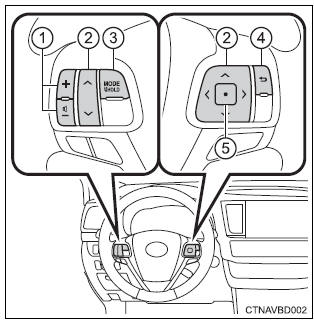
- Mode/hold” switch
- changes audio source
- press and hold this switch to mute or pause the current operation to cancel the mute or pause, press and hold.
- Back switch
- returns to the previous screen
- Enter switch
- displays the preset/list screen
- selects items
 Warning Warning
Exercise care when operating the audio switches on the steering wheel. |
Aux port/usb port
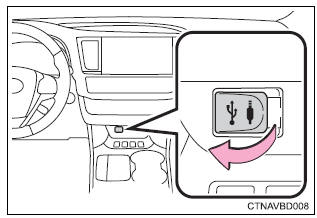
Connect an ipod, usb memory device or portable audio player to the aux port/usb port as indicated below. Select “ipod”, “usb”, “aux” or “a/v” on the audio source selection screen and the device can be operated via audio system.
Connecting using the aux port/usb port
iPod
Open the cover and connect an ipod using an ipod cable.
Turn on the power of the ipod if it is not turned on.
Usb memory
Open the cover and connect the usb memory device.
Turn on the power of the usb memory device if it is not turned on.
Portable audio player
Open the cover and connect the portable audio player.
Turn on the power of the portable audio player if it is not turned on.
 Warning Warning
Do not connect a device or operate the device controls. |
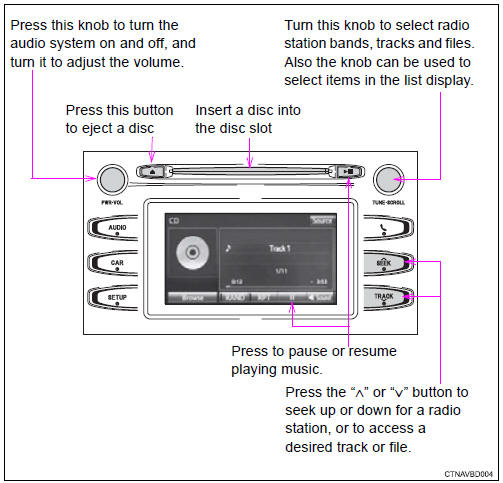
Basic audio operations
Basic audio operations and functions common to each mode are explained in this section.
Operating the audio system
Random playback
Select  to change on/off.
Repeat play
Select  to change on/off.
?Using cellular phones
Interference may be heard through the audio system's speakers if a cellular phone is being used inside or close to the vehicle while the audio system is operating.
Certification (caution)
Laser product
This product is a class 1 laser product.
Do not open the cover of the player or attempt to repair the unit yourself.
Refer servicing to qualified personnel.
- Laser products
- Do not take this unit apart or attempt to make any changes yourself.
This is an intricate unit that uses a laser pickup to retrieve information from the surface of compact discs. The laser is carefully shielded so that its rays remain inside the cabinet. Therefore, never try to disassemble the player or alter any of its parts since you may be exposed to laser rays and dangerous voltages.
- This product utilizes a laser.
Use of controls or adjustments or performance of procedures other than those specified herein may result in hazardous radiation exposure.
The use of optical instruments with this product will increase eye hazard.
 Notice Notice
Do not leave the audio system on longer than necessary when the engine is off. To avoid damaging the audio system
Take care not to spill drinks or other fluids on the audio system. |
Download Manual