Multi-information display (with monochrome display)
Display contents
The multi-information display presents the driver with a variety of driving-related data.
- Drive information
- warning messages
- Eco driving indicator zone display
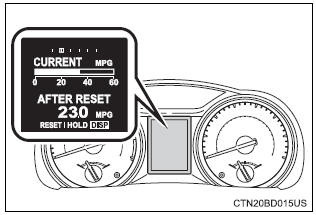
Drive information
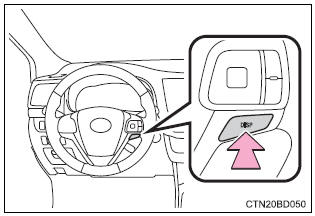
Items displayed can be switched by pressing the “disp” switch.
- Current fuel consumption
Displays the current rate of fuel consumption.
Average fuel economy (after reset*) displays the average fuel economy since the function was reset respectively use the displayed average fuel economy as a reference.
- Distance (driving range)
Displays the estimated maximum distance that can be driven with the quantity of fuel remaining and the distance driven after the function was reset respectively
- this distance is computed based on your average fuel consumption. As a result, the actual distance that can be driven may differ from that displayed.
- When only a small amount of fuel is added to the tank, the display may not be updated.
When refueling, turn the engine switch off. If the vehicle is refueled without turning the engine switch off, the display may not be updated.
Average fuel economy (after refuel)
Displays the average fuel economy since the vehicle was refueled respectively
Use the displayed average fuel economy as a reference.
- Distance (after reset*)
Displays the estimated maximum distance driven after the function was reset respectively
Average vehicle speed (after reset*)
Displays the average vehicle speed since the function was reset
- Customization
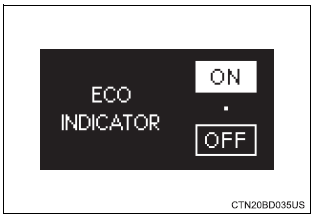
Eco driving indicator light, language and units settings can be changed.
- Eco driving indicator zone display
*: Press and hold the “disp” switch to reset.
Settings display
- Changing the settings
- Press the “disp” switch to display the setting display while the vehicle is stopped, and then press and hold the “disp” switch to display the customize mode display.
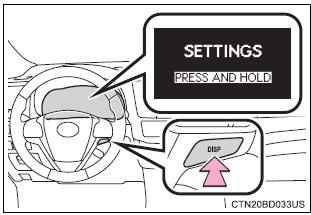
- Press the “disp” switch to select the item to be set, then press and hold the “disp” switch.
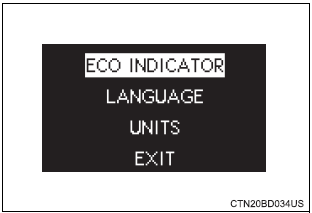
- Press the “disp” switch to select the desired setting, and then press and hold the “disp” switch.
To go back to the previous screen or exit the customize mode, press the “disp” switch to select “exit”, and then press and hold the “disp” switch.
- Customizable items
- Eco driving indicator light select to activate/deactivate the eco driving indicator light.
- Language select to change the language on the display.
- Units select to change the unit of measure for fuel consumption.
Settings can be changed. (Customizable features: )
- Setting display automatic cancelation
In the following situations, setting display in which the settings can be changed through the "disp" switch will automatically be turned off.
- When a warning message appears while the setting display is displayed
- when the vehicle begins to move while the setting display is displayed
- Liquid crystal display
Small spots or light spots may appear on the display. This phenomenon is characteristic of liquid crystal displays, and there is no problem continuing to use the display.
 Warnin Warnin
Allow the interior of the vehicle to warm up before using the liquid crystal information display. At extremely low temperatures, the display monitor may respond slowly, and display changes may be delayed. For example, there is a lag between the driver's shifting and the new gear number appearing on the display. This lag could cause the driver to downshift again, causing rapid and excessive engine braking and possibly an accident resulting in death or injury. Cautions during setting up the display
As the engine needs to be running during setting up the display, ensure that the vehicle is parked in a place with adequate ventilation. In a closed area such as a garage, exhaust gases including harmful carbon monoxide (co) may collect and enter the vehicle. This may lead to death or a serious health hazard. |
 Notice Notice
|
Download Manual