Driving assist systems
To help enhance driving safety and performance, the following systems operate automatically in response to various driving situations. Be aware, however, that these systems are supplementary and should not be relied upon too heavily when operating the vehicle.
Abs (anti-lock brake system)
Helps to prevent wheel lock when the brakes are applied suddenly, or if the brakes are applied while driving on a slippery road surface
Brake assist
Generates an increased level of braking force after the brake pedal is depressed when the system detects a panic stop situation
Vsc (vehicle stability control)
Helps the driver to control skidding when swerving suddenly or turning on slippery road surfaces
Enhanced vsc (enhanced vehicle stability control)
Provides cooperative control of the abs, trac, vsc and eps.
Helps to maintain directional stability when swerving on slippery road surfaces by controlling steering performance.
Trac (traction control)
Helps to maintain drive power and prevent the drive wheels from spinning when starting the vehicle or accelerating on slippery roads
Hill-start assist control
Prevents the vehicle from rolling backward when starting on an incline or slippery slope
Downhill assist control system (awd models)
Dynamic torque control awd system (awd models)
Automatically switches from front-wheel drive to all-wheel drive (awd) according to the driving conditions, helping to ensure reliable handling and stability. Examples of conditions where the system will switch to awd are when cornering, going uphill, starting off or accelerating, and when the road surface is slippery due to snow, rain, etc.
Eps (electric power steering)
Employs an electric motor to reduce the amount of effort needed to turn the steering wheel
Pcs (pre-collision system) (if equipped)
When the trac/vsc systems are operating
The slip indicator light will flash while the trac/vsc systems are operating.
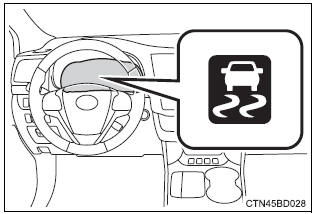
Disabling the trac system
If the vehicle gets stuck in mud, dirt or snow, the trac system may reduce power from the engine to the wheels. Pressing  to turn the
system off may make it easier for you to rock the vehicle in order to free it.
To turn the trac system off, quickly press and release  .
.
The “trac off” will be shown on the multi-information display. Press  again to turn the system back
on.
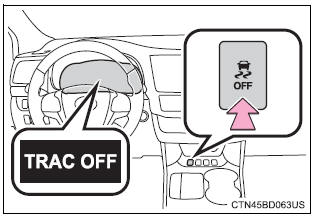
Turning off both trac and vsc systems
To turn the trac and vsc systems off, press and hold for more than 3
seconds while the vehicle is stopped.
The vsc off indicator light will come on and the “trac off” will be shown on the multi-information display.* Press again to turn the systems
back on.
*: On vehicles with pre-collision system, pre-collision brake assist and precollision braking will also be disabled. The pre-collision system warning light will come on and the message will be shown on the multi-information display.
When the message is displayed on the multi-information display showing that trac has been disabled even if
switch has not been
pressed
Trac, hill-start assist control and downhill assist control cannot be operated.
Contact your toyota dealer.
Sounds and vibrations caused by the abs, brake assist, trac, vsc and hill-start assist control systems
- Sound may be heard from the engine compartment when the brake pedal is depressed repeatedly, when the engine is started or just after the vehicle begins to move. This sound does not indicate that a malfunction has occurred in any of these systems.
- Any of the following conditions may occur when the above systems are operating. None of these indicates that a malfunction has occurred.
- Vibrations may be felt through the vehicle body and steering.
- A motor sound may be heard after the vehicle comes to a stop.
- The brake pedal may pulsate slightly after the abs is activated.
- The brake pedal may move down slightly after the abs is activated.
Eps operation sound
When the steering wheel is operated, a motor sound (whirring sound) may be heard. This does not indicate a malfunction.
Automatic reactivation of trac and vsc systems
After turning the trac and vsc systems off, the systems will be automatically re-enabled in the following situations:
- vehicles without a smart key system: when the engine switch is turned to the "lock" position vehicles with a smart key system: when the engine switch is turned off
- if only the trac system is turned off, the trac will turn on when vehicle speed increases
if both the trac and vsc systems are turned off, automatic re-enabling will not occur when vehicle speed increases.
Reduced effectiveness of the eps system
The effectiveness of the eps system is reduced to prevent the system from overheating when there is frequent steering input over an extended period of time. The steering wheel may feel heavy as a result. Should this occur, refrain from excessive steering input or stop the vehicle and turn the engine off. The eps system should return to normal within 10 minutes.
Operating conditions of hill-start assist control
When the following four conditions are met, the hill-start assist control will operate:
- the shift lever is in a position other than p or n (when starting off forward/ backward on an upward incline).
- The vehicle is stopped.
- The accelerator pedal is not depressed.
- The parking brake is not engaged.
Automatic system cancelation of hill-start assist control
The hill-start assist control will turn off in any of the following situations:
- the shift lever is moved to p or n.
- The accelerator pedal is depressed.
- The parking brake is engaged.
- Approximately 2 seconds elapse after the brake pedal is released.
 Warning Warning
Stopping distance when the abs is operating may exceed that of normal conditions
The abs is not designed to shorten the vehicle's stopping distance. Always maintain a safe distance from the vehicle in front of you, especially in the following situations:
Trac may not operate effectively when
Directional control and power may not be achievable while driving on slippery road surfaces, even if the trac system is operating. Drive the vehicle carefully in conditions where stability and power may be lost. Hill- start assist control
When the vsc is activated
The slip indicator light flashes. Always drive carefully. Reckless driving may cause an accident. Exercise particular care when the indicator light flashes. When the trac/vsc systems are turned off
Be especially careful and drive at a speed appropriate to the road conditions. As these are the systems to help ensure vehicle stability and driving force, do not turn the trac/vsc systems off unless necessary. Replacing tires
Make sure that all tires are of the specified size, brand, tread pattern and total load capacity. In addition, make sure that the tires are inflated to the recommended tire inflation pressure level. The abs, trac and vsc systems will not function correctly if different tires are installed on the vehicle. Contact your toyota dealer for further information when replacing tires or wheels. Handling of tires and the suspension
Using tires with any kind of problem or modifying the suspension will affect the driving assist systems, and may cause a system to malfunction. |
Downhill assist control system
With the downhill assist control system, the vehicle is able to descend a steep hill, maintaining a constant low speed of about 3 mph (5 km/h) without brake pedal operation.
Activating the downhill assist control system
Activating the downhill assist control system press the “dac” switch.
The downhill assist control system indicator will come on to indicate that the downhill assist control system is activated.
Pressing the switch again turns the system off.
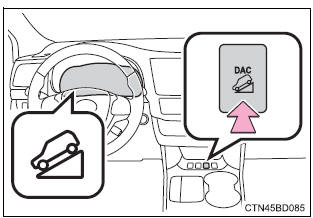
While the downhill assist control system is operating
The slip indicator will flash to indicate that the downhill assist control system is operating, and the stop lights and high mounted stoplight will turn on.
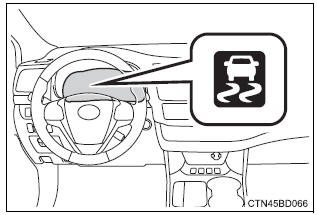
Conditions in which the downhill assist control system does not operate
- In the following situations, the downhill assist control system indicator flashes and the downhill assist control system does not operate or will stop operating:
- The shift lever is not in 1 range of s mode or r.
- The vehicle speed is higher than 15 mph (25 km/h).
- If the accelerator or brake pedal is depressed, the downhill assist control system will stop operating with the downhill assist control system indicator still on.
If the “dac” switch is turned off during operation of the downhill assist control system
The downhill assist control system gradually ceases operation. The downhill assist control system indicator will flash during the canceling operation, and then go off when the system is fully off.
Downhill assist control system operation sound
- ?A sound may be heard from the engine compartment during operation of the downhill assist control system. This sound does not indicate a malfunction.
- If the accelerator or brake pedal is depressed during operation of the downhill assist control system, a sound caused by the release of system operation may be heard, or you may feel the brake pedal push-back. This does not indicate a malfunction.
When the downhill assist control system operates continuously
The brake actuator may overheat. In that case, the downhill assist control system will stop operating, a buzzer will sound and the downhill assist control system indicator will start flashing. Refrain from using the system until the downhill assist control system indicator stays on. (There is no problem with continuing to drive normally.)
If the slip indicator comes on
It may indicate a malfunction in the system. Contact your toyota dealer.
 Warning Warning
|
Pcs (pre-collision system)
When the radar sensor detects that a frontal collision is highly likely or even unavoidable, safety systems such as the brakes and seat belts are automatically engaged to lessen impact as well as vehicle damage.
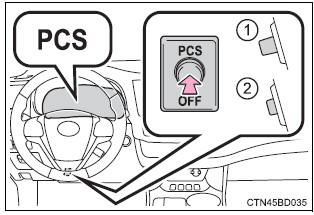
The pre-collision system can be turned on and off as necessary by operating the switch.
Pre-collision warning
When a high possibility of a frontal collision is detected, the pre-collision system warning light flashes, a buzzer sounds and a message is shown on the multi-information display to urge the driver to take evasive action.
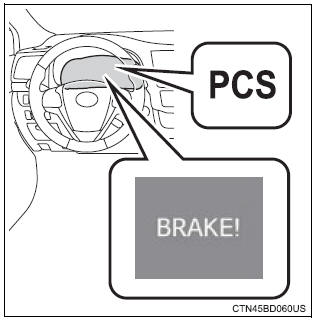
Pre-collision brake assist
When there is a high possibility of a frontal collision, the system applies greater braking force in relation to how strongly the brake pedal is depressed.
The system may not warn the driver using a warning light, warning display and buzzer when the system detects and judges braking operations.
Pre-collision braking
When there is a high possibility of a frontal collision, the system warns the driver using a warning light, warning display and buzzer.
If the system determines that a collision is unavoidable, the brakes are automatically applied to reduce the collision speed.
Disabling pre-collision system
- Enabled
- Disabled
The pre-collision system warning light comes on when pre-collision system is disabled.
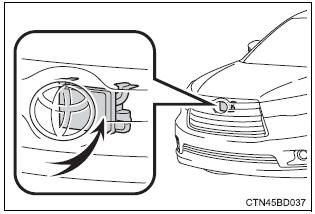
Radar sensor
The radar sensor detects vehicles or other obstacles on or near the road ahead and determines whether a collision is imminent based on the position, speed, and heading of the obstacles.
The pre-collision system is operational when
The pcs off switch is not pressed and the following conditions are met:
- Pre-collision warning:
- Vehicle speed is greater than about 10 mph (15 km/h).
- The speed at which your vehicle is approaching the obstacle or the vehicle running ahead of you is greater than about 10 mph (15 km/h).
- Pre-collision brake assist:
- The vsc off switch is not pressed.
- Vehicle speed is greater than about 19 mph (30 km/h).
- The speed at which your vehicle is approaching the obstacle or the vehicle running ahead of you is greater than about 19 mph (30 km/h).
- The brake pedal is depressed.
- Pre-collision braking:
- The vsc off switch is not pressed.
- Vehicle speed is greater than about 10 mph (15 km/h).
- The speed at which your vehicle is approaching the obstacle or the vehicle running ahead of you is greater than about 10 mph (15 km/h).
Conditions that may trigger the system even if there is no danger of a collision
- When there is an object by the roadside at the entrance to a curve
- when passing an oncoming vehicle on a curve
- when driving over a narrow iron bridge
- when there is a metal object on the road surface
- when driving on an uneven road surface
- when passing an oncoming vehicle on a left-turn
- when your vehicle rapidly closes on the vehicle in front
- when a grade separation/interchange, sign, billboard, or other structure appears to be directly in the vehicle's line of travel
- when there is a metal plate in the road in front of the vehicle on a downhill slope
- when climbing a steep hill causes an overhead billboard or other metallic structure to appear directly in the vehicle's line of travel
- when driving under an overpass
- when an extreme change in vehicle height occurs
- when passing through certain toll gates
- when passing through a tunnel
- when the radar sensor moves off position due to its surrounding area being subjected to a strong impact
When the system is activated in the situations described above, there is also a possibility that the brakes will be applied with a force greater than normal.
Obstacles not detected
The sensor cannot detect plastic obstacles such as traffic cones. There may also be occasions when the sensor cannot detect pedestrians, animals, bicycles, motorcycles, trees, or snowdrifts.
Situations in which the pre-collision system does not function properly
The system may not function effectively in situations such as the following:
- on roads with sharp bends or uneven surfaces
- if a vehicle suddenly moves in front of your vehicle, such as at an intersection
- if a vehicle suddenly cuts in front of your vehicle, such as when overtaking
- in inclement weather such as heavy rain, fog, snow or sand storms
- if the vehicle is skidding when vsc is not operating
- when an extreme change in vehicle height occurs
- when only part of your vehicle's front end collides with, or contacts, a vehicle or object in a frontal collision
- when the radar sensor moves off position due to its surrounding area being subjected to a strong impact
Automatic cancelation of the pre-collision system
When a malfunction occurs due to sensor contamination, etc. That results in the sensors being unable to detect obstacles, the pre-collision system will be automatically disabled. In this case, the system will not activate even if there is a collision possibility.
When there is a malfunction in the system
The pre-collision system warning light will flash and warning messages will be displayed.
Certification for the pre-collision system
- For vehicles sold in the u.S.A.
Fcc id : hyqdnmwr007
This device complies with part 15 of the fcc rules. Operation is subject to the following two conditions :(1) this device may not cause harmful interference, and (2) this device must accept any interference received, including interference that may cause undesired operation.
Fcc warning
Changes or modifications not expressly approved by the party responsible for compliance could void the user's authority to operate the equipment.
Radiofrequency radiation exposure information: this equipment complies with fcc radiation exposure limits set forth for an uncontrolled environment.
This equipment should be installed and operated with minimum distance of 20 cm between the radiator (antenna) and your body.
This transmitter must not be co-located or operating in conjunction with any other antenna or transmitter.
- For vehicles sold in canada
Operation is subject to the following two conditions: (1) this device may not cause interference, and (2) this device must accept any interference, including interference that may cause undesired operation of the device.
 Warning Warning
Do not overly rely on the pre-collision system. Always drive safely, taking care to observe your surroundings and checking for any obstacles or other road hazards. Failure to do so may cause an accident resulting in death or serious injury. When the sensor may not be correctly detecting the vehicle ahead
Apply the brakes as necessary in any of the following situations:
H andling the radar sensor
Observe the following to ensure the pre-collision system can function effectively. Otherwise, the system may not function correctly and could result in an accident.
Cautions regarding the assist contents of the system
By means of alarms and brake control, the pre-collision system is intended to assist the driver in avoiding collisions through the process of lookjudge- act. There are limits to the degree of assistance the system can provide, so please keep in mind the following important points.
|
Download Manual