Steering wheel
ADJUSTING THE STEERING WHEEL
 WARNING: Do not adjust the steering wheel when your vehicle is moving. WARNING: Do not adjust the steering wheel when your vehicle is moving. |
Note: Make sure that you are sitting in the correct position.See Sitting in the Correct Position.
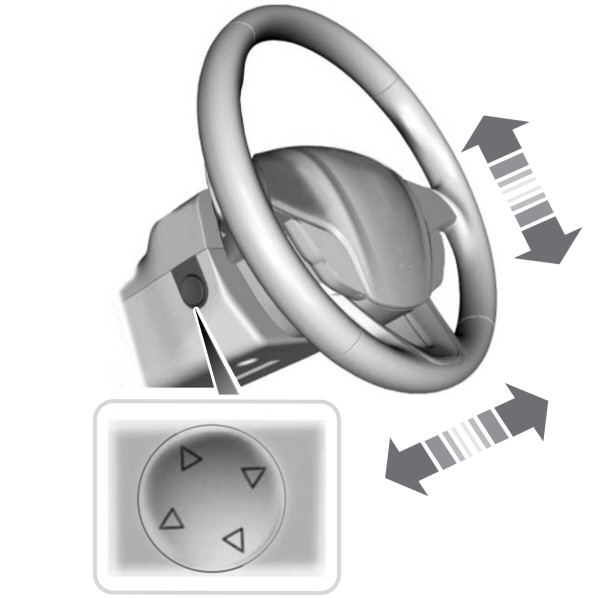
Press the top or bottom of the control to move the steering wheel up or down.
Press the front or rear of the control to move the steering wheel in or out.
You can save and recall the steering wheel position with the memory function. See Recalling a Preset Position.
RESETTING THE STOPPING POSITION
Note: The steering wheel stops when it detects an obstruction. This sets a new stopping position.
To reset the steering column to its normal stopping position:
- Confirm there is nothing obstructing the motion of the steering column.
- Press and hold the steering column control until the steering column stops moving.
- Press the steering column control again.
Note: The steering column may start to move again.
- When the steering column stops, continue holding the control for a few seconds.
- Repeat for each direction, as necessary.
HORN
|
|
 Press on the center of the steering wheel near the horn icon to activate the horn.
SWITCHING THE HEATED STEERING WHEEL ON AND OFF

On some vehicles, an indicator on the button illuminates when the heated steering wheel is on.
Note: A sensor regulates the temperature of the steering wheel.
Download Manual