Keyless entry
KEYLESS ENTRY LIMITATIONS
Make sure your remote control is within 3 ft (1 m) from the front door handles and the tailgate.
The system could not function if:
- The remote control remains stationary for about a minute.
- The vehicle battery has no charge.
- The remote control battery has no charge.
- There is interference causing issues with the remote control frequencies.
- The remote control is too close to metal objects or electronic devices, for example keys or a cell phone.
KEYLESS ENTRY SETTINGS
SWITCHING KEYLESS ENTRY ON AND OFF
- Switch the ignition on using an original key that has not been created as a MyKey.
- Press Settings on the touchscreen.
- Press Vehicle Settings.
- Press Locks.
REPROGRAMMING THE UNLOCKING FUNCTION
You can enable two-stage unlocking function allowing you to unlock only the driver door when you touch the unlock sensor.
Press and hold both the lock and unlock buttons on the remote control for four seconds to disable or enable two-stage unlocking.
If you program the unlocking function so that only the driver door unlocks, you can unlock all of the other doors from inside your vehicle using the power door lock control. You can unlock individual doors by pulling the interior door handles on those doors.
USING KEYLESS ENTRY
UNLOCKING THE DOORS

With the remote control within 3 ft (1 m) of your vehicle, touch the unlock sensor on the back of the door handle for a brief period and then pull on the door handle to unlock, being careful not to touch the lock sensor at the same time or pull on the door handle too quickly. The system requires a brief delay to authenticate the remote control.
LOCKING THE DOORS

With your passive key within 3 ft (1 m) of your vehicle, touch the outer door handle lock sensor for approximately one second to lock, being careful not to touch the unlock sensor on the back of the door handle at the same time. After locking, you can immediately pull on the door handle to confirm locking occurred without inadvertently unlocking.
OPENING THE LIFTGATE WITH THE REMOTE CONTROL
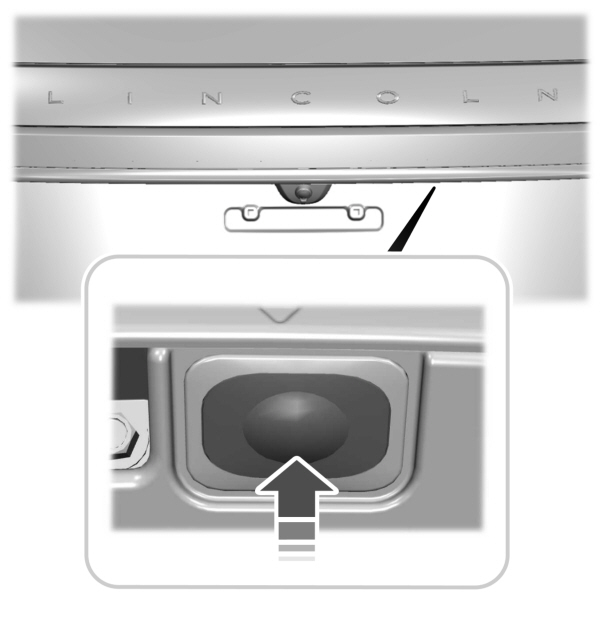
Press the exterior liftgate release button inside of the liftgate handle. The liftgate unlocks and opens.
KEYLESS ENTRY – FREQUENTLY ASKED QUESTIONS
WHY DOES THE KEYPAD NOT ACCEPT THE ACCESS CODE?
- If you enter the access code too fast on the keypad, the unlock function may not work. Slowly re-enter the access code.
WHY DOES THE PASSIVE KEY NOT WORK?
- The system deactivates passive keys left inside your vehicle when you lock it. You cannot switch the ignition on using a deactivated passive key. Press the unlock button on the remote control to reactivate a passive key.
WHY DOES THE KEYPAD NOT FUNCTION?
- The keypad goes into an anti-scan mode if you enter a wrong code seven times. The anti-scan mode disables the keypad for one minute and the red light flashes.
Download Manual