Keys and remote controls
REMOTE CONTROL LIMITATIONS
 WARNING: Changes or modifications not expressively approved by the party responsible for compliance could void the user's authority to operate the equipment. The term "IC:" before the radio certification number only signifies that Industry Canada technical specifications were met. WARNING: Changes or modifications not expressively approved by the party responsible for compliance could void the user's authority to operate the equipment. The term "IC:" before the radio certification number only signifies that Industry Canada technical specifications were met. |
This device complies with Part 15 of the FCC Rules and with Industry Canada license-exempt RSS standard(s).Operation is subject to the following two conditions: (1) This device may not cause harmful interference, and (2) This device must accept any interference received, including interference that may cause undesired operation.
Make sure a valid remote control is within 3 ft (1 m) from the front door handles and rear of vehicle.
The system may not function if:
- The remote control remains stationary for about a minute.
- The vehicle battery has no charge.
- The remote control battery has no charge.
- There is interference causing issues with the remote control frequencies.
- The remote control is too close to metal objects or electronic devices, for example keys or a cell phone.
USING THE REMOTE CONTROL
| WARNING: Do not leave a key or remote control unattended in the vehicle. Children or pets could operate the power windows, moonroof or other controls. Failure to follow this instruction could result in personal injury or death. |
Use your remote control to access various vehicle systems.
Note: The buttons on your remote may vary depending on the vehicle region or options.
UNLOCK
 Press the button to unlock all doors.See Unlocking and Locking the Doors Using the Remote Control. Press the button to unlock all doors.See Unlocking and Locking the Doors Using the Remote Control. |
LOCK
 Press the button to lock all doors.See Unlocking and Locking the Doors Using the Remote Control. Press the button to lock all doors.See Unlocking and Locking the Doors Using the Remote Control. |
REMOTE START (IF EQUIPPED)
 Press the button twice within three seconds to remote start. See Remotely Starting and Stopping the Vehicle. Press the button twice within three seconds to remote start. See Remotely Starting and Stopping the Vehicle. |
OPENING AND CLOSING THE LIFTGATE
 Press the button twice within three seconds to open and close the liftgate. See Opening the Liftgate Using the Remote Control. Press the button twice within three seconds to open and close the liftgate. See Opening the Liftgate Using the Remote Control. |
PANIC ALARM (IF EQUIPPED)
 Press the button to sound the panic alarm.See Sounding the Panic Alarm. Press the button to sound the panic alarm.See Sounding the Panic Alarm. |
REMOVING THE KEY BLADE
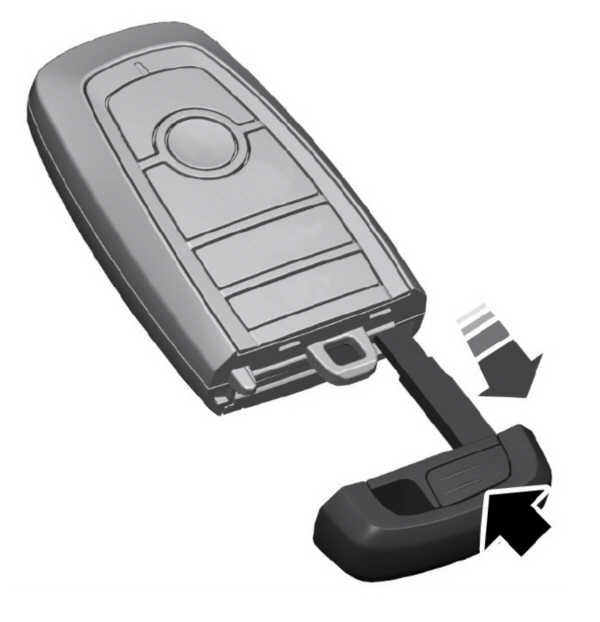
Push the release button on your passive key and pull the key blade out.
SOUNDING THE PANIC ALARM
Note: The panic alarm only operates when the ignition is off.
LOCATING YOUR VEHICLE
CHANGING THE REMOTE CONTROL BATTERY
| WARNING: Keep batteries away from children to prevent ingestion. Failure to follow this instruction could result in personal injury or death. If ingested, immediately seek medical attention. WARNING: If the battery compartment does not securely close, stop using the remote control and replace it as soon as possible. In the meantime, keep the remote control away from children. Failure to follow this instruction could result in personal injury or death. |
The remote control uses one coin-type 3-volt lithium battery CR2450 or equivalent.
- Push the release button and pull the key blade out.
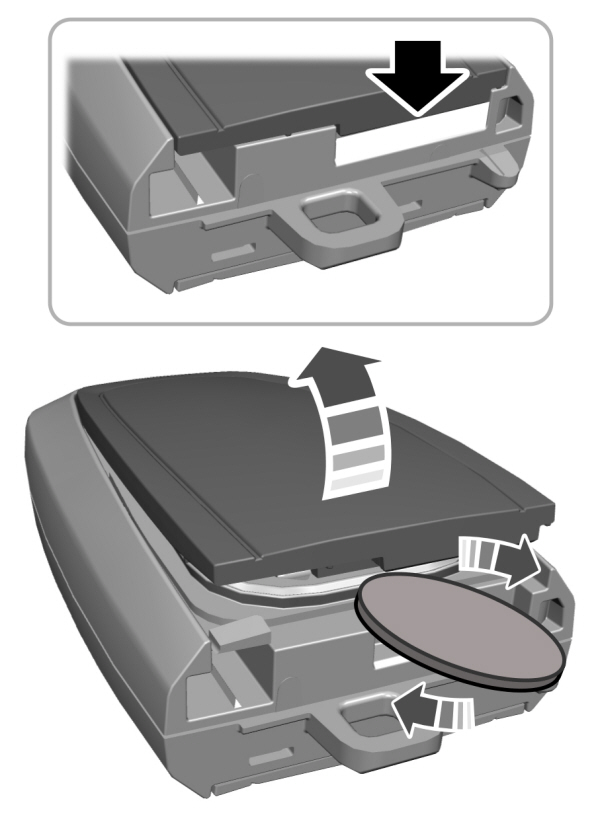
- Twist a thin coin under the tab hidden behind the key blade head to remove the battery cover.
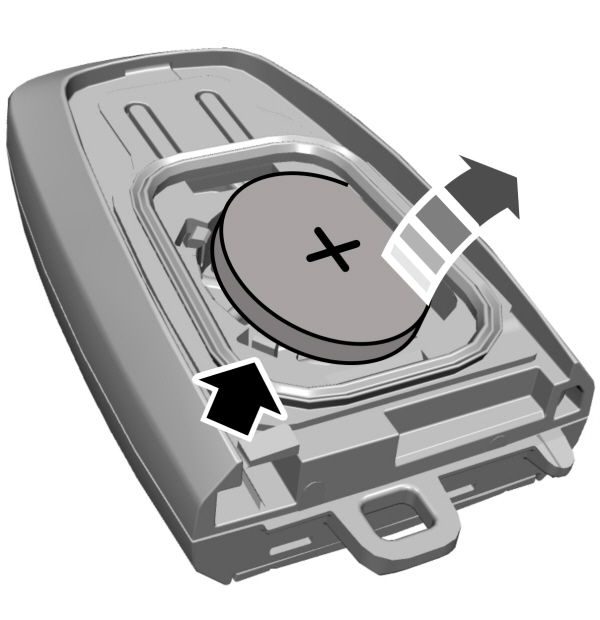
- Insert a screwdriver, and carefully remove the battery.
- Install a new battery with the + facing upward.
- Reinstall the battery housing cover onto the transmitter and install the key blade.

Note: Do not wipe off any grease on the battery terminals or on the back surface of the circuit board.
Note: Replacing the battery does not erase the programmed key from your vehicle.The remote control should operate normally.
REPLACING A LOST KEY OR REMOTE CONTROL
You can purchase replacement keys or remote controls from an authorized dealer.Authorized dealers can program remote controls for your vehicle.
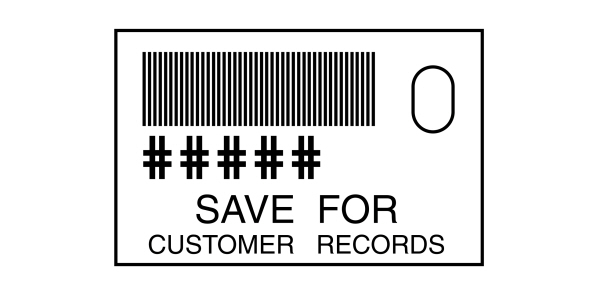
Note: Your vehicle keys came with a security label that provides important key cut information.Keep the label in a safe place for future reference.
PROGRAMMING THE REMOTE CONTROL
Note: You can program a maximum of four remote controls to your vehicle.
Note: If your programmed remote controls are lost or stolen and you do not have an extra coded remote, you need to have your vehicle towed to an authorized dealer. Store an extra programmed remote away from your vehicle in a safe place to help prevent any inconvenience. Contact an authorized dealer to purchase additional spare or replacement remotes.
You must have two previously programmed remote controls inside your vehicle and the new unprogrammed remote controls readily accessible. Contact an authorized dealer to have the spare remote control programmed if two previously programmed remotes are not available.Make sure that your vehicle is off before beginning this procedure. Make sure that you close all the doors before beginning and that they remain closed throughout the procedure.Perform all steps within 30 seconds of starting the sequence.Stop and wait for at least one minute before starting again if you perform any steps out of sequence.
Read and understand the entire procedure before you begin.
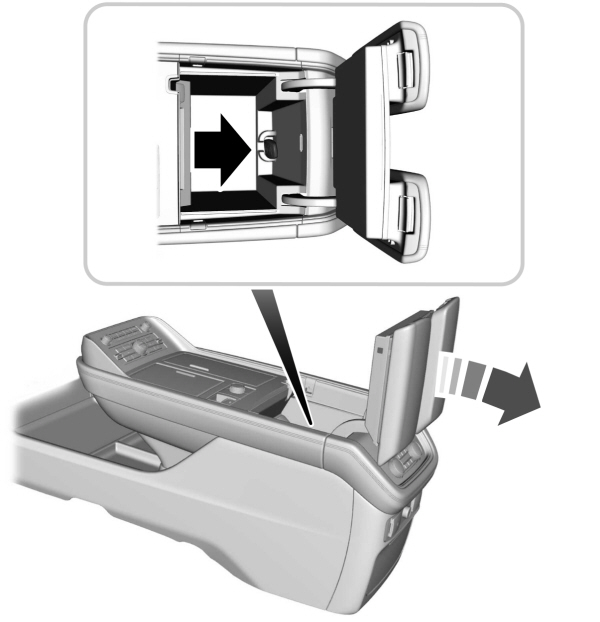
- Place the first programmed remote in the backup slot inside the center console, with your foot off the brake pedal press and release the push button ignition switch.
- Wait five seconds and then press and release the push button ignition switch again.
- Remove the remote control.
- Within 10 seconds, place a second programmed remote control in the backup slot.Press and release the push button ignition switch.
- Wait five seconds and then press and release the push button ignition switch again.Keep the ignition on for at least three seconds, but no more than 10 seconds.
- Remove the remote control.
- Place the unprogrammed remote control in the backup slot and press and release the push button ignition switch.
Programming is now complete.With your foot on the brake pedal, press the push button ignition switch to verify the remote control functions operate and your vehicle starts with the new remote control.
If programming was not successful, wait 10 seconds and repeat Steps 1 through 7. If you are still unsuccessful, take your vehicle to an authorized dealer.
KEYS AND REMOTE CONTROLS – INFORMATION MESSAGES
| Message | Action |
|---|---|
|
Key Battery Low Replace Soon |
Replace remote control battery. |
Download Manual