Lane keeping system
WHAT IS THE LANE KEEPING SYSTEM
The lane keeping system alerts you by providing temporary steering assistance or steering wheel vibration when it detects an unintended lane or road departure.
HOW DOES THE LANE KEEPING SYSTEM WORK
The lane keeping system uses a forward looking camera mounted on the windshield to monitor vehicle movement within the lane of travel.
When the camera detects a drift out of the lane of travel, the lane keeping system alerts the driver by vibrating the steering wheel, or aids the driver by providing a small steering input to move the vehicle back into the lane of travel.
The driver can select one of three modes:
- Alert
- Aid
- Alert + Aid
LANE KEEPING SYSTEM PRECAUTIONS
 WARNING: You are responsible for controlling your vehicle at all times. The system is designed to be an aid and does not relieve you of your responsibility to drive with due care and attention. Failure to follow this instruction could result in the loss of control of your vehicle, personal injury or death. WARNING: The system will not operate if the sensor cannot track the road lane markings. WARNING: The sensor may incorrectly track lane markings as other structures or objects. This can result in a false or missed warning. WARNING: In cold and severe weather conditions the system may not function. Rain, snow and spray can all limit sensor performance. WARNING: The system may not operate properly if the sensor is blocked. Keep the windshield free from obstruction. WARNING: If damage occurs in the immediate area surrounding the sensor, have your vehicle checked as soon as possible. WARNING: The system may not correctly operate if your vehicle is fitted with a suspension kit not approved by us. WARNING: Large contrasts in outside lighting can limit sensor performance. WARNING: You are responsible for controlling your vehicle at all times. The system is designed to be an aid and does not relieve you of your responsibility to drive with due care and attention. Failure to follow this instruction could result in the loss of control of your vehicle, personal injury or death. WARNING: The system will not operate if the sensor cannot track the road lane markings. WARNING: The sensor may incorrectly track lane markings as other structures or objects. This can result in a false or missed warning. WARNING: In cold and severe weather conditions the system may not function. Rain, snow and spray can all limit sensor performance. WARNING: The system may not operate properly if the sensor is blocked. Keep the windshield free from obstruction. WARNING: If damage occurs in the immediate area surrounding the sensor, have your vehicle checked as soon as possible. WARNING: The system may not correctly operate if your vehicle is fitted with a suspension kit not approved by us. WARNING: Large contrasts in outside lighting can limit sensor performance. |
LANE KEEPING SYSTEM LIMITATIONS
The lane keeping system only operates when the vehicle speed is greater than 40 mph (64 km/h).
The system works when the camera can detect at least one lane marking or the edge of the road.
Note: When you select Aid or Alert and Aid mode and the system detects no steering activity for a short period of time, the system alerts you to put your hands on the steering wheel. The system may detect a light grip or touch on the steering wheel as hands-off driving.
The lane keeping system may not correctly operate in any of the following conditions:
- The lane keeping system does not detect at least one lane marking.
- You switch the turn signal on.
- You apply direct steering, accelerate fast or brake hard.
- The vehicle speed is less than 40 mph (64 km/h).
- The anti-lock brake, stability control or traction control system activates.
- The lane is too narrow.
- Something is obscuring the camera or it is unable to detect the lane markings due to environment, traffic or vehicle conditions.
- Entering or exiting a tight curve when driving at high speeds.
The lane keeping system may not correct lane positioning in any of the following conditions:
- High winds.
- Uneven road surfaces.
- Heavy or uneven loads.
- Incorrect tire pressure.
SWITCHING THE LANE KEEPING SYSTEM ON AND OFF

To deactivate the lane keeping system, press the button again.
Note: When switching the system on or off a message appears in the instrument cluster display to show the status.
Note: The system stores the on or off setting until manually changed by you.
Note: If your vehicle has MyKey™, the system defaults to that setting.
SWITCHING THE LANE KEEPING SYSTEM MODE
The lane keeping system has different settings that you can view or adjust using the touchscreen.
The system stores the last known selection for each setting.
To change the lane keeping system mode, use the touchscreen:
- Press Features on the touchscreen.
- Press Driver Assistance.
- Press Lane-Keeping System.
- Select a mode.
Note: The system remembers the last setting when you start your vehicle.
WHAT IS ALERT MODE
Alert mode vibrates the steering wheel when it detects an unintended lane departure.
HOW DOES ALERT MODE WORK
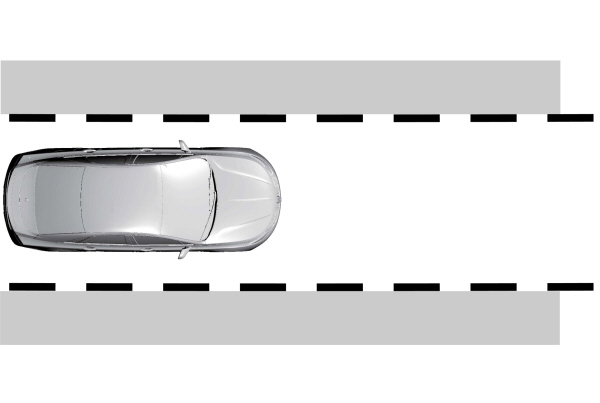
When in alert mode, the lane keeping system alerts you by vibrating the steering wheel. The intensity of the vibration is set through the lane keeping system menu.
ADJUSTING THE STEERING WHEEL VIBRATION INTENSITY
To change the steering wheel vibration intensity, use the touchscreen:
- Press Features on the touchscreen.
- Press Driver Assistance.
- Press Lane-Keeping System.
- Select an alert intensity setting.
WHAT IS AID MODE
Aid mode provides temporary steering assistance toward the center of the lane.
HOW DOES AID MODE WORK
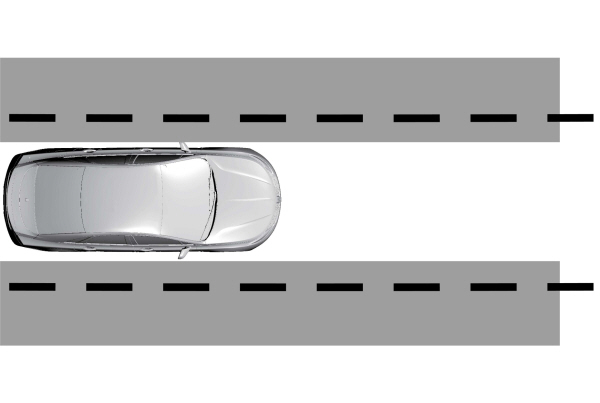
The lane keeping system aids you when an unintentional lane departure occurs. The system provides a small steering input to move the vehicle towards the center of the lane.
WHAT IS ALERT AND AID MODE
Alert and aid mode uses multiple features to keep you in your lane. The system first provides a small steering input to bring your vehicle back towards the center of the lane. If your vehicle moves too far from the center of the lane the system alerts you with vibration in the steering wheel.
HOW DOES ALERT AND AID MODE WORK
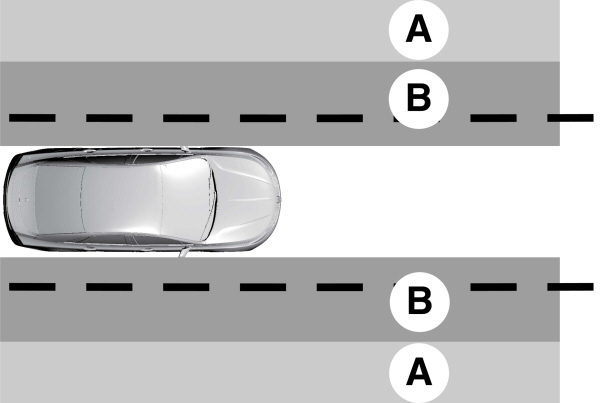
A Alert. Alert.B Aid. |
The lane keeping system detects a lane departure and provides aid when the vehicles enters B and applies the additional alert warning if A is entered.
LANE KEEPING SYSTEM INDICATORS
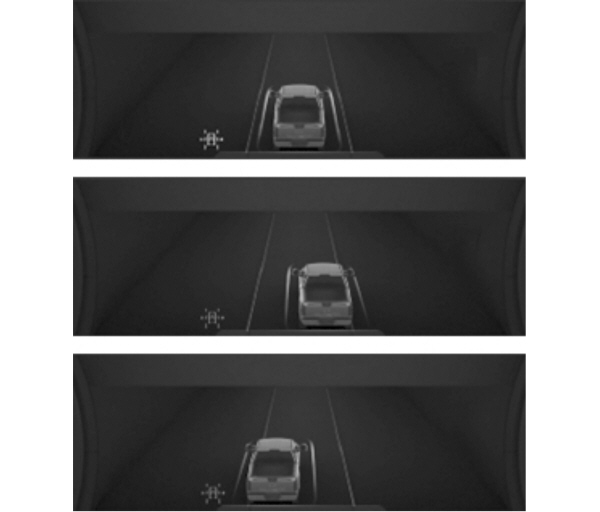
If you switch the lane keeping system on, a graphic with lane markings appears in the instrument cluster display.
When you switch the system off, the lane marking graphics do not display.
Note: The overhead vehicle graphic may still display if adaptive cruise control is enabled.
While the lane keeping system is on, the color of the lane markings change to indicate the system status.
| Gray | Green | Orange | Red |
|---|---|---|---|
| Indicates that the system is temporarily unavailable to provide a warning or intervention on the indicated side. | Indicates that the system is available or ready to provide a warning or intervention on the indicated side. | Indicates that the system is providing or has just provided a lane keeping aid intervention. | Indicates that the system is providing or has just provided a lane keeping alert warning. |
WHAT IS BLIND SPOT ASSIST
Blind spot assist is an extension of the lane keeping system.
It may help you identify adjacent vehicles during a lane change.
Blind spot assist provides a blind spot warning and steering assistance to help you become aware of and steer away from vehicles in your blind spot during lane changes.
HOW DOES BLIND SPOT ASSIST WORK
During lane changes, the design of the blind spot assist feature detects vehicles in, or approaching, your blind spot and provides a warning, plus steering assistance to direct your vehicle back into your lane.
When active, this system functions with or without the use of turn signals and hazard flashers.
You must keep your hands on the steering wheel at all times.
BLIND SPOT ASSIST LIMITATIONS
All system limitations present in the basic lane keeping system also apply to blind spot assist.
Blind spot assist does not function under the following conditions:
- No lane markings are detected.
- One or both rear radar sensors become blocked or faulty.
- Attaching bike or cargo racks could cause false alerts due to obstruction of the sensor.
Blind spot assist may have difficulty detecting hazards under the following conditions:
- If a vehicle is approaching in an adjacent lane at a speed higher than your vehicle.
- Bad weather obstructing the sensors.
BLIND SPOT ASSIST INDICATORS
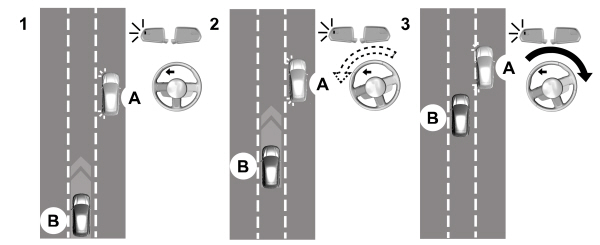
Diagram 1: Vehicle A uses its left turn signal preparing to change from the right lane to the middle lane. Vehicle B is already in the middle lane and just entered Vehicle A's blind spot causing the blind spot information system alert indicator to flash on the exterior mirror.
Diagram 2: The driver of Vehicle A begins to steer into the center lane not aware of Vehicle B.
Diagram 3: Blind spot assist counter steers to help alert the driver of Vehicle A to direct their vehicle back into the right lane to help avoid a possible collision with Vehicle B.
The lane keeping aid warning lamp or yellow lane marking in your instrument cluster display indicate blind spot assist activation. In addition, the blind spot information system alert indicator flashes on the exterior mirror on the same side as the detection. See Blind Spot Information System.
BLIND SPOT ASSIST INFORMATION MESSAGES
| Message | Action |
|---|---|
|
Blind Spot Assist Not Available Trailer Attached |
Displays if you attach a trailer to your vehicle with the blind spot information system switched off or you have not configured the trailer. |
|
Blind Spot Assist Not Available Side Sensor Blocked |
Displays if your blind spot information system sensors are blocked. |
|
Blind Spot Assist System fault |
The system has detected a fault that requires service.Have your vehicle checked as soon as possible. |
|
Trailer Brake Module Fault |
Lost communication with the trailer module. Blind spot assist is suppressed until the failure is fixed. |
|
Trailer Lighting Module Fault See Manual |
Lost communication with the trailer module. Blind spot assist is suppressed until the failure is fixed. |
|
Front Camera Fault Service Required |
Front camera fault. Blind spot assist is disabled until the failure is fixed. |
WHAT IS BLIND SPOT ASSIST WITH TRAILER COVERAGE
Blind spot assist with trailer coverage is an extension of the lane keeping system.
It may help you identify adjacent vehicles during a lane change.
Blind spot assist provides a blind spot warning and steering assistance to help you become aware of and steer away from vehicles in your blind spot during lane changes.
When attaching a trailer, ensure you have properly set up the trailer coverage settings.
HOW DOES BLIND SPOT ASSIST WITH TRAILER COVERAGE WORK
During lane changes, the design of the blind spot assist feature detects vehicles in, or approaching, your blind spot and provides a warning, plus steering assistance to direct your vehicle back into your lane.
If a supported trailer is connected, the function is reduced to only detecting vehicles on both sides of your vehicle and trailer, extending rearward from the exterior mirrors to the end of your trailer.
When active, this system functions with or without the use of direction indicators and hazard flashers.
You must keep your hands on the steering wheel at all times.
BLIND SPOT ASSIST WITH TRAILER COVERAGE LIMITATIONS
All system limitations present in the basic lane keeping system also apply to blind spot assist.
Blind spot assist does not function under the following conditions:
- No lane markings are detected.
- One or both rear radar sensors become blocked or faulty.
- You have not configured the attached trailer correctly in the trailer tow menus or you attached an unsupported trailer. The system only supports certain trailer shapes and dimensions.
Note: Blind spot assist with trailer coverage could have reduced performance if any of the above limitations are present.
Blind spot assist may have difficulty detecting hazards under the following conditions:
- If a vehicle is approaching in an adjacent lane at a relative speed much higher than your vehicle.
- Bad weather conditions are present that obstruct the sensors.
- Attaching bike or cargo racks could cause false alerts due to obstruction of the sensor.
BLIND SPOT ASSIST WITH TRAILER COVERAGE INDICATORS
Diagram 1: Vehicle A uses its left turn signal preparing to change from the right lane to the middle lane. Vehicle B is already in the middle lane and just entered Vehicle A's blind spot causing the blind spot information system alert indicator to flash on the exterior mirror.
Diagram 2: The driver of Vehicle A begins to steer into the center lane not aware of Vehicle B.
Diagram 3: Blind spot assist counter steers to help alert the driver of Vehicle A to direct their vehicle back into the right lane to help avoid a possible collision with Vehicle B.
The lane keeping aid warning lamp or yellow lane marking in your instrument cluster display indicate blind spot assist activation. In addition, the blind spot information system alert indicator flashes on the exterior mirror on the same side as the detection. See Blind Spot Information System.
BLIND SPOT ASSIST INFORMATION MESSAGES
| Message | Action |
|---|---|
|
Blind Spot Assist Not Available Trailer Attached |
Displays if you attach a trailer to your vehicle with the blind spot information system switched off or you have not configured the trailer. |
|
Blind Spot Assist Not Available Side Sensor Blocked |
Displays if your blind spot information system sensors are blocked. |
|
Blind Spot Assist System fault |
The system has detected a fault that requires service.Have your vehicle checked as soon as possible. |
|
Trailer Brake Module Fault |
Lost communication with the trailer module. Blind spot assist is disabled until the failure is fixed. |
|
Trailer Lighting Module Fault See Manual |
Lost communication with the trailer module. Blind spot assist is disabled until the failure is fixed. |
|
Front Camera Fault Service Required |
Front camera fault. Blind spot assist is disabled until the failure is fixed. |
LANE KEEPING SYSTEM – INFORMATION MESSAGES
| Message | Action |
|---|---|
|
Lane Keeping Sys. Malfunction Service Required |
The system has malfunctioned. Have your vehicle checked as soon as possible. |
|
Front Camera Temporarily Not Available |
The system has detected a condition that has caused the system to be temporarily unavailable. |
|
Front Camera Low Visibility Clean Screen |
The system has detected a condition that requires you to clean the windshield in order for it to operate properly. |
|
Front Camera Malfunction Service Required |
The system has malfunctioned. Have your vehicle checked as soon as possible. |
|
Keep Hands on Steering Wheel |
The system requests that you keep your hands on the steering wheel. |
LANE KEEPING SYSTEM – FREQUENTLY ASKED QUESTIONS
WHY IS THE FEATURE NOT AVAILABLE (LANE MARKINGS ARE GRAY) WHEN I CAN SEE THE LANE MARKINGS ON THE ROAD?
- Your vehicle speed is less than 40 mph (65 km/h).
- The sun is shining directly into the camera lens.
- A quick intentional lane change has occurred.
- You are driving your vehicle too close to the lane markings for an extended interval of time.
- Driving at high speeds in curves.
- The last alert warning or aid intervention occurred a short time ago.
- Ambiguous lane markings, for example, in construction zones.
- Rapid transition from light to dark, or from dark to light.
- Sudden offset in lane markings.
- ABS or AdvanceTrac™ is active.
- There is a camera blockage due to dirt, grime, fog, frost or water on the windshield.
- You are driving too close to the vehicle in front of you.
- Transitioning between no lane markings to lane markings, or vice versa.
- There is standing water on the road.
- Faint lane markings, for example, partial yellow lane markings on concrete roads.
- Lane width is too narrow or too wide.
- You have not calibrated the camera after a windshield replacement.
- Driving on roads with tight curves or uneven surfaces.
WHY DOES THE VEHICLE NOT COME BACK TOWARD THE MIDDLE OF THE LANE, AS EXPECTED, IN THE AID, OR AID + ALERT MODE?
- High cross winds are present.
- There is a large road crown.
- Rough roads, grooves or shoulder drop-offs.
- Heavy, uneven loading of the vehicle or improper tire inflation pressure.
- You changed the tires or modified the suspension.
Download Manual