Front seats
FRONT SEAT PRECAUTIONS
 WARNING: Sitting improperly, out of position or with the seatback reclined too far can take weight off the seat cushion and affect the decision of the passenger sensing system, resulting in serious injury or death in the event of a crash. Always sit upright against your seat back, with your feet on the floor. WARNING: Do not recline the seat backrest too far as this can cause the occupant to slide under the seatbelt, resulting in personal injury in the event of a crash. WARNING: Do not place objects higher than the top of the seat backrest. Failure to follow this instruction could result in personal injury or death in the event of a sudden stop or crash. WARNING: Do not adjust the driver seat or seat backrest when your vehicle is moving. This may result in sudden seat movement, causing the loss of control of your vehicle. WARNING: Sitting improperly, out of position or with the seatback reclined too far can take weight off the seat cushion and affect the decision of the passenger sensing system, resulting in serious injury or death in the event of a crash. Always sit upright against your seat back, with your feet on the floor. WARNING: Do not recline the seat backrest too far as this can cause the occupant to slide under the seatbelt, resulting in personal injury in the event of a crash. WARNING: Do not place objects higher than the top of the seat backrest. Failure to follow this instruction could result in personal injury or death in the event of a sudden stop or crash. WARNING: Do not adjust the driver seat or seat backrest when your vehicle is moving. This may result in sudden seat movement, causing the loss of control of your vehicle. |
SITTING IN THE CORRECT POSITION
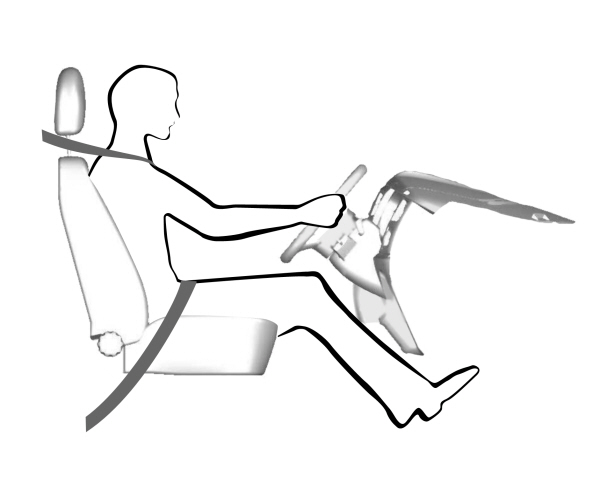
When you use them properly, the seat, head restraint, seatbelt and airbags will provide optimum protection in the event of a crash.
We recommend that you follow these guidelines:
- Sit in an upright position with the base of your spine as far back as possible.
- Do not recline the seat backrest so that your torso is more than 30 degrees from the upright position.
- Adjust the head restraint so that the top of it is level with the top of your head and as far forward as possible. Make sure that you remain comfortable.
- Keep sufficient distance between yourself and the steering wheel. We recommend a minimum of 10 in (25 cm) between your breastbone and the airbag cover.
- Hold the steering wheel with your arms slightly bent.
- Bend your legs slightly so that you can press the pedals fully.
- Position the shoulder strap of the seatbelt over the center of your shoulder and position the lap strap tightly across your hips.
Make sure that your driving position is comfortable and that you can maintain full control of your vehicle.
HEAD RESTRAINT COMPONENTS
|
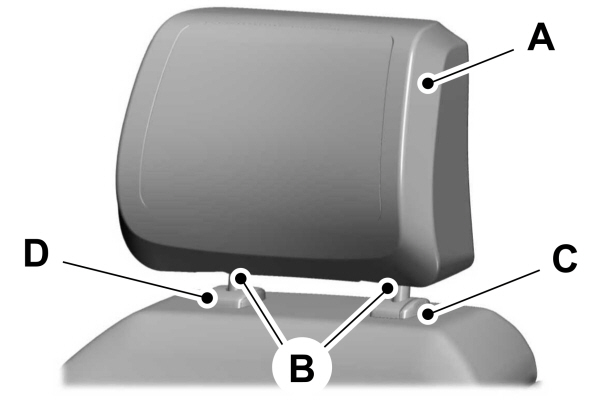
THE HEAD RESTRAINTS CONSIST OF: A An energy absorbing head restraint. An energy absorbing head restraint.B Two steel stems.C Guide sleeve adjust and release button.D Guide sleeve unlock and remove button (If equipped). |
ADJUSTING THE HEAD RESTRAINT
| WARNING: Fully adjust the head restraint before you sit in or operate your vehicle. This will help minimize the risk of neck injury in the event of a crash. Do not adjust the head restraint when your vehicle is moving. WARNING: The head restraint is a safety device. Whenever possible it should be installed and properly adjusted when the seat is occupied. Failure to adjust the head restraint properly could reduce its effectiveness during certain impacts. WARNING: Adjust the head restraints for all passengers before you drive your vehicle. This will help minimize the risk of neck injury in the event of a crash. Do not adjust the head restraints when your vehicle is moving. |
To raise the head restraint, pull the head restraint up.
To lower the head restraint:
- Press and hold the adjust and release button.
- Push the head restraint down.
To tilt the head restraint - if equipped:
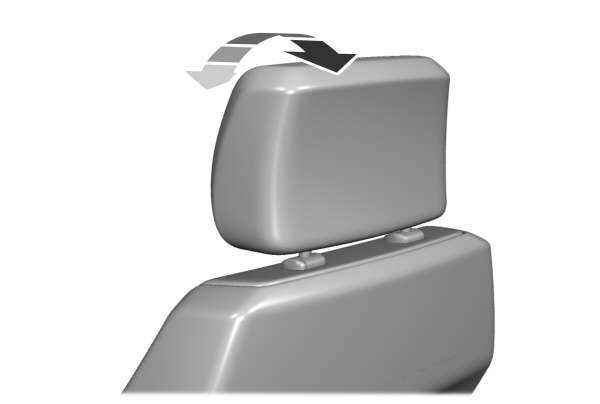
- Adjust the seat backrest to an upright driving or riding position.
- Pivot the head restraint forward toward your head to the preferred position.
After the head restraint reaches the forward-most tilt position, pivot it forward again to release it to the rearward, untilted position.
Note: Do not attempt to force the head restraint backward after it is tilted. Instead, continue tilting it forward until the head restraint releases to the upright position.
POWER HEAD RESTRAINTS (IF EQUIPPED)
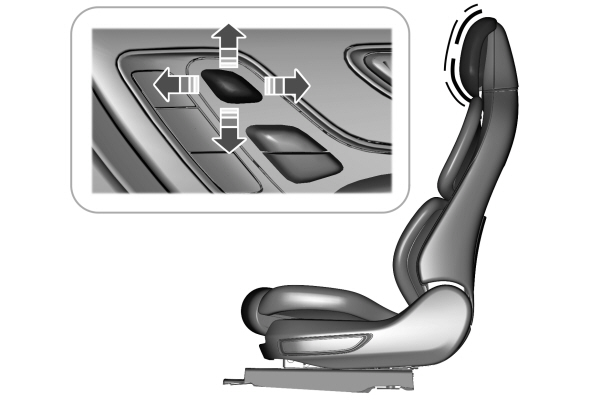
To raise the head restraint, lift the switch up.
To lower the head restraint, press the switch down.
To move the head restraint forward, push the switch forward.
To move the head restraint rearward, push the switch rearward.
REMOVING THE HEAD RESTRAINT
- Pull up the head restraint until it reaches its highest position.
- Press and hold the adjust and release button and the unlock and remove button.
- Pull up the head restraint.
Note: You cannot remove head restraints that have audio system speakers.
INSTALLING THE HEAD RESTRAINT
Align the steel stems into the guide sleeves and push the head restraint down until it locks.
MOVING THE SEAT BACKWARD AND FORWARD
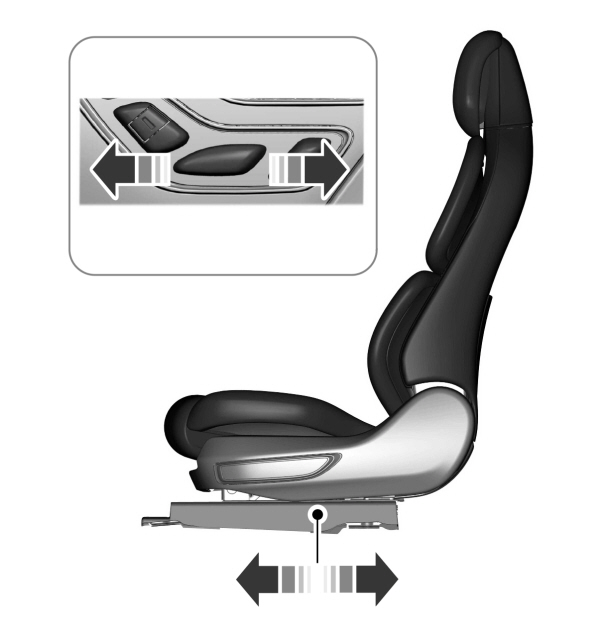
ADJUSTING THE SEAT CUSHION
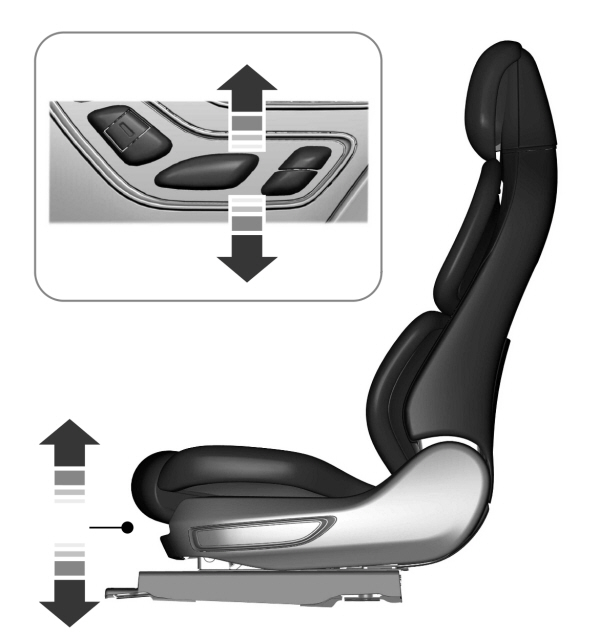
ADJUSTING THE LENGTH OF THE SEAT CUSHION
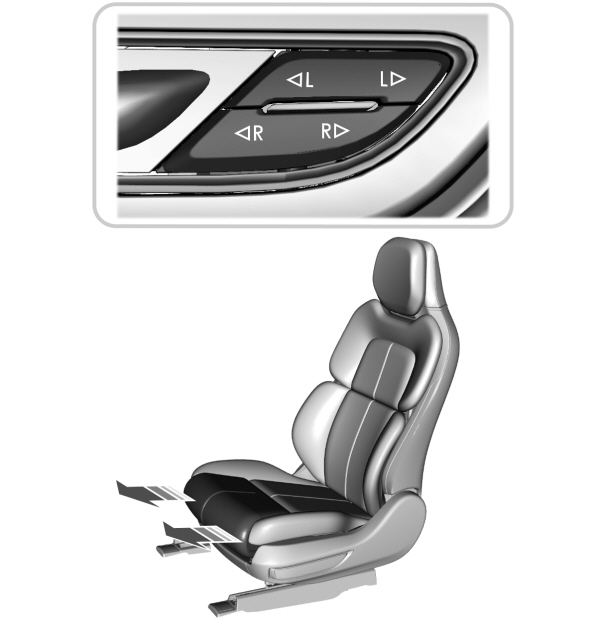
Press the top of the control to adjust the left side of the cushion.
Press the bottom of the control to adjust the right side of the cushion.
ADJUSTING THE SEAT BACKREST
| WARNING: Do not place cargo or any objects behind the seatback before returning it to the original position. WARNING: Do not adjust the driver seat or seat backrest when your vehicle is moving. This may result in sudden seat movement, causing the loss of control of your vehicle. |
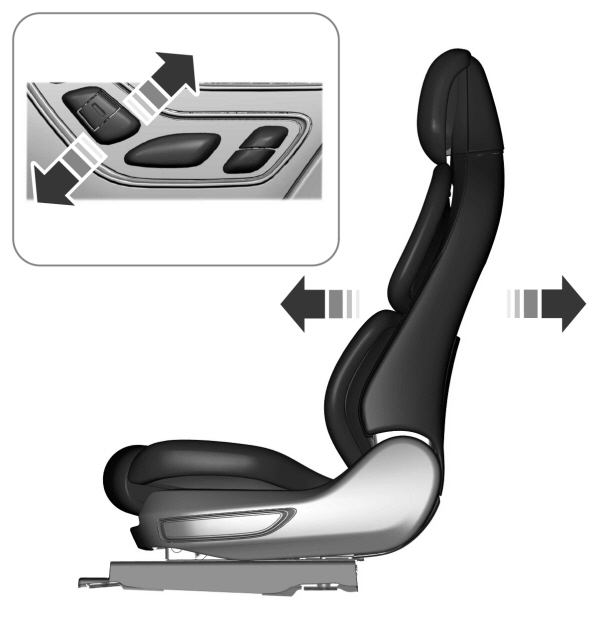
ADJUSTING THE UPPER SEAT BACKREST
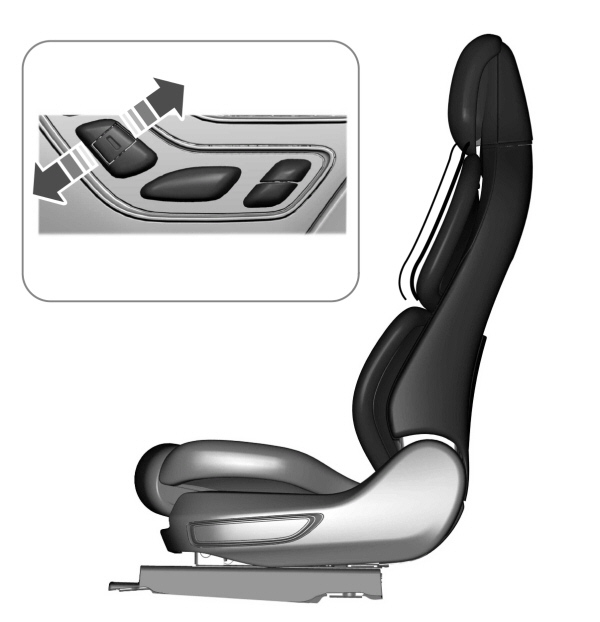
ADJUSTING THE SEAT HEIGHT
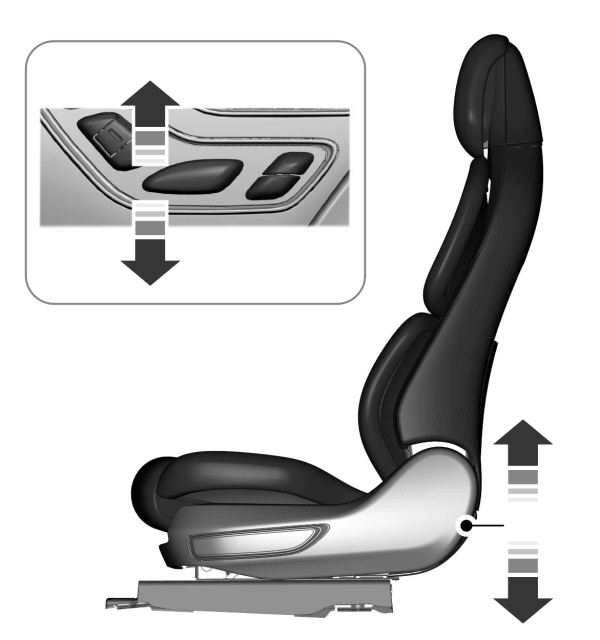
ADJUSTING THE LUMBAR SUPPORT
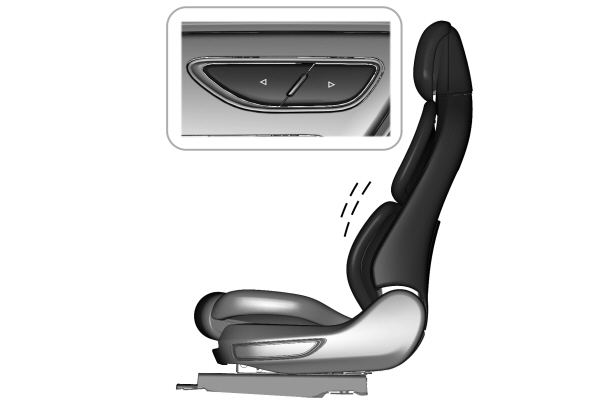
MASSAGE SEAT LIMITATIONS
The vehicle must be running or be in accessory mode to activate the seats.
The passenger side massage is available if the occupant meets the seat sensor weight requirements.
Allow a few seconds for any selection to activate. Selecting a different adjustment cancels the current one in progress. When the seat backrest and cushion are both active, the massage alternates between zones.
ADJUSTING THE MASSAGE SEAT SETTINGS
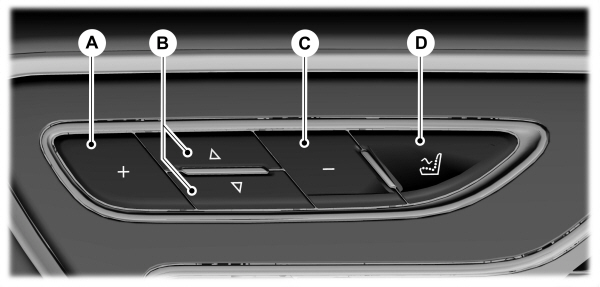
| AIncrease the massage intensity. B Select the massage feature.C Decrease the massage intensity.D On and off. |
You can also adjust this feature through the touchscreen.
HEATED SEAT PRECAUTIONS
| WARNING: Use caution when using the heated seat if you are unable to feel pain to your skin because of advanced age, chronic illness, diabetes, spinal cord injury, medication, alcohol use, exhaustion or other physical conditions. The heated seat could cause burns even at low temperatures, especially if used for long periods of time. Failure to follow this instruction could result in personal injury. WARNING: Do not poke sharp objects into the seat cushion or seat backrest. This could damage the heated seat element and cause it to overheat. Failure to follow this instruction could result in personal injury. WARNING: Do not place anything on the seat that blocks the heat, for example a seat cover or a cushion. This could cause the seat to overheat. Failure to follow this instruction could result in personal injury. |
Do not:
- Place heavy objects on the seat.
- Operate the heated seat if water or any other liquid spills on the seat. Allow the seat to dry.
SWITCHING THE HEATED SEATS ON AND OFF
The vehicle must be running to use this feature.
Press the heated seat symbol to cycle through the various heat settings and off. More indicator lights indicate warmer settings.
Note: The heated seats may remain on after you remote start your vehicle, based on your remote start settings. The heated seats may also turn on when you start your vehicle if they were on when you switched your vehicle off.
AUTOMATIC CLIMATE CONTROLLED SEATS (IF EQUIPPED)
When you switch the auto setting on, the climate controlled seats switch between the heated seats and ventilated seats to match your climate control setting.
VENTILATED SEAT PRECAUTIONS
Do not:
- Spill liquid on the front seats. This may cause the air vent holes to become blocked and not work properly.
- Place cargo or objects under the seats. They may block the air intake causing the air vents to not work properly.
SWITCHING THE VENTILATED SEATS ON AND OFF
The vehicle must be running to use this feature.

Press this symbol on the climate controls or the touchscreen to cycle through the various ventilation settings and off. More indicator lights indicate higher fan speeds.
Note: When you switch the climate control fan speed and the ventilated seats to their maximum settings, the ventilated seats provide increased cooling.
If the engine falls below 350 RPM while the ventilated seats are on, the feature turns itself off unless the vehicle is in Auto-Start-Stop mode. You may need to reactivate the ventilated seats.
Note: The ventilated seats may remain on after you remote start your vehicle, based on your remote start settings. The ventilated seats may also turn on when you start your vehicle if they were on when you switched your vehicle off.
Download Manual