Rear passenger climate control
IDENTIFYING THE REAR PASSENGER CLIMATE CONTROL UNIT
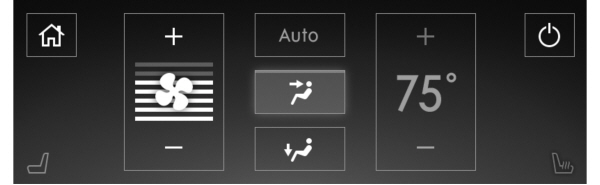
Note: Depending on your vehicle option package, the controls could look different from what you see here.
 Press the icon on the touchscreen to access the climate control features. Press the icon on the touchscreen to access the climate control features. |
SWITCHING THE REAR PASSENGER CLIMATE CONTROLS ON AND OFF

Note: If the system is on and Max Defrost is switched on through the front climate controls, the system turns off. It turns back on when Max Defrost is switched off.
Note: If Max Defrost is switched on, the system can be turned on at the same time.
SETTING THE BLOWER MOTOR SPEED
Press the buttons on the touchscreen to adjust the volume of air circulated in the rear passenger compartment.
 |
 |
SETTING THE TEMPERATURE
Press the buttons on the touchscreen to set the temperature in the rear passenger compartment.
| |
|
DIRECTING THE FLOW OF AIR
DIRECTING AIR TO THE REAR CONSOLE AIR VENTS
 Press the button on the touchscreen to direct airflow to the rear console air vents. Press the button on the touchscreen to direct airflow to the rear console air vents. |
DIRECTING AIR TO THE REAR FOOTWELL AIR VENTS

Note: Air can be directed through any combination of air vents.
SWITCHING REAR AUTO MODE ON AND OFF

The system adjusts the blower motor speed, air distribution, air conditioning operation to reach and maintain the temperature you have set.
REAR PASSENGER CLIMATE CONTROL INDICATORS

Note: If the rear climate controls are locked and the rear climate system is turned off, the indicator illuminates for a few seconds when you try to use any of the rear climate controls.
Download Manual