Blind spot information system
HOW DOES BLIND SPOT INFORMATION SYSTEM WORK
Blind spot information system uses sensors on both sides of your vehicle, detecting rearward from the exterior mirrors to approximately 13 ft (4 m) beyond the rear bumper. The detection area extends to approximately 59 ft (18 m) beyond the rear bumper when the vehicle speed is greater than 30 mph (48 km/h) to alert you of faster approaching vehicles.
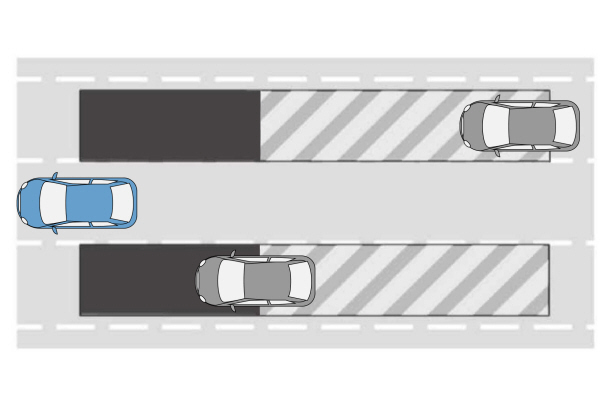
BLIND SPOT INFORMATION SYSTEM PRECAUTIONS
 WARNING: Do not use the blind spot information system as a replacement for using the interior and exterior mirrors or looking over your shoulder before changing lanes. The blind spot information system is not a replacement for careful driving. WARNING: The system may not operate properly during severe weather conditions, for example snow, ice, heavy rain and spray. Always drive with due care and attention. Failure to take care may result in a crash. WARNING: Do not use the blind spot information system as a replacement for using the interior and exterior mirrors or looking over your shoulder before changing lanes. The blind spot information system is not a replacement for careful driving. WARNING: The system may not operate properly during severe weather conditions, for example snow, ice, heavy rain and spray. Always drive with due care and attention. Failure to take care may result in a crash. |
Note: Blind spot information system does not prevent contact with other vehicles. It does not detect parked vehicles, pedestrians, animals or other infrastructure.
BLIND SPOT INFORMATION SYSTEM LIMITATIONS
Blind spot information system does not operate in park (P) or reverse (R).
The system may not alert you if a vehicle quickly passes through the detection zone while overtaking.
Note: For vehicles without the trailer coverage feature, we recommend that you switch the blind spot information system off when you attach a trailer.
BLIND SPOT INFORMATION SYSTEM REQUIREMENTS
Blind spot information system turns on when all the following occur:
- You start your vehicle.
- You shift into drive (D).
- The vehicle speed is greater than 6 mph (10 km/h).
SWITCHING BLIND SPOT INFORMATION SYSTEM ON AND OFF
To switch blind spot information system on or off, use the touchscreen:
- Press Features on the touchscreen.
- Press Driver Assistance.
- Press Blind Spot Information System.
- Switch the feature on or off.
When you switch blind spot information system off, a warning lamp illuminates. When you switch the system on or off, the alert indicators flash twice.
Note: The system remembers the last setting when you start your vehicle.
LOCATING THE BLIND SPOT INFORMATION SYSTEM SENSORS
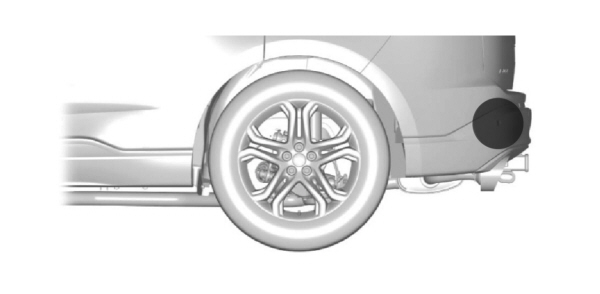
The sensors are behind the rear fascia on both sides of your vehicle.
Note: Keep the sensors free from snow, ice and large accumulations of dirt.
Note: Do not cover the sensors with bumper stickers, repair compound or other objects.
Note: Bike and cargo racks could cause false alerts due to obstruction of the sensor. We recommend switching the feature off when using a bike or cargo rack.
Note: Blocked sensors may affect system accuracy.
If the sensors become blocked, a message appears in the instrument cluster display.
The alert indicators illuminate but the system does not alert you.
WHAT IS BLIND SPOT INFORMATION SYSTEM WITH TRAILER COVERAGE
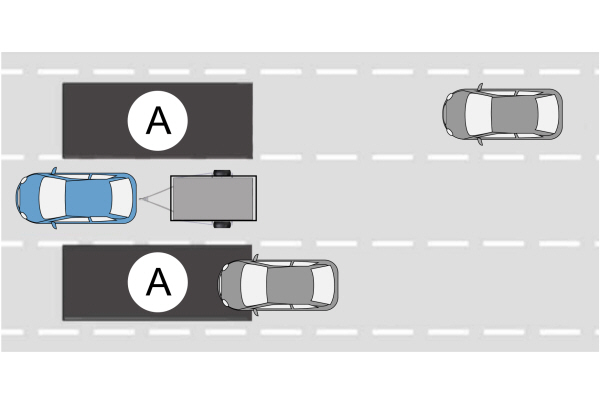
A. Trailer coverage detection zone. Trailer coverage detection zone. |
Blind spot information system detects vehicles that may have entered the blind spot zone. The detection area is on both sides your vehicle and trailer, extending rearward from the exterior mirrors to the end of your trailer.
BLIND SPOT INFORMATION SYSTEM WITH TRAILER COVERAGE LIMITATIONS
Trailer coverage only supports conventional trailers.
Make sure the trailer width is less than or equal to 8.5 ft (2.6 m) and the length is less than 33 ft (10.1 m).
Some trailers could cause a slight change in system performance:
- Large box trailers, including v-nose or horse trailers, could cause false alerts to occur when driving next to infrastructures or near parked cars. A false alert could also occur while making a 90 ° turn.
- Trailers that have a width greater than 8.5 ft (2.6 m) at the front and have a total length greater than 20 ft (6 m) could cause delayed alerts when a vehicle is passing at high speeds.
- Box trailers that have a width greater than 8.5 ft (2.6 m) at the front could cause early alerts when you pass a vehicle.
- Clam shell or v-nose box trailers with a width greater than 8.5 ft (2.6 m) at the front could cause delayed alerts when a vehicle traveling the same speed as your vehicle merges lanes.
SETTING A TRAILER LENGTH
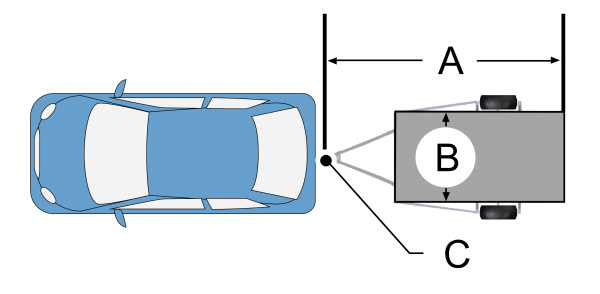
| ATrailer length. B Trailer width.C Trailer hitch ball. |
You can set-up a trailer to work with the blind spot information system through the touchscreen by using the add trailer menu.
- Input the trailer name and trailer type, conventional, gooseneck or fifth wheel, then save to continue trailer setup.
Note: The system only supports conventional trailers.
- Trailer width measurement. Measure the width at the front of the trailer. It is not measured at the widest point of the trailer. The maximum width at the front of the trailer the system can support is 8.5 ft (2.6 m).
Note: If the trailer is a bike rack or cargo rack with electrical lighting, enter a length of around 3 ft (1 m). Cross traffic alert remains on for trailers with a length of 3 ft (1 m) or less.
Note: The system requires proper measurement and measure entry to properly function.
SELECTING A TRAILER
When you connect a trailer to your vehicle, the trailer set up menu appears in the touchscreen. This menu allows you to set up a new trailer or choose from a previously set up trailer. A warning message appears and the system turns off if you do not choose or add a new trailer.
Note: The warning message may not appear until your vehicle reaches 22 mph (35 km/h).
BLIND SPOT INFORMATION SYSTEM INDICATORS
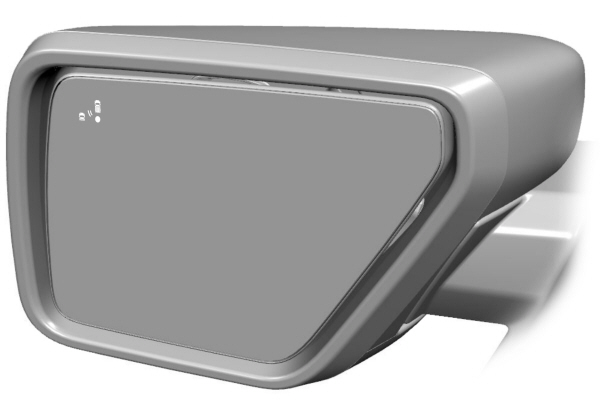
 When blind spot information system detects a vehicle, an alert indicator illuminates in the exterior mirror on the side from which the vehicle is approaching. If you turn the turn signal on for that side of your vehicle, the alert indicator flashes. When blind spot information system detects a vehicle, an alert indicator illuminates in the exterior mirror on the side from which the vehicle is approaching. If you turn the turn signal on for that side of your vehicle, the alert indicator flashes. |
BLIND SPOT INFORMATION SYSTEM – INFORMATION MESSAGES
| Message | Action |
|---|---|
|
Blind Spot System Fault |
A fault with the system has occurred.Have your vehicle checked as soon as possible. |
|
Blind Spot Not Available Sensor Blocked See Manual |
Something is blocking the sensors. Clean the sensors. |
|
Blind Spot Alert Deactivated Trailer Attached |
The system automatically turns off and displays this message when you connect a trailer to your vehicle under any of the following conditions: - Your vehicle does not have blind spot information system with trailer coverage. - You switch the blind spot information system off through the touchscreen. - Your trailer exceeds the limits for the system. See Setting a Trailer Length. |
Note: When connecting a trailer, the system may detect the trailer and turn the system OFF. If the system does not automatically turn OFF, manually switch the blind spot information system OFF. If your vehicle has the blind spot information system with trailer coverage, the system prompts you to set up a trailer that allows the feature to function, if your trailer meets the requirements of the system.
Download Manual