Displays, control elements
In the vicinity of the steering wheel
1
2
3
4
5
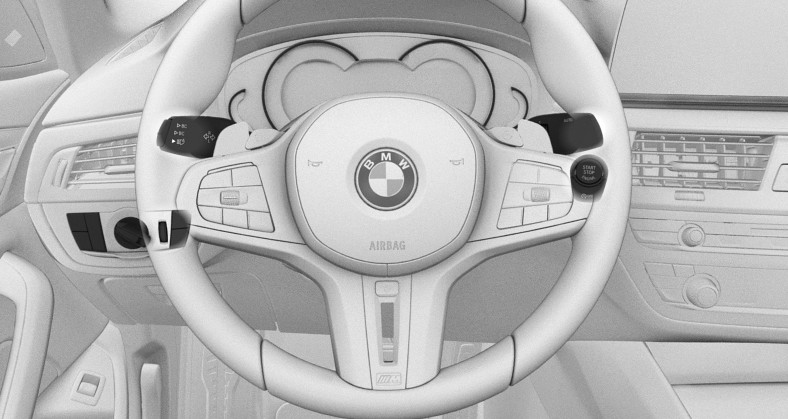
1
Light switch
2
Turn signal indicator, high beams
3
Instrument cluster
4
Wipers
5
Start/Stop button
Indicator/warning lights
The indicator/warning lights can light up in a variety of combinations and colors.
Several of the lights are checked for proper functioning and light up temporarily when drive-ready state is turned on.
Driver's door
1
2
3
4
5
6
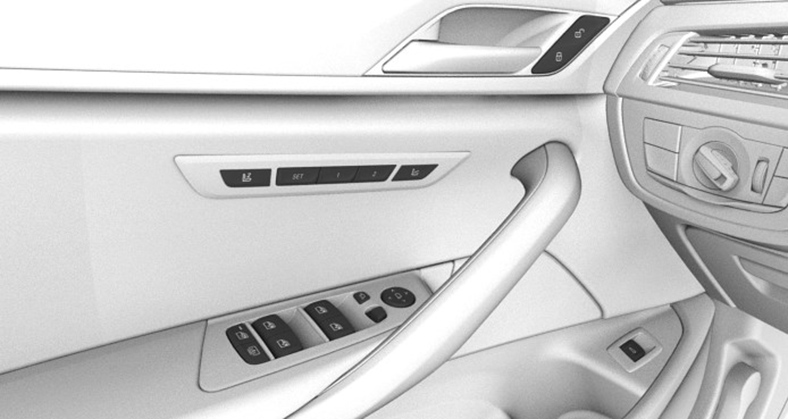
1
Exterior mirrors
2
Power windows
3
Safety switch
4
Seats, comfort features
5
Central locking system
6
Opening the trunk lid
Switch console
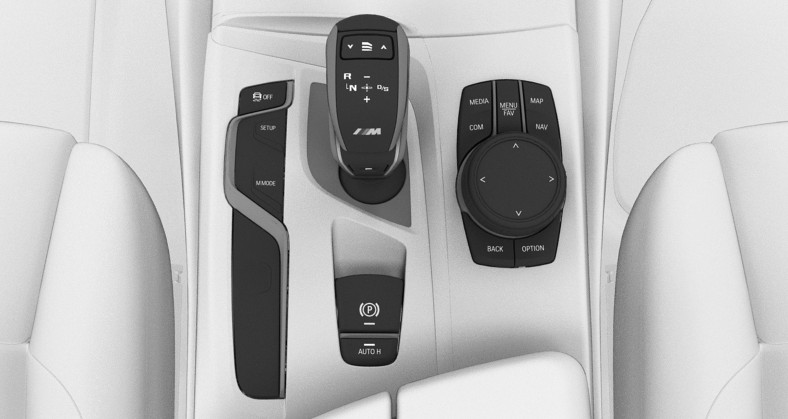
1
Selector lever
2
Controller
3
Parking brake, Automatic Hold
4
Parking assistance systems
5
Sound control
6
SETUP
7
M MODE
iDrive
Principle
iDrive is the operating concept of the infotainment system and includes a large number of functions.
Buttons on the Controller
|
Button |
Function |
|---|---|
|
|
Call up the main menu. |
|
|
Call up the Media/Radio menu. |
|
|
Call up the Communication menu. |
|
|
Call up the navigation map. |
|
|
Call up the destination input menu for navigation. |
|
|
Call up the previous display. |
|
|
Call up the Options menu. |







Voice control
Activating the voice control system

Press the button on the steering wheel.
Say the command.
Canceling voice control
Press the button on the steering wheel or ›Cancel‹.
Download Manual