VEHICLE USER GUIDE — IF EQUIPPED
Access your Owner’s Information right through your Uconnect 4C or 4C NAV touchscreen system — If Equipped.
To access the Vehicle User Guide on your Uconnect Touch- screen: Press the Uconnect Apps button. From there, press the Vehicle User Guide icon on your touchscreen. No Uconnect registration is required.
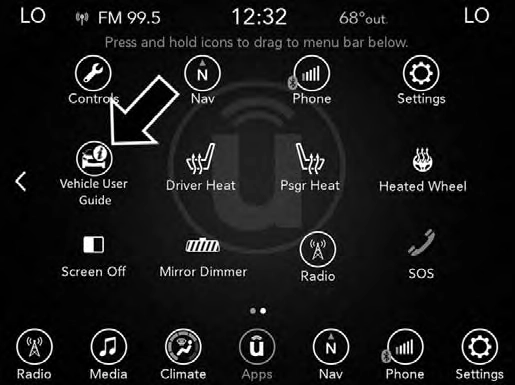
Uconnect 4C NAV With 8.4–inch Display Vehicle User Guide Touchscreen Icon
NOTE: Vehicle User Guide features are not available while the vehicle is moving. If you try to access while the vehicle is in motion, the system will display: Feature not available while the vehicle is in motion.
Pre-Installed Features
Features/Benefits
Once you launch your Vehicle User Guide, you will be able to explore your warranty information and radio manual when and where you need them. Your Uconnect system displays the Vehicle User Guide on your touchscreen radio to assist in better understanding your vehicle. There’s no app to download, no phone to connect and no external device needed for playback. Plus, it’s updated throughout the year, in real-time, so it never goes out of date.
|
Operating Instructions |
Maintenance Schedules |
|
Warranty Information |
Emergency Procedures |
|
Fluid Level Standards |
911 Contact and More |
Tip: When viewing a topic, tap the star icon to add it to your Favorites, for easy access in the future.
KEYSKey Fob
Your vehicle uses a keyless ignition system. The ignition system consists of a key fob with Remote Keyless Entry (RKE) and a START/STOP push button ignition system. The Remote Keyless Entry system consists of a key fob and Keyless Enter-N-Go feature if equipped.
NOTE: The key fob may not be found if it is located next to a mobile phone, laptop or other electronic device; these devices may block the key fob’s wireless signal.
The key fob allows you to lock or unlock the doors and liftgate from distances up to approximately 66 ft (20 m) using a handheld key fob. The key fob does not need to be pointed at the vehicle to activate the system.
NOTE:
With ignition on/start and the vehicle moving at 5 mph (8 km/h), all RKE commands are disabled.
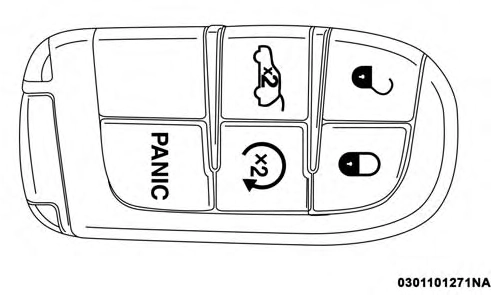
Key Fob
 All doors can be programmed to unlock on the first push of the unlock button. Refer to “Uconnect Settings” in “Multi- media” for further information.
NOTE: If the vehicle is unlocked by a key fob, and no door 3
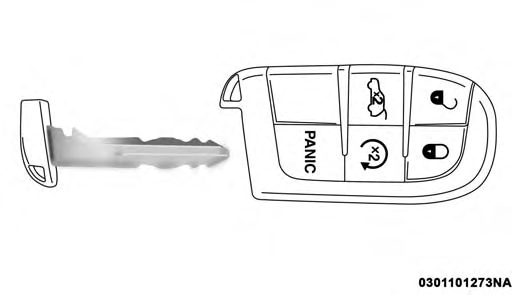
Key Fob With Emergency Key
In case the ignition switch does not change with the push of a button, the key fob may have a low or fully depleted battery. A low key fob battery can be verified by referring to the instrument cluster, which will display directions to follow.
To Unlock The Doors And Liftgate
Push and release the unlock button on the key fob once to unlock the driver’s door or twice within five seconds to unlock all doors and the liftgate.
is opened within 60 seconds, the vehicle will re-lock and if equipped, the security alarm will arm.
The turn signal lights will flash twice to acknowledge the unlock signal. The illuminated entry system will be acti- vated.
1st Push Of Key Fob Unlock Button
This feature lets you program the system to unlock either the driver’s door or all doors on the first push of the unlock button on the key fob. To change the current setting, refer to “Uconnect Settings” in “Multimedia” for further infor- mation.
NOTE: If the vehicle is equipped with Passive Entry, refer to “Keyless Enter-N-Go — Passive Entry” located in “Doors” in “Getting To Know Your Vehicle” for further information.
To Lock The Doors And Liftgate
Push and release the lock button on the key fob to lock all doors and liftgate.
The turn signal lights will flash and the horn will chirp to acknowledge the signal. Refer to “Uconnect Settings” located in “Multimedia” for further programmable infor- mation.
If the vehicle is equipped with Passive Entry, refer to “Keyless Enter-N-Go — Passive Entry” located in “Doors” in “Getting To Know Your Vehicle” for further information.
If one or more doors are open, or the liftgate is open, the doors will lock. The doors will unlock again automatically if the key is left inside the passenger compartment, other- wise the doors will stay locked.
Replacing The Battery In The Key With Remote Control
The recommended replacement battery is one CR2032 battery.
NOTE:
Perchlorate Material — special handling may apply. See www.dtsc.ca.gov/hazardouswaste/perchlorate for fur- ther information.
Do not touch the battery terminals that are on the back housing or the printed circuit board.
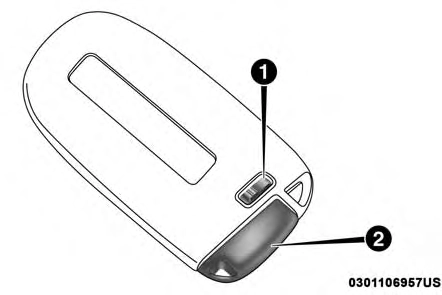
Emergency Key Removal
1 — Emergency Key Release Button 2 — Emergency Key
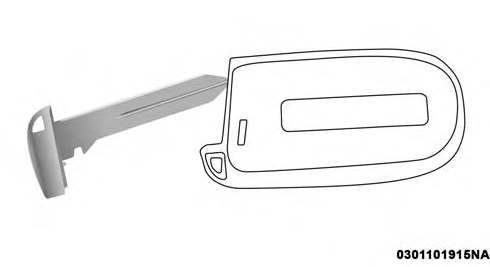
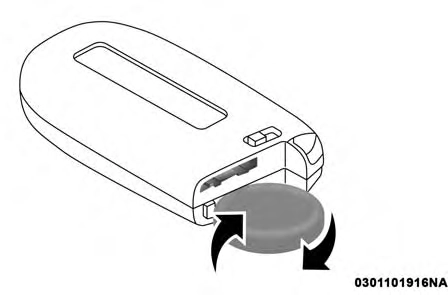 3
3
Emergency Key Removal Separating Case With A Coin
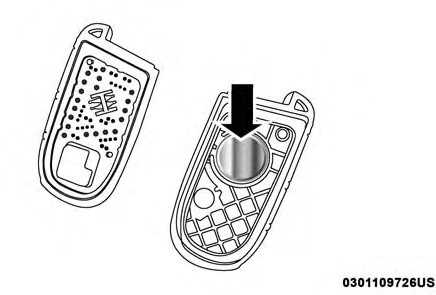
Key Fob Battery Replacement
Programming Additional Key Fobs
Programming the key fob may be performed by an autho- rized dealer.
NOTE: Once a key fob is programmed to a vehicle, it cannot be repurposed and reprogrammed to another ve- hicle.
Request For Additional Key Fobs
NOTE: Only key fobs that are programmed to the vehicle electronics can be used to start and operate the vehicle. Once a key fob is programmed to a vehicle, it cannot be programmed to any other vehicle.
Duplication of key fobs may be performed at an authorized dealer. This procedure consists of programming a blank key fob to the vehicle electronics. A blank key fob is one that has never been programmed.
NOTE:
When having the Sentry Key Immobilizer System ser- viced, bring all vehicle keys with you to an authorized
Download Manual