COMMANDVIEW SUNROOF WITH POWER SHADE — IF EQUIPPED
The CommandView sunroof switch is located to the left between the sun visors on the overhead console.
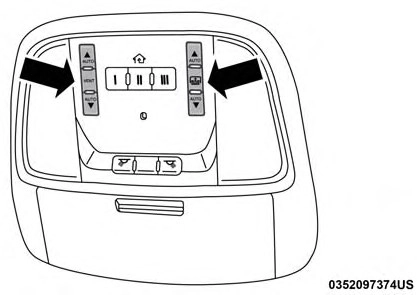 The power shade switch is located to the right between the sun visors on the overhead console.
CommandView Sunroof And Power Shade Switches
The sunroof has two programmed automatic stops for the sunroof open position; a comfort stop position and a full open position. The comfort stop position has been opti- mized to minimize wind buffeting.
Express
Push the switch rearward and release it within one-half second. The sunroof will open automatically to the comfort stop position. Push the switch rearward and release it again, the sunroof will open to the full open position and automatically stop. This is called “Express Open”. During Express Open operation, any movement of the sunroof switch will stop the sunroof.
Manual Mode
To open the sunroof, push and hold the switch rearward. The sunroof will stop automatically at the comfort stop position. Push and hold the switch rearward again, the sunroof will open to the full open position and automati- cally stop. Any release of the switch will stop the move- ment. The sunroof and sunshade will remain in a partially opened condition until the switch is pushed and held rearward again.
NOTE: If the sunshade is in the closed position when Express or Manual Open operation is initiated the sun- shade will automatically open to the half open position prior to the sunroof opening.
Express Close
Push the switch forward and release it within one-half second and the sunroof will close automatically from any position. During Express Close operation, any other actua- tion of the sunroof switches will stop the sunroof in a partially open position.
Manual Close
Push and hold the switch forward and the sunroof will close from any position and stop at full closed position. Releasing the switch while the sunroof is in motion will stop the sunroof in a partially open position.
Wind buffeting can be described as the perception of pressure on the ears or a helicopter-type sound in the ears. Your vehicle may exhibit wind buffeting with the windows down, or the sunroof (if equipped) in certain open or partially open positions. This is a normal occurrence and can be minimized. If the buffeting occurs with the rear windows open, then open the front and rear windows together to minimize the buffeting. If the buffeting occurs with the sunroof open, adjust the sunroof opening to minimize the buffeting or open any window.
The sunshade has two programmed positions: half open and full open positions. When operating the sunshade from the closed position, the sunshade will always stop at the half open position regardless of express or manual open operation. The switch must be actuated again to continue on to full open position.
Express Open
Push the sunshade switch rearward and release it within one-half second, the sunshade will open to the half open position and stop automatically. Push and release the switch again from the half open position and the sunshade will open to the full open position and stop automatically. During Express Open operation, any other actuation of the sunroof switches will stop the sunshade in a partially open position.
Manual Open
Push and hold the sunshade switch rearward, the sun- shade will open to the half open position and stop auto- matically. Push and hold the sunshade switch again and the sunshade will open to the full open position. Releasing the switch while the sunshade is in motion will stop the sunshade in a partially open position.
If the sunroof is open or vented, the sunshade cannot be closed beyond the half open position. Pushing the sun- shade close switch when the sunroof is open/vented and the sunshade is at half open position will first automati- cally close the sunroof prior to the sunshade closing.
Express Close
Push the sunshade switch forward and release it within one-half second and the sunshade will close automatically. During Express Close operation, any other actuation of the sunroof switches will stop the sunshade in a partially open position.
Manual Close
Push and hold the switch forward and the sunshade will close and stop at full closed position. Releasing the switch while the sunshade is in motion will stop the sunshade in a partially open position.
This feature will detect an obstruction in the opening of the sunroof during Express Close operation. If an obstruction in the path of the sunroof is detected, the sunroof will automatically retract. Remove the obstruction if this oc- curs.
NOTE: If three consecutive sunroof close attempts result in Pinch Protect reversals, Pinch Protect will disable and the sunroof must be closed in Manual Mode.
Push and release the "Vent" button within one-half second and the sunroof will open to the vent position. This is called “Express Vent”, and it will occur regardless of
sunroof position. During Express Vent operation, any 3
movement of the switch will stop the sunroof.
NOTE: If the sunshade is in the closed position when the vent switch is pushed, the sunshade will automatically cycle to the halfway open position prior to the sunroof opening to the Vent position.
Use only a non-abrasive cleaner and a soft cloth to clean the glass panel.
Download Manual