QUADRA-LIFT — IF EQUIPPED
Description
The Quadra-Lift air suspension system provides full time load leveling capability along with the benefit of vehicle height adjustment by the push of a button. The vehicle will automatically raise and lower the ride height to adapt to the appropriate driving conditions. At higher speeds, the
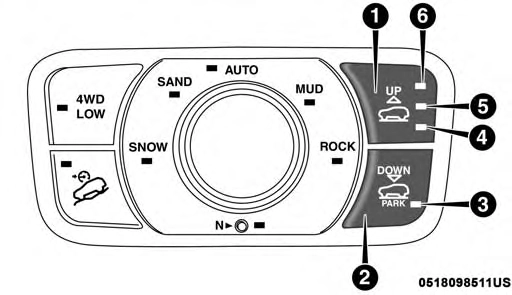
vehicle will lower to an aerodynamic ride height and when operating in off-road modes, the vehicle will raise the ride height accordingly. The buttons near the terrain switch in the center console area can be used to set preferred ride height to match the appropriate conditions.
 6
6
Selec-Terrain Switch
6 — Off-Road 2 Indicator Lamp (Customer Selectable)
Normal Ride Height (NRH) – This is the standard position of the suspension and is meant for normal driving.
Off-Road 1 (OR1) (Raises the vehicle approximately
1.1 inches (28 mm)) – This is the primary position for all off-road driving until OR2 is needed. A smoother and more comfortable ride will result. Push the “UP” button once from the NRH position while the vehicle speed is below 38 mph (61 km/h). When in the OR1 position, if the vehicle speed remains between 40 mph (64 km/h) and 50 mph (80 km/h) for greater than 20 seconds or if the vehicle speed exceeds 50 mph (80 km/h), the vehicle will be automatically lowered to NRH. Refer to “Driving Tips” in “Starting And Operating” for further informa- tion.
Off-Road 2 (OR2) (Raises the vehicle approximately
2.2 inches (55 mm)) – This position is intended for off-roading use only where maximum ground clearance is required. To enter OR2, push the “UP” button twice from the NRH position or once from the OR1 position while vehicle speed is below 20 mph (32 km/h). While in OR2, if the vehicle speed exceeds 25 mph (40 km/h) the vehicle height will be automatically lowered to OR1. Refer to “Driving Tips” in “Starting And Operating” for further information.
Aero Mode (Lowers the vehicle approximately
0.6 inches (15 mm)) – This position provides improved aerodynamics by lowering the vehicle. The vehicle will automatically enter Aero Mode when the vehicle speed remains between 52 mph (83 km/h) and 56 mph (90 km/h) for greater than 20 seconds or if the vehicle speed exceeds 56 mph (90 km/h). The vehicle will return to NRH from Aero Mode if the vehicle speed remains between 20 mph (32 km/h) and 25 mph (40 km/h) for greater than 20 seconds or if the vehicle speed falls below 20 mph (32 km/h). The vehicle will enter Aero Mode, regardless of vehicle speed if the vehicle is in “SPORT” mode.
Entry/Exit Mode (Lowers the vehicle approximately
1.6 inches (40 mm) – This position lowers the vehicle for easier passenger entry and exit as well as lowering the rear of the vehicle for easier loading and unloading of cargo. To enter Entry/Exit Mode, push the “DOWN” button once from (NRH) while the vehicle speed is below 25 mph (40 km/h). Once the vehicle speed goes below 15 mph (24 km/h) the vehicle height will begin to lower. If the vehicle speed remains between 15 mph (24 km/h) and 25 mph (40 km/h) for greater than 60 seconds, or the vehicle speed exceeds 25 mph (40 km/h) the Entry/Exit Mode change will be cancelled. To exit
Entry/Exit Mode, press the “Up” button once while in Entry/Exit Mode or drive the vehicle over 15 mph (24 km/h).
NOTE: Automatic lowering of the vehicle into Entry/Exit Mode can be enabled through the Uconnect Touch-Screen Radio. If this feature is enabled, the vehicle will only lower if the gear selector is in "PARK", the terrain switch is in
"AUTO", the transfer-case is in "AUTO” and the vehicle
any time while the vehicle is lowering the change will not be completed until the open door(s) is/are closed.
The Quadra-Lift air suspension system uses a lifting and lowering pattern which keeps the headlights from incor- rectly shining into oncoming traffic. When raising the vehicle, the rear of the vehicle will move up first and then the front. When lowering the vehicle, the front will move down first and then the rear.
level should be either in Normal or Aero Mode. The Vehicle
After the engine is turned off, it may be noticed that the air 6
will not automatically lower if the air suspension level is in Off Rd 2 or Off Rd 1. If the vehicle is equipped with Intrusion Theft Module (ITM), the lowering will be sup- pressed when the ignition is switched OFF and the door is open to prevent setting the alarm off.
The Selec-Terrain switch will automatically change the vehicle to the proper height based on the position of the Selec-Terrain switch. The height can be changed from the default Selec-Terrain setting by normal use of the air suspension buttons. Refer to “Selec-Terrain” in “Starting And Operating” for further information.
The system requires that the engine be running for all changes. When lowering the vehicle all of the doors, including the liftgate, must be closed. If a door is opened at
suspension system operates briefly, this is normal. The system is correcting the position of the vehicle to ensure a proper appearance.
To assist with changing a spare tire, the Quadra-Lift air suspension system has a feature which allows the auto- matic leveling to be disabled. Refer to “Uconnect Settings” in “Multimedia” for further information.
For further information refer to “Driving Tips” in “Starting And Operating” section.
NOTE: If equipped with a touch screen radio all enabling/ disabling of air suspension features must be done through the radio. Refer to “Uconnect Settings” in “Multimedia” for further information.
The Air Suspension system has multiple modes to protect the system in unique situations:
Tire/Jack Mode
To assist with changing a spare tire, the air suspension system has a feature which allows the automatic leveling to be disabled. Refer to “Uconnect Settings” in “Multimedia” for further information.
NOTE: This mode is intended to be enabled with engine running.
Auto Entry/Exit Mode
To assist in entering and exiting the vehicle, the air suspension system has a feature which automatically low- ers the vehicle to entry/exit ride height. Refer to “Uconnect Settings” in “Multimedia” for further information.
NOTE: This mode is intended to be enabled with engine running.
Transport Mode
To assist with flat bed towing, the air suspension system has a feature which will put the vehicle into Entry/Exit height and disable the automatic load leveling system. Refer to “Uconnect Settings” in “Multimedia” for further information.
NOTE: This mode is intended to be enabled with engine running.
Suspension Display Messages Mode
The “Suspension Display Messages” setting allows you to only display suspension warnings. Refer to “Uconnect Settings” in “Multimedia” for further information.
NOTE: This mode is intended to be enabled with engine running.
Wheel Alignment Mode
Before performing a wheel alignment this mode must be enabled. Refer to “Uconnect Settings” in “Multimedia” for further information.
NOTE: This mode is intended to be enabled with engine running.
If equipped with a touch screen radio all enabling/ disabling of air suspension features must be done through the radio. Refer to “Uconnect Settings” in “Multimedia” for further information.
When the appropriate conditions exist, a message will appear in the instrument cluster. Refer to “Instrument Cluster Display” in “Getting To Know Your Instrument Panel” for further information.
The indicator lamps 3 through 6 will illuminate to show the current position of the vehicle. Flashing indicator lamps will show a position which the system is working to achieve. When raising, if multiple indicator lamps are flashing on the “UP” button, the highest flashing indicator lamp is the position the system is working to achieve. When lowering, if multiple indicators are flashing on the "DOWN" button the lowest solid indicator lamp is the position the system is working to achieve.
Pushing the “UP” button once will move the suspension one position higher from the current position, assuming all conditions are met (i.e. engine running, speed below threshold, etc). The “UP” button can be pushed multiple times, each push will raise the requested level by one position up to a maximum position of OR2 or the highest position allowed based on current conditions (i.e. vehicle speed, etc).
Pushing the “DOWN” button once will move the suspen- sion one position lower from the current level, assuming all 6
conditions are met (i.e. engine running, doors closed, speed below threshold, etc). The “DOWN” button can be pressed multiple times. Each push will lower the requested level by one position down to a minimum of Park Mode or the lowest position allowed based on current conditions (i.e. vehicle speed, etc.)
Automatic height changes will occur based on vehicle speed and the current vehicle height. The indicator lamps and instrument cluster display messages will operate the same for automatic changes and user requested changes.
Off-Road 2 (OR2) – Indicator lamps 4, 5, and 6 will be illuminated when the vehicle is in OR2.
Off-Road 1 (OR1) – Indicator lamps 4 and 5 will be illuminated when the vehicle is in OR1.
Normal Ride Height (NRH) – Indicator lamp 4 will be illuminated when the vehicle is in this position.
Entry/Exit Mode – Indicator lamp 3 will be illuminated when the vehicle is in Entry/Exit Mode. If Entry/Exit Mode is requested while vehicle speed is between 15 mph (24 km/h) and 25 mph (40 km/h), indicator lamp 4 will remain on solid and indicator lamp 3 will flash as the system waits for the vehicle to reduce speed. If vehicle speed is reduced to, and kept below, 15 mph (24 km/h) indicator lamp 4 will turn off and indicator
lamp 3 will flash until Entry/Exit Mode is achieved at which point indicator lamp 3 will go solid. If during the height change to Entry/Exit Mode, the vehicle speed exceeds 15 mph (24 km/h), the height change will be paused until the vehicle speed either goes below 15 mph (24 km/h) and the height change continues to Entry/ Exit Mode, or exceeds 25 mph (40 km/h) and the vehicle height will return to NRH. Entry/Exit Mode may be selected while the vehicle is not moving provided that the engine is still running and all doors remain closed.
Transport Mode - No indicator lamps will be illumi- nated. Customer driving will disable Transport Mode.
Tire/Jack Mode - Indicator lamps 3 and 6 will be illuminated. Customer driving will disable Tire/Jack Mode.
Wheel Alignment Mode - Indicator lamps 3 and 4 will be illuminated. Customer driving will disable Wheel Align- ment Mode.
Download Manual