STOP/START SYSTEM — IF EQUIPPED
The Stop/Start function is developed to reduce fuel con- sumption. The system will stop the engine automatically
the instrument cluster display, this indicates the vehicle
during a vehicle stop if the required conditions are met. 6
needs to be taken to the dealer for service. Refer to “Warning Lights And Messages” in “Getting To Know Your Instrument Panel” for further information.
NOTE:
Even if the power steering assistance is no longer operational, it is still possible to steer the vehicle. Under these conditions there will be a substantial increase in steering effort, especially at low speeds and during parking maneuvers.
If the condition persists, see your authorized dealer for service.
If the Steering icon is displayed and the “POWER STEER- ING SYSTEM OVER TEMP” message is displayed on the
Releasing the brake pedal or pressing the accelerator pedal will automatically re-start the engine.
This vehicle has been upgraded with a heavy duty starter, enhanced battery, and other upgraded engine parts, to handle the additional engine starts.
 The Stop/Start feature is enabled after every normal customer engine start. At that time, the system will go into STOP/START READY and if all other conditions are met, can go into a STOP/
START AUTOSTOP ACTIVE “Autostop” mode.
To Activate The Autostop Mode, The Following Must Occur:
The system must be in STOP/START READY state. A STOP/START READY message will be displayed in the instrument cluster display within the Stop/Start section. Refer to “Instrument Cluster” in “Getting To Know Your Instrument Panel” for further information.
The shifter must be in a forward gear and the brake pedal depressed.
The engine will shut down, the tachometer will move to the zero position and the Stop/Start telltale will illuminate indicating you are in Autostop. Customer settings will be maintained upon return to an engine running condition.
Refer to the “Stop/Start System” in the “Starting And Operating” section for further information.
Prior to engine shut down, the system will check many safety and comfort conditions to see if they are fulfilled. Detailed information about the operation of the Stop/Start system may be viewed in the instrument cluster display Stop/Start Screen. In the following situations, the engine will not stop:
Cabin heating or cooling is in process and an acceptable cabin temperature has not been achieved.
Other Factors Which Can Inhibit Autostop Include:
5 mph (8 km/h) threshold not achieved from previous AUTOSTOP.
It may be possible for the vehicle to be driven several times without the STOP/START system going into a STOP/ START READY state under more extreme conditions of the items listed above.
 While in a forward gear, the engine will start when the 6
brake pedal is released or the throttle pedal is depressed. The transmission will automatically re-engage upon en- gine restart.
Conditions That Will Cause The Engine To Start Auto- matically While In Autostop Mode:
HVAC system temperature or fan speed is manually adjusted.
Low brake vacuum (e.g. after several brake pedal appli- cations).
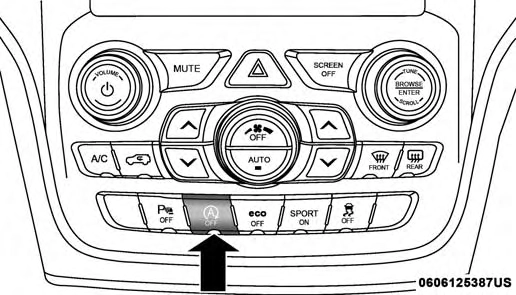
STOP/START Off Switch
Push the STOP/START OFF switch (located on the switch bank). The light on the switch will turn off.
If there is a malfunction in the STOP/START system, the system will not shut down the engine. A “SERVICE STOP/ START SYSTEM” message will appear in the instrument cluster display. Refer to “Instrument Cluster Display“ in “Getting to Know Your Instrument Panel” for further information.
If the “SERVICE STOP/START SYSTEM” message appears in the instrument cluster display, have the system checked by an authorized dealer.
Download Manual