If your vehicle is equipped with a 12–inch Uconnect display, the Hazard Warning switch is located above the display.
Push the switch to turn on the Hazard Warning flasher. When the switch is activated, all directional turn signals will flash on and off to warn oncoming traffic of an emergency. Push the switch a second time to turn off the Hazard Warning flashers.
This is an emergency warning system and it should not be used when the vehicle is in motion. Use it when your vehicle is disabled and it is creating a safety hazard for other motor- ists.
When leaving the vehicle to seek assistance, the Hazard Warning flashers will continue to operate even though the ignition is placed in the OFF position.
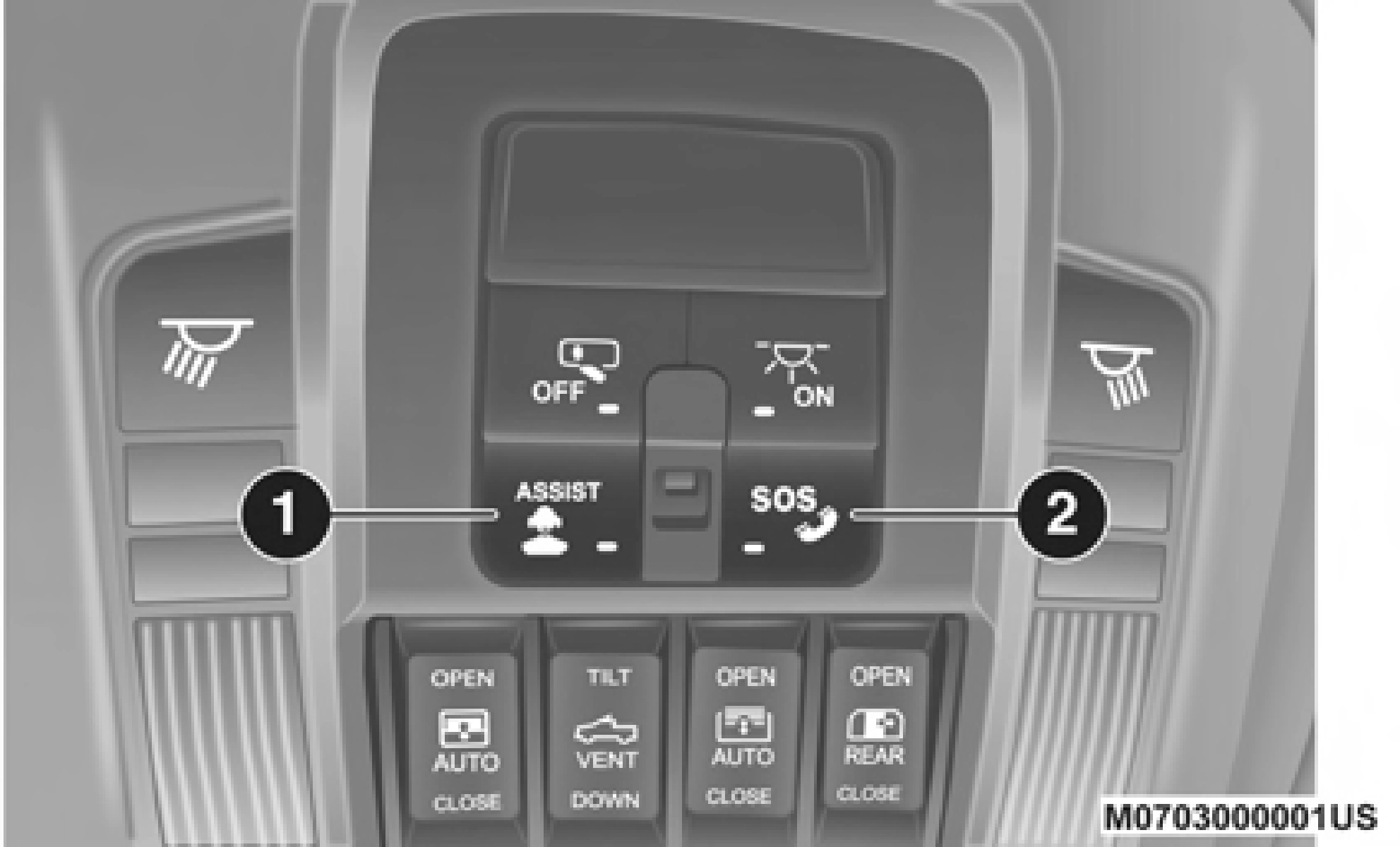
1 — ASSIST Button 2 — SOS Button
6
Assist And SOS Buttons
If equipped, the overhead console contains an ASSIST and a SOS button.
NOTE:
Your vehicle may be transmitting data as authorized by the subscriber.
The SOS and ASSIST buttons will only function if you are connected to an operable LTE (voice/data) or 4G (data) network. Other Uconnect services will only be operable if your SiriusXM Guardian™ service is active and connected to an operable LTE (voice/data) or 4G (data) network.
ASSIST Call
The ASSIST Button is used to automatically connect you to any one of the following support centers:
Roadside Assistance – If you get a flat tire, or need a tow, just push the ASSIST button and you'll be connected to someone who can help. Roadside Assistance will know what vehicle you're driving and its location. Additional fees may apply for roadside assistance.
SiriusXM Guardian™ Customer Care – In-vehicle support for SiriusXM Guardian™.
Vehicle Customer Care – Total support for all other vehicle issues.
SOS Call
Push the SOS Call button on the overhead console.
NOTE:
In case the SOS Call button is pushed in error, there will be a ten second delay before the SOS Call system initiates a call to a SOS operator. To cancel the SOS Call connection, push the SOS call button on the overhead console or press the cancel- lation button on the Device Screen. Termination of the SOS Call will turn off the green LED light on the overhead console.
The LED light located between the ASSIST and SOS buttons on the overhead console will turn green once a connection to a SOS operator has been made.
Once a connection between the vehicle and a SOS oper- ator is made, the SOS Call system may transmit the following important vehicle information to a SOS oper- ator:
Indication that the occupant placed a SOS Call
The vehicle brand
The last known GPS coordinates of the vehicle
You should be able to speak with the SOS operator through the vehicle audio system to determine if addi- tional help is needed.
NOTE:
Your vehicle may be transmitting data as authorized by the subscriber.
Once a connection is made between the vehicle's SOS Call system and the SOS operator, the SOS operator may be able to open a voice connection with the vehicle to deter- mine if additional help is needed. Once the SOS operator opens a voice connection with the vehicle's SOS Call system, the operator should be able to speak with you or other vehicle occupants and hear sounds occurring in the vehicle. The vehicle's SOS Call system will attempt to remain connected with the SOS operator until the SOS
operator terminates the connection. 6
The SOS operator may attempt to contact appropriate emergency responders and provide them with important vehicle information and GPS coordinates.
(Continued)
WARNING! (Continued)
Never place anything on or near the vehicle's operable network and GPS antennas. You could prevent oper- able network and GPS signal reception, which can prevent your vehicle from placing an emergency call. An operable network and GPS signal reception is required for the SOS Call system to function properly.
The SOS Call system is embedded into the vehicle's electrical system. Do not add aftermarket electrical equipment to the vehicle's electrical system. This may prevent your vehicle from sending a signal to initiate an emergency call. To avoid interference that can cause the SOS Call system to fail, never add aftermarket equipment (e.g., two-way mobile radio, CB radio, data recorder, etc.) to your vehicle's electrical system or modify the antennas on your vehicle. IF YOUR VEHICLE LOSES BATTERY POWER FOR ANY REASON (INCLUDING DURING OR AFTER AN ACCIDENT), THE UCONNECT FEATURES, APPS AND SERVICES, AMONG OTHERS, WILL NOT OPERATE.
Modifications to any part of the SOS Call system could cause the air bag system to fail when you need it. You could be injured if the air bag system is not there to help protect you.
SOS Call System Limitations
Vehicles sold in Mexico DO NOT have SOS Call system capabilities.
SOS or other emergency line operators in Mexico may not answer or respond to SOS system calls.
If the SOS Call system detects a malfunction, any of the following may occur at the time the malfunction is detected, and at the beginning of each ignition cycle:
The overhead console light located between the ASSIST and SOS buttons will continuously be illuminated red.
The Device Screen will display the following message: “Vehicle device requires service. Please contact your dealer.”
An In-Vehicle Audio message will state “Vehicle device requires service. Please contact your dealer.”
(Continued)
Operator error by the SOS operator
LTE (voice/data) or 4G (data) network congestion
Weather
Buildings, structures, geographic terrain, or tunnels
Even if the SOS Call system is fully functional, factors beyond FCA US LLC's control may prevent or stop the SOS Call system operation. These include, but are not limited to, the following factors:
Delayed accessories mode is active
The ignition is in the OFF position
The vehicle's electrical systems are not intact
The SOS Call system software and/or hardware are damaged during a crash
The vehicle battery loses power or becomes disconnected during a vehicle crash
LTE (voice/data) or 4G (data) network and/or Global Positioning Satellite signals are unavailable or obstructed
Equipment malfunction at the SOS operator facility
6
NOTE:
Your vehicle may be transmitting data as authorized by the subscriber.
Never place anything on or near the vehicle's LTE (voice/ data) or 4G (data) and GPS antennas. You could prevent LTE (voice/data) or 4G (data) and GPS signal reception, which can prevent your vehicle from placing an emer- gency call. An operable LTE (voice/data) or 4G (data) network connection and a GPS signal is required for the SOS Call system to function properly.
General Information
The following regulatory statement applies to all radio frequency (RF) devices equipped in this vehicle:
This device complies with Part 15 of the FCC Rules and with Innovation, Science and Economic Development Canada Operation is subject to the following two conditions:
This device may not cause harmful interference, and
This device must accept any interference received, including interference that may cause undesired opera- tion.
NOTE:
Changes or modifications not expressly approved by the party responsible for compliance could void the user's authority to operate the equipment.
 Assist And SOS Buttons