Wi-Fi Connection
You can connect the audio system to the internet using Wi-Fi and use online services through the touchscreen. If your compatible phone has hotspot capabilities, the system can be tethered to the phone. When the vehicle is stopped, follow the steps below to set up Wi-Fi. Standard data rates apply with your phone service provider.
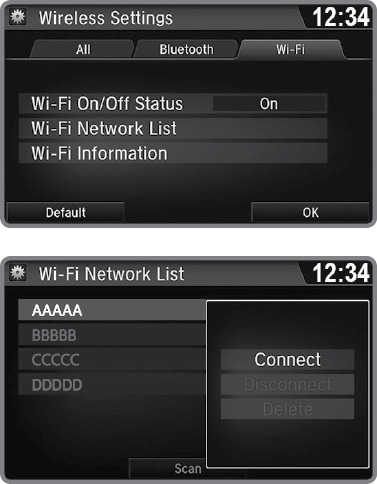
- From the HOME screen, select Settings.
- Select Bluetooth/Wi-Fi. Select the Wi-Fi tab.
- Select Wi-Fi On/Off Status, and select On.
- Select Wi-Fi Network List. Make sure your phone's Wi-Fi setting is in access point (tethering) mode.
- Select the phone you want to connect to the system. If the phone you want to connect does not appear, select Scan.
- Select Connect.
- Enter a password for your phone. Select OK. The Wi-Fi symbol is displayed on the list when connection is successful.
- Select HOME to go back to the home screen.
Related topics:
- Apple CarPlay
- Android Auto
- Basic Navigation Operation
- Pairing a Phone
- Basic HFL Operation
- Bluetooth Audio
- Operating Display Audio
- Siri Eyes Free
- SiriusXM Radio*
- iPod
- FM Radio
- Pandora*
- Subscription Features
Download Manual