Basic HFL Operation
Make and receive phone calls using the vehicle's audio system, without handling your phone.
Visit Open Web Page (U.S.) or call 888-528-7876 (U.S. and Canada) to check phone compatibility. Standard data rates apply.
HFL Displays and Controls
Use the steering-wheel controls or touchscreen to enter information and make selections.
To reduce the potential for driver distraction, certain manual functions may be inoperable or grayed out while the vehicle is moving. Voice commands are always available.
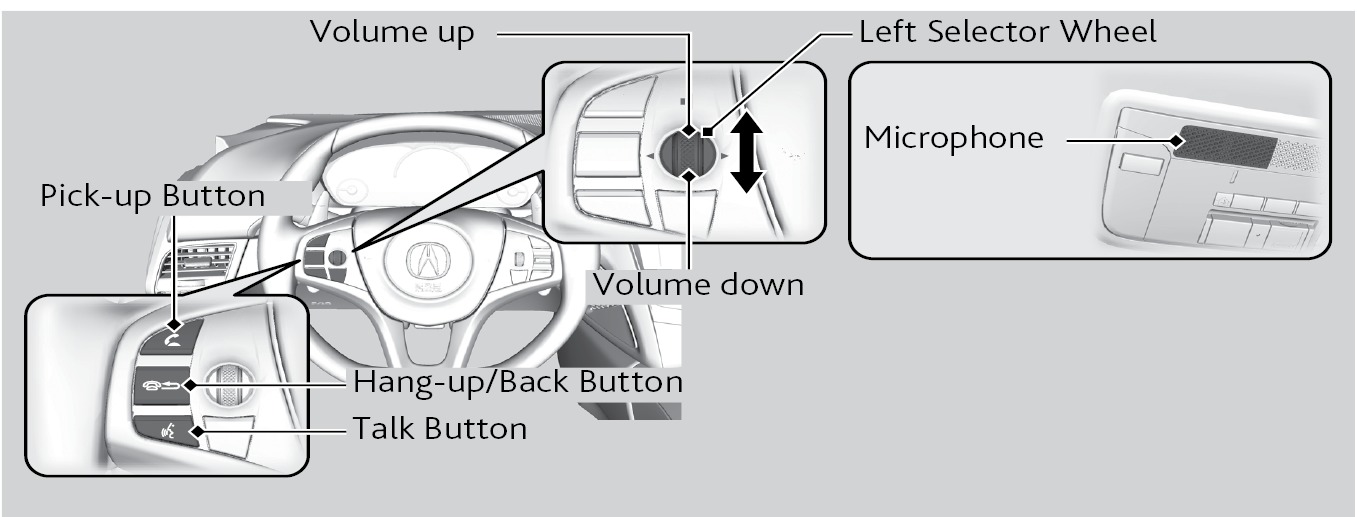
Applicable laws may prohibit the operation of handheld electronic devices while operating a vehicle.
Talk Button Tips
- For a list of phone-related voice commands, see "Voice Command Index".
- When using the Talk button, wait until you hear a beep before speaking.
- To bypass the system prompts, simply press the Talk button again to say your command.
- When the Talk button is pressed, all available voice commands are highlighted in yellow.
- Speak in a clear, natural voice.
- Reduce all background noise.
- Adjust the dashboard and side vents away from the microphone in the ceiling.
- Close the windows.
Related topics:
- Pairing a Phone
- Making a Call
- SMS Text Messaging and E-Mail
- Voice Command Index
- Subscription Features
- Bluetooth Audio
Download Manual