Automatic Brake
Hold
Maintains rear brake hold even after the brake pedal is released. Make sure the vehicle is on and your seat belt is fastened when operating this feature.
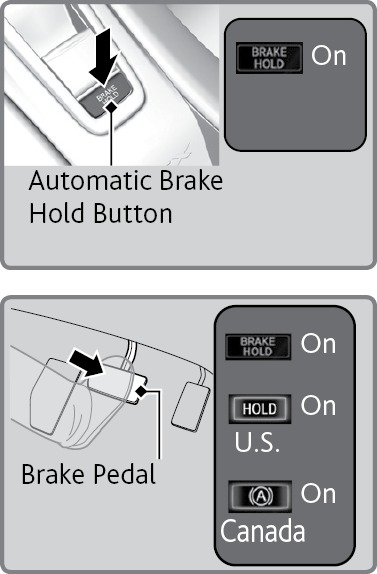
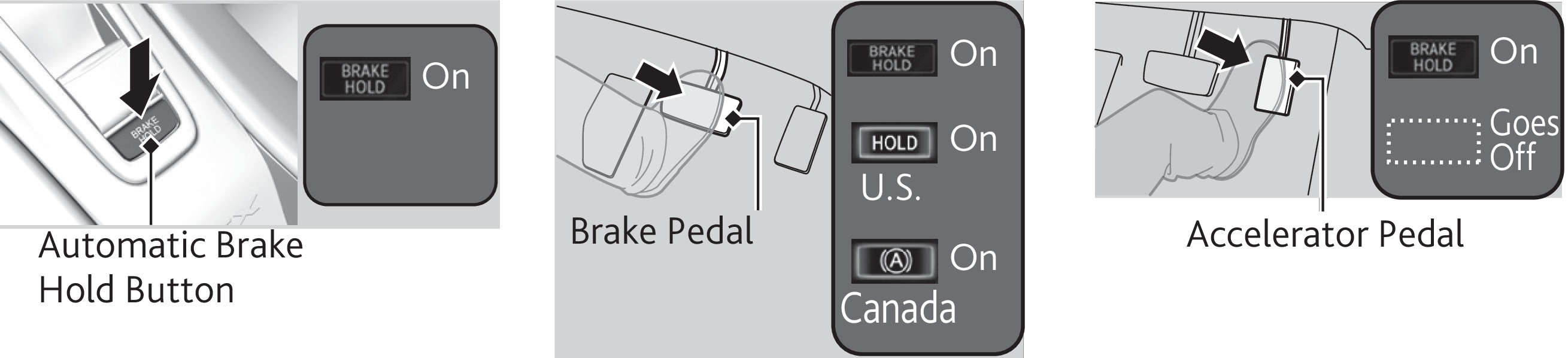
- Press the BRAKE HOLD button. The BRAKE HOLD indicator appears in the instrument panel.
- With the transmission in D, M, or N, press the brake pedal and come to a complete stop. The HOLD indicator appears, and brake hold is applied. Release the brake pedal.
Press the accelerator pedal to cancel brake hold and start moving.
To turn off brake hold: Press the brake pedal and press the BRAKE HOLD button again.
Automatic brake hold cancels when:
- Braking is applied for more than 10 minutes.
- The driver's seat belt is unfastened.
- The power system is turned off.
Using the automatic brake hold system on steep hills or slippery roads may still allow the vehicle to move if you remove your foot from the brake pedal.
If a vehicle unexpectedly moves, it may cause a crash resulting in serious injury or death.
Never use the automatic brake hold system or rely on it to keep a vehicle from moving when stopped on a steep hill or slippery roads.
Using the automatic brake hold system to park the vehicle may result in the vehicle unexpectedly moving.
If a vehicle moves unexpectedly, it may cause a crash, resulting in serious injury or death.
Never leave the vehicle when braking is temporarily kept by automatic brake hold and always park the vehicle by putting the transmission in Park (P) and applying the parking brake.
- Braking
- Dashboard and Ceiling Controls
Download Manual