Lane Keeping System (Lane Assist)
 Introduction
Lane Assist helps the driver to stay in a lane, within the system limitations. This function is not suitable for, and not designed for, autonomously keeping your vehicle in a lane.
Lane Assist detects the lane markers using a camera behind the windshield. If the system detects that the vehicle is coming too close to a lane marker, the system warns the driver with corrective steering. The driver can override the corrective steering at any time.
Speed range
Lane Assist is ready to take control (active system status) when a lane marking is detected within the system limits above approximately 35 mph (60 km/h).
 WARNING
The intelligent technology of Lane Assist cannot overcome the natural laws of physics and it can only operate within the limits of the system. Careless or unintended use of Lane Assist can cause accidents and serious injuries. The system cannot replace the driver’s attention and steering.
-
Always adapt your speed and remain a safe distance to vehicles driving ahead according to the visual, weather, road, and traffic conditions.
-
Always keep your hands on the steering wheel so that you are prepared to steer at any time. The driver is always responsible for keeping the vehicle within the lane.
-
Override immediately by steering if the system intervenes when it should not.
-
Pay attention to indicators in the instrument cluster display and respond to the prompts accordingly when the traffic situation allows.
-
Always pay attention to the area around your vehicle and drive with anticipation.
-
If the camera lens is dirty, covered, or damaged, Lane Assist may be limited.
Lane Assist limitations
Please read the introductory information and heed the Warnings and Notice .
Lane markings not detected or not correctly recognized
Lane Assist does not correctly detect all lane markings. If lane markings are not recognized, Lane Assist may fail to intervene. Be prepared to steer at all times.
Under certain circumstances, Lane Assist may incorrectly detect poor road surfaces, road structures or objects, reflections and glare as lane markings. Override immediately if the system intervenes when it should not.
Switching off Lane Assist temporarily
In the following situations, Lane Assist may intervene when not desired or may fail to intervene when it should. Therefore, the driver's attention is especially important in these scenarios. Switch off Lane Assist temporarily:
-
When the driving style is very dynamic.
-
When weather or road conditions are poor
-
In construction zones
-
In front of bumps or dips in the road
-
When not on highways or well-developed roads.
WARNING
If you do not switch off Lane Assist in the these situations, accidents and serious injuries could occur.
Lane Assist is not available
The system is not available under the following conditions (inactive system status):
-
The vehicle speed is less than around 55 km/h (around 30 mph).
-
Lane Assist has not detected a road lane marking.
-
In tight curves.
-
Temporarily, when the driving style is very dynamic.
-
When the turn signals are switched on before a manual lane change.
-
When the driver oversteers during a system intervention.
-
When there is no reaction from the driver to a driver intervention prompt.
Driving with Lane Assist
Please read the introductory information and heed the Warnings and Notice .
Switching on and off
You can view the switched on condition of the Lane Assist in the instrument cluster display and in the Infotainment system. You can also switch Lane Assist on and off there.
In the instrument cluster display:
-
Press the
 button.
 -
Switch Lane Assist on or off.
 Depending on the vehicle equipment, the button is located either on the multi-function steering wheel or the turn signal and high beam lever.
In the Infotainment system:
-
Open the Assistance systems menu.
-
Switch Lane Assist on or off in the corresponding submenu.
When the Travel Assist is switched on, also Lane Assist is switched on.
If there is a system malfunction, Lane Assist can turn off automatically.
Displays
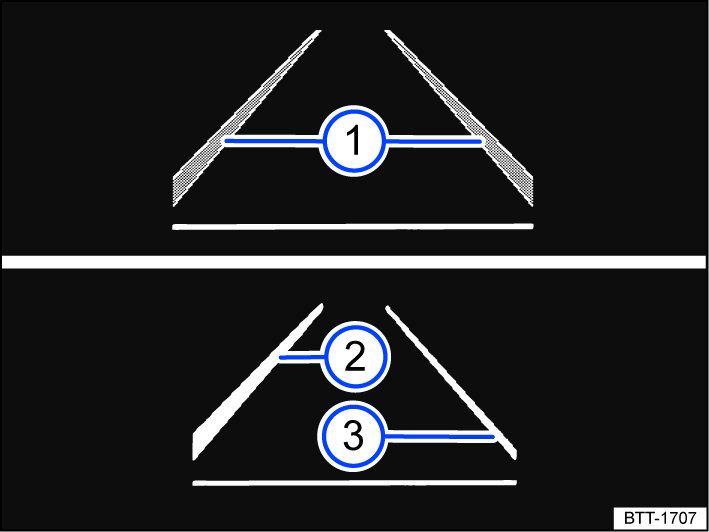
Fig. 131 In the instrument cluster display: Lane Assist indicators.
 Lane marking detected. The system is ready to monitor on the indicated side.
 Lane marking detected. The system is monitoring on the indicated side.
 The system is not ready to monitor on the indicated side.
One of the following indicator lights may come on, depending on the driving situation and the instrument cluster version:
 System active and ready to control.
 System in operation (corrective steering intervention).
If the indicator light does not light up, the system is not ready for operation on both sides (inactive system status) or is switched off.
If Travel Assist is actively regulating, there will be no steering intervention and no Lane Keeping System (Lane Assist) display.
Driver intervention request
If there is no steering activity, the system prompts you to drive in the center of your lane with an indicator in the instrument cluster display and warning chimes.
If you do not respond accordingly, the system becomes inactive.
Depending on the vehicle equipment, semi-automatic vehicle control in a medical emergency (Emergency Assist) is activated.
Independently of steering activity, you are also prompted by an indicator on the instrument cluster display and by a warning chime to drive in the middle of the lane if the corrective steering intervention takes a long time.
Steering wheel vibration
The following situations may cause the steering wheel to vibrate:
-
A lane is no longer detected during a sharp corrective steering intervention by the system.
In addition, you can select the Vibration or Steering wheel vibration option in the Assistance systems menu in the Infotainment system. If you select this option, the steering wheel will vibrate if Lane Assist is active and you drift onto a road lane marking that the system has detected.
Troubleshooting
Please read the introductory information and heed the Warnings and Notice .
Malfunction message, Lane Assist is not available
An indicator light comes on in the instrument cluster. In addition, a message is shown in the instrument cluster display.
-
The camera field of view is dirty. Clean the windshield .
-
The camera's view is limited due to weather conditions, such as snow, or from soap residue or coatings. Clean the windshield .
-
The camera's view is limited by attachments or stickers. Keep the area around the camera field of view clear.
-
The camera is misaligned or damaged, for example as a result of damage to the windshield. Check if there is noticeable damage .
-
Malfunction or fault. Stop the engine and restart.
-
If the problem persists, contact an authorized Volkswagen dealer or authorized Volkswagen Service Facility. Volkswagen recommends contacting an authorized Volkswagen dealer or authorized Volkswagen Service Facility.
It can take a few seconds once the ignition has been switched on for a system fault to be recognized.
If Lane Assist is not available, Emergency Assist is not available either.
If Lane Assist is not available, Travel Assist is not available either.
The system is functioning differently than expected
-
Do not mount any objects on the steering wheel.
Download Manual