Using the air conditioning system and defogger
Automatic air conditioning system
Automatic mode switch
Left-hand side temperature control knob Right-hand side temperature control knob “SYNC” switch
“OFF” switch
Windshield defogger switch
Rear window defogger and outside rear view mirror defoggers switch
Eco air conditioning mode switch Fan speed decrease switch
Fan speed increase switch Airflow mode control switch
Outside/recirculated air mode switch S-FLOW mode switch
“A/C” switch
Turn driver’s side temperature
control dial clockwise to increases the temperature and turn the dial counterclockwise to
 decreases the temperature.
The air conditioning system switches between individual and simultaneous modes each time the “SYNC” switch is pressed.
Simultaneous mode (the indicator on the “SYNC” switch is on):
The driver’s side temperature con- trol dial can be used to adjust the temperature for the driver’s and passenger’s side. At this time, operate the passenger’s side tem- perature control dial to enter indi- vidual mode.
Individual mode (the indicator on the “SYNC” switch is off):
The temperature for the driver’s and passenger’s side can be adjusted separately.
Pressing the “OFF” switch turns off the fan.
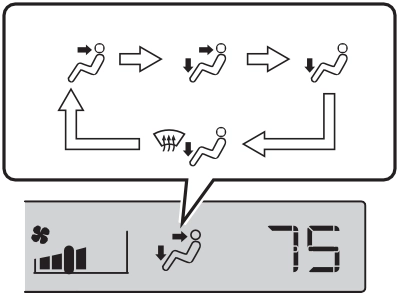
The airflow mode changes as fol- lows each time the switch is pressed.
|
1 2 3 4
|
Press the outside/recirculated air mode switch.
The mode switches between out- side air mode and recirculated air mode each time the switch is oper- ated.
When recirculated air mode is selected, the indicator illuminates on the outside/recirculated air mode switch.
When the function is on, the indica- tor illuminates on the “A/C” switch.
tized such as reducing fan speed, etc.
Press the eco air conditioning mode switch.
When the eco air conditioning mode is on, the indicator illumi- nates on the eco air conditioning mode switch.
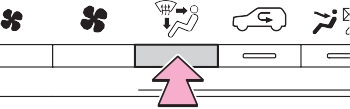
Press the windshield defogger switch.
Set the outside/recirculated air mode switch to outside air mode if the recirculated air mode is used. (It may switch automatically.)
To defog the windshield and the side windows quickly, turn the air flow and temperature up.
To return to the previous mode, press the windshield defogger switch again when the windshield is defogged.
When the windshield defogger switch is on, the indicator illumi- nates on the windshield defogger switch.
Press the rear window defogger and outside rear view mirror defoggers switch.
The defoggers will automatically turn off after 15 minutes.
When the rear window defogger and outside rear view mirror defog- gers switch is on, the indicator illu- minates on the rear window defogger and outside rear view mir- ror defoggers switch.
However, it is not a malfunction. In this situation, the air temperature from the outlets may not change even though the set temperature is raised.
Outside heat exchanger
The outside heat exchanger, accu- mulator and air conditioning piping may incur condensation or frost may form.
During or after the air conditioning operation, water droplets may fall from the vehicle. However, it is not a malfunction.
Accumulator
Outside heat exchanger
mance even if is pressed.
If the windows need to be defogged before driving, stop charging power and then press
.
Heating cannot be performed when it is 14°F (-10°C) or less as the gasoline engine cannot be started during “My Room Mode”. If heating is desired, stop charging and remove the AC charging cable from the vehicle.
Close all windows. If dust thrown up by the vehicle is still drawn into the vehicle after closing the windows, it is recommended that the air intake mode be set to outside air mode and the fan speed to any setting except off.
The dehumidification function may not operate even when “A/C” switch is pressed.
inside and outside the vehicle may enter into and accumulate in the air conditioning system. This may then cause odor to be emitted from the vents.
P.483
|
Caution |
|
|
Air conditioning system |
Approximately 90 seconds after the power switch turned to OFF, you may hear sound coming from air conditioning system. This is the sound of a air conditioning system initialize and, it does not indicate a malfunction.
Some functions can be customized. (Customizable features: P.580)
|
Using automatic mode |
The dehumidification function begins to operate. Air outlets and fan speed are automatically adjusted according to the tempera- ture setting and humidity.
If the fan speed setting or air flow modes are operated, the automatic mode indicator goes off. However, automatic mode for functions other than that operated is maintained.
Fan speed is adjusted automati- cally according to the temperature setting and the ambient conditions.
Therefore, the fan may stop for a while until warm or cool air is ready to flow immediately after the auto- matic mode switch is pressed.
When automatic mode is set, the humidity sensor detects fog on the windshield and controls the air con- ditioning system to prevent fog.
In front seat concentrated air- flow mode, directing airflow to the front seats only and to all seats can be switched via switch operation. When the mode has been switched manually, auto- matic airflow control stops oper- ating.
Press on the air condition-
ing operation panel and switch the airflow.
senger seat is not occupied, air-
flow may switch to only the driver’s seat. Unnecessary air conditioning is suppressed, con- tributing to increased fuel effi- ciency.
Front seat concentrated airflow mode operates in the following situations.
While operating, illumi- nates.
Even if the function is manually switched to directing airflow to only the front seats, when a rear seat is occupied, it may automatically direct airflow to all seats.
Press the switch to turn the sys- tem on/off.
The indicator comes on when the system is on.
The windshield wiper de-icer will automatically turn off after a period of time.

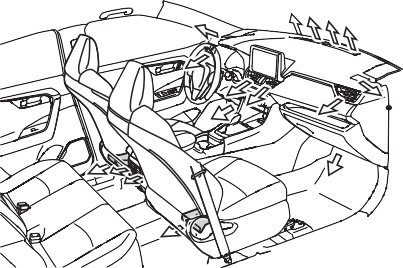
change according to the selected air flow mode.
|
|
Front
*: If equipped (center air outlets only)
Rear
|
|
|
To not interrupt the wind- shield defogger from operat- ing
Do not place anything on the instrument panel which may cover the air outlets. Otherwise, air flow may be obstructed, preventing the windshield defoggers from defog- ging. |
 WARNING
The system can be stopped by pressing “A/C” twice.
System is used while the AC charging cable is connected to the vehicle, electricity from an external power source can be used minimizing the drop in charge of the hybrid battery (traction battery).
Charging will be conducted auto- matically after the Remote Air Con- ditioning System is stopped.
The Remote Air Conditioning Sys- tem will operate in accordance with the temperature settings of the air conditioning system.
The system will only operate if all of the following conditions are met:
The system will automatically shut off under the following conditions:
The system may also shut off if the charge level of the hybrid battery (traction battery) drops to low.
The system may not start in the fol- lowing situations:
When defogging the windshield using the Remote Air Conditioning System, defogging may be insuffi-
cient due to the power being restricted more than during normal air conditioning operation. Also, the outside of the windshield may fog up due to the outside temperature, humidity or air conditioning set tem- perature.
Any unlocked doors will be automat- ically locked when the system is operating. The buzzer sounds and the emergency flashers flash to indi- cate that the doors have been locked or the system has been turned off.
P.218
P.194
P.493
Setting (e.g. Operation using “A/C” on the wireless remote control) can be changed. (Customizable fea- tures: P.569)
|
|
|
Precautions for the Remote Air Conditioning System
Do not use the system if people are in the vehicle.
Even when the system is in use, the internal temperature may still reach a high or low level due to features such as the automatic shut-off. Children and pets left inside the vehicle may suffer heatstroke dehydration or hypothermia or could result in death or serious injury. Depending on the surrounding environment, signals from the wireless switch may transmit further than expected. Pay appropriate attention to the vehicle’s surroundings and use the switch only when neces- sary.
Do not operate “A/C” on the wireless remote control if the hood is open. The Remote Air Conditioning System may oper- ate unintentionally and objects may be drawn into the electrical cooling fan.
|
 WARNING
|
|
|
To prevent the hybrid battery (traction battery) from being discharged
Use “A/C” on the wireless remote control only when necessary. |
 NOTICE
*: If equipped
|
|
|
To prevent damage to the seat heaters and seat ventila- tors
Do not put heavy objects that have an uneven surface on the seat and do not stick sharp objects (needles, nails, etc.) into the seat. To prevent 12-volt battery dis- charge
Do not use the functions when the hybrid system is off. |
 NOTICE
|
Heated steering wheel |
The indicator light comes on when the heated steering wheel is oper- ating.
The power switch is in ON.
When the seat heater is on, the indicator illuminates on the seat heater switch.
When not in use, put the switch in the neutral position. The indicator will turn off.
Each time the switch is pressed, the operation condition changes as follows.
Hi (3 segments lit) Mid (2 seg- ments lit) Lo (1 segment lit) Off
The level indicators (yellow) light up during operation.
The level indicators (green) light up during operation.
The power switch is in ON.
When a seat ventilator is set to Hi, the fan speed of the seat ventilator may increase according to the fan speed of the air conditioning sys- tem.
Seat ventilation blower level can be customized.
(Customizable features: P.580)
|
Operating the rear seat heaters (if equipped) |
The indicator light comes on when the seat heater is operating.
The power switch is in ON.
Download Manual