Steps to take in an emergency
508 8-2. Steps to take in an emergency
From the front
Use a towing dolly under the rear wheels.
From the rear
Use a towing dolly under the front wheels.
|
Situations when it is nec- essary to contact dealers before towing |
The following may indicate a problem with your transmission. Contact your Toyota dealer or commercial towing service before towing.
8-2. Steps to take in an emergency
509
|
Using a flatbed truck |
In order to suppress vehicle movement during transporta- tion, set the parking brake and turn the power switch off.
|
Visible symptoms |
|
Audible symptoms |
cornering
|
Operational symptoms |
side when braking
511
|
Warning light |
Details/Actions |
|
(U.S.A.) (Canada) (Red) |
Indicates that: The brake fluid level is low; or
The brake system is malfunctioning
Immediately stop the vehicle in a safe place and contact your Toyota dealer. Continuing to drive the vehicle may be dangerous. |
8
|
Warning light |
Details/Actions |
|
Indicates a malfunction in the vehicle’s charging system Immediately stop the vehicle in a safe place and contact your Toyota dealer. |
*: This light illuminates on the multi-information display.
|
Warning light |
Details/Actions |
|
Indicates that the engine is overheating Immediately stop the vehicle in a safe place. Handling method (P.544) |
*: This light illuminates on the multi-information display with a message.
|
Warning light |
Details/Actions |
|
Indicates that the hybrid system has overheated Stop the vehicle in a safe place. Handling method (P.544) |
*: This light illuminates on the multi-information display with a message.
|
Warning light |
Details/Actions |
|
Indicates that the engine oil pressure is too low Immediately stop the vehicle in a safe place and contact your Toyota dealer. |
*: This light illuminates on the multi-information display with a message.
|
Warning light |
Details/Actions |
|
(U.S.A.) (Canada) |
Indicates a malfunction in: The hybrid system;
The electronic engine control system;
The electronic throttle control system; or
The emission control system (if equipped)
Have the vehicle inspected by your Toyota dealer immediately. |
*: This light illuminates on the multi-information display.
513
|
Warning light |
Details/Actions |
|
(U.S.A.) (Canada) |
Indicates a malfunction in: The ABS; or
The brake assist system
Have the vehicle inspected by your Toyota dealer immediately. |
8
*: This light illuminates on the multi-information display.
|
Warning light |
Details/Actions |
|
(Flashes or illuminates) |
When a buzzer sounds simultaneously: Indicates a malfunction has occurred in the PCS (Pre-Collision System). Have the vehicle inspected by your Toyota dealer immediately. When a buzzer does not sound: The PCS (Pre-Collision System) has become temporarily unavailable, corrective action may be necessary. Follow the instructions displayed on the multi-information display. (P.313, 526) If the PCS (Pre-Collision System) or VSC (Vehi- cle Stability Control) system is disabled, the PCS warning light will illuminate. P.322 |
|
Warning light |
Details/Actions |
|
(Orange) |
Indicates a malfunction in the LTA (Lane Trac- ing Assist) Follow the instructions displayed on the multi-information display. (P.332) |
*: This light illuminates on the multi-information display.
|
Warning light |
Details/Actions |
|
(If equipped) |
When a buzzer sounds: Indicates a malfunction in the Intuitive parking assist function Have the vehicle inspected by your Toyota dealer immediately. When a buzzer does not sound: Indicates that the system is temporarily unavail- able, possibly due to a sensor being dirty or cov- ered with ice, etc. Follow the instructions displayed on the multi-information display. (P.359, 523) |
*: This light illuminates on the multi-information display.
*: This light illuminates on the multi-information display.
515
8
*: This light illuminates on the multi-information display.
|
Warning light |
Details/Actions |
|
(If equipped) |
Indicates a malfunction in the RCTA (Rear Cross Traffic Alert) function Have the vehicle inspected by your Toyota dealer immediately. Indicates that the rear bumper around the radar sensor is covered with dirt, etc. (P.350) Follow the instructions displayed on the multi-information display. (P.348, 523) |
*: This light illuminates on the multi-information display.
|
Warning light |
Details/Actions |
|
Indicates a malfunction in: The VSC/Trailer Sway Control system;
The TRAC system;
The Trail Mode function; or
The hill-start assist control system
Have the vehicle inspected by your Toyota dealer immediately. |
|
Warning light |
Details/Actions |
|
When a buzzer sounds: Brake Override System is malfunctioning;
Drive-Start Control is operating;
Drive-Start Control is malfunctioning; or
Parking Support Brake function (for static objects) (if equipped) is operating
Follow the instructions displayed on the multi-information display and head-up display (if equipped). When a buzzer does not sound: Brake Override System is operating Release the accelerator pedal and depress the brake pedal. |
*: This light illuminates on the multi-information display with a message.
517
8
*: This light illuminates on the multi-information display.
|
Warning light |
Details/Actions |
|
Indicates that remaining fuel is approximately 2.2 gal. (8.3 L, 1.8 Imp. gal.) or less Refuel the vehicle. |
|
Warning light |
Details/Actions |
|
Warns the driver and/or front passenger to fas- ten their seat belts Fasten the seat belt. If the front passenger’s seat is occupied, the front passenger’s seat belt also needs to be fastened to make the warning light (warning buzzer) turn off. |
*: Driver’s seat belt warning buzzer:
The driver’s seat belt warning buzzer sounds to alert the driver that his or her seat belt is not fastened. Once the power switch is turned to ON, the buzzer sounds. If the seat belt is still unfastened, the buzzer sounds inter- mittently for a certain period of time after the vehicle reaches a certain speed.
Front passenger’s seat belt warning buzzer:
The front passenger’s seat belt warning buzzer sounds to alert the front passenger that his or her seat belt is not fastened. If the seat belt is unfastened, the buzzer sounds intermittently for a certain period of time after the vehicle reaches a certain speed.
|
Warning light |
Details/Actions |
|
(If equipped) |
Warns the rear passengers to fasten their seat belts Fasten the seat belt. |
*1: This light illuminates on the multi-information display.
*2: Regardless of whether or not a rear passenger is present, this light will also illuminate for a certain period of time after the rear door is opened and closed.
*3: Rear passengers’ seat belt warning buzzer:
519
The rear passengers’ seat belt warning buzzer sounds to alert the rear passengers that his or her seat belt is not fastened. If the seat belt is unfastened, the buzzer sounds intermittently for a certain period of time, after the seat belt is fastened and unfastened and the vehicle reaches a certain speed.
In some cases, the buzzer may not be heard because of noisy place or an audio sound.
This warning light system monitors the airbag sensor assembly, front impact sensors, side impact sensors (front door), side impact sensors (front), side impact sensors (rear), driver’s seat position sensor, front passenger occupant classification sensors, “AIR BAG ON” indicator light, “AIR BAG OFF” indicator light, front passenger’s seat belt buckle switch, driver’s seat belt preten- sioner, front passenger’s seat belt pretensioner and force limiter, air- bags, interconnecting wiring and power sources. (P.35)
First check the following:
If it is, fill the fuel tank immediately.
The light will go off after several driving trips.
If the light does not go off even after several trips, contact your Toyota dealer as soon as possible.
When the 12-volt battery charge becomes insufficient or the voltage temporarily drops, the electric power steering system warning light may come on and the warning buzzer may sound.
At this time, the functions of the air conditioning, etc. may be partially limited in order to reduce the power consumption of the 12-volt battery.
Inspect the tires to check if a tire is punctured.
If a tire is punctured: P.527
If none of the tires are punctured:
Turn the power switch to OFF then turn it to ON. Check if the tire pres- sure warning light comes on or
blinks. 8
If the tire pressure warning light blinks for approximately 1 minute then stays on
There may be a malfunction in the tire pressure warning system. Have the vehicle inspected by your Toyota dealer immediately.
If the tire pressure warning light comes on
1 After the temperature of the tires has lowered sufficiently, check the inflation pressure of each tire and adjust them to the specified level.
 2 If the warning light does not turn off even after several minutes have elapsed, check that the inflation pressure of each tire is at the specified level and perform initialization. (P.474)
The tire pressure warning light may come on due to natural causes such as natural air leaks and tire inflation pressure changes caused by tem- perature. In this case, adjusting the tire inflation pressure will turn off the warning light (after a few minutes).
The compact spare tire is not equipped with a tire pressure warn- ing valve and transmitter. If a tire goes flat, the tire pressure warning light will not turn off even though the flat tire has been replaced with the spare tire. Replace the spare tire with the standard tire and adjust the tire inflation pressure. The tire pres- sure warning light will go off after a few minutes.
P.472
521
|
|
|
As an added safety feature, your vehicle has been equipped with a tire pressure monitoring system (TPMS-tire pressure warning sys- tem) that illuminates a low tire pressure telltale (tire pressure warning light) when one or more of your tires is significantly under- inflated. Accordingly, when the low tire pressure telltale (tire pres- sure warning light) illuminates, you should stop and check your tires as soon as possible, and inflate them to the proper pres- sure. Driving on a significantly under-inflated tire causes the tire to overheat and can lead to tire failure. Under-inflation also reduces fuel efficiency and tire tread life, and may affect the vehi- cle’s handling and stopping abil- ity. Please note that the TPMS (tire pressure warning system) is not a substitute for proper tire mainte- nance, and it is the driver’s responsibility to maintain correct tire pressure, even if under-infla- tion has not reached the level to trigger illumination of the TPMS low tire pressure telltale (tire pres- sure warning light). |
 WARNING
8
The warning messages explained below may differ from the actual messages according to operation conditions and vehicle specifica- tions.
523
pedal is shown
A warning message about an opera- tion of the brake pedal may be shown while the driving support sys- tems such as PCS (Pre-Collision system) or the dynamic radar cruise control with full-speed range is oper- ating. If a warning message is shown, be sure to decelerate the vehicle or follow an instruction shown on the multi-information dis- play.
An instruction for operation of the power switch is shown when the incorrect procedure for starting the hybrid system is performed or the power switch is operated incorrectly. Follow the instructions shown on the multi-information display to operate the power switch again.
To prevent the shift lever from being operated incorrectly or the vehicle from moving unexpectedly, a mes- sage that requires shifting the shift lever may be shown on the multi- information display. In that case, fol- low the instruction of the message and shift the shift lever.
Confirm the part indicated by the
multi-information display or a warn- ing light, and then perform the cop- ing method such as closing the open door or replenishing a con- sumable.
The system or part shown on the multi-information display is malfunc- tioning. Have the vehicle inspected by your Toyota dealer immediately.
a safe place and, if the fuel level is low, refuel the vehicle.
Indicates a malfunction in the vehi- cle’s charging system. Pull over and stop the vehicle as soon as it is safe to do so.
While the message is displayed, the functions of the air conditioning, etc. may be partially limited in order to reduce the power consumption of the 12-volt battery.
The message may be shown when driving under severe operating con- ditions. (For example, when driving up a long steep hill or driving up a steep hill in reverse.)
Coping method: P.544
This message may be displayed when the shift lever is in N.
As the hybrid battery (traction bat- tery) cannot be charged when the shift lever is in N, shift the shift lever to P when the vehicle is stopped.
This message is displayed when the hybrid battery (traction battery) charge has become extremely low because the shift lever has been left in N for a certain amount of time.
When operating the vehicle, shift to P and restart the hybrid system.
Message is displayed when the driver’s door is opened without turn- ing the power switch to OFF with the shift lever in any position other than P.
Shift the shift lever to P.
Message is displayed when the accelerator pedal has been depressed and the shift lever is in N. Release the accelerator pedal and shift the shift lever to D or R.
Message is displayed when the accelerator pedal is depressed to maintain the vehicle position when stopped on a upward slope, etc.
If this continues, the hybrid system may overheat.
Release the accelerator pedal and depress the brake pedal.
Power was turned off due to the automatic power off function.
Next time when starting the hybrid system, operate the hybrid system for approximately 5 minutes to
525
recharge the 12-volt battery.
The engine oil level may be low. Check the level of the engine oil, and add engine oil if necessary. This message may be displayed if the vehicle is stopped on a slope. Move the vehicle to a level surface and check if the message disap- pears.
Indicates that all maintenance according to the driven distance on the maintenance schedule* should be performed soon.
Comes on approximately 4500 miles (7200 km) after the message has been reset.
If necessary, perform maintenance. Please reset the message after the maintenance is performed. (P.451)
*: Refer to the separate “Scheduled Maintenance Guide” or “Owner’ Manual Supplement” for the main- tenance interval applicable to your vehicle.
Indicates that all maintenance is required to correspond to the driven distance on the maintenance sched- ule*.
Comes on approximately 5000 miles (8000 km) after the message has been reset. (The indicator will not work properly unless the mes- sage has been reset.)
Perform the necessary mainte- nance. Please reset the message after the maintenance is performed. (P.451)
*: Refer to the separate “Scheduled Maintenance Guide” or “Owner’ Manual Supplement” for the main-
tenance interval applicable to your vehicle.
The following systems may be sus- pended until the problem shown in the message is resolved. (P.313, 511)
*: If equipped
The dynamic radar cruise control with full-speed range system is sus- pended temporarily or until the prob- lem shown in the message is resolved. (causes and coping meth- ods: P.313)
The dynamic radar cruise control with full-speed range system cannot be used temporarily. Use the sys-
tem when it becomes available 8
again.
P.519
|
|
|
If a warning light comes on or a warning buzzer sounds when a warning message is shown on the multi-informa- tion display
P.521 |
 WARNING
|
|
|
“High Power Consumption Partial Limit On AC/Heater Operation” is frequently shown
There is a possible malfunction relating to the charging system or the 12-volt battery may be deteri- orating. Have the vehicle inspected by your Toyota dealer. If “Maintenance required For Traction Battery At Your Dealer” is shown
The hybrid battery (traction bat- tery) is scheduled to be inspected or replaced. Have the vehicle inspected by your Toyota dealer immediately. Continuing to drive the vehicle without having the hybrid bat- tery (traction battery) inspected will cause the hybrid system not to start.
If the hybrid system does not start, contact your Toyota dealer immediately.
|
 NOTICE
527
8
Jack Spare tire
Jack handle Wheel nut wrench
8-2. Steps to take in an emergency
rubber band.
529
|
Taking out the jack |
After taking out the jack, hold it in place by attaching the rubber band temporarily to the hole shown in the illustration.
To store the jack, rotate the jack and tighten until it no longer moves. Insert it into the deck under tray and then secure it in place with a
8
and then take out the spare tire.
1 Chock the tires.
|
|
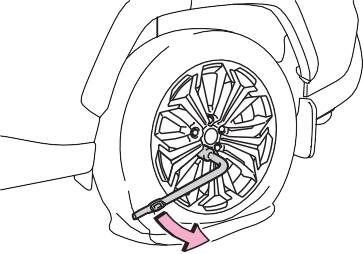
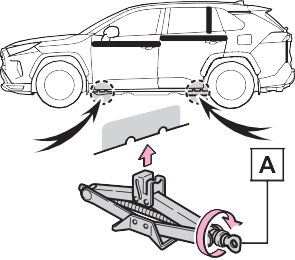
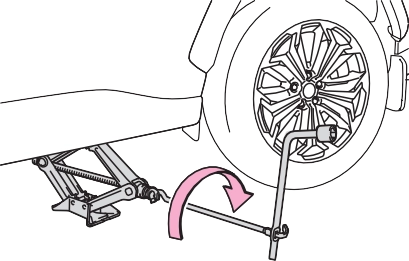
by hand until the notch of the jack is in contact with the jack point.
The jack point guides are located under the rocker panel. They indi- cate the jack point positions.
|
|
|
|
When resting the tire on the ground, place the tire so that the wheel design faces up to avoid scratching the wheel surface.
531
|
|
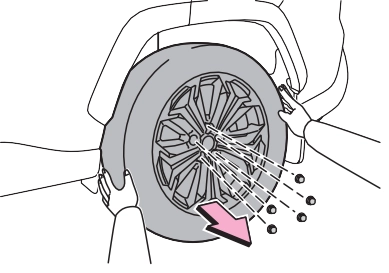
8
1 Remove any dirt or foreign matter from the wheel con- tact surface.
If foreign matter is on the wheel contact surface, the wheel nuts may loosen while the vehicle is in
motion, causing the tire to come off.
Turn the wheel nuts until the wash- ers ( A ) come into contact with the
Tightening torque:
76 ft•lbf (103 N•m, 10.5 kgf•m)
|
|
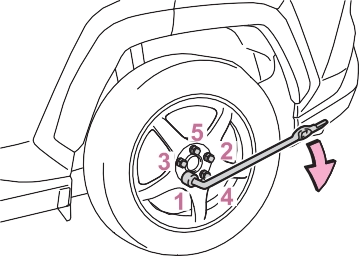
disc wheel ( B ).
USE ONLY” on the tire sidewall. Use the compact spare tire tem- porarily, and only in an emer- gency.
As the compact spare tire is not equipped with a tire pressure warn- ing valve and transmitter, low infla-
tion pressure of the spare tire will not be indicated by the tire pressure warning system. Also, if you replace the compact spare tire after the tire pressure warning light comes on, the light remains on.
The vehicle height may become lower when driving with the compact spare tire compared to when driving with standard tires.
Install the compact spare tire on one of the rear wheels of the vehicle.
Perform the following steps and fit
tire chains to the front tires:
8
|
The hybrid system will not start even though the cor- rect starting procedure is |
|
being followed (P.279) |
One of the following may be the cause of the problem:
8-2. Steps to take in an emergency
535
One of the following may be the cause of the problem:
One of the following may be the cause of the problem:
Contact your Toyota dealer if the problem cannot be repaired, or if repair procedures are
unknown.
|
Starting the hybrid sys- tem in an emergency |
When the hybrid system does not start, the following steps can be used as an interim measure to start the hybrid system if the power switch is functioning nor- mally.
Do not use this starting proce- dure except in cases of emer- gency.
Parking brake indicator will come on.
8
Even if the hybrid system can be
started using the above steps, the system may be malfunction- ing. Have the vehicle inspected by your Toyota dealer.
If you lose your keys
|
Opening the fuel filler door |
When removing the cover, to pre- vent damage, cover the tip of the screwdriver with a rag.
|
|
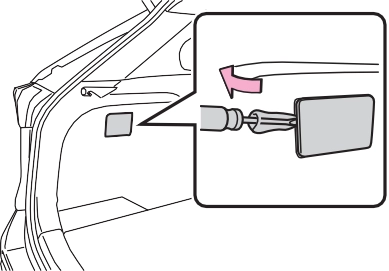
Using the lever to open the fuel filler door may not allow for an ade- quate reduction in fuel tank pres- sure before refueling. To prevent fuel from spilling out, turn the cap slowly when removing it.
During refueling, fuel may spill out from the filler opening due to air being discharged from inside the fuel tank. Therefore, fill the fuel tank
carefully and slowly.
537
8
Use the mechanical key (P.196) in order to perform the
following operations.
Turning the key rearward unlocks the driver’s door. Turning the key once again within 5 seconds unlocks the other doors.
*1: If equipped
*2: These settings must be custom- ized at your Toyota dealer.
|
|
|
When using the mechanical key and operating the power windows or the moon roof (if equipped) or panoramic moon roof (if equipped)
Operate the power window or the moon roof or panoramic moon roof after checking to make sure that there is no possibility of any passenger having any of their body parts caught in the window or the moon roof or panoramic moon roof. Also, do not allow chil- dren to operate the mechanical key. It is possible for children and other passengers to get caught in the power window or the moon roof or panoramic moon roof. |
 WARNING
|
Starting the hybrid sys- tem |
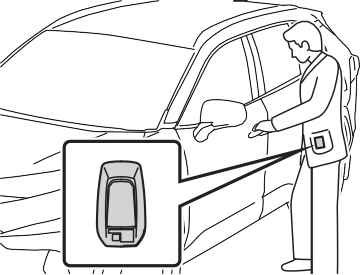
When the electronic key is detected, a buzzer sounds and the power switch will turn to ON.
When the smart key system is deactivated in customization set- ting, the power switch will turn to ACC.
is displayed on the multi- information display.
In the event that the hybrid system still cannot be started, contact your Toyota dealer.
539
As the above procedure is a tempo- rary measure, it is recommended that the electronic key battery be replaced immediately when the bat- tery is depleted. (P.493)
Release the brake pedal and press the power switch in step 3 above. The hybrid system does not start and modes will be changed each time the switch is pressed. (P.283)
When connecting the jumper (or booster) cables, depending on the situation, the alarm may activate
and the doors locked. (P.74) 8
|
|
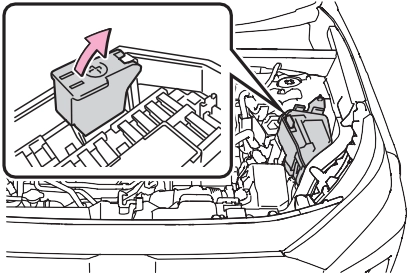
Push claw A
and B
to com-
pletely release the lock, and then lift
up the cover. 3 Open the exclusive jump starting terminal cover.
|
|
on your vehicle and
connect the clamp on the other end of the positive cable to on the second vehicle. Then, connect a negative cable clamp to
on the second vehicle and connect the clamp at the other end of
the negative cable to .
Positive (+) battery terminal (second vehicle) Negative (-) battery terminal (second vehicle)
Solid, stationary, unpainted metallic point away from the exclu- sive jump starting terminal and any moving parts as shown in the illustration
maintain at that level for approximately 5 minutes to
541
10Close the exclusive jump starting terminal cover, and reinstall the fuse box cover to its original position.
Once the hybrid system starts, have the vehicle inspected at your Toyota dealer as soon as possible.
The hybrid system cannot be started by push-starting.
is running at a low speed for an extended period, such as in heavy traffic.
When the 12-volt battery terminals are removed, the information stored in the ECU is cleared. Before removing the 12-volt battery termi- nals, contact your Toyota dealer.
The electricity stored in the 12-volt battery will discharge gradually even when the vehicle is not in use, due to natural discharge and the drain- ing effects of certain electrical appli- ances. If the vehicle is left for a long time, the 12-volt battery may dis- charge, and the hybrid system may be unable to start. (The 12-volt bat- tery recharges automatically while the hybrid system is operating.)
volt battery is discharged. Use the wireless remote control or the mechanical key to lock or unlock the doors.
If you are unsure what mode the power switch was in before the 12-volt battery discharged, be especially careful when recon- necting the 12-volt battery.
included with the new 12-volt bat- tery or the one installed on the battery prior to the replacement. (Depending on the new 12-volt battery installed, the exhaust hole may be plugged.)
For details, consult your Toyota dealer.
Exhaust hole Exhaust hose
Hole section of the vehicle
|
|
|
When removing the battery terminals
Always remove the negative (-) terminal first. If the positive (+) ter- minal contacts any metal in the surrounding area when the posi- tive (+) terminal is removed, a spark may occur, leading to a fire in addition to electrical shocks and death or serious injury. |
 WARNING
543

8
|
|
|
When handling jumper cables
When connecting the jumper cables, ensure that they do not become entangled in the cooling fan, etc. To prevent damaging the vehicle
The exclusive jump starting termi- nal is to be used when charging the 12-volt battery from another vehicle in an emergency. It cannot be used to jump start another vehicle. |
 NOTICE
|
Correction procedures |
the steam subsides.
8-2. Steps to take in an emergency
5 Add coolant if necessary.
545
If a large amount of coolant leaks, immediately contact your Toyota dealer.
A Reservoir B “FULL” line C “LOW” line
Water can be used in an emer- gency if engine coolant is unavail- able.
If water was added in an emer- gency, have the vehicle inspected at your Toyota dealer as soon as possible.
|
|
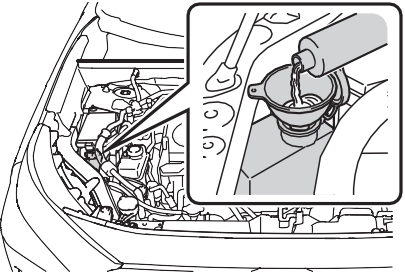
The fan operates when the air con- ditioning system is turned on imme- diately after a cold start. Confirm that the fan is operating by check- ing the fan sound and air flow. If it is difficult to check these, adjust the temperature control switch to “LO”
and turn the “A/C” switch ON and 8
OFF. After this, turn the air condi- tioning system on and off repeat- edly. (The fan may not operate in freezing temperatures.)
If the fan is operating:
Have the vehicle inspected at the nearest Toyota dealer.
Place See Owner’s Manual” is shown on the multi-infor- mation display.
If the message does not disappear: Stop the hybrid system and contact your Toyota dealer.
If the message is not displayed: Have the vehicle inspected at the nearest Toyota dealer.
Radiator Cooling fan
If a large amount of coolant leaks, immediately contact your Toyota dealer.
“FULL” and “LOW” lines on the reservoir.
|
|
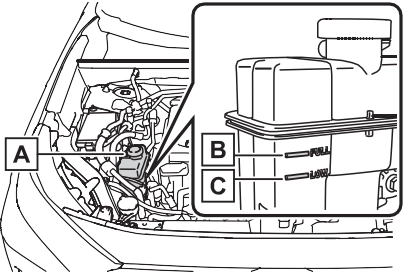
Reservoir “FULL” line “LOW” line
Water can be used in an emer- gency if power control unit coolant is unavailable.
If water was added in an emer- gency, have the vehicle inspected at your Toyota dealer as soon as possible.
|
|
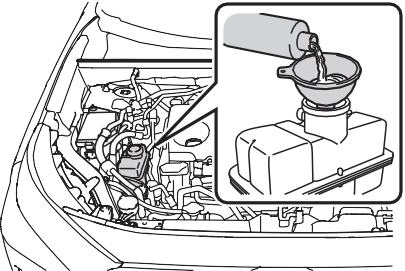
If the message does not disappear: Stop the hybrid system and contact your Toyota dealer.
If the message is not displayed: The hybrid system temperature has
dropped and the vehicle may be driven normally.
However, if the message appears again frequently, contact your Toyota dealer.
547
8
|
|
|
When adding engine/power control unit coolant
Add coolant slowly after the hybrid system has cooled down sufficiently. Adding cool coolant to a hot hybrid system too quickly can cause damage to the hybrid system. |
 NOTICE
|
Recovering procedure |
 Place wood, stones or some other material to help provide traction under the tires.
When it is difficult to free the vehicle
Press  to turn off TRAC. (P.382)
Vehicle specifications 9
9-3. Initialization
Items to initialize 582
9
Download Manual