Key information
Keys
The following keys are provided with the vehicle.
|
|
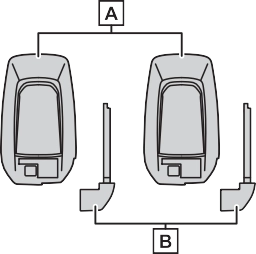
Electronic keys
When bringing an electronic key onto an aircraft, make sure you do not press any buttons on the elec- tronic key while inside the aircraft cabin. If you are carrying an elec- tronic key in your bag etc., ensure that the buttons are not likely to be pressed accidentally. Pressing a button may cause the electronic key to emit radio waves that could inter- fere with the operation of the air- craft.
hybrid system stops.
You can replace the battery by your- self (P.493). However, as there is a danger that the electronic key may be damaged, it is recommended that replacement is carried out by your Toyota dealer.
To prevent trapping the electronic key inside the vehicle, leaving the vehicle carrying the electronic key
on your person without turning the power switch to OFF or other pas- sengers from unintentionally taking the key out of the vehicle, etc., a message that prompts the user to confirm the state of the electronic key or power switch mode may be shown on the multi-information dis- play. In those cases, follow the instructions on the display immedi- ately.
The electronic key has a low bat- tery. Replace the electronic key bat- tery. (P.493)
P.493
The number of keys already regis- tered to the vehicle can be con- firmed. Ask your Toyota dealer for details.
This message will be displayed each time the driver’s door is opened when the doors are unlocked from the outside for approximately 10 days after a new electronic key has been registered. If this message is displayed but you have not had a new electronic key registered, ask your Toyota dealer to check if an unknown electronic key (other than those in your pos- session) has been registered.
|
|
|
To prevent key damage
Do not drop the keys, subject them to strong shocks or bend them.
|
 NOTICE
Locks all the doors (P.198)
Unlocks all the doors (P.198)
Opens the side windows*1 and the moon roof*1, 2 or panoramic moon roof*1, 2 (P.198)
Opens and closes the power back door*2 (P.207)
Operates Remote Air Condi- tioning System (P.405)
Sounds the alarm (P.196)
*1: These settings must be custom- ized at your Toyota dealer.
*2: If equipped
When is pressed for longer than about 1 second, an alarm will sound intermittently and the vehicle lights will flash to deter any person from trying to break into or damage your vehicle.
To stop the alarm, press any button
on the electronic key.
P.218
|
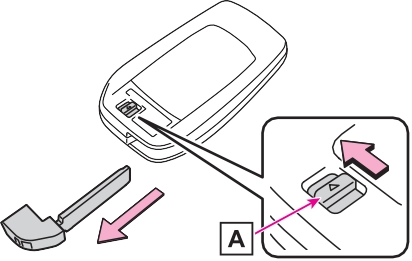
Using the mechanical key |
slide the release lever and take the key out.
The mechanical key can only be inserted in one direction, as the key only has grooves on one side. If the key cannot be inserted in a lock cyl- inder, turn it over and re-attempt to insert it.
After using the mechanical key, store it in the electronic key. Carry the mechanical key together with the electronic key. If the electronic key battery is depleted or the entry function does not operate properly, you will need the mechanical key. (P.537)
|
|
P.536
The key cylinder rotates freely to isolate inside mechanism.
Download Manual