Vehicle Dynamics Control system
In the event of wheelspin and/or skidding on a slippery road surface and/or during cornering and/or an evasive maneuver, the Vehicle Dynamics Control system adjusts the engine’s output and the wheels’ respective braking forces to help maintain traction and directional control.
The traction control function is designed to prevent spinning of the driving wheels on slippery road surfaces, thereby helping to maintain traction and directional control. Activation of this function is shown by flashing the Vehicle Dynamics Control operation indicator light.
The skid suppression function is designed to help maintain directional stability by suppressing the wheels’ tendency to slide sideways during steering operations. Acti- vation of this function is shown by flashing the Vehicle Dynamics Control operation indicator light.
– Slight twitching of the brake
pedal is felt.
. Always turn off the engine before replacing a tire. Failure to do so may render the Vehicle Dynamics Control system unable to operate correctly.
Refer to “Vehicle Dynamics Control warn- ing light/Vehicle Dynamics Control opera- tion indicator light” P176 and “Vehicle Dynamics Control OFF indicator light”
P178.
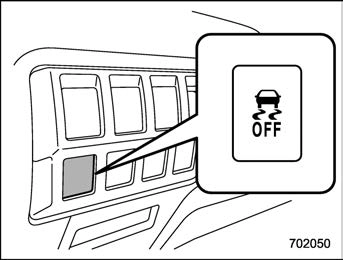
Type A
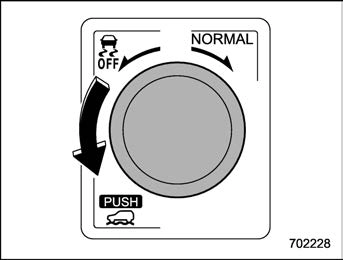
Type B
Press or turn the Vehicle Dynamics Con- trol OFF switch to deactivate the Vehicle Dynamics Control system. Creating ade- quate driving wheel slip by deactivating the Vehicle Dynamics Control system may help to recover from the loss of traction. Use the Vehicle Dynamics Control OFF switch as necessary.
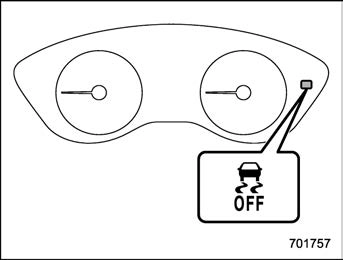
When the switch is pressed or turned during engine operation, the Vehicle Dy- namics Control OFF indicator light “  ” on the combination meter illuminates. The Vehicle Dynamics Control system will be deactivated and the vehicle will behave like a model not equipped with the Vehicle Dynamics Control system. When the switch is pressed again (type A) or turned to the “NORMAL” side (type B) to reacti- vate the Vehicle Dynamics Control sys- tem, the Vehicle Dynamics Control OFF indicator light turns off.
With the Vehicle Dynamics Control system deactivated, traction and stability en- hancement offered by the Vehicle Dy- namics Control system is unavailable. Therefore, you should not deactivate the Vehicle Dynamics Control system except
under the above-mentioned situations.
system is activated, the Vehicle Dy- namics Control operation indicator light flashes.
Download Manual