Illumination brightness control
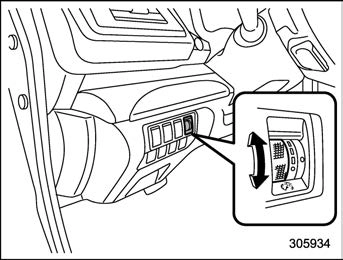
The illumination brightness of the instru- ment panel illuminates under the following conditions.
 When the light switch is in the “ ” or “
  ” position
When the light control switch is in the “AUTO” position and the headlights illumi- nate automatically
You can adjust the illumination brightness for better visibility.
To brighten, turn the control dial upward. To darken, turn the control dial downward.
When the control dial is turned fully upward, the illumination brightness becomes the maximum and the auto- matic dimming function does not work at all.
The brightness setting is not can- celed even when the ignition switch is turned to the “LOCK”/“OFF” position.
Auto dimmer cancel function
When the ambient light is bright, the illumination brightness is set to the max- imum regardless of the position of the control dial. In this case, you cannot adjust the illumination brightness by using the control dial. When the ambient light is dark, you can dim the illumination brightness as described above.
The operational/non-operational setting and sensitivity of the auto dimmer cancel function can be changed by your SUBARU dealer. Contact your SUBARU dealer for details.
Download Manual