Automatic climate control operation
When this mode is selected, the fan speed, airflow distribution, air-inlet control, and air conditioner compressor operation are automatically controlled. To activate this mode, perform the following.
operation, the “FULL” indicator light on the multi-function display (color LCD) will turn off and the “AUTO” indicator light will remain illuminated. You can then manually control the system as desired using the button you operated. To change the system back to the FULL AUTO mode, press the AUTO button.
To turn off the climate control system, press the ON/OFF button. Then the air inlet selection will be set to the following.
The sensors are located as follows.
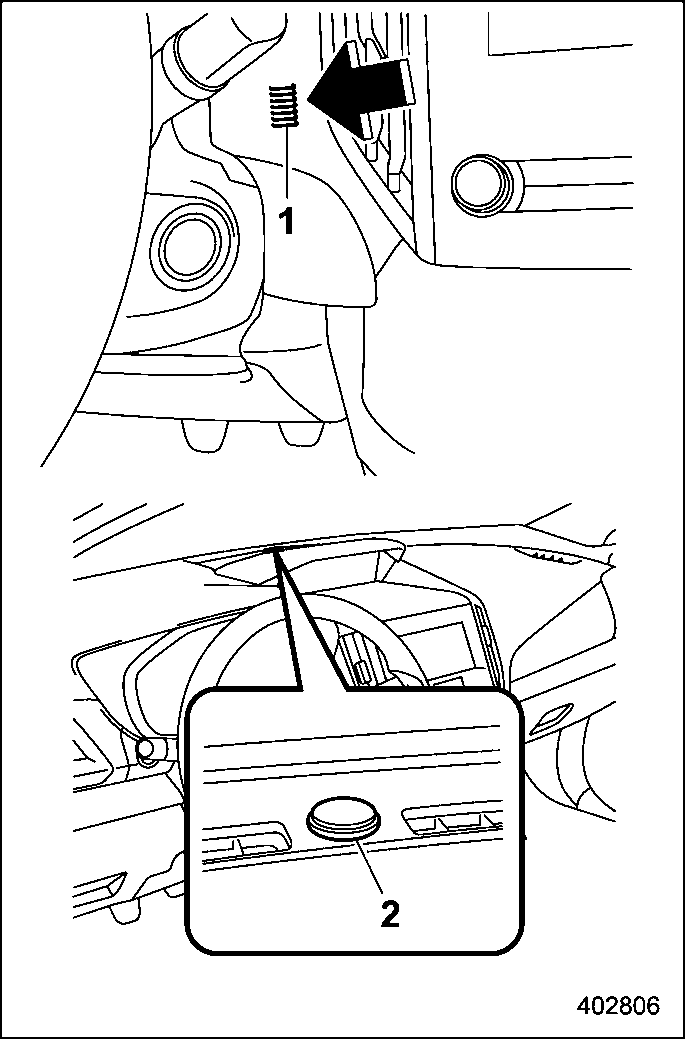
The automatic climate control system employs several sensors. These sensors
262 Automatic climate control operation
are delicate. If they are not treated properly and become damaged, the system may not be able to control the interior tempera- ture correctly. To avoid damaging the sensors, observe the following precau- tions.
The automatic climate control can be customized on the multi-function display. Refer to “Setting screen” P212 for setting methods.
The climate control can be set in the following mode.
Use this mode for normal climate control.
Use this mode for the mild airflow mode.
Use this mode when climate control needs to be operate to increase the comfort quickly. This will reduce the operation range of the Auto Start Stop function.
! ECO mode
Use this mode when fuel efficiency is prioritized over comfort. This increases the range of the Auto Start Stop operation.
This mode switches the climate control operation according to the number of passengers.
This mode detects passenger by the occupant detection system sensor to set the front passenger setting temperature OFF when there is no front passenger in the seat. The setting temperature will be changed to the driver’s setting tempera- ture automatically.
! Rear occupant detection
This function judges if there are any passenger in the rear seat by the opening and closing record of rear doors. If there are no passenger in the rear seat, the airflow of the climate control is reduced and priority is on the front seat passenger.
Download Manual