Intelligent 4WD (if so equipped)
4X4–I SYSTEM OPERATION
WARNING
|
CAUTION
|
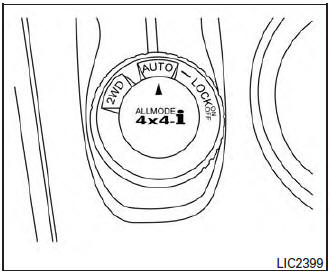
4WD shift switch
The 4WD system is used to select the 2WD, AUTO or LOCK mode depending on the driving conditions.
Turn the 4WD mode switch, located on the center console, to select 2WD, AUTO, or LOCK.
- 2WD – Turn the 4WD mode switch to the 2WD position. The 2WD indicator light in the vehicle information display illuminates.
- AUTO – Turn the 4WD mode switch to the neutral (AUTO) position. The 4WD AUTO indicator light in the vehicle information display illuminates.
- LOCK – To engage the LOCK mode, turn the 4WD mode switch to the LOCK position.
The switch will return to the AUTO position automatically and the 4WD LOCK indicator light in the vehicle information display illuminates. To disengage the LOCK mode, turn the switch to the LOCK position again. The switch will return to the AUTO position automatically, and the 4WD LOCK indicator light turns into the AUTO indicator light. The LOCK mode will automatically be cancelled when the ignition switch is turned to the “OFF” position.
| 4WD mode | Wheels driven | 4WD mode indicator light | Use condi |
| 2WD | Front only – This mode is used when driving on a normal road *1 | 2WD | For driving on dry paved roads. |
| AUTO | Distribution of torque to the front and rear wheels changes automatically depending on road conditions encountered. This results in improved driving stability. | AUTO | For driving on paved or slippery roads. |
| LOCK | 4-Wheel Drive *2 *3 | LOCK | For driving on rough roads. |
*1 The 2WD mode may change to the 4WD mode automatically depending on the driving conditions.
*2 The LOCK mode will change to the AUTO mode automatically when the vehicle has been driven at a high speed. The 4WD LOCK indicator light turns into the AUTO indicator light.
*3 The LOCK mode will automatically be cancelled when the ignition switch is turned to the OFF position.
4WD shift tips
- If the 4WD mode switch is operated while making a turn, accelerating or decelerating, or if the ignition switch is turned off while in the AUTO or LOCK mode, you may feel a jolt. This is normal.
- The oil temperature of power train parts will increase if the vehicle is continuously operated under conditions where the difference between the front and rear wheels is large (wheel slip), such as when driving the vehicle on rough roads through sand or mud or when freeing a stuck vehicle. In these cases, the 4WD mode changes to the 2WD mode to protect the powertrain parts.
- Brake distance in the 4WD mode is the same as 2WD.
CAUTION
|
4WD mode indicator lights
The 2WD, 4WD AUTO and LOCK mode indicator lights are located in the vehicle information display.
The 4WD mode indicator lights will display the mode selected by the 4WD mode switch while the engine is running.
The 4WD AUTO indicator light illuminates when selecting the AUTO mode.
The 4WD LOCK indicator light illuminates when selecting the LOCKmode and the2WDindicator light illuminates when selecting the 2WD mode.
Download Manual