Forward Collision Warning (FCW) system (if so equipped)
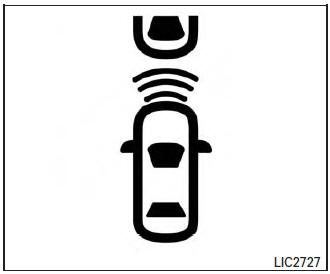
The Forward Collision Warning (FCW) system will warn the driver by flashing the FCW indicator light and providing a warning chime when your vehicle is getting close to the vehicle ahead in the traveling lane.
The FCW system will function when your vehicle is driven at speeds of approximately 10 MPH (15 km/h) and above.
Forward Collision Warning (FCW) system
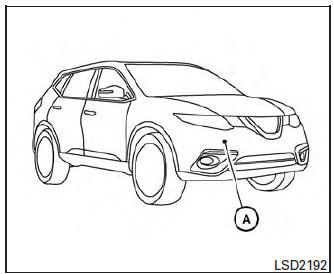
The FCW system uses the distance sensor A located behind the front bumper to measure the distance to the vehicle ahead. When the system judges that your vehicle is getting close to the vehicle ahead in the travel lane, FCW Indicator (white) on the instrument panel flashes and a warning chime sounds.
The FCW system can be turned on/off by using the settings menu on the information display. For additional information, refer to “How to enable/disable the FCW system” using the settings menu in this section.
FCW Indicator (orange)
Approach warning
Approach warning
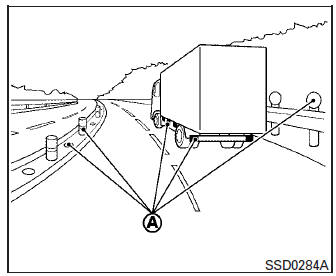
NOTE: The warning chime may sound and the FCW indicator may blink when the distance sensor detects vehicles in other lanes A or objects on the side of the road A . This may cause the FCW system to operate inappropriately.
The distance sensor may detect these objects when the vehicle is driven on winding roads, narrow roads, hilly roads, or when entering or exiting a curve.
Also, the sensor sensitivity can be affected by vehicle operation (steering maneuver or driving position in the lane) or traffic or vehicle condition (for example, if a vehicle is being driven with some damage).
Precautions on FCW system
WARNING
|
If the system cancels and a message appears with a beep sound, pull off the road to a safe location, stop the vehicle and turn the engine off.
Check to see if the sensor area of the front bumper is blocked. If the sensor area of the front bumper is blocked, remove the object blocking and restart the engine.
If the sensor is malfunctioning, have the system checked by a NISSAN dealer.
FCW system operation
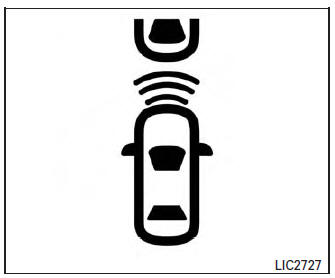
Forward Collision Warning light
The FCW system is active at speeds of approximately 10 MPH (15 km/h) and above, when the system turns on.
When FCW is turned on, FCW Indicator (white) will turn on. FCW system is activated using the settings menu on the information display. For additional information, refer to “How to enable/disable the FCW system” using the settings menu in this section.
How to enable/disable the FCW system
Perform the following steps to enable or disable the FCW system.
- Press the button until “Settings” displays in the vehicle information display. Use the button to select “Driver Assistance”.
Then press the ENTER button.
- Select “Driver Aids”, and press the ENTER button.
- To set FCW system to on or off, use the ↑↓ buttons to navigate in the menu and use the ENTER button to select or change item:
- To turn on the warning use the ENTER button to check box for “Forward.”
- To turn off the warning use the ENTER button to clear box for “Forward.”
- The FCW indicator will illuminate on the Vehicle Information Display when the system is on.
Sensor maintenance
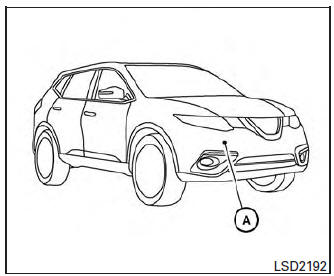
Sensor maintenance
The distance sensor for the FCW system A is located behind the front bumper.
To keep the FCW system operating properly, be sure to observe the following:
- Always keep the sensor area of the front bumper clean.
- Do not strike or damage the areas around the sensor.
- Do not cover or attach stickers or similar objects on the front bumper near the sensor area. This could cause failure or malfunction.
Download Manual