equipped)
The Blind Spot Warning (BSW) system helps alert the driver of other vehicles in adjacent lanes when changing lanes.
The Lane Departure Warning (LDW) system helps alert the driver when the vehicle is traveling close to either the left or the right of a traveling lane.
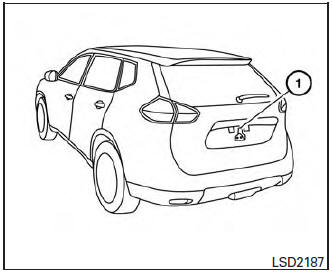
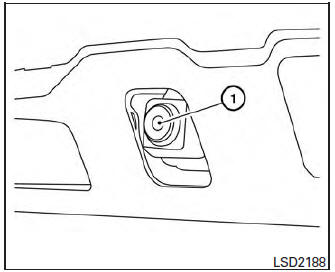
The BSW/LDW systems use the rear view monitor camera unit 1 with automatic washer and blower
WARNING
|
BSW system operation
BSW system operation
The BSW system operates above approximately 20 MPH (32 km/h).
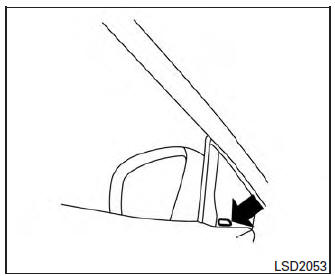
When the camera unit detects vehicles in the detection zone, the Blind Spot indicator light located inside the outside mirrors will illuminate. If the turn signal is then activated, the system chimes (twice) and the Blind Spot indicator light flashes to alert the driver.
The Blind Spot indicator light continues to flash until the detected vehicle(s) leave the detection zone.
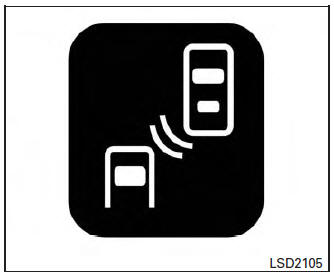
Blind Spot indicator light
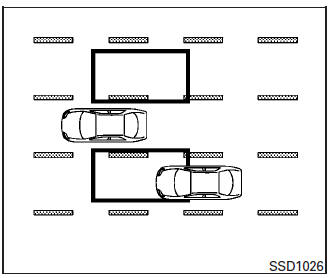
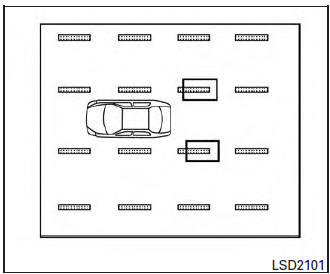
Detection zone
The camera unit can detect vehicles on either side of your vehicle when part of another vehicle is within the detection zone shown as illustrated.
This detection zone typically starts from the outside mirror of your vehicle and extends approximately 10 ft (3.0 m) behind the rear bumper, and approximately 10 ft (3.0 m) sideways.
NOTE: The Blind Spot indicator lights will illuminate for a few seconds when the ignition switch is placed in the ON position. The brightness of the Blind Spot indicator lights is adjusted automatically depending on the brightness of the ambient light.
A chime sounds if the camera unit has already detected vehicles when the driver activates the turn signal. If a vehicle comes into the detection zone after the driver activates the turn signal, then only the Blind Spot indicator light flashes and no chime sounds. For additional information, refer to “BSW driving situations” in this section.
Turning on or off the BSW system
The BSW system is turned on or off using the settings menu in the vehicle information display.
SYSTEM ON: The BSW indicator in the vehicle information display will appear.
SYSTEM OFF: The BSW indicator in the vehicle information display will disappear.
Perform the following steps to enable or disable the BSW system:
- Press the
 button until “Settings” displays in the vehicle information display. Use the t
 o select “Driver Assistance”.
Then press the ENTER button.
- Select “Driving Aids”, and press the ENTER button.
- To set the BSW system to on or off, use the
 buttons to navigate in the menu and use the ENTER button to select or change an item:
- Select “Blind Spot” and press the ENTER button.
- To turn on the warning, use the ENTER button to check box for “Warning (BSW)”
WARNING
|
BSW driving situations
Another vehicle approaching from behind
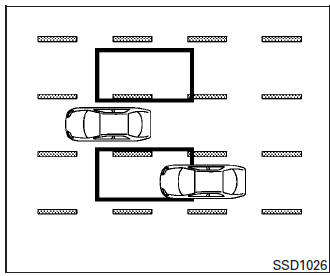
The Blind Spot indicator light illuminates if a vehicle enters the detection zone from behind in an adjacent lane.
However, if the overtaking vehicle is traveling much faster than your vehicle, the indicator light may not illuminate before the detected vehicle is beside your vehicle. Always use the side and rear mirrors and turn and look in the direction your vehicle will move to ensure it is safe to change lanes.
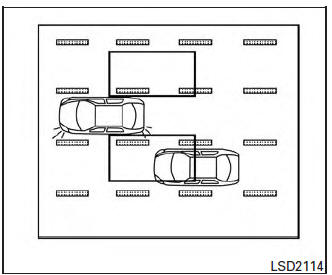
If the driver activates the turn signal, then the Blind Spot indicator light flashes and a chime will sound twice.
NOTE: If the driver activates the turn signal before a vehicle enters the detection zone, the Blind Spot indicator light will flash but no chime will sound when the other vehicle is detected.
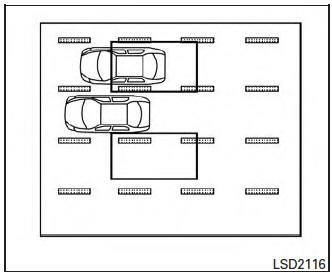
Overtaking other vehicles
The Blind Spot indicator light illuminates if you overtake a vehicle and that vehicle stays in the detection zone for approximately 3 seconds.
The camera unit may not detect slower moving vehicles if they are passed quickly
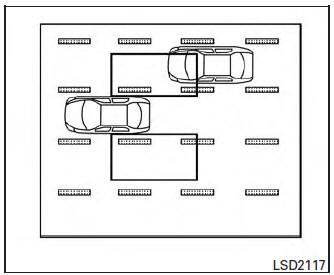
If the driver activates the turn signal while another vehicle is in the detection zone, then the Blind Spot indicator light flashes and a chime will sound twice.
LDW system operation
LDW system operation
The LDW system operates above approximately 45 MPH (70 km/h).
When the vehicle approaches either the left or the right of the traveling lane, the LDW system will chime a sound and the LDW light on the instrument panel will blink to alert the driver The LDW system is not designed to operate under the following conditions
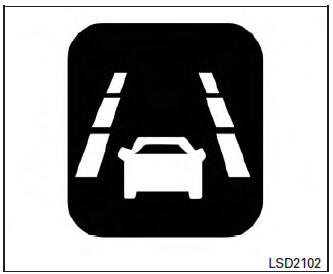
Lane departure warning light
- When you operate the lane change signal and change traveling lanes in the direction of the signal. (The LDW system will become operable again approximately 2 seconds after the lane change signal is turned off.)
- When the vehicle speed is less than approximately 45 MPH (70 km/h).
Turning on or off the LDW system The LDW system is turned on or off using the settings menu in the vehicle information display.
SYSTEM ON: The LDW light on the instrument panel will light up.
SYSTEM OFF: The LDW light on the instrument panel will go out.
Perform the following steps to enable or disable the LDW system:
- Press the
 button until “Settings” displays in the vehicle information display. Use the
  to select “Driver Assistance”.
Then press the ENTER button.
- Select “Driving Aids”, and press the ENTER button.
- To set the LDW system to on or off, use the
 buttons to navigate in the menu and use the ENTER button to select or change an item:
- Select “Lane” and press the ENTER button.
- To turn on the warning, use the ENTER button to check box for “Warning (LDW)”
WARNING
|
BSW/LDW temporary disabled status
Under the following condition, the BSW and/or LDW system is turned off temporarily, the BSW light and/or LDW light will blink, and either of the following message will appear in the vehicle information display:
- “Trunk is open”
- “Washer fluid is low”
When the above conditions are corrected, the BSW and/or LDW system will resume automatically.
BSW/LDW automatic deactivation
When dirt, rain or snow cannot be removed by the automatic washer and blower and accumulates on the camera, making it impossible to detect the vehicles or the lane markers, the BSW and/or LDW system will be turned off automatically.
The BSW light (white) and/or LDW light (orange) will blink, and the “Unavailable : Clean rear camera” will appear in the vehicle information display.
Action to take: If the message appears, park the vehicle in a safe place, clean the camera unit with a soft cloth.
Then turn off and restart the engine.
BSW/LDW malfunction
When the BSW and/or LDW system malfunctions, they will be turned off automatically, the BSW light (white) and/or LDW light (orange) will illuminate and “Malfunction: Please see owners manual” will appear in the vehicle information display.
Action to take: Stop the vehicle in a safe location, turn off and restart the engine. If the BSW light (white) and/or the LDW light (orange) continues to illuminate, have theBSWand/or LDW system checked by a NISSAN dealer.
Camera unit maintenance
Camera unit maintenance
The rear camera unit 1 for the LDW/BSW systems is located above the rear license plate. To maintain the proper operation of the LDW/BSW systems and help keep the system functioning, be sure to observe the following:
- Always keep the camera unit clean. Be careful not to damage the nozzle of automatic washer and blower.
- Do not attach “license plate accessories” that reflect light.
- Do not strike or damage the areas around the camera unit.
Download Manual