Remote Engine
Start*
Start your vehicle's engine using the remote transmitter before you enter the vehicle.
Make sure the vehicle is in a safe location (i.e., a well ventilated area, away from flammable materials) when using remote engine start.
*if equipped
Starting the Engine
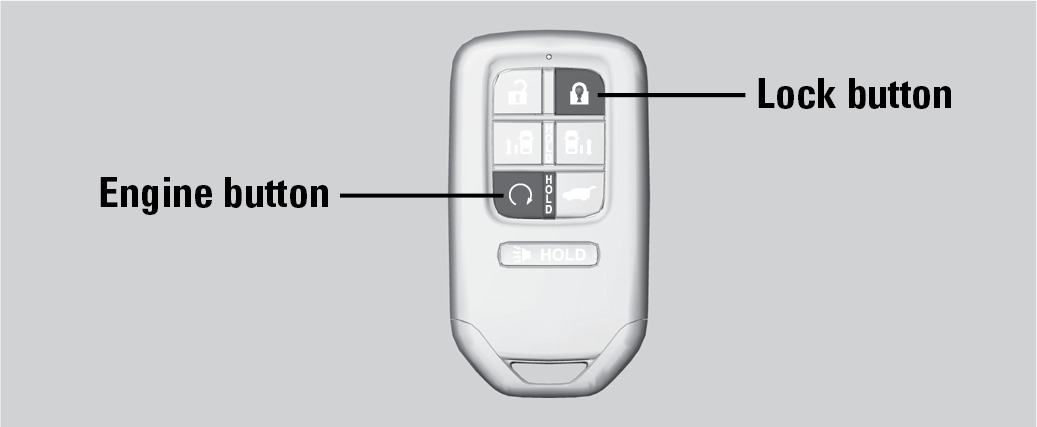
Press the Lock button, then press and hold the Engine button within 5 seconds to remotely start the engine.
The engine runs for up to 10 minutes. To extend the run time for another 10 minutes, repeat the procedure during the initial 10 minutes.
While the engine is running, the climate control system adjusts the cabin temperature, the security system remains on, and lights and accessories remain off.
If you press the button and the transmission is not in P, the vehicle goes into ACCESSORY mode.
Stopping the Engine
Press and hold the Engine button.
When started remotely, the engine shuts off after 10 minutes of idling. It will also stop if the ENGINE START/STOP button and the brake are pressed individually.
Engine exhaust contains toxic carbon monoxide gas.
Breathing carbon monoxide can kill you or cause unconsciousness.
Never use the remote engine starter when the vehicle is parked in a garage or other area with limited ventilation.
Electronic Gear Selector
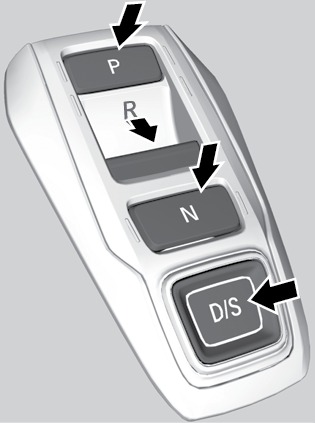
Park (P): Used for parking or starting. Press P with the brake pedal pressed. A red indicator appears.
Reverse (R): Used for reversing. Pull back R. A green indicator appears.
Neutral (N): Used for idling. Press N. A red indicator appears.
Drive (D/S): Used for normal driving (D) or driving in Sport mode (S) (see "Remote Engine Start"). Press D/S once for normal driving. Press D/S twice for Sport mode driving. A green indicator appears. Make sure the electric parking brake is released (see "Braking").
The vehicle can roll away if left unattended without confirming that Park is engaged. Always keep your foot on the brake pedal until you have confirmed that P is shown on the gear position indicator.
When you change from D to R and vice versa, press the brake pedal and come to a complete stop, then select the intended gear position while maintaining brake pressure.
Auto park mode
For your convenience, Park (P) is automatically selected when all of the following conditions are met:
- The vehicle is stopped.
- The driver's seatbelt is unbuckled.
- The driver's door is opened.
Car wash mode
If you are driving through a conveyor-style car wash where you or the attendant do not remain in the vehicle, follow these steps while the engine is on:
- Press and hold the brake pedal.
- Press then release the Neutral (N) button. Neutral-hold mode will display in the driver information interface.
- Press and hold N again for two seconds. This puts the vehicle in car wash mode. You can exit the vehicle without it shifting to Park.
If the ENGINE STOP/START button is pressed after car wash mode has been activated, the power mode will change to ACCESSORY and a message will be displayed on the driver information interface. After 15 minutes, the gear position changes to Park and the power mode changes to OFF
When the transmission is too hot, car wash mode may not be available. Let the engine idle to cool the transmission.
Sequential Mode
Use the paddle shifters to change gears without removing your hands from the steering wheel.
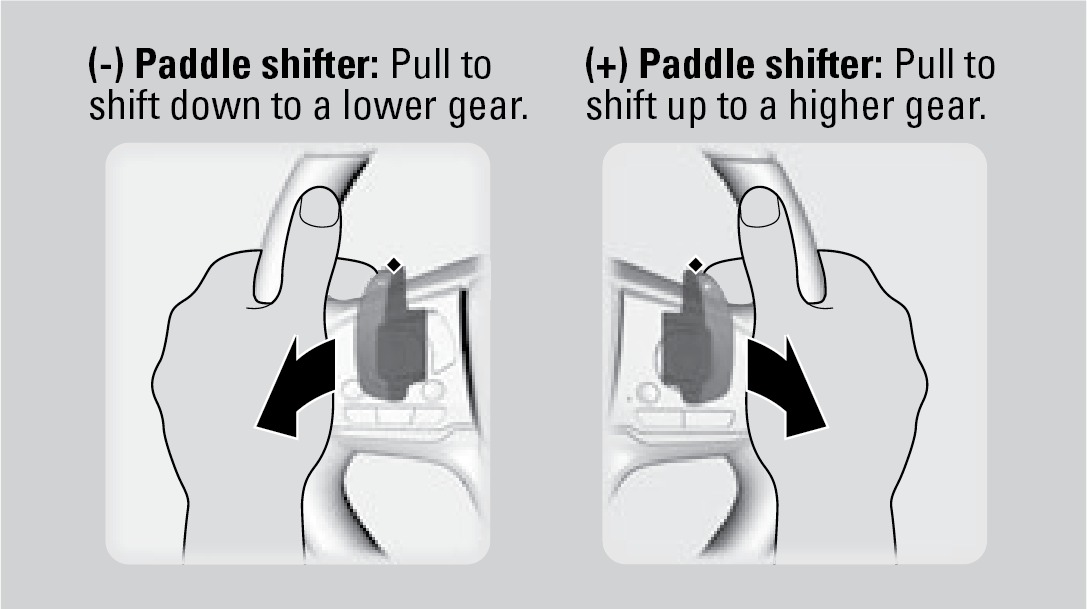
When the transmission is in D: The vehicle goes into sequential shift mode momentarily, and the gear selection indicator comes on. When you start traveling at a constant speed, sequential mode and the gear position indicator automatically go off.
When the transmission is in S: The vehicle goes into sequential mode, and the M (sequential mode) indicator and gear selection indicator come on. Use the paddle shifters to change gears.
To cancel this mode, hold the + paddle shifter for two seconds or press D/S again. The M indicator and gear selection indicator go off.
- Starting to Drive
- Door Operation
- Braking
- Using the Remote Transmitter
- Smart Entry System*
Download Manual