HondaLink®*
Models with Display Audio
Provides you with useful information about your vehicle directly from Honda.
To check phone compatibility, visit Open Web Page (U.S.) or Open Web Page (Canada). Standard data rates may apply with your phone service provider.
To get more information on HondaLink, visit Open Web Page (U.S.) or Open Web Page(Canada).
HondaLink Connection
Follow the steps below to connect to HondaLink and use its features.
- Download the HondaLink Connect app to your compatible smartphone.
- Pair your phone to Bluetooth HandsFreeLink (see "Pairing a Phone").
- From the HOME screen, select HondaLink.
- Certain features require you to send vehicle information to Honda. Select Enable Once, Always Enable, or Cancel.
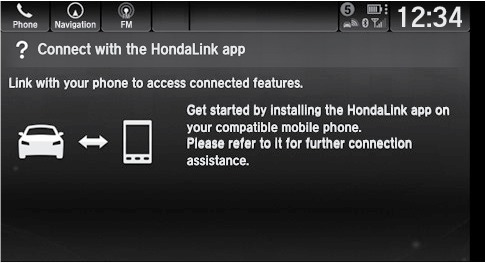
HondaLink Menu
Select a menu option.
Vehicle: Get instructional messages when your vehicle needs service.
Help & Support: Display tips for vehicle usage, get roadside assistance, or contact customer service.
Messages from Honda:Display helpful and important information from Honda. If you have a new message, a yellow envelope icon appears at the top of the screen and a beep sounds. Swipe down to view the message.
Operator Assistance*
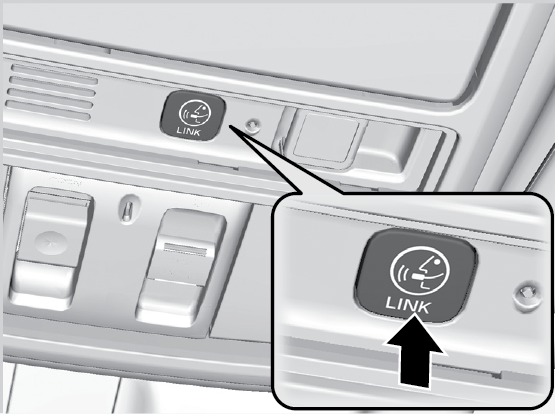
Connect to a HondaLink operator for roadside assistance or help finding a destination.
To place a call: Press the Link button.
To end a call: Select End Call on the touchscreen, or the hang-up button on the steering wheel.
- Wi-Fi Connection*
- Apple CarPlay
- Android Auto
- Basic Audio Operation
- Color Audio Operation*
- Basic Navigation Operation
- HondaLink Assist*
- Honda Roadside Assistance
Download Manual