Windows
Opening/Closing the Power Windows
The power windows can be opened and closed when the power mode is in ON, using the switches on the doors.
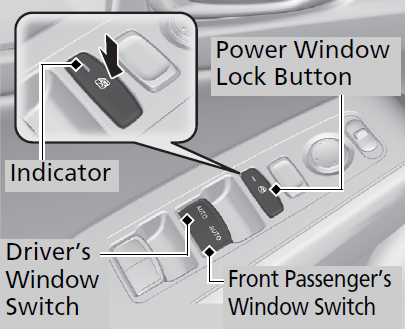
The driver’s side switches can be used to open and close all the windows. The power window lock button on the driver’s side must be switched off (indicator off) to open and close the windows from anywhere other than the driver’s seat.
When the power window lock button is pressed, the indicator comes on and you can only operate the driver’s window. Turn the power window lock button on if a child is in the vehicle.
- WARNING Closing a power window on someone’s hands or fingers can cause serious injury.
Make sure your passengers are away from the windows before closing them.
- Detail
Opening either front door cancels this function.
-
To open: Push the switch down lightly, and hold it until the desired position is reached.
To close: Pull the switch up lightly, and hold it until the desired position is reached To open: Push the switch down firmly.
To close: Pull the switch up firmly.The window opens or closes completely. To stop the window at any time, push or pull the switch briefly.
-
To open: Push the switch down.
To close: Pull the switch up.Release the switch when the window reaches the desired position.

- To open: Press the unlock button, and then within 10 seconds, press it again and hold it. If the windows stop midway, repeat the procedure.

- Detail
Pull and hold the outer handle. Insert the key into the key cylinder completely from below the handle.
To open: Unlock the driver’s door with the key. Within 10 seconds of returning the key to the central position, turn the key in the unlock direction and hold it there.
Release the key to stop the windows at the desired position. If you want further adjustment, repeat the same operation.

- Detail
* Not available on all models
Download Manual