Honda Sensing®
Honda Sensing®
Honda Sensing® is a driver support system which employs the use of two distinctly different kinds of sensors: the sonar sensors located in the front and rear bumpers, and the front grille, and a front wide view camera mounted to the interior side of the windshield, behind the rearview mirror.
Honda Sensing® is a driver support system which employs the use of a front wide view camera mounted to the interior side of the windshield, behind the rearview mirror.
Honda Sensing® has following functions.
- Collision Mitigation Braking SystemTM (CMBSTM)
- Low Speed Braking Control*
- Road Departure Mitigation System
- Traffic Sign Recognition System
- Adaptive Cruise Control (ACC) with Low Speed Follow*
- Adaptive Cruise Control (ACC)*
- Lane Keeping Assist System (LKAS)
- Traffic Jam Assist*
-
Press to activate standby mode for ACC with Low Speed Follow*/ACC*. Or press to cancel the system.
Press to activate standby mode for LKAS and Traffic Jam Assist*. Or press to cancel these systems.

-
Press to change the ACC with Low Speed Follow*/ACC* following-interval.
Press to cancel ACC with Low Speed Follow*/ACC*.

You can see the current state of Adaptive Cruise Control (ACC) with Low Speed Follow*/Adaptive Cruise Control (ACC)*, Lane Keeping Assist System (LKAS) and Traffic Jam Assist*.
- Indicates that ACC with Low Speed Follow*/ACC* is ready to be activated.
- Green: The system is on.
- White: The system is standby.
- Amber: There is a problem with the system.
- Indicates that LKAS or Traffic Jam Assist* is ready to be activated.
- Green: The system is on.
- White: The system is standby.
- Amber: There is a problem with the system.
- Indicates that LKAS or Traffic Jam Assist* is activated and whether or not traffic lane lines are detected.
- Green lines: The system is on.
- White lines: Traffic lane lines are detected.
- Amber line: Lane departure is detected.
- Indicates whether or not a vehicle is detected ahead.
Models with B-type meter- Control target vehicle: White and outlined in green
- Outside of control target vehicle: Gray
- Indicates that ACC with Low Speed Follow*/ACC* shows the set vehicle speed.
- Indicates that ACC with Low Speed Follow*/ACC* shows the set vehicle interval.
- Indicates that ACC with Low Speed Follow*/ACC* is ready to be activated.


* Not available on all models
Collision Mitigation Braking SystemTM (CMBSTM)
The CMBSTM is designed to alert you when the potential for a collision is determined, as well as assist in reducing speed, avoiding collisions, and reducing collision severity.
- Detail
Drive a short distance at more than 12 mph (20 km/h).
Each indicator should go off. If any do not, have your vehicle checked by a dealer.
If you use tires of different sizes, types, brands, or degree of wear, the system may not work properly.

The CMBSTM will be canceled when your vehicle stops or the system determines there no longer is the potential for a collision.
The CMBSTM may also be canceled when a driver operates the steering wheel and the brake or accelerator pedal to avoid a collision.
- Detail
However, this pedestrian detection feature may not activate or may not detect a pedestrian in front of your vehicle under certain conditions.
Refer to the ones indicating the pedestrian detection limitations from the list.

You can change the distance (Long/Normal/Short) between vehicles at which the system’s earliest collision alert will come on through the driver information interface* or audio/information screen* setting options.
The system has three alert stages for a possible collision. However, depending on circumstances, the CMBSTM may not go through all of the stages before initiating the last stage.
|
Distance between vehicles
|
CMBSTM
|
|||
|---|---|---|---|---|
|
The sensors detect a vehicle
|
Audible & Visual WARNINGS
|
Braking
|
||
|
Stage one
|
 |
There is a risk of a collision with the vehicle ahead of you.
|
When in Long, visual and audible alerts come on at a longer distance from a vehicle ahead than in Normal setting, and in Short, at a shorter distance than in Normal.
|
—
|
|
Stage two
|
 |
The risk of a collision has increased, time to respond is reduced.
|
Visual and audible alerts.
|
Lightly applied
|
|
Stage three
|
 |
The CMBSTM determines that a collision is unavoidable.
|
Forcefully applied
|
- When you turn the CMBSTM on and off, do the following.
- Press the safety support switch.
Models with A-type meter- Roll the left selector wheel to the
 symbol and push it.
Models with B-type meter- Roll the right selector wheel to the symbol and push it.
- A message appears on the driver information interface when the system turns on or off.
- A check mark appears in the box and the color of the symbol changes to green when the system is on. The check mark disappears and the color of the symbol changes to gray when the system is off.
The CMBSTM is turned on every time you start the engine, even if you turned it off the last time you drove the vehicle.


The system may automatically shut off and the safety support indicator (amber) will come on under certain conditions. Some examples of these conditions are listed below. Other conditions may reduce some of the CMBSTM functions.
- Detail
- Driving in bad weather (rain, fog, snow, etc.).
- Sudden changes between light and dark, such as the entrance or exit of a tunnel or the shadows of trees, buildings, etc.
- Driving into low sunlight (e.g., at dawn or dusk).
- Strong light is reflected onto vehicles, pedestrians, moving bicycles, or road surfaces.
- Water is sprayed by or snow blown from a vehicle ahead.
- Driving at night or in a dark place such as a tunnel (due to low-light conditions, vehicles, pedestrians, or moving bicycles may not be illuminated).
- Driving on curvy, winding, undulating, or sloping roads.
- There is a film of water or puddles on the road surface.
- Driving on rutted roads (snowy or unpaved roads, etc.).
- Your vehicle is strongly shaken on uneven road surfaces.
- The vehicle is tilted due to heavy load in the trunk or rear seats.
- Tire chains* are installed.
- Driving at night or in a dark place (e.g., a tunnel) with the headlights off.
- The front of the camera is covered by dirt, fog, rain, mud, wet snow, seals, accessories, stickers, or film on the windshield.
- There is residue on the windshield from the windshield wipers.
- When lighting is weak due to dirt covering the headlight lenses, or there is poor visibility in a dark place due to the headlights being improperly adjusted.
- An abnormal tire or wheel condition (incorrect sizes, varied sizes or construction, improperly inflated, compact spare tire*, etc.).
- The suspension has been modified.
- The distance between your vehicle and the vehicle ahead of you, oncoming vehicle, pedestrian, or moving bicycle ahead of you is too short.
- The vehicle ahead of you, oncoming vehicle, pedestrian, or moving bicycle suddenly cuts in front of or jumps out in front of you.
- The bicycle is stopped.
- The oncoming vehicle or vehicle ahead of you is sideways.
- When the vehicle ahead of you, oncoming vehicle, pedestrian, or moving bicycle blends in with the background, preventing the system from recognizing them.
- When several pedestrians or bicycles are moving ahead of you in a group.
- When a pedestrian or moving bicycle crosses the road too quickly.
- A pedestrian or moving bicycle approaches from the opposite direction.
- The headlights of the vehicle ahead of you or oncoming vehicle are lit on one side or not lit on either side in a dark place.
- When part of a pedestrian (heads, limbs, etc.) is hidden by load.
- When a pedestrian is bent over or squatting, when their hands are raised, or they are running.
- When the pedestrian is shorter than about 3.3 feet (1 meter) or taller than about 6.6 feet (2 meters) in height.
- When the pedestrian is pushing a stroller or bicycle.
- When the vehicle ahead of you is a motorcycle, wheelchair, or other specially shaped vehicle.
- When a vehicle is lower in the rear than the front such as trucks that are not carrying a load, or a narrow vehicle.
- When the vehicle ahead of you, oncoming vehicle, pedestrian or moving bicycle is not in front of the vehicle.
- The speed difference between your vehicle and the vehicle ahead of you, oncoming vehicle, pedestrian or moving bicycle is significantly large.
- When the vehicle or moving bicycle in front of you slows suddenly.
- When the driver operates the brake pedal and steering wheel to avoid a collision.
- When you approach the vehicle ahead of you, oncoming vehicle, pedestrians or moving bicycles while accelerating rapidly or operating the steering wheel (except when turning left at an intersection etc.)*1
- When the moving bicycle is a child-sized bicycle, folding bicycle, three-wheeler or other bicycle with small tires, or a long bicycle like a tandem bicycle.
- When the camera cannot correctly identify the shape of the vehicle ahead of you, oncoming vehicle, pedestrian, or moving bicycle.
- When the minimum ground clearance of a vehicle ahead of you is extremely high.
- When there is a possibility of a frontal collision with the oncoming vehicle while turning left, the CMBSTM is activated. However, it may not be activated if you suddenly turn the steering wheel.
The CMBSTM may automatically shut itself off and the safety support indicator (amber) comes and stays on when:
- You drive off-road or on a mountain road, or curved and winding road for an extended period.
- Driving in bad weather (rain, fog, snow, etc.).
- Driving with the parking brake applied.
- The camera temperature gets too high.
- The front of the camera is covered by dirt, fog, rain, mud, wet snow, seals, accessories, stickers, or film on the windshield.
- An abnormal tire condition is detected (incorrect tire size, flat tire, etc.).
Once the conditions that caused the CMBSTM to shut off improve or are addressed (e.g., cleaning), the system comes back on.
Even if there is little chance of a collision, the CMBSTM may activate under the following conditions:
- Your vehicle approaches or passes another vehicle that is making a left or right turn.
- Your vehicle approaches another vehicle ahead of you and you change lanes to pass.
- Your vehicle approaches another vehicle at an intersection, etc.

- When passing through a low or narrow gate at a speed well over the speed limit.
- When there are traffic signs or structures such as guard rails are beside the road along a curve.

- When driving through curves, your vehicle comes to a point where the oncoming vehicle is right in front of you.

- When approaching stationary vehicles or walls, such as when parking.
* Not available on all models
Low Speed Braking Control* (Continuously variable transmission models)
Using sonar sensors located on the front and rear bumpers, and the front grille, this system detects if there is danger of a potential collision with a wall or other obstacle during normal driving or when the accelerator pedal is depressed with too much force. The system then assists in avoiding collisions and reducing damage from impact through assistive braking and/or assistive driving power suppression.
- WARNING The Low Speed Braking Control System cannot avoid all collisions and may not reduce damage in each situation where the accelerator is mistakenly or aggressively pressed. Overreliance on the system may result in a collision with serious injury or death. Always check your surroundings, your shift position, and your pedal use.
Driver remains responsible for safely operating the vehicle.
- Detail
Assistive braking provides a visual and audible alert when the vehicle is moving between approximately 1 and 6 mph (2 and 10 km/h) and there is the possibility of a collision with a detected wall or other obstacles, as well as providing assistance with braking.

If the only rear sensors are turned off using the parking sensor system, the assistive braking is not working when reversing.
When the vehicle is stopped or moving at less than 6 mph (10 km/h) and there is an obstacle such as a wall detected near the front of or back of the vehicle, if the accelerator pedal is depressed more than necessary, the system will inform you with a visual and audible alert. At the same time, the system will prevent sudden forward or backwards movement by limiting the output of the engine, then assistive braking will activate nearby the obstacle.

When moving forward:
When on a steep slope or the shift position is in P, R, or N.
When reversing:
When on a steep slope or the shift position is in a position other than R.
If the only rear sensors are turned off using the parking sensor system, the assistive driving power suppression is not working when reversing.
- When you turn the system on and off, do the following.
- Press the safety support switch.
- Roll the right selector wheel to the
 symbol and push it.
- A message appears on the driver information interface when the system turns on or off.
- A check mark appears in the box and the color of the symbol changes to green when the system is on. The check mark disappears and the color of the symbol changes to gray when the system is off.
The system is turned on every time you start the engine, even if you turned it off the last time you drove the vehicle.

- Detail
The system will automatically turn ON after the vehicle has been moving at over 12 mph (20 km/h) for some time.
If the system does not turn on, have your vehicle checked by a dealer.
- When the accelerator is no longer depressed.
- When the accelerator is depressed for approximately four seconds.
- When the brake pedal is depressed.
- When the steering wheel is turned and a collision avoided.
- A certain amount of time has passed since activation.
- Detail
They can be activated again after driving for a certain distance after last activation.
However, if assistive braking has been activated, in order to activate assistive driving power suppression again, it is necessary to drive for a certain distance to reset the system.
The system may not operate correctly in the following conditions:
- Obstacles that do not reflect sound waves well, such as people, snow, cloth, sponges, etc.
- Thin obstacles such as fences, bicycles, sign posts, etc.
- Short or small obstacles.
- Obstacles immediately in front of the bumper.
- Moving objects or obstacles that suddenly enter the road.
- Obstacles that are not perpendicular to the ground.
- The sonar sensor is dirty (covered by snow, water, mud, etc.).
- The vehicle is too hot or cold.
- The steering wheel is turned sharply when approaching the obstacle at an angle.
- The vehicle is tilted due to heavy load or suspension modifications.
- An abnormal tire or wheel condition (incorrect sizes, varied sizes or construction, improperly inflated, compact spare tire, etc.).
- Bad weather conditions such as heavy rain, fog, snow, sandstorms, etc.
- The ambient temperature/humidity is too high or low.
- When going down a very steep slope.
- When close to other vehicles with sonar sensors or other objects that emit ultrasonic waves.
- When passing through short or narrow gates.
- When driving on uneven surfaces, grassy areas, or places with steps.
- When a sloped pillar or wall is protruding from a high position.
- When there are obstacles next to the road.
- When driving toward flags, curtains, tree branches, railroad crossing bars, etc.
- When driving on flooded roads.
* Not available on all models
Low Speed Braking Control* (Manual transmission models)
Using sonar sensors located on the front and rear bumpers, and the front grille, this system detects if there is danger of a potential collision with a wall or other obstacle during normal driving. The system then assists in avoiding collisions and reducing damage from impact through assistive braking.
- WARNING The Low Speed Braking Control System cannot avoid all collisions and may not reduce damage in each situation where the accelerator is mistakenly or aggressively pressed. Overreliance on the system may result in a collision with serious injury or death. Always check your surroundings, your shift position, and your pedal use. Driver remains responsible for safely operating the vehicle.
- Detail
Low Speed Braking Control provides a visual and audible alert when the vehicle is moving between approximately 1 and 6 mph (2 and 10 km/h) and there is the possibility of a collision with a detected wall or other obstacles, as well as providing assistance with braking.

If the only rear sensors are turned off using the parking sensor system, the assistive braking is not working when reversing.
- When you turn the system on and off, do the following.
- Press the safety support switch.
- Roll the right selector wheel to the symbol and push it.
- A message appears on the driver information interface when the system turns on or off.
- A check mark appears in the box and the color of the symbol changes to green when the system is on. The check mark disappears and the color of the symbol changes to gray when the system is off.
The system is turned on every time you start the engine, even if you turned it off the last time you drove the vehicle.

- Detail
The system will automatically turn ON after the vehicle has been moving at over 12 mph (20 km/h) for some time.
If the system does not turn on, have your vehicle checked by a dealer.
A certain amount of time has passed since activation.
- Detail
They can be activated again after driving for a certain distance after last activation.
The system may not operate correctly in the following conditions:
- Obstacles that do not reflect sound waves well, such as people, snow, cloth, sponges, etc.
- Thin obstacles such as fences, bicycles, sign posts, etc.
- Short or small obstacles.
- Obstacles immediately in front of the bumper.
- Moving objects or obstacles that suddenly enter the road.
- Obstacles that are not perpendicular to the ground.
- The sonar sensor is dirty (covered by snow, water, mud, etc.).
- The vehicle is too hot or cold.
- The steering wheel is turned sharply when approaching the obstacle at an angle.
- The vehicle is tilted due to heavy load or suspension modifications.
- An abnormal tire or wheel condition (incorrect sizes, varied sizes or construction, improperly inflated, compact spare tire, etc.).
- Bad weather conditions such as heavy rain, fog, snow, sandstorms, etc.
- The ambient temperature/humidity is too high or low.
- When going down a very steep slope.
- When close to other vehicles with sonar sensors or other objects that emit ultrasonic waves.
- When passing through short or narrow gates.
- When driving on uneven surfaces, grassy areas, or places with steps.
- When a sloped pillar or wall is protruding from a high position.
- When there are obstacles next to the road.
- When driving toward flags, curtains, tree branches, railroad crossing bars, etc.
- When driving on flooded roads.
* Not available on all models
Adaptive Cruise Control (ACC) with Low Speed Follow*
When ACC with Low Speed Follow slows your vehicle by applying the brakes, your vehicle’s brake lights will illuminate.

- WARNING Improper use of ACC with Low Speed Follow can lead to a crash.
Use ACC with Low Speed Follow only when driving on expressways or freeways and in good road and weather conditions.
- WARNING ACC with Low Speed Follow has limited braking capability and may not stop your vehicle in time to avoid a collision with a vehicle that quickly stops in front of you.
Always be prepared to apply the brake pedal if the conditions require.
- Detail
- On roads with frequent lane-change or continuous stop and go traffic. ACC with Low Speed Follow cannot keep an appropriate distance between your vehicle and vehicle ahead of you.
- On roads with sharp turns.
- On roads with toll collection facilities or other objects between lanes of traffic, or in parking areas, or facilities with drive through access.
- On roads with bad weather (rain, fog, snow, etc.), ACC with Low Speed Follow may not detect the distance between your vehicle and the vehicle ahead of you properly.
- On roads with slippery or icy surfaces. The wheels may spin out and your vehicle may lose the control on the condition.
- On roads with steep uphill or steep downhill slopes.
- On roads with undulating slopes.
 button.

When driving at about 25 mph (40 km/h) or above: Take your foot off the pedal and press the RES/+/SET/− switch up or down when you reach the desired speed. The moment you release the switch, the set speed is fixed, and ACC with Low Speed Follow begins.
When driving slower than about 25 mph (40 km/h): If the vehicle is moving and the brake pedal is not depressed, pressing the switch fixes the set speed to about 25 mph (40 km/h) regardless of current vehicle speed. If your vehicle is stationary, you can set the vehicle speed even with the brake pedal depressed.
- Models with A-type meter
- Models with B-type meter
When ACC with Low Speed Follow starts operating, the vehicle icon, interval bars and set speed appear on the gauge.
When you use ACC with Low Speed Follow, Straight Driving Assist (a feature of the Electric Power Steering system) is activated.
By enabling the steering system to automatically compensate for natural steering pull, Straight Driving Assist makes it easier for you to keep your vehicle in a straight line.
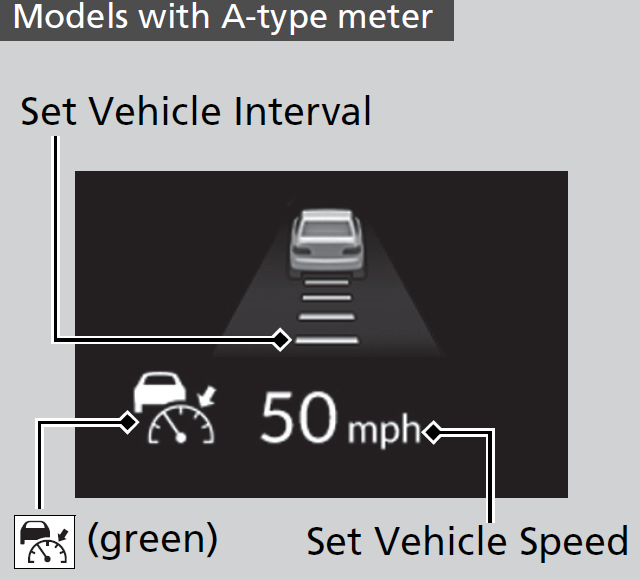

- Detail
Drive a short distance at more than 12 mph (20 km/h).
Each indicator should go off. If any do not, have your vehicle checked by a dealer.
- WARNING Exiting a vehicle that has been stopped while the ACC with Low Speed Follow system is operating can result in the vehicle moving without operator control.
A vehicle that moves without operator control can cause a crash, resulting in serious injury or death.
Never exit a vehicle when the vehicle is stopped by ACC with Low Speed Follow.
- Detail
- The vehicle ahead of you is going at almost the same speed as, or faster than, your vehicle.
- A vehicle that cuts in front of you is going faster than your vehicle, gradually increasing the interval between the vehicles.
- ACC with Low Speed Follow may temporarily control the interval between your vehicle and the vehicle in adjacent lane or surroundings of your vehicle depending on the road conditions (e.g. curves) or vehicle conditions (e.g. operating the steering wheel or the vehicle location in the lane).
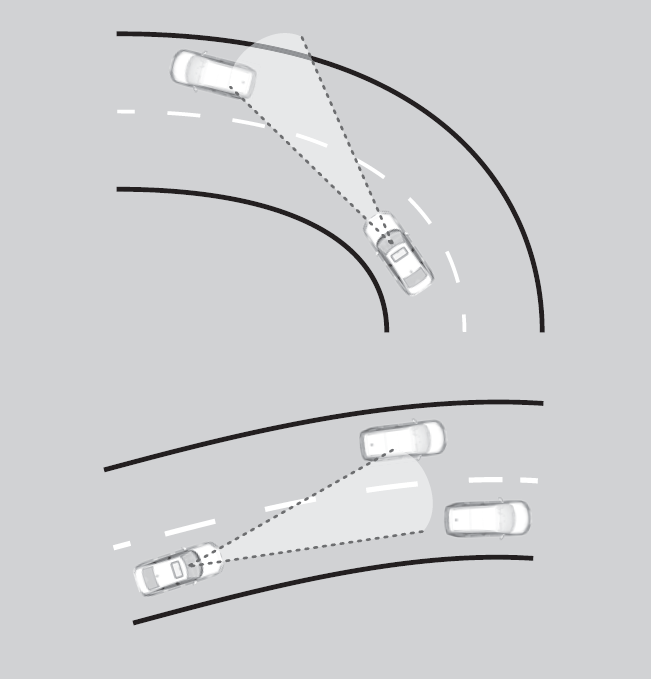
- When the vehicle ahead of you moves away, such as when entering an interchange or rest area, ACC with Low Speed Follow may continue to maintain the set following-interval for a short time.
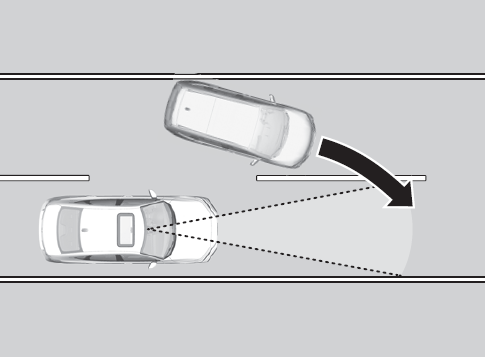

ACC with Low Speed Follow monitors if a vehicle ahead of you enters the ACC with Low Speed Follow range. If a vehicle is detected doing so, the ACC with Low Speed Follow system maintains or decelerates your vehicle’s set speed in order to keep the vehicle’s set following-interval from the vehicle ahead.

-
When a vehicle whose speed is slower than your set speed is detected in front of you, your vehicle starts to slow down.
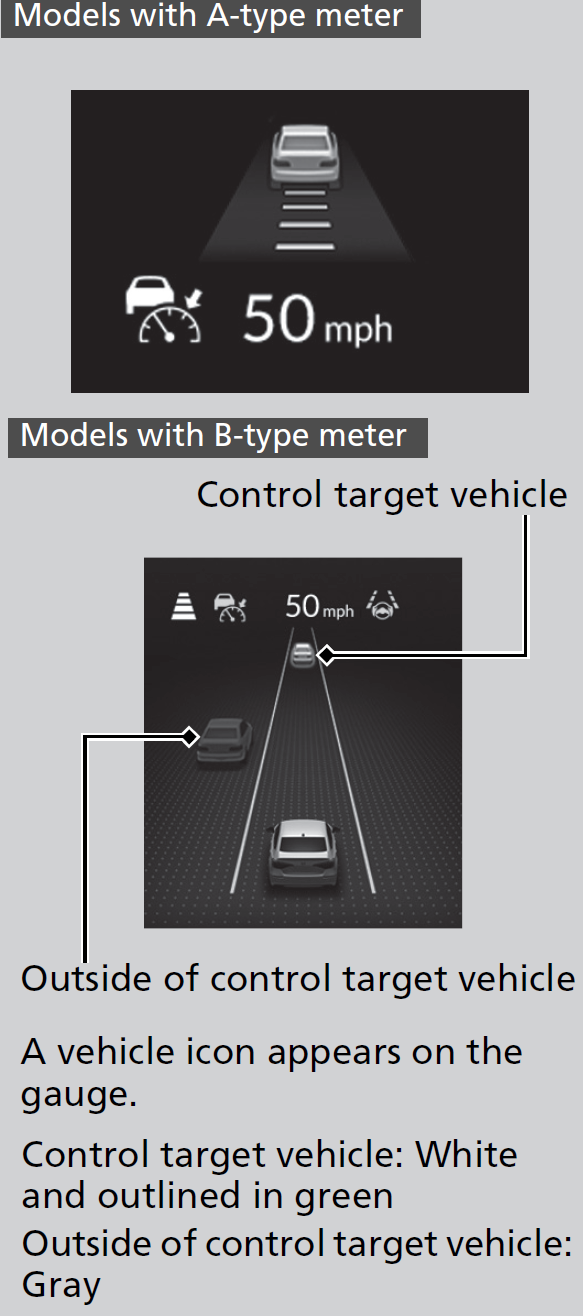
- Your vehicle maintains the set speed without having to keep your foot on the brake or accelerator pedal.
If there previously was a vehicle detected ahead that kept your vehicle from traveling at the set speed, ACC with Low Speed Follow accelerates your vehicle to the set speed, and then maintains it.On steep downhill during ACC with Low Speed Follow, it brakes to inhibit excessive acceleration for maintaining the set speed. However the vehicle speed may become faster than the set speed.
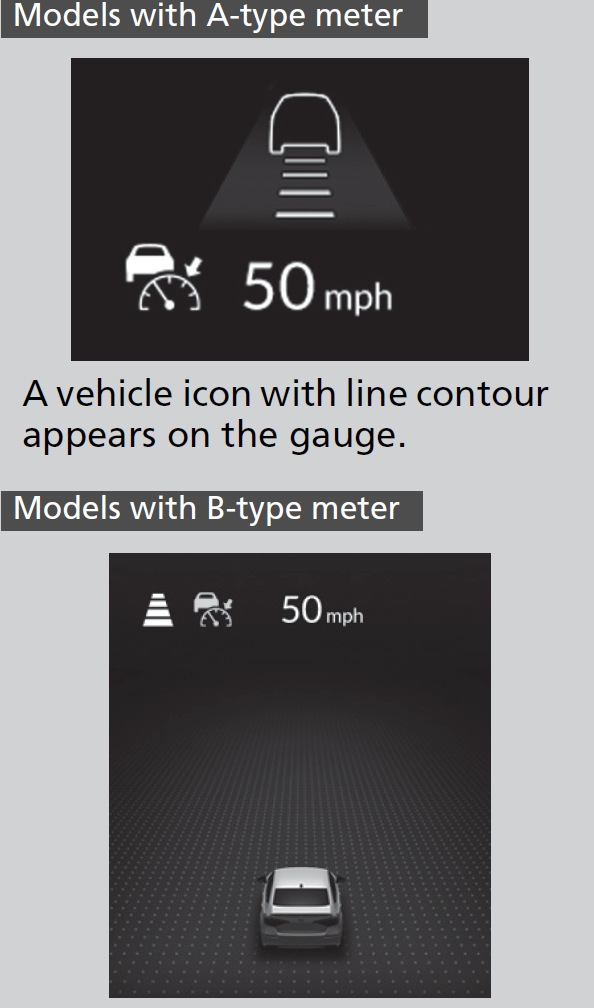
- Your vehicle also stops, automatically. The Stopped message appears on the gauge.
When the vehicle ahead of you starts again, the vehicle icon on the gauge blinks. If you press the RES/+/SET/− switch up or down, or depress the accelerator pedal, ACC with Low Speed Follow operates again within the prior set speed.

- If no vehicle is ahead of you before you resume driving, depress the accelerator pedal and ACC with Low Speed Follow will operate again within the prior set speed.

The system may automatically shut off under certain conditions. Some examples of these conditions are listed below. Other conditions may reduce some of the ACC with Low Speed Follow functions.
- Driving in bad weather (rain, fog, snow, etc.).
- Sudden changes between light and dark, such as the entrance or exit of a tunnel or the shadows of trees, buildings, etc.
- Strong light is reflected onto vehicles or road surfaces.
- Water is sprayed by or snow blown from a vehicle ahead.
- Driving at night or in a dark place such as a tunnel (due to low-light conditions, the whole vehicle may not be illuminated).
- Driving into low sunlight (e.g., at dawn or dusk).
- Driving on curvy, winding, undulating, or sloping roads.
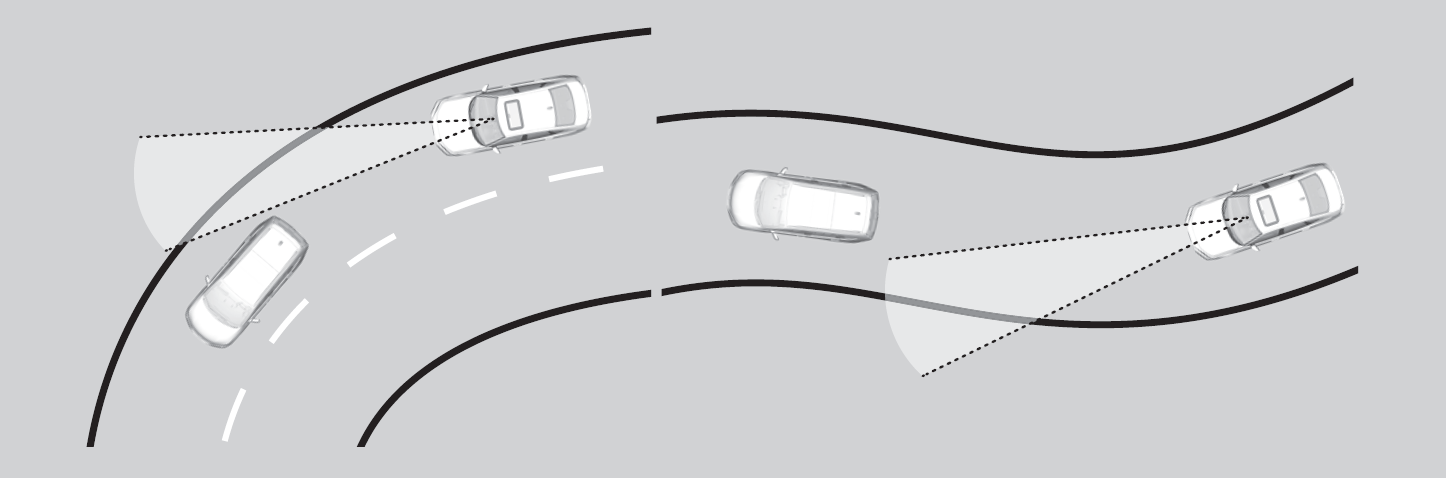
- Driving on rutted roads (snowy or unpaved roads, etc.).
- Puddles or a film of water is on the road surface.
- Your vehicle is strongly shaken on uneven road surfaces.
- The vehicle is tilted due to heavy load in the trunk or rear seats.
- Tire chains are installed.
- The front of the camera is covered by dirt, fog, rain, mud, wet snow, seals, accessories, stickers, or film of the windshield.
- Driving at night or in a dark place (e.g., a tunnel) with the headlights off.
- There is residue on the windshield from the windshield wipers.
- When lighting is weak due to dirt covering the headlight lenses, or there is poor visibility in a dark place due to the headlights being improperly adjusted.
- An abnormal tire or wheel condition (incorrect sizes, varied sizes or construction, improperly inflated, compact spare tire, etc.).
- The suspension has been modified.
- A vehicle suddenly crosses in front of you.
- The interval between your vehicle and the vehicle ahead of you is too short.
- When the vehicle ahead of you blends in with the background, preventing the system from recognizing it.
- The headlights of the vehicle ahead of you are lit on one side or not lit on either side in a dark place.
- A vehicle ahead of you stops and the speed difference between your vehicle and the vehicle ahead of you is significantly large.
- When the vehicle ahead of you slows suddenly.
- When a vehicle ahead of you is specially-shaped.
- When a vehicle is lower in the rear than the front such as trucks that are not carrying a load, or a narrow vehicle.

- When your vehicle or the vehicle ahead of you is driving on the edge of the lane.
- When the vehicle ahead of you is a narrow vehicle such as a motorcycle.
- When the minimum ground clearance of a vehicle ahead of you is extremely high.
- When the camera cannot correctly identify the shape of the vehicle ahead of you.
Increase or decrease the vehicle speed using the RES/+/SET/−switch on the steering wheel.

- Each time you press the RES/+/SET/− switch up or down, the vehicle speed is increased or decreased by about 1 mph or 1 km/h accordingly.
- If you keep the RES/+/SET/− switch pressed up or down, the vehicle speed increases or decreases by about 5 mph or 5 km/h accordingly.
- Detail
Press the Interval button to change the ACC with Low Speed Follow following-interval.
Each time you press the button, the following-interval (the interval behind a vehicle detected ahead of you) setting cycles through furthest, far, mid, and nearest following-intervals.Determine the most appropriate following-interval setting based on your specific driving conditions. Be sure to adhere to any following-interval requirements set by local regulation.

The higher your vehicle’s following-speed is, the longer the nearest, mid, far or furthest following-interval becomes. See the following examples for your reference.
|
Following-interval
|
When the Set Speed is:
|
||
|---|---|---|---|
|
50 mph (80 km/h)
|
65 mph (104 km/h)
|
||
|
Nearest
|
 |
87.3 feet
26.6 meters
1.2 sec
|
110.6 feet
33.7 meters
1.2 sec
|
|
Mid
|
 |
113.4 feet
34.6 meters
1.6 sec
|
147.2 feet
44.9 meters
1.6 sec
|
|
Far
|
 |
144.2 feet
44.0 meters
2.0 sec
|
187.3 feet
57.1 meters
2.0 sec
|
|
Furthest
|
 |
175.9 feet
53.6 meters
2.4 sec
|
229.6 feet
70.0 meters
2.4 sec
|
When your vehicle stops automatically because a vehicle detected ahead of you has stopped, the interval between the two vehicles will vary based on the ACC with Low Speed Follow interval setting.
- Models with A-type meter
- Models with B-type meter
- To cancel ACC with Low Speed Follow, do any of the following:
- Press the CANCEL button.
- The indicator (green) on the gauge changes to the indicator (white).
- The
- Press the button.
- indicator (green) goes off.
- Depress the brake pedal while the vehicle is moving forward.
- The indicator (green) on the gauge changes to the indicator (white).
- The
- Press the CANCEL button.

- Detail
When you turn the ACC with Low Speed Follow off by pressing the CANCEL button or depressing the brake pedal, the prior set speed is displayed on the gauge in gray.
When pressing the RES/+/SET/− switch up, the ACC with Low Speed Follow is activated with displayed speed.
If the
indicator (white) is displayed and you press the RES/+/SET/− switch, but no prior set speed (in gray) is displayed, the speed will be set to your vehicle's current speed.
button. Press the button to activate the system, then set the desired speed.The beeper sounds and a message appears on the driver information interface when ACC with Low Speed Follow is automatically canceled. Any of these conditions may cause the ACC with Low Speed Follow to automatically cancel:
- Bad weather (rain, fog, snow, etc.)
- The vehicle ahead of you cannot be detected.
- An abnormal tire condition is detected, or the tires are skidding.
- Driving on a mountainous road, or driving off road for extended periods.
- Abrupt steering wheel movement.
- When the ABS, VSA®, CMBSTM, or Low Speed Braking Control* is activated.
- When the VSA® system indicator comes on.
- When the vehicle is stopped on a very steep slope.
- When you manually apply the parking brake.
- Water is sprayed by or snow blown from a vehicle ahead.
- Driving into low sunlight (e.g., at dawn or dusk).
- When the detected vehicle within the ACC with Low Speed Follow range is too close to your vehicle.
- When accelerating rapidly.
- The front of the camera is covered by dirt, fog, rain, mud, wet snow, seals, accessories, stickers, or film on the windshield.
- The vehicle is loaded heavy load in the trunk or rear seats.
- When passing through a dark place, such as tunnel.
- When the parking brake and brake system indicator (amber) comes on.
- The vehicle has repeatedly applied the brakes to maintain the set speed (for example, you are descending a long slope).
- When the system doesn't detect any driving actions from the driver for a certain amount of time while the LKAS is also activated.
The ACC with Low Speed Follow automatic cancellation can be also triggered by the following causes. In these cases, the parking brake will be automatically applied.
- The driver’s seat belt is unfastened when the vehicle is stationary.
- The vehicle stops for more than 10 minutes.
- The engine is turned off.
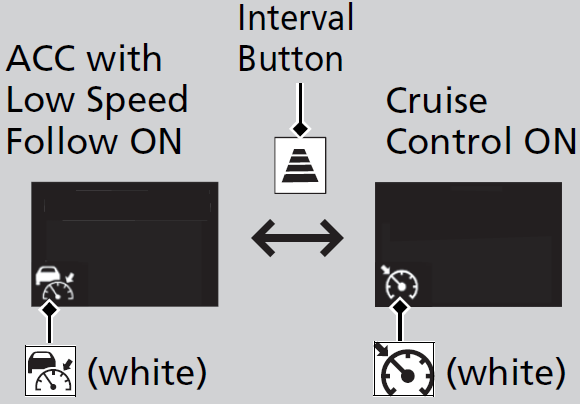
- Press and hold the Interval button for one second. Cruise mode selected appears on the driver information interface for two seconds, and then the mode switches to Cruise.
The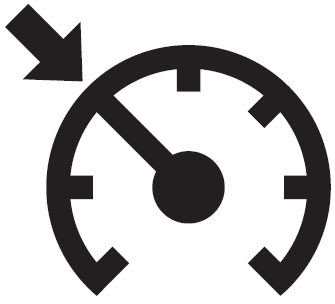 indicator comes on.
- Green: The system is on.
- White: The system is standby.
- Detail
- When the vehicle speed is set.
- When ACC with Low Speed Follow is not activated.
Desired speed in a range above roughly 25 mph (40 km/h).
When you use cruise control, Straight Driving Assist (a feature of the Electric Power Steering system) is activated.
By enabling the steering system to automatically compensate for natural steering pull, Straight Driving Assist makes it easier for you to keep your vehicle in a straight line.
- Each time you press the RES/+/SET/− switch up or down, the vehicle speed is increased or decreased by about 1 mph or 1 km/h accordingly.
- If you keep the RES/+/SET/− switch pressed up or down, the vehicle speed increases or decreases by about 5 mph or 5 km/h accordingly.
To cancel cruise control, do any of the following:
- Press the CANCEL button.
- The indicator (green) on the gauge changes to the indicator (white).
- The
- Press the button.
- The indicator (green) goes off.
- The
- Depress the brake pedal.
- The indicator (green) on the gauge changes to the indicator (white).
- The
- Detail
- When vehicle speed is less than 25 mph (40 km/h)
- When cruise control is canceled by pressing the button.
When you turn the cruise control off by pressing the CANCEL button or depressing the brake pedal, the prior set speed is displayed on the gauge in gray.
When pressing the RES/+/SET/− switch up, the cruise control is activated with displayed speed.
If the
indicator (white) is displayed and you press the RES/+/SET/− switch, but no prior set speed (in gray) is displayed, the speed will be set to your vehicle's current speed.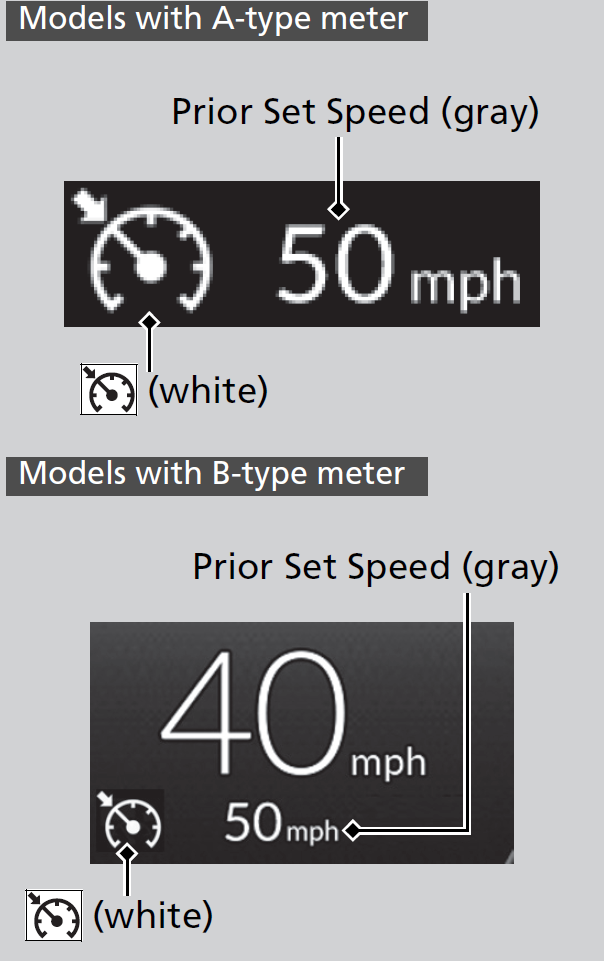
* Not available on all models
Adaptive Cruise Control (ACC)*
When ACC slows your vehicle by applying the brakes, your vehicle’s brake lights will illuminate.
- WARNING Improper use of ACC can lead to a crash.
Use ACC only when driving on expressways or freeways and in good road and weather conditions.
- WARNING ACC has limited braking capability.
When your vehicle speed drops below 22 mph (35 km/h), ACC will automatically cancel and no longer will apply your vehicle’s brakes.
Always be prepared to apply the brake pedal when conditions require.
- Detail
- On roads with frequent lane-change or continuous stop and go traffic. ACC cannot keep an appropriate distance between your vehicle and vehicle ahead of you.
- On roads with sharp turns.
- On roads with toll collection facilities or other objects between lanes of traffic, or in parking areas, or facilities with drive through access.
- On roads with bad weather (rain, fog, snow, etc.), ACC may not detect the distance between your vehicle and the vehicle ahead of you properly.
- On roads with slippery or icy surfaces. The wheels may spin out and your vehicle may lose the control on the condition.
- On roads with steep uphill or steep downhill slopes.
- On roads with undulating slopes.
button.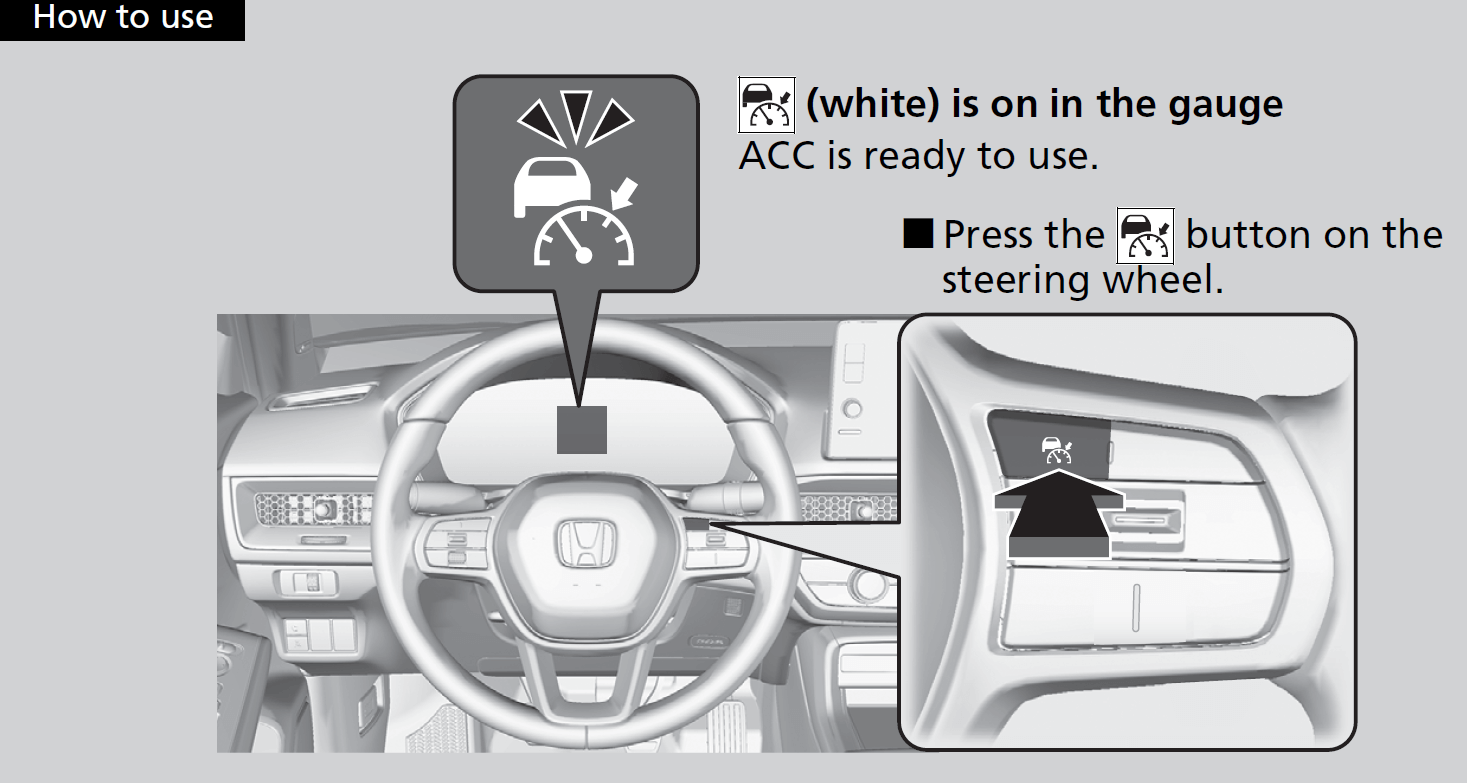
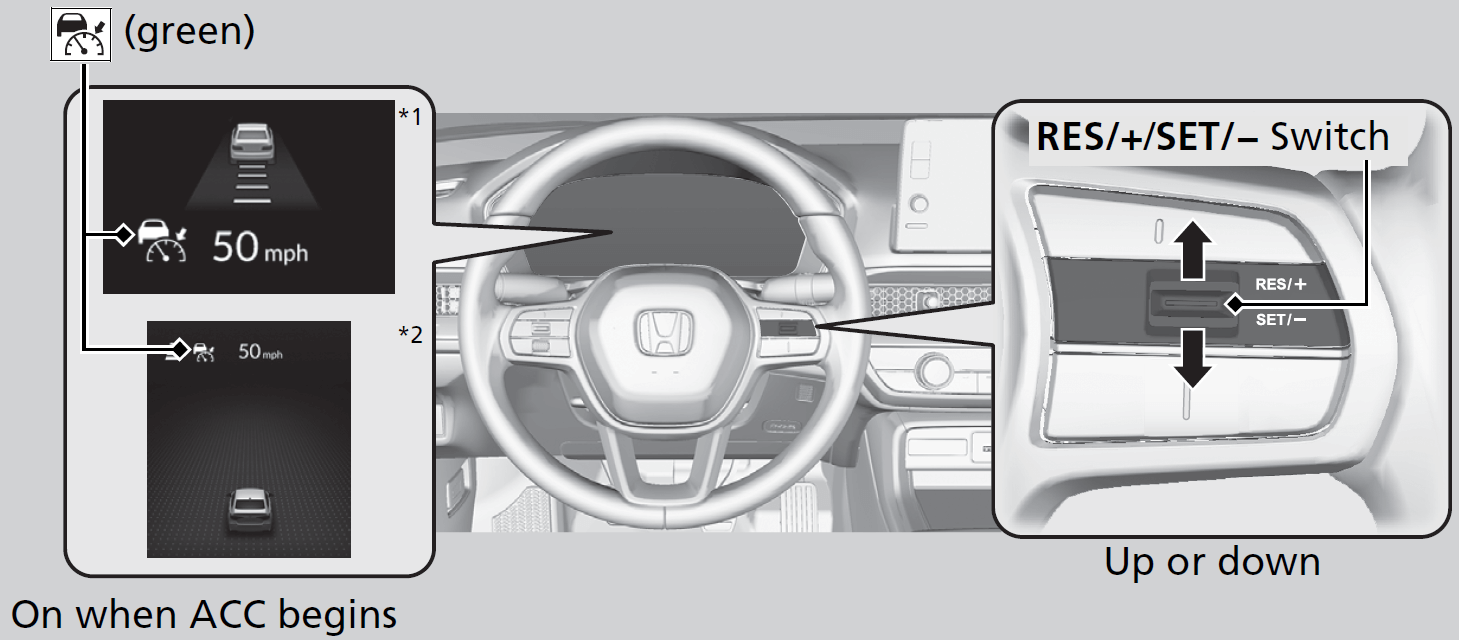
Take your foot off the pedal and press the RES/+/SET/− switch up or down when you reach the desired speed. The moment you release the switch, the set speed is fixed, and ACC begins.
- Models with A-type meter
- Models with B-type meter
When ACC starts operating, the vehicle icon, interval bars and set speed appear on the gauge.
When you use ACC, Straight Driving Assist (a feature of the Electric Power Steering system) is activated.
By enabling the steering system to automatically compensate for natural steering pull, Straight Driving Assist makes it easier for you to keep your vehicle in a straight line.
- Detail
Drive a short distance at more than 12 mph (20 km/h).
Each indicator should go off. If any do not, have your vehicle checked by a dealer.
- Detail
- The vehicle ahead of you is going at almost the same speed as, or faster than, your vehicle.
- A vehicle that cuts in front of you is going faster than your vehicle, gradually increasing the interval between the vehicles.
- ACC may temporarily control the interval between your vehicle and the vehicle in adjacent lane or surroundings of your vehicle depending on the road conditions (e.g. curves) or vehicle conditions (e.g. operating the steering wheel or the vehicle location in the lane).
- When the vehicle ahead of you moves away, such as when entering an interchange or rest area, ACC may continue to maintain the set following-interval for a short time.

ACC monitors if a vehicle ahead of you enters the ACC range. If a vehicle is detected doing so, the ACC system maintains or decelerates your vehicle’s set speed in order to keep the vehicle’s set following-interval from the vehicle ahead.
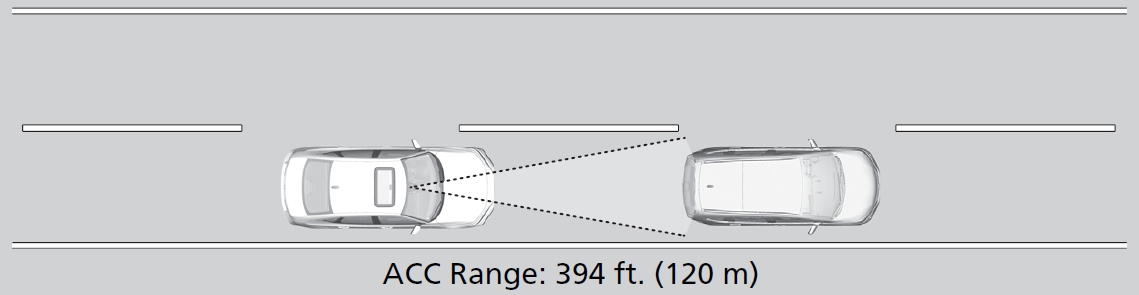
-
When a vehicle whose speed is slower than your set speed is detected in front of you, your vehicle starts to slow down.
- Your vehicle maintains the set speed without having to keep your foot on the brake or accelerator pedal.
If there previously was a vehicle detected ahead that kept your vehicle from traveling at the set speed, ACC accelerates your vehicle to the set speed, and then maintains it.On steep downhill during ACC, it brakes to inhibit excessive acceleration for maintaining the set speed. However the vehicle speed may become faster than the set speed.
The system may automatically shut off under certain conditions. Some examples of these conditions are listed below. Other conditions may reduce some of the ACC functions.
- Driving in bad weather (rain, fog, snow, etc.).
- Sudden changes between light and dark, such as the entrance or exit of a tunnel or the shadows of trees, buildings, etc.
- Strong light is reflected onto vehicles or road surfaces.
- Water is sprayed by or snow blown from a vehicle ahead.
- Driving at night or in a dark place such as a tunnel (due to low-light conditions, the whole vehicle may not be illuminated).
- Driving into low sunlight (e.g., at dawn or dusk).
- Driving on curvy, winding, undulating, or sloping roads.
- Driving on rutted roads (snowy or unpaved roads, etc.).
- Puddles or a film of water is on the road surface.
- Your vehicle is strongly shaken on uneven road surfaces.
- The vehicle is tilted due to heavy load in the trunk or rear seats.
- Tire chains are installed.
- The front of the camera is covered by dirt, fog, rain, mud, wet snow, seals, accessories, stickers, or film of the windshield.
- Driving at night or in a dark place (e.g., a tunnel) with the headlights off.
- There is residue on the windshield from the windshield wipers.
- When lighting is weak due to dirt covering the headlight lenses, or there is poor visibility in a dark place due to the headlights being improperly adjusted.
- An abnormal tire or wheel condition (incorrect sizes, varied sizes or construction, improperly inflated, compact spare tire*, etc.).
- The suspension has been modified.
- A vehicle suddenly crosses in front of you.
- The interval between your vehicle and the vehicle ahead of you is too short.
- When the vehicle ahead of you blends in with the background, preventing the system from recognizing it.
- The headlights of the vehicle ahead of you are lit on one side or not lit on either side in a dark place.
- A vehicle ahead of you stops and the speed difference between your vehicle and the vehicle ahead of you is significantly large.
- When the vehicle ahead of you slows suddenly.
- When a vehicle ahead of you is specially-shaped.
- When a vehicle is lower in the rear than the front such as trucks that are not carrying a load, or a narrow vehicle.
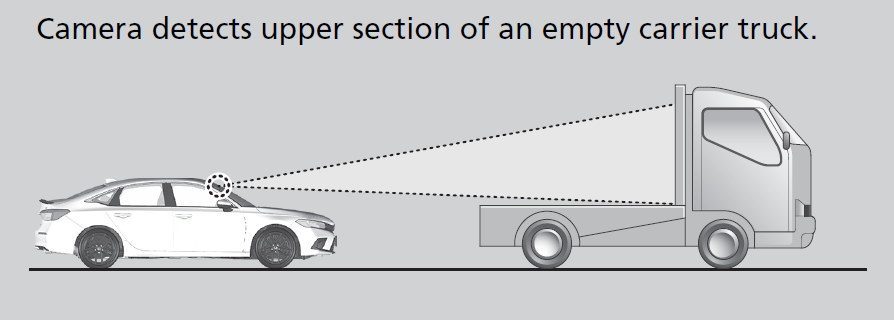
- When your vehicle or the vehicle ahead of you is driving on the edge of the lane.
- When the vehicle ahead of you is a narrow vehicle such as a motorcycle.
- When the minimum ground clearance of a vehicle ahead of you is extremely high.
- When the camera cannot correctly identify the shape of the vehicle ahead of you.
Increase or decrease the vehicle speed using the RES/+/SET/−switch on the steering wheel.
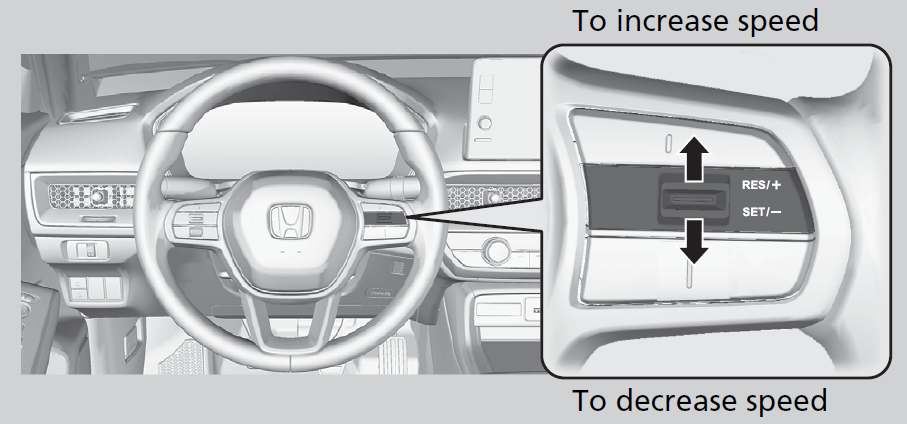
- Each time you press the RES/+/SET/− switch up or down, the vehicle speed is increased or decreased by about 1 mph or 1 km/h accordingly.
- If you keep the RES/+/SET/− switch pressed up or down, the vehicle speed increases or decreases by about 5 mph or 5 km/h accordingly.
- Detail
Press the Interval button to change the ACC following-interval.
Each time you press the button, the following-interval (the interval behind a vehicle detected ahead of you) setting cycles through furthest, far, mid, and nearest following-intervals.Determine the most appropriate following-interval setting based on your specific driving conditions. Be sure to adhere to any following-interval requirements set by local regulation.
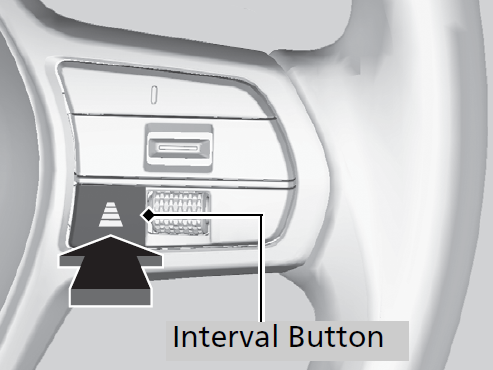
The higher your vehicle’s following-speed is, the longer the nearest, mid, far or furthest following-interval becomes. See the following examples for your reference.
|
Following-interval
|
When the Set Speed is:
|
||
|---|---|---|---|
|
50 mph (80 km/h)
|
65 mph (104 km/h)
|
||
|
Nearest
|
|
87.3 feet
26.6 meters
1.2 sec
|
110.6 feet
33.7 meters
1.2 sec
|
|
Mid
|
|
113.4 feet
34.6 meters
1.6 sec
|
147.2 feet
44.9 meters
1.6 sec
|
|
Far
|
|
144.2 feet
44.0 meters
2.0 sec
|
187.3 feet
57.1 meters
2.0 sec
|
|
Furthest
|
|
175.9 feet
53.6 meters
2.4 sec
|
229.6 feet
70.0 meters
2.4 sec
|
- Models with A-type meter
- Models with B-type meter
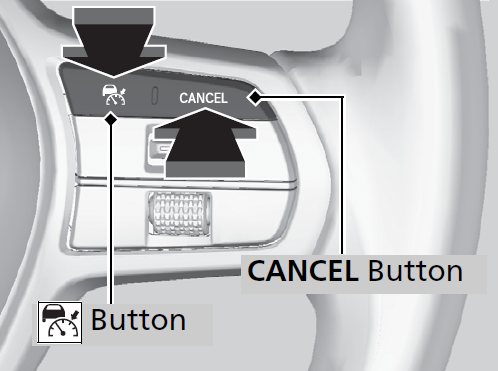
- To cancel ACC, do any of the following:
- Press the CANCEL button.
- The indicator (green) on the gauge changes to the indicator (white).
- The
- Press the button.
- indicator (green) goes off.
- Depress the brake pedal while the vehicle is moving forward.
- The indicator (green) on the gauge changes to the indicator (white).
- The
- Depress the clutch pedal for five seconds or more.
- The indicator (green) on the gauge changes to the indicator (white).
- The
- Press the CANCEL button.
- Detail
When you turn the ACC off by pressing the CANCEL button or depressing the brake pedal, the prior set speed is displayed on the gauge in gray.
When pressing the RES/+/SET/− switch up, the ACC is activated with displayed speed.
If the
indicator (white) is displayed and you press the RES/+/SET/− switch, but no prior set speed (in gray) is displayed, the speed will be set to your vehicle's current speed.
button. Press the button to activate the system, then set the desired speed.If the vehicle speed is less than 25 mph (40 km/h) you cannot resume.
The beeper sounds and a message appears on the driver information interface when ACC is automatically canceled. Any of these conditions may cause the ACC to automatically cancel:
- Bad weather (rain, fog, snow, etc.)
- The vehicle ahead of you cannot be detected.
- An abnormal tire condition is detected, or the tires are skidding.
- Driving on a mountainous road, or driving off road for extended periods.
- Abrupt steering wheel movement.
- When the ABS, VSA®, CMBSTM or Low Speed Braking Control* is activated.
- When the VSA® system indicator comes on.
- When the vehicle is stopped on a very steep slope.
- When you manually apply the parking brake.
- When vehicle speed is less than 22 mph (35 km/h).
- Water is sprayed by or snow blown from a vehicle ahead.
- Driving into low sunlight (e.g., at dawn or dusk).
- When the detected vehicle within the ACC range is too close to your vehicle.
- When accelerating rapidly.
- The front of the camera is covered by dirt, fog, rain, mud, wet snow, seals, accessories, stickers, or film on the windshield.
- The engine is turned off.
- The vehicle is loaded heavy load in the trunk or rear seats.
- When passing through a dark place, such as tunnel.
- When the parking brake and brake system indicator (amber) comes on.
- The vehicle has repeatedly applied the brakes to maintain the set speed (for example, you are descending a long slope).
- When the system doesn't detect any driving actions from the driver for a certain amount of time while the LKAS is also activated.
- Ignoring shift down indication shown in the gauge will cancel the ACC after about 10 seconds.
- The engine speed goes into the tachometer red zone.
- The engine speed goes to below 1,000 rpm.
- You shift into neutral temporarily when shifting into a higher or lower gear.
- When the transmission is put into N without depressing the clutch pedal.
- Press and hold the Interval button for one second. Cruise mode selected appears on the driver information interface for two seconds, and then the mode switches to Cruise.
The indicator comes on.- Green: The system is on.
- White: The system is standby.
- Detail
- When the vehicle speed is set.
- When ACC is not activated.
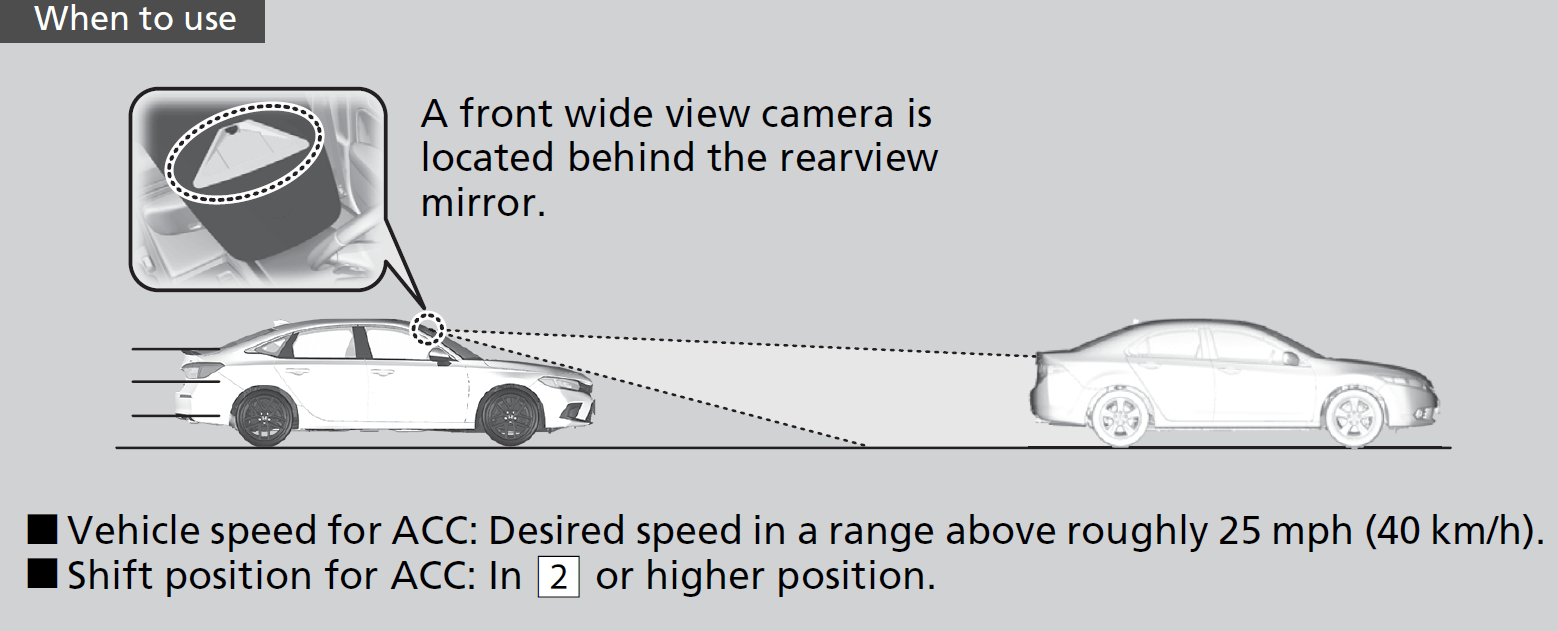
Desired speed in a range above roughly 25 mph (40 km/h).
- Each time you press the RES/+/SET/− switch up or down, the vehicle speed is increased or decreased by about 1 mph or 1 km/h accordingly.
- If you keep the RES/+/SET/− switch pressed up or down, the vehicle speed increases or decreases by about 5 mph or 5 km/h accordingly.
To cancel cruise control, do any of the following:
- Press the CANCEL button.
- The indicator (green) on the gauge changes to the indicator (white).
- The
- Press the button.
- The indicator (green) goes off.
- The
- Depress the brake pedal.
- The indicator (green) on the gauge changes to the indicator (white).
- The
- Depress the clutch pedal for five seconds or more.
- The indicator (green) on the gauge changes to the indicator (white).
- The
- Detail
When you turn the cruise control off by pressing the CANCEL button or depressing the brake pedal, the prior set speed is displayed on the gauge in gray.
When pressing the RES/+/SET/− switch up, the cruise control is activated with displayed speed.
If the
indicator (white) is displayed and you press the RES/+/SET/− switch, but no prior set speed (in gray) is displayed, the speed will be set to your vehicle's current speed.
button. Press the button to activate the system, then set the desired speed.* Not available on all models
Lane Keeping Assist System (LKAS)
Provides steering input to help keep the vehicle in the middle of a detected lane and provides tactile and visual alerts if the vehicle is detected drifting out of its lane.

- Detail
The LKAS is convenient when it is used on expressways or freeways.
It is always your responsibility to safely operate the vehicle and avoid collisions.
Provides assistance to keep the vehicle in the center of the lane. When the vehicle nears a white or yellow line, steering force of the electric power steering will become stronger.

When the vehicle enters the warning area, the LKAS alerts you with slight steering wheel vibration as well as a warning display.

- Models with A-type meter
- Models with B-type meter
The system can be used when the following conditions are met.
- The lane in which you are driving has detectable lane markers on both sides, and your vehicle is in the center of the lane.
- The vehicle is traveling between about 45 and 90 mph (72 and 145 km/h).
- You are driving on a straight or slightly curved road.
- The turn signals are off.
- The brake pedal is not depressed.
- Detail
- Always keep the windshield around the camera clean.
- When cleaning the windshield, be careful not to apply windshield cleanser to the camera lens.
- Do not touch the camera lens.
- Do not attach a sticker to the area around the camera.
-
- Press the LKAS button.
- LKAS indicator (white) appears on the gauge.
The system is standby. - If traffic lane lines are detected, white lines appear on the gauge.
- LKAS indicator (white) appears on the gauge.
- Press the LKAS button.

- Models with A-type meter
- Models with B-type meter
-
- Keep your vehicle near the center of the lane while driving.
- The LKAS indicator changes from white to green, and white lines change to green once the system starts operating after detecting the left and right lane markings.
- Keep your vehicle near the center of the lane while driving.

Press the LKAS button.
The LKAS is turned off every time you stop the engine, even if you turned it on the last time you drove the vehicle.

-
- Decrease the vehicle speed to about 40 mph (64 km/h) or less.
- Increasing the vehicle speed to about 45 mph (72 km/h) or more resumes the LKAS.
- Depress the brake pedal.
- The LKAS resumes and starts detecting the lane lines again once you release the brake pedal.
- Your vehicle is driving to the right or the left of the lane.
- Decrease the vehicle speed to about 40 mph (64 km/h) or less.

- Detail
LKAS suspended beep on and off can be selected.
- The system fails to detect lane lines.
- The steering wheel is turned quickly.
- You fail to steer the vehicle.
- Driving through a sharp curve.
- Driving at a speed in excess of approximately 94 mph (150 km/h).
Once these conditions no longer exist, the LKAS automatically resumes.
In the following cases, traffic lane lines may disappear on the gauge, the beeper may sound, and the LKAS may automatically be canceled:
- The camera temperature gets extremely high.
- The camera behind the rearview mirror, or the area around the camera, including the windshield, gets dirty.
- The ABS or VSA® system engages.
The system may not detect lane markings and therefore may not keep the vehicle in the middle of the lane under certain conditions, including the following:
- There is little contrast between lane lines and the roadway surface.
- Driving in bad weather (rain, fog, snow, etc.).
- Driving on a snowy or wet roadway.
- Driving into low sunlight (e.g., at dawn or dusk).
- Shadows of adjacent objects (trees, buildings, guard rails, vehicles, etc.) are parallel to white (or yellow) lines.
- Sudden changes between light and dark, such as the entrance or exit of a tunnel or the shadows of trees, buildings, etc.
- Driving at night or in a dark place such as a tunnel (due to low-light conditions, lane lines or the road surface may not be illuminated).
- The distance between your vehicle and the vehicle ahead of you is too short, and lane lines and the road surface are not visible.
- Strong light is reflected onto the roadway.
- Driving on a road with temporary lane markings.
- Faint, multiple, or varied lane markings are visible on the roadway due to road repairs or old lane markings.

- The roadway has merging, split, or crossing lines, such as at an intersection or crosswalk.
- The lane markings are extremely narrow, wide, or changing.

- Part of the lane markings are hidden by an object, such as a vehicle.
- The road is hilly or the vehicle is approaching the crest of a hill.
- Your vehicle is strongly shaken on uneven road surfaces.
- When objects on the road (curb, guard rail, pylons, etc.) are recognized as white (or yellow) lines.
- Driving on rough or unpaved roads, or over bumpy surfaces.
- Driving on roads with double lane lines.
- Driving on snowy or slippery roads.
- The pavement is only partially visible due to snow or puddles on the road.
- There is a film of water or puddles on the road surface.
- White (or yellow) lines are not recognized correctly due to road conditions such as curves, twists, or hills.
- Driving on unpaved or rutted roads.
- Passing through an exit or an interchange.

- When lighting is weak due to dirt covering the headlight lenses, or there is poor visibility in a dark place due to the headlights being improperly adjusted.
- The front of the camera is covered by dirt, fog, rain, mud, wet snow, seals, accessories, stickers, or film on the windshield.
- Driving at night or in a dark place (e.g., a tunnel) with the headlights off.
- There is residue on the windshield from the windshield wipers.
- An abnormal tire or wheel condition (incorrect sizes, varied sizes or construction, improperly inflated, compact spare tire*, etc.).
- The vehicle is tilted due to a heavy load in the trunk or rear seats.
- The suspension has been modified.
- Tire chains* are installed.
* Not available on all models
Traffic Jam Assist*
The Traffic Jam Assist system uses a camera mounted to the upper portion of the windshield to detect and monitor left and right white (or yellow) traffic lane lines. Based on inputs from the camera, the system can apply steering torque to keep your vehicle in the center of the detected lane.
- Detail
Traffic Jam Assist is convenient when it is used on expressways or freeways.
It is always your responsibility to safely operate the vehicle and avoid collisions.
When you are in heavy traffic and Lane Keeping Assist System (LKAS) is active, the Traffic Jam Assist system, upon detecting the traffic lane lines, will apply steering torque to help keep your vehicle in the center of the lane.

The torque applied to the steering may not be noticeable when the driver has full control of the steering, or when the surface of the road is rough or uneven.
When the vehicle enters the warning area, Traffic Jam Assist alerts you with slight steering wheel vibration or an audible alert as well as a warning display.
- Models with A-type meter
- Models with B-type meter
Traffic Jam Assist is activated when all of the following conditions exist:
- LKAS is activated.
- The lane in which you are driving has detectable lane markers on both sides, and your vehicle is in the center of the lane.
- The vehicle is traveling between about 0 and 45mph (0 and 72km/h).
- You are driving on a straight or slightly curved road.
- The driver is gripping the steering wheel.
- The shift position is in D, S* or L*.
Do not use Traffic Jam Assist in any of the following situations:
- You are traveling on a road with sharp curves.
- The system may not allow your vehicle to respond in a manner best suited for the road conditions.
- You are entering a toll booth, interchange, service area, or parking area.
- You are driving in adverse weather (rain, fog, snow, etc.).
- The surface of the road is slippery; for example, it is icy or covered with snow.
- The tires may slip, causing you to lose control of the vehicle.
- Detail
- Keep your vehicle near the center of the lane while driving.
- The LKAS indicator changes from white to green, and white lines change to green once the system starts operating after detecting the left and right lane markings.


- Detail

Press the LKAS button to cancel Traffic Jam Assist.
The system is automatically temporarily canceled under the following circumstances.
- The system fails to detect lane lines.
- The steering wheel is turned sharply.
- You fail to steer the vehicle.
- You are driving through a sharp curve.
- The brake pedal is depressed.
Once these conditions no longer exist, Traffic Jam Assist automatically resumes.
- Detail
- When the speed of the vehicle reaches 45mph (72km/h), Traffic Jam Assist is deactivated and LKAS is activated instead. Once the speed of the vehicle drops to under 40mph (64km/h), Traffic Jam Assist is reactivated.
The traffic lane lines will disappear from the screen, the beeper may sound, and Traffic Jam Assist will be canceled under the following circumstances:
- The temperature of the camera is too high.
- The camera behind the rearview mirror, or the area around the camera, including the windshield, is dirty.
The system may not detect lane markings and therefore may not keep the vehicle in the middle of the lane under certain conditions, including the following:
- There is little contrast between lane lines and the roadway surface.
- Driving in bad weather (rain, fog, snow, etc.).
- Driving on a snowy or wet roadway.
- Driving into low sunlight (e.g., at dawn or dusk).
- Shadows of adjacent objects (trees, buildings, guard rails, vehicles, etc.) are parallel to white (or yellow) lines.
- Sudden changes between light and dark, such as the entrance or exit of a tunnel or the shadows of trees, buildings, etc.
- Driving at night or in a dark place such as a tunnel (due to low-light conditions, lane lines or the road surface may not be illuminated).
- When the lane lines or road surface are not visible, such as when the distance to the vehicle in front of you is extremely short or when at an intersection.
- Strong light is reflected onto the roadway.
- Driving on a road with temporary lane markings.
- Faint, multiple, or varied lane markings are visible on the roadway due to road repairs or old lane markings.
- The roadway has merging, split, or crossing lines, such as at an intersection or crosswalk.
- The lane markings are extremely narrow, wide, or changing.
- Part of the lane markings are hidden by an object, such as a vehicle.
- The road is hilly or the vehicle is approaching the crest of a hill.
- Your vehicle is strongly shaken on uneven road surfaces.
- When objects on the road (curb, guard rail, pylons, etc.) are recognized as white (or yellow) lines.
- Driving on rough or unpaved roads, or over bumpy surfaces.
- Driving on roads with double lane lines.
- Driving on snowy or slippery roads.
- The pavement is only partially visible due to snow or puddles on the road.
- There is a film of water or puddles on the road surface.
- White (or yellow) lines are not recognized correctly due to road conditions such as curves, twists, or hills.
- Driving on unpaved or rutted roads.
- Passing through an exit or an interchange.
- When lighting is weak due to dirt covering the headlight lenses, or there is poor visibility in a dark place due to the headlights being improperly adjusted.
- The front of the camera is covered by dirt, fog, rain, mud, wet snow, seals, accessories, stickers, or film on the windshield.
- Driving at night or in a dark place (e.g., a tunnel) with the headlights off.
- There is residue on the windshield from the windshield wipers.
- An abnormal tire or wheel condition (incorrect sizes, varied sizes or construction, improperly inflated, compact spare tire, etc.).
- The vehicle is tilted due to a heavy load in the trunk or rear seats.
- The suspension has been modified.
- Tire chains are installed.
* Not available on all models
Road Departure Mitigation System
Alerts and helps assist you when the system detects a possibility of your vehicle crossing over detected lane markings, or approaching the outer edge of the pavement (into grass or gravel border) or a detected oncoming vehicle.
- Detail
Overreliance on the Road Departure Mitigation system may result in a collision. It is always your responsibility to keep the vehicle within your driving lane.
The Road Departure Mitigation system may not detect all lane markings or every instance of lane drift.
The Road Departure Mitigation system may not detect that you are approaching the outer edge of the pavement (bordered by grass or gravel) or an oncoming vehicle.
The Road Departure Mitigation system may not be able to assist you depending on weather, speed or road conditions.

- The front camera behind the rearview mirror monitors left and right lane markings in white or yellow, the outer edge of the pavement (bordered by grass or gravel) or a detected oncoming vehicles.
If your vehicle approaches any detected lane markings, the outer edge of the pavement (bordered by grass or gravel) or a detected oncoming vehicles when the turn signals have not been engaged, the system activates.- If the system cannot detect lane markings (in white or yellow), no assistance will be provided to avoid approaching oncoming vehicles. In addition to a visual alert, the system assists with steering and alerts you with rapid steering wheel vibrations to help you remain within the detected lane.
- If the system cannot detect lane markings (in white or yellow), no assistance will be provided to avoid approaching oncoming vehicles. In addition to a visual alert, the system assists with steering and alerts you with rapid steering wheel vibrations to help you remain within the detected lane.

- Models with A-type meter
- Models with B-type meter
The system cancels assisting operations when you turn the steering wheel to avoid crossing over detected lane markings or approaching the outer edge of the pavement (into grass or gravel border) or an oncoming vehicle.
If the system operates several times without detecting driver response, the system beeps to alert you.
The system activates when all of the following conditions are met:
- The vehicle is traveling between about 45 and 90 mph (72 and 145 km/h).
- The vehicle is on a straight or slightly curved road.
- The turn signals are off.
- The system makes a determination that the driver is not actively accelerating, braking, or steering.
- Detail
- Driven on the inside edge of a curve, or outside of a lane.
- Driven in a narrow lane.
- When you turn the Road Departure Mitigation system on and off, do the following.
- Press the safety support switch.
Models with A-type meter- Roll the left selector wheel to the
 symbol and push it.
Models with B-type meter- Roll the right selector wheel to the symbol and push it.
- A message appears on the driver information interface when the system turns on or off.
- A check mark appears in the box and the color of the symbol changes to green when the system is on. The check mark disappears and the color of the symbol changes to gray when the system is off.
The Road Departure Mitigation system is in the previously selected on (checked) or off (unchecked) setting each time you start the engine.
- Models with A-type meter
- Models with B-type meter
- Detail
- There is little contrast between lane lines and the roadway surface.
- Driving in bad weather (rain, fog, snow, etc.).
- Driving on a snowy or wet roadway.
- Driving into low sunlight (e.g., at dawn or dusk).
- Shadows of adjacent objects (trees, buildings, guard rails, vehicles, etc.) are parallel to white (or yellow) lines.
- Sudden changes between light and dark, such as the entrance or exit of a tunnel or the shadows of trees, buildings, etc.
- Strong light is reflected onto the roadway.
- Driving at night or in a dark place such as a tunnel (due to low-light conditions, lane lines, the road surface, or oncoming vehicles may not be illuminated).
- The distance between your vehicle and the vehicle ahead of you is too short, and lane lines and the road surface are not visible.
- The outer edge of the road is bordered by objects, materials, etc. other than grass or gravel.
- Driving on a road with temporary lane markings.
- Faint, multiple, or varied lane markings are visible on the roadway due to road repairs or old lane markings.
- The roadway has merging, split, or crossing lines, such as at an intersection or crosswalk.
- The lane markings are extremely narrow, wide, or changing.
- Part of the lane markings are hidden by an object, such as a vehicle.
- The road is hilly or the vehicle is approaching the crest of a hill.
- Your vehicle is strongly shaken on uneven road surfaces.
- When objects on the road (curb, guard rail, pylons, etc.) are recognized as white (or yellow) lines.
- Driving on rough or unpaved roads, or over bumpy surfaces.
- Driving on roads with double lane lines.
- Driving on snowy or slippery roads.
- Passing through an exit or an intersection.
- The pavement is only partially visible due to snow or puddles on the road.
- Driving on unpaved or rutted roads.
- White (or yellow) lines are not recognized correctly due to road conditions such as curves, twists, or hills.
- When lighting is weak due to dirt covering the headlight lenses, or there is poor visibility in a dark place due to the headlights being improperly adjusted.
- The front of the camera is covered by dirt, fog, rain, mud, wet snow, seals, accessories, stickers, or film on the windshield.
- Driving at night or in a dark place (e.g., a tunnel) with the headlights off.
- When the driver operates the brake pedal and steering wheel.
- There is residue on the windshield from the windshield wipers.
- An abnormal tire or wheel condition (incorrect sizes, varied sizes or construction, improperly inflated, compact spare tire*, etc.).
- The vehicle is tilted due to heavy load in the trunk or rear seats.
- Tire chains* are installed.
- The suspension has been modified.
- The oncoming vehicle or vehicle ahead of you is sideways.
- The oncoming vehicle jumps out in front of you.
- When the oncoming vehicle blends in with the background, preventing the system from recognizing it.
- The headlights of an oncoming vehicle are lit on one side or not lit on either side in a dark place.
- The distance between your vehicle and the oncoming vehicle is too short.
- Part of the oncoming vehicle is not visible due to the vehicle ahead of you.
- There are multiple oncoming lanes or turning lanes.
- The vehicle in the adjacent lane is parked or moving at an extremely slow speed.
- When the oncoming vehicle is specially-shaped.
- When the camera cannot correctly identify the shape of the oncoming vehicle.
- When driving through curves, your vehicle comes to a point where an oncoming vehicle is right in front of you.


Drive a short distance at more than 12 mph (20 km/h).
Each indicator should go off. If any do not, have your vehicle checked by a dealer.
The system may not properly detect lane markings (in white or yellow), the outer edge of the pavement (into grass or gravel border) or an oncoming vehicle under certain conditions. Some examples of these conditions are listed below.
The Road Departure Mitigation system may activate in the below conditions.
* Not available on all models
Traffic Sign Recognition System
Reminds you of road sign information, such as the current speed limit your vehicle has just passed through, showing it on the gauge.
- Detail
Do not rely too much on the system. Always drive at speeds appropriate for the road conditions.
Scratches, nicks, and other damage to the windshield within the camera’s field of vision can cause the system to operate abnormally. If this occurs, we recommend that you replace the windshield with a genuine Honda replacement windshield. Making even minor repairs within the camera’s field of vision or installing an aftermarket replacement windshield may also cause the system to operate abnormally. After replacing the windshield, have a dealer recalibrate the camera. Proper calibration of the camera is necessary for the system to operate properly.
Covering the camera can concentrate heat on it.
The sign icon also may switch to another one, or disappear when:
- The end of speed limit or other designated limit is detected.
- You make a turn with a turn signal at an intersection.
The traffic sign recognition system may not be able to recognize a traffic sign in the following cases.
- Detail
 appears on the gauge. If this message does not disappear, have your vehicle checked by a dealer.
- Driving into low sunlight (e.g., at dawn or dusk).
- Strong light is reflected onto the roadway.
- Driving at night, in dark areas such as long tunnels.
- Driving in bad weather (rain, fog, snow, etc.).
- Sudden changes between light and dark, such as the entrance or exit of a tunnel or the shadows of trees, buildings, etc.
- Water is sprayed by or snow blown from a vehicle ahead.
- Your vehicle is strongly shaken on uneven road surfaces.
- When lighting is weak due to dirt covering the headlight lenses, or there is poor visibility in a dark place due to the headlights being improperly adjusted.
- The front of the camera is covered by dirt, fog, rain, mud, wet snow, seals, accessories, stickers, or film on the windshield.
- There is residue on the windshield from the windshield wipers.
- An abnormal tire or wheel condition (incorrect sizes, varied sizes or construction, improperly inflated, compact spare tire*, etc.).
- The vehicle is tilted due to heavy load in the trunk or rear seats.
- The suspension has been modified.
- Tire chains* are installed.
- Driving at night or in a dark place (e.g., a tunnel) with the headlights off.
- The sign is in a place that makes it hard to find.
- The sign is located far away from your vehicle.
- The sign is located where it is hard for headlight beams to reach.
- The sign is on a corner or bend in the road.
- The sign is faded or bent.
- The sign is rotated or damaged signs.
- The sign is covered with mud, snow, or frost.
- Part of the sign is hidden by the trees, or is in the shadow of a vehicle or other object.
- Light (such as a streetlight) is reflected on the surface of the sign, or it is hidden in shadow.
- The sign is too bright or too dark (electric signs).
- Small signs (auxiliary signs, etc.).
- When you are driving at a high speed.
The traffic sign recognition system may not operate correctly, such as displaying signs that do not adhere to the actual regulations for the roadway or do not exist at all in the following cases.
- A speed limit sign may display at a higher or lower speed than the actual speed limit.
- There is a supplementary sign with further information such as weather, time, vehicle type, school zone, etc.
- Figures on the sign are hard to read (electric signs, numbers on the sign are blurred, etc.).
- The sign is in the vicinity of the lane you are driving in, even though it is not for the lane, such as a speed limit sign situated at an exit or an intersection between the side road and the main road.
- There are things that look similar in color or shape to recognized objects (similar sign, electric sign, signboard, structure, etc.).
The speed limit sign icon is displayed on the screen.

* Not available on all models
Front Wide View Camera
The camera, used in systems such as Lane Keeping Assist System (LKAS), Road Departure Mitigation system, Adaptive Cruise Control (ACC) with Low Speed Follow*/Adaptive Cruise Control (ACC)*, Traffic Sign Recognition system, CMBSTM, and Traffic Jam Assist*, is designed to detect an object that triggers any of the systems to operate their functions.
- Detail
- Use the climate control system to cool down the interior and, if necessary, also use defroster mode with the airflow directed towards the camera.
- Start driving the vehicle to lower the windshield temperature, which cools down the area around the camera.
- Park your vehicle in a safe place, and make sure the windshield is clean.
Clean the windshield if it is dirty. If the message does not disappear after driven for a while, have your vehicle checked by a dealer.
Scratches, nicks, and other damage to the windshield within the camera’s field of vision can cause the system to operate abnormally. If this occurs, we recommend that you replace the windshield with a genuine Honda replacement windshield. Making even minor repairs within the camera’s field of vision or installing an aftermarket replacement windshield may also cause the system to operate abnormally.
After replacing the windshield, have a dealer recalibrate the camera. Proper calibration of the camera is necessary for the system to operate properly.
This camera is located behind the rearview mirror.
To help reduce the likelihood that high interior temperatures will cause the camera’s sensing system to shut off, when parking, find a shady area or face the front of the vehicle away from the sun. If you use a reflective sun shade, do not allow it to cover the camera housing. Covering the camera can concentrate heat on it.

* Not available on all models
Sonar Sensors*
- Detail
- Place stickers or other objects on or around the sensors.
- Hit the area around the sensors.
- Attempt to take apart any sensor.
- Put any accessories on or around the sensors.
- A sensor has been subjected to shock.
- Work needs to be done to the area around a sensor.
- The front or rear bumper has made contact with a hill, parking block, curb, embankment, etc.
- The vehicle has been involved in frontal or rear collision.
- The vehicle has been driven through a deep puddle.
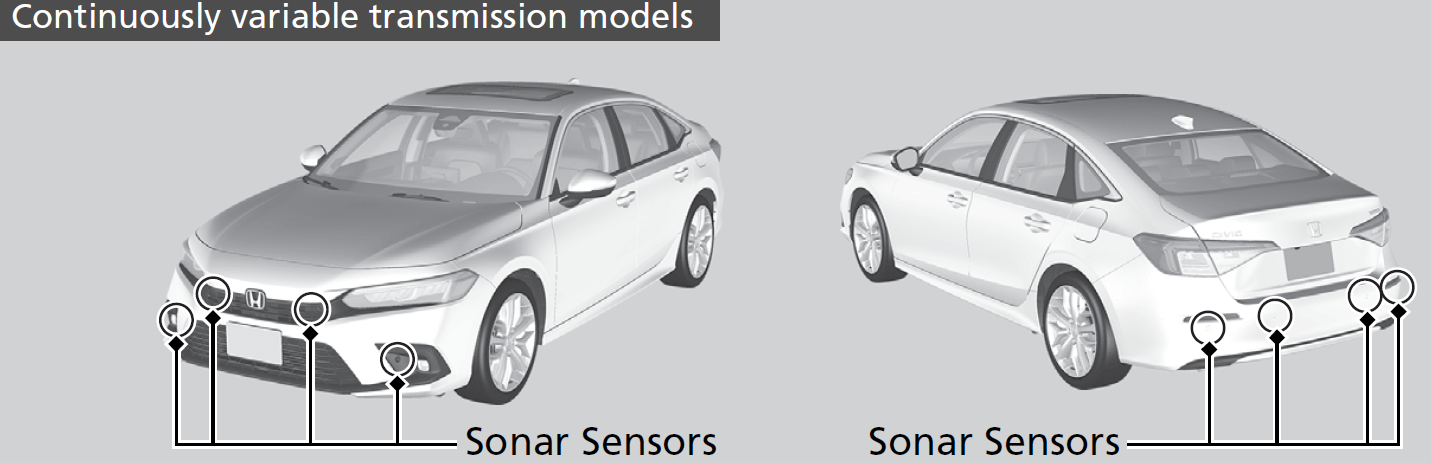
The sonar sensors are situated in the front and rear bumpers, and the front grille.


* Not available on all models
Download Manual