Locking and Unlocking the Doors
Key
This vehicle comes with the following keys:
- Use the keys to start and stop the engine, lock and unlock all the doors and the fuel fill door, and open the trunk.

- Detail
- Do not leave the keys in direct sunlight, or in locations with high temperature or high humidity.
- Do not drop the keys or set heavy objects on them.
- Keep the keys away from liquids, dust and sand.
- Do not take the keys apart except for replacing the battery.
If the keys do not work properly, have them inspected by a dealer.
The built-in key can be used to unlock the doors when the keyless remote battery becomes weak and the power door unlock operation is disabled.
To remove the built-in key, push the release button and then pull out the key. To reinstall the built-in key, push the built-in key into the keyless remote until it clicks.

- Contains a number that you will need if you purchase a replacement key.

- Detail
If you wish to purchase an additional key, contact a dealer.
Low Keyless Remote Signal Strength
The vehicle transmits radio waves to locate the keyless remote to start the engine, lock and unlock* all the doors and the fuel fill door, and open* the trunk.
In the following cases, starting the engine or locking/unlocking* the doors/fuel fill door, or opening* the trunk may be inhibited or operation may be unstable:
- Strong radio waves are being transmitted by nearby equipment.
- You are carrying the keyless remote together with telecommunications equipment, laptop computers, cell phones, or wireless devices.
- A metallic object is touching or covering the keyless remote.
- Detail
Battery life is about two years, but this varies depending on regularity of use.
The battery is consumed whenever the keyless remote is receiving strong radio waves. Avoid placing it near electrical appliances such as televisions and personal computers.
* Not available on all models
Locking/Unlocking the Doors from the Outside
- Detail
No doors opened: The lights fade out after 30 seconds.
Doors relocked: The lights go off immediately.
- When you carry the keyless remote, you can lock/unlock the doors and fuel fill door, and open the trunk.
You can lock/unlock the doors and fuel fill door within a radius of about 32 inches (80 cm) of the outside door handle. You can open the trunk within about 32 inches (80 cm) radius from the trunk release button.

- Detail
- Do not leave the keyless remote in the vehicle when you get out. Carry it with you.
- Even if you are not carrying the keyless remote, you can lock/unlock the doors while someone else with the keyless remote is within range.
- The door may be unlocked if the door handle is covered with water in heavy rain or in a car wash if the keyless remote is within range.
- If you grip a front door handle or touch the front door lock sensor wearing gloves, the door sensor may be slow to respond or may not respond by locking/unlocking the doors.
- After locking the door, you have up to 2 seconds during which you can pull the door handle to confirm whether the door is locked. If you need to unlock the door immediately after locking it, wait at least 2 seconds before gripping the handle, otherwise the door will not unlock.
- The door might not open if you pull it immediately after gripping the door handle. Grip the handle again and confirm that the door is unlocked before pulling the handle.
- Even within the 32 inches (80 cm) radius, you may not be able to lock/unlock the doors with the keyless remote if it is above or below the outside handle.
- The keyless remote may not operate if it is too close to the door and door glass.
-
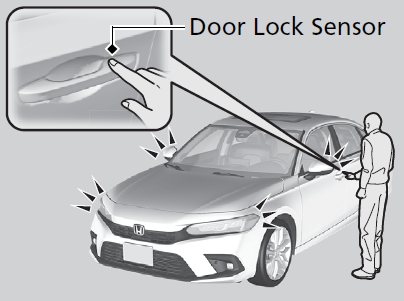
Touch the door lock sensor on the front door.
- All the doors and trunk lock and the security system sets.
- Some exterior lights flash once and the beeper sounds once.
-
Grab the driver’s door handle:
- The driver’s door and fuel fill door unlock.
- Some exterior lights flash twice and the beeper sounds twice.
Grab the front passenger’s door handle:
- All the doors and trunk unlock.
- Some exterior lights flash twice and the beeper sounds twice.

-
Press the trunk release button:
- The trunk unlocks and opens.
- Some exterior lights flash twice and the beeper sounds once.

-
When you walk away from the vehicle with all doors closed while carrying the keyless remote, the doors will automatically lock.
The auto lock function activates when all doors are closed, and the keyless remote is within about 5 feet (1.5 m) radius of the outside door handle or trunk release button.
Exit vehicle while carrying the keyless remote and close door(s).

-
- While within about 5 feet (1.5 m) radius of the vehicle.
- The beeper sounds; the auto lock function will be activated.
- Carry the keyless remote beyond about 5 feet (1.5 m) from the vehicle and remain outside this range for 2 or more seconds.
- Some exterior lights flash; the beeper sounds; all doors will then lock.
To temporarily deactivate the function:
- Set the power mode to OFF.
- Open the driver’s door.
- Using the master door lock switch, operate the lock as follows:
Lock Unlock Lock Unlock.
- The beeper sounds and the function is deactivated.
To restore the function:
- Set the power mode to ON.
- Lock the vehicle without using the auto lock function.
- With the keyless remote on you, move out of the auto lock function operation range.
- Open any door.
- While within about 5 feet (1.5 m) radius of the vehicle.

- Detail
- The keyless remote is inside the vehicle.
- The beeper will not sound.
- The keyless remote is taken out of its operational range before all the doors are closed.
- The beeper will sound.
- The keyless remote is inside the vehicle.
- A door or the hood is not closed.
- The power mode is set to any mode other than OFF.
- The keyless remote is not located within a radius of about 5 feet (1.5 m) from the vehicle when you get out of the vehicle and close the doors.
- The keyless remote is put inside the vehicle through a window.
- You are located too close to the vehicle.
- The keyless remote is put inside the trunk.
If you set the auto lock function to ON using the audio/information screen or driver information interface, only the remote transmitter that was used to unlock the driver’s door prior to the setting change can activate auto lock.
-
Press the lock button.
Once:- Some exterior lights flash, all the doors and fuel fill door lock, and the security system sets.
Twice (within five seconds after the first push):- Some exterior lights flash, the beeper sounds, and verifies the security system is set.
Press the unlock button.
Once:- Some exterior lights flash twice, and the driver’s door and fuel fill door unlock.
Twice:- The remaining doors unlock.

- Detail
If the LED does not come on when you press a button, the battery is dead.
If the unlock button of the keyless remote does not work, use the built-in key instead. The keyhole is on the back of the door handle.
- Insert the built-in key into the key cylinder from below the handle and then turn it.

- Detail
If you do not have the key on you, or if for some reason you cannot lock a door using the key, you can lock the door without it.
-
Push the lock tab forward 1 or push the master door lock switch in the lock direction 2, and close the door.
Push the lock tab forward and close the door.

-
Models with keyless access system
If the vehicle cannot detect the keyless remote, lockout protection activates.
- A beeper sounds, some exterior lights flash, the doors unlock, and a message appears on the driver information interface.
- This allows you to open a door in case the keyless remote is still inside the vehicle.
If you do not open a door, all doors relock after 15 seconds.
To avoid non-detection, make sure to keep the keyless remote away from cell phones and other devices that may cause signal interference.
Models without keyless access systemThe doors and the trunk cannot be locked when the keyless remote is inside the vehicle.

- Detail
* Not available on all models
Locking/Unlocking the Doors from the Inside
-
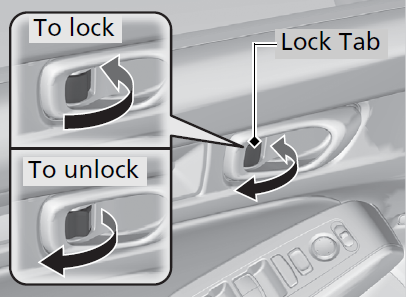
Push the lock tab forward.
Pull the lock tab rearward.
- Detail
When you unlock the door using the lock tab on the driver’s door, only the driver’s door and fuel fill door will unlock.
- Pull the front door inner handle.
- The door unlocks and opens in one motion.

Unlocking and opening the driver’s door from the inner handle unlocks all the other doors.
To avoid all the doors unlocking, use the lock tab on the driver’s door to unlock, then lock again before opening the door.
- This setting works for one time only.
If you do not want all the doors to be unlocked all the time, customize the Auto Door Unlock*1/Auto door unlock*2 setting to OFF using the driver information interface or audio/information screen.
- Models with 9-in. Color Touchscreen
- Models with 7-in. Color Touchscreen
- Detail
- Press the master door lock switch in as shown to lock or unlock all doors and fuel fill door.

- Detail
Childproof Door Locks
The childproof door locks prevent the rear doors from being opened from the inside regardless of the position of the lock tab.
- Detail
- Slide the lever in the rear door to the lock position, and close the door.
Open the door using the outside door handle.

Auto Door Locking/Unlocking
Your vehicle locks or unlocks all doors automatically when a certain condition is met.
- Detail
All doors lock when the vehicle’s speed reaches about 10 mph (15 km/h).
All doors unlock when the driver’s door is opened.
Download Manual